

Looking for fast, reliable keyless entry without relying on an internet connection? The best fingerprint door locks without WiFi give you convenient access, stronger control, and fewer app-related headaches.
This roundup focuses on practical offline options for front doors, bedrooms, apartments, and offices, with an emphasis on ease of use, backup access, and everyday security.
Best 10 Fingerprint Door Locks Without WiFi Picks for 2026
Local control deadbolt
Fast fingerprint deadbolt with keypad backup

- Fingerprint, keypad, keys, and one-time PINs
- Auto-lock plus silent and away modes
- BHMA Grade 3 and IP54 weather resistance
Best For: Front doors and rentals needing local, no-WiFi access
Full-handle local access lock
Fingerprint lever set with local code access

- Fingerprint, passcode, keys, and temp codes
- Auto-lock, silent mode, and vacation mode
- BHMA Grade 3 with IP54 weather resistance
Best For: Families wanting a no-WiFi lever handle lock
High-capacity indoor knob
High-capacity fingerprint knob without app
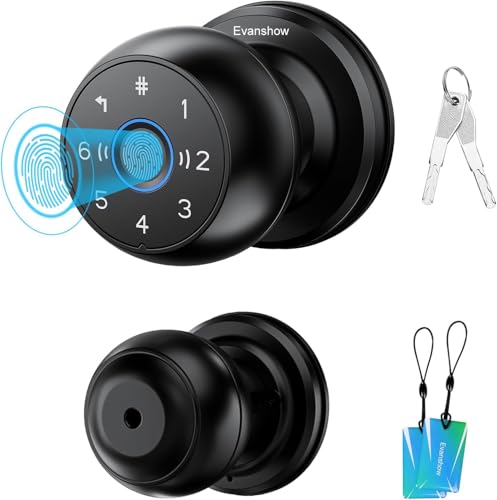
- Up to 300 users with 100 fingerprints
- 0.5-second fingerprint unlock and auto-lock
- No drilling or wiring for wooden doors
Best For: Apartments and bedrooms needing a large-user local lock
Bluetooth Fingerprint Deadbolt
DESLOC B200 Fingerprint Smart Door Lock

- Bluetooth app control with no WiFi needed for basic use
- Unlocks in under 0.3 seconds with up to 50 fingerprints
- USB-C backup power and up to 12-month battery life
Best For: Bluetooth-first households wanting fast biometric entry and backup access options
Offline Bluetooth Handle Lock
TMEZON T8 Fingerprint Door Lock

- TUYA Bluetooth app works without WiFi or app fees
- Fingerprint unlock is claimed in about 0.2 seconds
- Supports fingerprints, passcodes, IC cards, and keys
Best For: Indoor doors like bedrooms, apartments, and offices
Local-App Fingerprint Deadbolt
Ulecoce U68 Fingerprint Keypad Deadbolt

- Local app control with no WiFi dependency for routine use
- Fingerprint unlock as fast as 0.3 seconds
- Auto-lock, one-touch lock, and multiple code types
Best For: Front doors and households wanting flexible access without WiFi
Bluetooth Biometric Knob
Fingerprint Thumbprint Entry for Bedrooms

- Fingerprint unlock with Bluetooth app control
- Mechanical key backup included
- Privacy, passage, normal, and silent modes
Best For: Bedrooms, apartments, and offices needing local-only smart access
7-in-1 Front Door Deadbolt
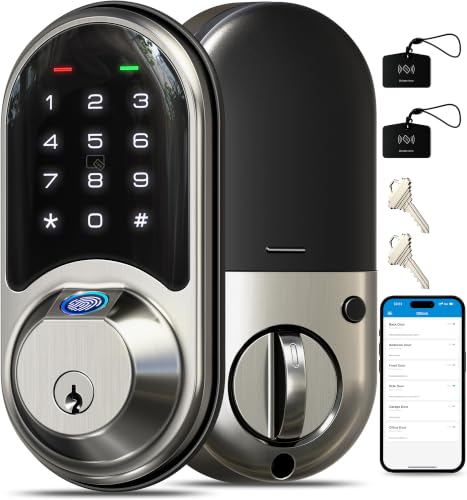
- Seven unlock methods, including fingerprint and code
- Fast 0.2s fingerprint recognition
- BHMA/ANSI Grade 3 with IP55 weather resistance
Best For: Front doors, rentals, and high-traffic homes
Fingerprint Handle Lock
Nyboer Modern Keyless Entry Deadbolt Alternative

- Fingerprint, passcode, key, app, and fob access
- 5-minute installation for most U.S. doors
- IP65 waterproof aluminum alloy build
Best For: Homeowners wanting a modern handle-style smart lock
Local control deadbolt – Fast fingerprint deadbolt with keypad backup
If you want fingerprint door locks without WiFi, the TEEHO TE002 is a straightforward deadbolt that keeps things local while still offering flexible access. It combines fingerprint entry, passcodes, backup keys, and one-time PINs, so it works well for households that need simple sharing without app setup or network dependence.
Best For: Front doors, rentals, and busy homes that want fast local access with multiple backup options.
Pros:
- Stores up to 20 fingerprints and 20 passcodes, plus backup keys and one-time PINs.
- Fast fingerprint recognition is designed to unlock in about 1 second.
- Auto-lock, one-touch lock, silent mode, and away mode add everyday convenience.
- BHMA Grade 3 construction and IP54 weather resistance support outdoor use.
Cons:
- Requires 4 AA batteries, which are not included.
- Only fits standard U.S. doors with 2-1/8″ (54mm) holes.
- No WiFi or app features, so remote control is not available.
This is a practical pick if you want a no-WiFi fingerprint deadbolt that focuses on quick entry, basic security, and easy installation. It is especially useful for homes that need keypad and key backup without adding smart-home complexity.
Compact indoor biometric knob – Biometric door knob with keypad and cards
For fingerprint door locks without WiFi in a simpler knob style, this biometric model keeps access local and compact. It adds fingerprint entry, a keypad, mechanical keys, and IC cards, which makes it a flexible choice for bedrooms, offices, and indoor doors where app-based features are not needed.
Best For: Bedrooms, offices, and indoor doors that need a basic no-WiFi biometric knob.
Pros:
- 4-in-1 access includes fingerprint, password, mechanical keys, and IC cards.
- Supports up to 100 fingerprints and 50 passwords.
- Fast sensor claims fingerprint recognition in less than a second.
- No drilling or wiring, with tools and video tutorials included.
Cons:
- You must register an administrator fingerprint before normal use.
- Designed for wooden doors only, with a 1.18″-1.97″ thickness range.
- Indoor-focused design is less suited to exterior weather exposure.
This is a good fit if you want a no-WiFi fingerprint door lock that emphasizes quick entry and simple installation over advanced smart features. The added card access is especially handy for shared indoor spaces.
Full-handle local access lock – Fingerprint lever set with local code access
The Veise KS02B is a strong option if you’re comparing fingerprint door locks without WiFi and want a full lever-handle set instead of just a deadbolt. It keeps everything local with fingerprints, passcodes, keys, and temporary codes, while adding auto-lock, silent mode, and vacation mode for more controlled everyday use.
Best For: Main entrances, side doors, and families that want a no-WiFi lever lock with flexible local access.
Pros:
- 0.3-second fingerprint recognition and 1-second unlocking are designed for quick access.
- Offers 20 fingerprints, 20 passcodes, backup keys, and one-time temp codes.
- Includes anti-peep protection, vacation mode, silent mode, and passage mode.
- BHMA Grade 3 and IP54 ratings support durability and outdoor use.
Cons:
- Uses 4 AA batteries, which are not included.
- Requires standard door thickness and two 2-1/8″ holes for installation.
- No WiFi or app control for remote access management.
This is a well-rounded no-WiFi fingerprint lock for users who want more than a basic keypad deadbolt. The lever handles and multiple access modes make it especially practical for busy homes.
High-capacity indoor knob – High-capacity fingerprint knob without app
If you need fingerprint door locks without WiFi and want a simple knob format, the Evanshow smart door knob keeps access local with fingerprint and password entry. It is aimed at bedrooms, apartments, hotels, and indoor front-door use, with a high user capacity and auto-lock convenience built in.
Best For: Bedrooms, apartments, and indoor spaces that need a high-capacity no-WiFi fingerprint knob.
Pros:
- Supports up to 300 users, including 100 fingerprints and 100 passwords.
- Unlocks by fingerprint in about 0.5 seconds and includes auto-lock.
- No drilling or wiring is needed for compatible wooden doors.
- Works for multiple indoor spaces, including bedrooms, apartments, and offices.
Cons:
- You must add an administrator first, or any fingerprint may unlock the door.
- Designed for 1.18″-1.97″ thick wooden doors only.
- No WiFi or app functionality for remote access.
This model makes sense if your priority is a large-capacity, no-WiFi fingerprint door lock in a compact knob design. It trades advanced smart features for straightforward local entry and easy installation.
Bluetooth Fingerprint Deadbolt – DESLOC B200 Fingerprint Smart Door Lock
If you want fingerprint door locks without WiFi, the DESLOC B200 is built around Bluetooth app control plus local access options like fingerprint, PIN, eKeys, key fobs, physical keys, and voice control through a G2 Gateway. It focuses on quick, everyday entry, with fingerprint unlocking in under 0.3 seconds and support for up to 50 fingerprints, making it practical for households that want convenience without relying on a WiFi connection for basic use.
Best For: Families or homeowners who want a Bluetooth-based smart deadbolt with fast fingerprint entry and multiple backup unlock methods.
Pros:
- Fast fingerprint recognition claims unlocks in under 0.3 seconds.
- Supports multiple access methods, including fingerprint, PIN, app, eKeys, key fobs, and physical keys.
- Easy DIY installation with a screwdriver and fit for most standard US doors.
- USB-C emergency power port and up to 12-month battery life add backup convenience.
Cons:
- Voice control requires the G2 Gateway.
- App management is Bluetooth-based and depends on close-range use.
- Battery life can vary based on usage.
This is a solid pick if you want a reliable fingerprint deadbolt that works well without WiFi for day-to-day access. The combination of quick biometrics, backup power, and standard-door compatibility makes it a practical upgrade for a busy front door.
Offline Bluetooth Handle Lock – TMEZON T8 Fingerprint Door Lock
For fingerprint door locks without WiFi, the TMEZON T8 stands out because its TUYA Bluetooth app works without WiFi or extra fees, while still giving you fingerprint, passcode, IC card, and key access. It is aimed at everyday indoor use, with quick fingerprint unlocking in around 0.2 seconds and support for more than 50 fingerprints, plus the convenience of a handle-style design for bedrooms, offices, apartments, and similar spaces.
Best For: Bedrooms, apartments, offices, and other indoor doors where Bluetooth app control is enough and WiFi is not required.
Pros:
- Bluetooth TUYA app works without WiFi and does not charge app fees.
- Very fast fingerprint unlocking claimed at about 0.2 seconds.
- Multiple unlock options include fingerprints, passcodes, IC cards, and physical keys.
- Auto-lock and one-key anti-lock features add convenience and privacy control.
Cons:
- WiFi use requires a Tuya gateway if you want that added connectivity.
- Best suited to indoor settings rather than a main exterior deadbolt setup.
- Uses a handle-style form factor, which may not fit every door preference.
This is a good fit if you want a no-WiFi fingerprint lock for room-level access with simple app management. Its mix of fast biometrics, card support, and easy installation makes it especially useful for shared indoor spaces.
Local-App Fingerprint Deadbolt – Ulecoce U68 Fingerprint Keypad Deadbolt
If you are shopping for fingerprint door locks without WiFi, the Ulecoce U68 is a strong option because it focuses on local app control, fingerprint entry, keypad codes, and physical keys instead of depending on cloud connectivity. It supports fast fingerprint recognition in as little as 0.3 seconds, can handle more than 100 user codes, and adds practical features like auto-lock and one-touch locking for front doors and other common entry points.
Best For: Homeowners who want a feature-rich fingerprint deadbolt with app control but no WiFi dependency for routine access.
Pros:
- Fingerprint unlock is claimed as fast as 0.3 seconds with high recognition accuracy.
- Offers app unlocking, temporary codes, one-time codes, scheduled codes, and physical keys.
- Auto-lock can be set from 5 to 60 seconds, plus one-touch lock on both sides.
- Easy screwdriver-only installation and support for standard left- or right-hand doors.
Cons:
- App-based unlocking works within a 50-meter range, so it is not full remote access.
- The product is feature-heavy, which may be more than some simple-use buyers need.
- Fingerprint and keypad capacity are shared across combined entries rather than a separate large biometric pool.
The Ulecoce U68 is a practical pick if you want strong everyday control without needing WiFi for core functionality. Its mix of biometric, keypad, and code-sharing features makes it especially flexible for family use, guests, and short-term access.
Bluetooth Biometric Knob – Fingerprint Thumbprint Entry for Bedrooms
If you want fingerprint door locks without WiFi for an interior door, this smart knob keeps things simple with fingerprint unlock, app management over Bluetooth, and a mechanical key backup. It’s aimed at bedrooms, apartments, offices, and Airbnb spaces where convenience matters more than full remote access.
Best For: Bedroom, apartment, or office doors where you want local app control and quick fingerprint entry.
Pros:
- Fingerprint unlock plus app control within Bluetooth range
- Mechanical key backup for emergency access
- Multiple modes: Passage, Normal, Privacy, and Silent
- Rechargeable battery with USB-C charging and low-battery alerts
Cons:
- Remote control needs a separate gateway
- Not suitable for doors with weather strips installed
- Designed mainly for interior-style use cases
This is a practical pick if you want a straightforward biometric knob without depending on WiFi. The Bluetooth app features are useful for setup and member management, but the lock stays most compelling as a simple, local-use smart door knob.
7-in-1 Front Door Deadbolt – Veise Fingerprint Smart Lock
For shoppers comparing fingerprint door locks without WiFi, this Veise deadbolt stands out because it still gives you multiple local and app-based unlock options while keeping remote features optional. It combines fingerprint access, keypad entry, and traditional key backup in a front-door-friendly design.
Best For: Front doors, rentals, and busy households that want fingerprint access plus flexible local entry methods.
Pros:
- 7 unlock methods including fingerprint, code, app, fobs, eKey sharing, and key
- Fast 0.2s fingerprint recognition with support for up to 50 fingerprints
- Auto lock, privacy mode, passage mode, and low-battery alert
- BHMA/ANSI Grade 3 build with IP55 weather resistance
Cons:
- Remote control and voice features require the separate G2 gateway
- App and web portal access are useful, but not fully remote without add-ons
- Best suited to standard US door sizes only
This is the most feature-rich option in the group if you want a fingerprint deadbolt that can work well without WiFi while still leaving room to expand later. It’s especially strong for homes, rentals, and offices that need more ways to manage access.
Fingerprint Handle Lock – Nyboer Modern Keyless Entry Deadbolt Alternative
If you’re shopping for fingerprint door locks without WiFi and prefer a handle-style design, this Nyboer model offers fingerprint, password, key, app, and key fob access in a compact modern package. It’s built for easy installation and everyday use on residential exterior doors.
Best For: Homeowners who want a modern fingerprint handle lock with simple setup and backup entry methods.
Pros:
- Fingerprint, passcode, key, app, and fob unlocking
- 5-minute installation and fit for most U.S. doors
- Aluminum alloy construction for added durability
- IP65 waterproof rating for exterior and interior doors
Cons:
- Remote control requires the separate Nyboer gateway
- Wi-Fi is listed in the specs, but remote features depend on add-ons
- Only 4 AA batteries, so battery maintenance is part of ownership
This lock works well if you want a fingerprint entry option without needing to lean on WiFi for daily access. Its handle format and quick installation make it a practical deadbolt alternative for front doors and other residential entry points.
How We Picked the Best Fingerprint Door Locks Without WiFi
We focused on Fingerprint Door Locks Without WiFi that offer dependable biometric unlocking, straightforward installation, and useful backup entry methods. We also looked for models with clear lock/unlock feedback, solid build quality, and features that fit real-world use such as keypad access, mechanical keys, and auto-lock.
Quick Comparison
For the fastest daily entry, fingerprint-enabled deadbolts are usually the best fit for front doors. Door knobs with fingerprint readers are often simpler choices for bedrooms, offices, or interior doors. If multiple people need access, prioritize models with more user slots, keypad codes, and backup keys. If you want the least setup complexity, an offline lock with on-device storage is typically easier than one that depends on app configuration.
Key Buying Factors for Fingerprint Door Locks Without WiFi
Biometric Accuracy and Speed
Look for a lock that recognizes fingerprints quickly and consistently, especially if several people will use it every day. Better sensors reduce failed attempts and make the lock feel much more natural to use.
Backup Entry Options
Even the best biometric lock should include a backup plan. Keypad codes, physical keys, IC cards, or secondary unlock methods add flexibility when batteries run low or a fingerprint is not read correctly.
Lock Type and Door Fit
Choose a deadbolt for exterior doors where security matters most, and consider a knob or lever lock for interior doors or lighter-use entry points. Check door thickness, handedness, and existing bore hole dimensions before buying.
Power and Maintenance
Most offline smart locks run on batteries, so battery life matters. Low-battery alerts, emergency power options, and easy replacement access help avoid lockouts.
Weather Resistance and Durability
If the lock will face sun, rain, or humidity, look for a model with weather-resistant construction and a finish that can handle regular wear.
Who Should Buy Which Fingerprint Door Locks Without WiFi?
Buy a fingerprint deadbolt if you want the strongest all-around option for a front door. Choose a fingerprint knob or lever if you want simpler installation for a bedroom, apartment, or office. If you share access with family, roommates, guests, or workers, pick a model with multiple user profiles and keypad backup. If you want the cleanest setup with minimal dependence on apps or home networks, offline Fingerprint Door Locks Without WiFi are the most practical choice.
