

Choosing the right camera for an older loved one is about more than video quality. The best options should make it easy to check in, hear what’s happening, and respond quickly when something seems off.
This roundup of indoor security cameras for elderly parents focuses on models that balance clear imaging, simple controls, useful alerts, and practical features like two-way talk, pan-and-tilt, and no-subscription options.
Best 10 Indoor Security Cameras for Elderly Parents Picks for 2026
Screen-Based Check-In
4" Display Elderly Monitor Camera
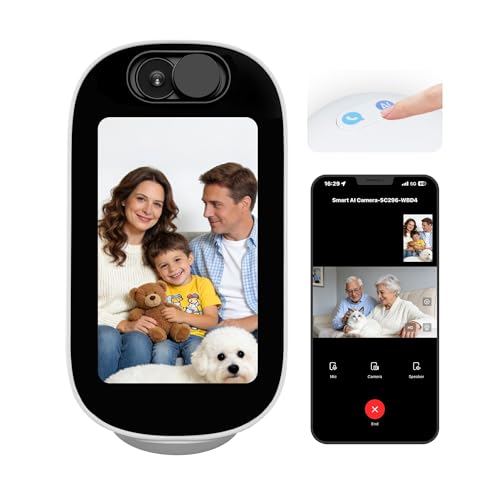
- Built-in 4-inch display for visible interaction.
- One-tap video calling supports easy family check-ins.
- 355° pan and auto-tracking help follow movement.
Best For: Families wanting a screen-based camera for easier senior check-ins.
Easy One-Button Calling
2-Pack Video Calling Grandparents Camera

- One-button calling is built for easier senior use.
- Two-way video and audio support personal check-ins.
- 1080p video with night vision and motion alerts.
Best For: Older adults who need simple one-button video calling.
Simple 2K Pan-and-Tilt
One-Touch Call Indoor Security Camera

- One-touch calling helps simplify check-ins.
- 2K QHD video offers sharper detail.
- 360° pan, tilt, and motion tracking broaden coverage.
Best For: Families wanting an easy-to-use pan-and-tilt monitor for seniors.
Wide-Coverage Smart Monitor
ZUMIMALL 2K WiFi Camera with One-Touch Call

- One-touch call and two-way talk
- 355° pan/tilt with auto tracking
- 3MP image and dual-band Wi-Fi
Best For: Families needing wide room coverage and quick call access
Premium Detail Pick
eufy E30 4K Pan/Tilt Indoor Camera

- 4K recording with 24/7 capture
- AI detection and auto tracking
- No subscription with local storage
Best For: Buyers who want high-detail monitoring without monthly fees
Easy Room Coverage
Tapo 1080P Pan/Tilt Wired Camera

- 360°/114° pan-tilt coverage
- 1080p video with 30 ft. night vision
- Local storage with optional cloud
Best For: A single-room setup with broad viewing and no subscription requirement
Smart Tracking
Kasa 1080p Pan/Tilt Wired Camera

- Motion tracking and patrol mode
- 360°/113° pan-tilt coverage
- Local microSD storage up to 256 GB
Best For: Families who want motion-following monitoring in larger rooms
Two-Camera Value

- 2K video for clearer detail
- Two cameras for multi-room coverage
- 360°/114° pan-tilt with local storage
Best For: Monitoring two indoor areas with better-than-1080p detail
Dual-Band 2-Pack – 5G & 2.4G Indoor/Outdoor Wi-Fi Camera
If you’re comparing indoor security cameras for elderly parents, this 2-pack is a practical option for covering more than one room or entryway. It supports both 5GHz and 2.4GHz Wi‑Fi, offers 1080p video with color night vision, and adds motion alerts plus two-way audio for quick check-ins.
Best For: Families who want flexible dual-band connectivity and coverage for multiple areas.
Pros:
- Supports both 5GHz and 2.4GHz Wi‑Fi for more flexible setup.
- 1080p video with color night vision helps improve nighttime visibility.
- Motion detection sends phone alerts when activity is detected.
- Two-way audio and Alexa/Google Assistant support make check-ins easier.
Cons:
- SD card is not included for local continuous recording.
- Designed as a corded camera, so placement depends on outlet access.
Overall, this model fits households that want straightforward remote monitoring with strong connectivity options and the ability to cover more than one space. The 2-pack makes it especially useful if your parents spend time in separate rooms.
Screen-Based Check-In – 4" Display Elderly Monitor Camera
For indoor security cameras for elderly parents, this model stands out because it includes a built-in 4-inch screen and one-tap video calling. That makes it easier to check in without relying only on a phone app, while AI conversation, motion tracking, and dual-band Wi‑Fi add extra convenience.
Best For: Families who want a camera with a built-in display and easier face-to-face check-ins.
Pros:
- Built-in 4-inch screen adds a visible, interactive way to use the camera.
- One-tap two-way video calling is useful for elderly check-ins.
- AI conversation features can provide simple companionship and interaction.
- 355° pan and auto-tracking help keep moving subjects in view.
Cons:
- Requires corded power, so it needs a nearby outlet.
- Some features may be more than needed if you only want basic monitoring.
This is a strong choice if you want monitoring to feel more personal and less app-dependent. The built-in display and video calling make it especially suited to households helping older adults stay connected.
Easy One-Button Calling – 2-Pack Video Calling Grandparents Camera
When shopping for indoor security cameras for elderly parents, simple communication matters as much as video quality. This 2-pack combines two-way video, a 2.8-inch display, one-button calling, and motion detection, making it easier for older adults to reach family without using a smartphone.
Best For: Grandparents or older adults who need an easy one-button way to place video calls.
Pros:
- One-button calling is designed for users who may have trouble with phones.
- Two-way video and audio support more personal conversations.
- 1080p video and night vision help with everyday monitoring.
- 2-pack format is useful for covering more than one room or person.
Cons:
- Works with 2.4GHz Wi‑Fi only, not 5GHz.
- Motion alerts are motion-only, so it does not advertise advanced AI detection.
This model is best if the main priority is making check-ins easy for seniors and family members. The physical display and one-button call feature make it feel more approachable than a camera that depends entirely on an app.
Simple 2K Pan-and-Tilt – One-Touch Call Indoor Security Camera
If you want indoor security cameras for elderly parents that are easy to set up and easy to use, this aosu model is worth a look. It supports 2.4GHz Wi‑Fi, adds one-touch calls for quick communication, and uses 2K resolution plus 360-degree coverage for broader room monitoring.
Best For: Families who want a simple pan-and-tilt camera with one-touch calling.
Pros:
- One-touch calls make quick communication easier for children or older adults.
- 2K QHD resolution provides sharper live video than basic 1080p models.
- 360° horizontal rotation and 155° vertical tilt improve room coverage.
- Smart motion tracking can follow movement around the room.
Cons:
- Supports 2.4GHz Wi‑Fi only, so it is not dual-band.
- Uses infrared night vision rather than color night vision.
This camera is a strong middle-ground option if you want clearer video and easy calling without adding too much complexity. It works well for parents who need a dependable check-in camera with broad room coverage.
Easy Check-In Option – LASTCOW 2.8-inch HD Video Calling Camera
If you’re comparing indoor security cameras for elderly parents, this LASTCOW model stands out for simple video calling and one-button active call support. It combines 1080P live video, two-way audio, and a built-in 2.8-inch screen so family members can check in without relying only on a phone app. The motion sensor, 360-degree wide view, and night vision add basic home monitoring coverage.
Best For: Families who want a camera that doubles as an easy video check-in device for seniors.
Pros:
- One-button active call feature is designed for elderly users or children who may have trouble using a phone
- 1080P video, two-way voice, and a 2.8-inch screen make live check-ins straightforward
- Motion activation, 360-degree viewing, and night vision help monitor the room day and night
- Works with the Im Cam app on Android and iOS devices
Cons:
- Works only with 2.4G Wi-Fi
- Motion alerts are limited to motion-only detection
- Built-in screen is small compared with a tablet or phone display
This is a practical pick if your main goal is making it easier for an older parent to initiate contact, not just passively watch a room. The extra screen and one-touch calling are the key differences here.
Wide-Coverage Smart Monitor – ZUMIMALL 2K WiFi Camera with One-Touch Call
For shoppers focused on indoor security cameras for elderly parents, this ZUMIMALL camera brings together one-touch calling, AI-assisted tracking, and a wide pan/tilt design. Its 3MP image quality is sharper than standard 1080P, and the app can follow movement automatically when it detects children, pets, or the elderly. It also supports 2.4GHz and 5GHz Wi-Fi, plus Alexa and Google Home integration.
Best For: Households that want a flexible room camera with call, tracking, and wide coverage features.
Pros:
- One-touch call and two-way talk help seniors or family members get attention quickly
- 355-degree horizontal rotation, 120-degree vertical movement, and auto tracking cover more of the room
- 3MP image quality is clearer than traditional 1080P
- Supports both 2.4GHz and 5GHz Wi-Fi, plus Alexa and Google Home
Cons:
- It is wired, so placement depends on power access
- Some features rely on the app and may take setup time
- Night lighting and lullabies are more relevant for baby monitoring than senior care
This model is a strong all-around choice if you want active monitoring instead of just a fixed view. The one-touch call feature makes it especially useful when older parents need a fast way to reach family.
Premium Detail Pick – eufy E30 4K Pan/Tilt Indoor Camera
If you want indoor security cameras for elderly parents with sharper detail and no subscription requirement, the eufy E30 is built around 4K recording, AI detection, and 24/7 recording. The camera can distinguish humans, pets, audio cues, and crying sounds, then auto-track movement to keep activity in frame. A panoramic pan/tilt view, color night vision, and two-way audio round out the feature set.
Best For: Buyers who want high-resolution indoor monitoring with local storage and smart tracking.
Pros:
- 4K recording captures more detail than standard indoor cameras
- AI detection can distinguish humans, pets, audio cues, and crying sounds
- Pan/tilt control with auto tracking helps keep a person in view
- No subscription required, with local SD card storage available
Cons:
- HomeKit support is limited to up to 1080P resolution
- It is corded, so it needs nearby power
- Built-in smart features may be more than some households need for basic check-ins
This is the most detail-oriented option in the group, especially if video clarity matters and you prefer avoiding monthly fees. It fits well when you want a modern indoor camera that can also function as a family communication tool.
Easy Room Coverage – Tapo 1080P Pan/Tilt Wired Camera
If you’re comparing indoor security cameras for elderly parents, this Tapo pan/tilt model is a practical pick for covering a whole room or hallway. Its 360° horizontal and 114° vertical movement lets you check wider areas from one camera, while motion, person, and crying alerts help you stay informed without a subscription fee.
Best For: Monitoring a single room or walkway with broad pan/tilt coverage and local recording.
Pros:
- 360° horizontal and 114° vertical pan/tilt coverage helps reduce blind spots.
- 1080p video and up to 30 ft. night vision support clear day-and-night viewing.
- Instant notifications for motion, person, or baby crying detection.
- Subscription-free local storage with optional cloud backup.
Cons:
- Wired power means it must stay near an outlet.
- microSD card is not included for local recording.
This is a straightforward, room-covering camera for families who want dependable alerts and flexible storage without paying monthly fees.
Smart Tracking – Kasa 1080p Pan/Tilt Wired Camera
For indoor security cameras for elderly parents, this Kasa model stands out if you want the camera to follow movement and send useful alerts. The pan/tilt view, motion tracking, and patrol mode make it easier to keep an eye on larger living areas, while local storage gives you a no-subscription option.
Best For: Tracking movement in a larger indoor space with patrol mode and motion-following alerts.
Pros:
- 360° horizontal and 113° vertical pan/tilt range helps cover more of a room.
- Motion tracking and patrol mode add more active monitoring.
- Push notifications for motion or person detection, plus baby crying detection.
- Up to 256 GB local microSD storage and optional cloud backup.
Cons:
- 1080p resolution is solid, but not as detailed as 2K options.
- Wired installation limits placement to areas near power.
If you want a camera that can actively track movement rather than just sit and watch, this Kasa option is a strong fit for everyday home monitoring.
Two-Camera Value – Tapo 2K Pan/Tilt Wired 2-Pack
If you need indoor security cameras for elderly parents and want to cover more than one area, this two-pack offers a simple way to monitor multiple rooms. Each camera brings 2K video, pan/tilt viewing, motion and crying alerts, and local storage support, so you can spread coverage across the home without adding a monthly fee.
Best For: Covering two indoor spaces with higher-resolution video and flexible storage.
Pros:
- 2K video offers more detail than standard 1080p models.
- 360° horizontal and 114° vertical pan/tilt viewing helps cover a room.
- Motion, person, and baby crying alerts support practical monitoring.
- Two cameras in one bundle make it easier to watch multiple spaces.
Cons:
- Wired power still requires outlet placement.
- Alert type is motion-only in the listed details.
This bundle makes sense when one camera isn’t enough and you want higher-resolution coverage across more than one room.
How We Picked the Best Indoor Security Cameras for Elderly Parents
We prioritized cameras that are easy to use day to day, with a focus on reliable indoor monitoring rather than advanced home-security extras. The strongest picks offer clear live video, dependable motion alerts, good low-light performance, and communication tools that help family members check in from anywhere.
We also looked for helpful setup details such as Wi-Fi compatibility, wired versus wireless operation, local or cloud storage options, and whether the camera supports multiple caregivers. For Indoor Security Cameras for Elderly Parents, simplicity matters as much as image quality.
Quick Comparison
If you want the easiest all-around experience, choose a model with a screen, one-touch calling, or simple app controls. If privacy and low ongoing cost matter most, a no-subscription camera is a smart fit. If you need broader room coverage, pan-and-tilt models with tracking are usually the best value.
Think about the home first: a small apartment may only need a fixed-view camera, while a larger room or living area benefits from 360-degree coverage and smarter alerts.
Key Buying Factors for Indoor Security Cameras for Elderly Parents
Video Quality and Low-Light Visibility
Look for at least 1080p resolution, with 2K or better if you want sharper detail. Good night vision is important because many check-ins happen in dim rooms or after bedtime.
Two-Way Audio and Calling Features
Two-way talk lets you reassure your parent, speak to a caregiver, or ask a quick question without using the phone. Some models go further with one-touch call buttons or built-in screens, which can be especially helpful for seniors who are not comfortable with apps.
Alerts, Motion Detection, and Tracking
Motion detection can help you notice movement, falls, or unusual activity, but too many notifications can become annoying. Adjustable sensitivity and human detection are useful for reducing false alerts. Pan-and-tilt and auto-tracking can also improve coverage in larger rooms.
Privacy, Storage, and Subscriptions
Check whether the camera requires a monthly plan for core features. If you want to avoid recurring costs, a no-subscription option with local storage may be preferable. Also consider who can access the feed and whether the app supports multiple family members.
Who Should Buy Which Indoor Security Cameras for Elderly Parents?
If your priority is simple family check-ins, choose a camera with a screen or one-touch calling. If you want the best balance of value and room coverage, pick a pan-and-tilt camera with motion alerts and two-way audio. If you’re monitoring a parent in a shared household or want richer detail, a higher-resolution model with AI detection is worth the upgrade.
For most households, the best Indoor Security Cameras for Elderly Parents are the ones that are easy to install, easy to access, and easy to trust every single day.
