

Smart locks can make daily entry easier, but the best models do more than replace a key. They should fit your door, offer dependable remote access, and work smoothly with Alexa for voice-friendly control and routines.
Below, we focus on smart door locks compatible with Alexa that balance convenience, installation ease, and practical security features for homes, rentals, and busy family doors.
Best 10 Smart Door Locks Compatible with Alexa Picks for 2026
Premium Wi-Fi Keypad Deadbolt
Schlage Encode Wi-Fi Deadbolt with Touchscreen Keypad

- Built-in Wi-Fi supports remote app control
- Works with Alexa and Google Home
- Stores up to 100 access codes
Best For: Homeowners wanting a secure Wi-Fi deadbolt with Alexa support
Feature-Rich App Lock
Tapo DL100 Smart Wi-Fi Deadbolt

- Alexa-compatible with PIN-verified voice commands
- Offers keypad, Wi-Fi, Bluetooth, and backup keys
- Includes IP54 weatherproofing and BHMA Grade 3
Best For: Families needing flexible access and weather resistance
Biometric Backup Power Lock
DESLOC B200 Fingerprint Smart Door Lock

- Eight unlock methods including fingerprint and app
- Alexa voice control needs the G2 gateway
- Up to 12 months of battery life with USB-C backup
Best For: Users who want fast fingerprint entry and backup power
Fingerprint Keyless Entry Choice
Fingerprint Smart Door Lock with Handle & Keypad

- Fingerprint, keypad, app, FOB, and key access
- Alexa and Google support via optional WiFi Gateway
- DIY install with guest codes and access logs
Best For: Families, Airbnb hosts, and rental properties
Wi-Fi Voice-Control Deadbolt
Philips WiFi Smart Keypad Deadbolt Lock

- Built-in Wi-Fi with no hub required
- Alexa and Google Assistant voice compatibility
- Up to 100 passwords with auto-lock settings
Best For: Homeowners and landlords needing remote control and voice access
Fingerprint Wi-Fi Smart Upgrade
Philips Built-in WiFi Smart Lock
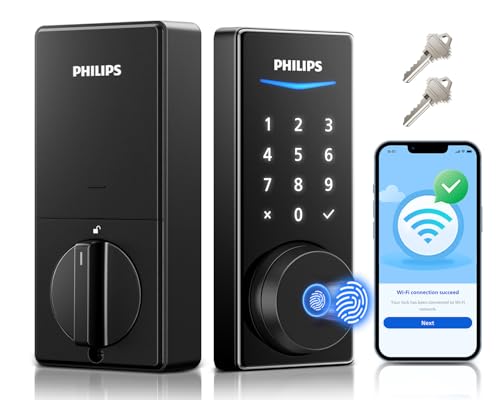
- Built-in Wi-Fi with no additional hub
- Fingerprint unlock in about 0.3 seconds
- Alexa-compatible voice control and five unlock methods
Best For: Homes needing fast fingerprint access and Alexa compatibility
Editor’s Pick
Philips WiFi Keypad Door Lock with Handle

- Built-in WiFi with no hub required
- Alexa and Google Assistant voice control
- Fingerprint, passcode, and app access
Best For: all-in-one front door upgrades with handle included
Most Flexible Access

- Alexa-compatible voice locking and unlocking
- Built-in Wi-Fi with no hub required
- App, fingerprint, code, and key access
Best For: families wanting multiple unlock methods and remote control
Premium Wi-Fi Keypad Deadbolt – Schlage Encode Wi-Fi Deadbolt with Touchscreen Keypad
If you’re comparing smart door locks compatible with Alexa and want a proven Wi-Fi deadbolt, the Schlage Encode is built for simple remote control and everyday convenience. Its built-in Wi-Fi lets you manage the lock from the Schlage Home app without a separate hub, while Alexa voice control adds hands-free locking when paired with a voice-enabled device.
Best For: Homeowners who want a Wi-Fi smart lock with keypad access, Alexa support, and strong security features.
Pros:
- Built-in Wi-Fi for remote control and monitoring from anywhere
- Works with Alexa and Google Home for optional voice control
- Supports up to 100 access codes for families or guests
- Includes auto-lock, touchscreen entry, and one backup key
Cons:
- Voice control requires the Schlage Home app and a voice-enabled device
- Battery-powered design uses four AA batteries
- Fits standard door sizes only, so installation compatibility should be checked first
The Encode stands out if you want a polished, mainstream smart lock with strong security credentials and easy setup. It balances convenience, app control, and Alexa compatibility well for a front door upgrade.
Feature-Rich App Lock – Tapo DL100 Smart Wi-Fi Deadbolt
The Tapo DL100 is a practical pick if you want smart door locks compatible with Alexa and prefer a deadbolt with flexible access options. It combines Wi-Fi app control, Bluetooth for nearby use, and voice commands with PIN verification, making it easy to manage entry without relying on a single unlock method.
Best For: Families and everyday users who want multiple unlock methods, Alexa integration, and weather-resistant construction.
Pros:
- Multiple unlock methods including keypad, Bluetooth, Wi-Fi, and backup keys
- Compatible with Alexa, Google Home, and Samsung SmartThings
- Up to 200 customizable codes for family and guest access
- IP54 weatherproofing and BHMA Grade 3 durability
Cons:
- Voice unlock requires PIN verification
- Battery life varies by Wi-Fi or Bluetooth mode
- Best fit is standard door sizing, so measure before ordering
Overall, the DL100 is a strong all-around option if you value versatility more than a minimalist lock. Its mix of app management, voice support, and weather resistance makes it well suited to busy front doors.
Multi-Access Handle Lock – Bluetooth Fingerprint Smart Lock with Handle
If you need smart door locks compatible with Alexa but want more than a basic deadbolt, this handle-and-keypad design adds fingerprint, FOB, code, app, and key access. It works with Alexa and Google when paired with a gateway, which makes it a good fit for users who want hands-free control plus lots of entry options.
Best For: Rentals, Airbnb units, and households that need flexible unlock methods and guest-friendly code management.
Pros:
- Six unlock methods including fingerprint, keypad, FOB, code, app, and key
- Works with Alexa and Google when paired with a gateway
- Designed for standard US doors with DIY installation
- Guest code options suit Airbnb, rental, and family use
Cons:
- Alexa voice features require a gateway
- Bluetooth-based smart access may be less direct than built-in Wi-Fi locks
- Handle-and-lock format may not suit buyers who only want a deadbolt
This lock is especially appealing if you want convenient day-to-day access and practical guest management. The broader mix of unlock methods makes it more versatile than many simple keypad-only models.
Biometric Backup Power Lock – DESLOC B200 Fingerprint Smart Door Lock
The DESLOC B200 is a solid choice if you want smart door locks compatible with Alexa and care about quick biometric entry. It supports fingerprint, PIN, app control, eKeys, key fobs, physical keys, and voice control with Alexa or Google Assistant when using the required G2 gateway.
Best For: Buyers who want fast fingerprint entry, long battery life, and app-based access management.
Pros:
- Eight unlock methods for flexible daily use
- Fast fingerprint recognition with self-learning support
- Up to 12-month battery life with USB-C emergency power
- BHMA Grade 3 with IP54 weather resistance
Cons:
- Alexa voice control requires the G2 gateway
- Bluetooth app management also depends on gateway use for remote-style access
- Battery is not included, so you’ll need to supply four AA batteries
In practice, the B200 is a strong fit for users who value speed and redundancy over a bare-bones lock. Its biometric focus and backup power options make it appealing for busy front doors and changing household access needs.
Fingerprint Keyless Entry Choice – Fingerprint Smart Door Lock with Handle & Keypad
If you want smart door locks compatible with Alexa that also make everyday entry simpler, this Sifely model is built around flexibility. It supports fingerprint, keypad, app, FOB, and key access, and with the optional WiFi Gateway it adds remote control plus Alexa and Google Assistant voice support.
Best For: Families, Airbnb hosts, and rental property owners who want multiple unlock methods and voice compatibility.
Pros:
- Unlock with fingerprint, keypad, app, FOB, or physical key.
- Supports Alexa and Google Assistant through the optional WiFi Gateway.
- Guest codes and access logs make it practical for Airbnb and rentals.
- DIY installation is designed to fit most standard doors without extra drilling.
Cons:
- Alexa voice control requires the separate WiFi Gateway.
- The app control is Bluetooth-based unless the gateway is added.
- Door style compatibility is broad, but still limited to standard-door fitment.
This is a versatile pick if you value lots of entry options and straightforward installation more than an all-in-one Wi-Fi setup. It is especially appealing for households and hosts who want a keypad lock that can scale from local app use to voice-enabled smart home control.
Wi-Fi Voice-Control Deadbolt – Philips WiFi Smart Keypad Deadbolt Lock
For shoppers comparing smart door locks compatible with Alexa, this Philips deadbolt stands out for built-in Wi-Fi and direct app control. It works with Alexa and Google Assistant for voice commands, and it does not require a separate hub, making it a cleaner setup for front-door keyless entry.
Best For: Homeowners and landlords who want a direct Wi-Fi deadbolt with voice control and flexible access codes.
Pros:
- Built-in Wi-Fi lets you control the lock remotely without a hub.
- Works with Alexa and Google Assistant for voice locking and unlocking.
- Supports up to 100 passwords, including permanent, one-time, and timed codes.
- Auto-lock can be set from 10 to 180 seconds for added convenience.
Cons:
- It uses physical buttons rather than a touchscreen, which may not suit everyone.
- Batteries are required and are not included.
- Voice unlocking depends on pairing with Alexa or Google Assistant.
This is a strong practical option if you want a straightforward Wi-Fi deadbolt with remote access and voice compatibility. The password flexibility also makes it well suited to shared homes, tenants, and service providers.
Fingerprint Wi-Fi Smart Upgrade – Philips Built-in WiFi Smart Lock
If you want smart door locks compatible with Alexa and you also care about fast biometric entry, this Philips model is a compelling fit. It combines built-in Wi-Fi, fingerprint access, keypad codes, app control, voice commands, and a physical key option in one splash-proof design.
Best For: Homes that want fingerprint convenience plus Alexa-compatible remote access and multiple entry methods.
Pros:
- Built-in Wi-Fi allows remote control without an additional hub.
- Fingerprint unlock works in about 0.3 seconds and stores multiple prints.
- Alexa and Google Assistant support adds voice unlocking convenience.
- Five unlock methods and flexible code types suit families, guests, and renters.
Cons:
- It is designed for home use, so it may be less targeted to heavy commercial needs.
- Battery life details are not highlighted in the supplied notes.
- Voice unlocking still depends on pairing with a smart assistant.
This lock is a good all-around upgrade if you want speed, app control, and voice compatibility in the same package. The fingerprint sensor is the standout feature, especially for households that want quick access without giving up keypad or key backup.
Editor’s Pick – Philips WiFi Keypad Door Lock with Handle
If you want smart door locks compatible with Alexa that also bundle the handle, this Philips option is a practical all-in-one upgrade. It connects directly to 2.4GHz WiFi, supports app control, fingerprint entry, passcodes, and voice commands, and it adds auto-lock for everyday convenience.
Best For: Homeowners or rental hosts who want a handle-and-deadbolt smart lock set with remote access and Alexa voice support.
Pros:
- Built-in WiFi means no hub or bridge is needed.
- Works with Alexa or Google Assistant for voice locking and status checks.
- Fast fingerprint unlock and multiple passcode types suit families and guests.
- Includes a matching handle set for a more complete front-door upgrade.
Cons:
- Auto-lock is off by default and must be enabled in the app.
- Uses batteries that are not included.
- Installation notes mention careful setup and door-hand direction checks.
Overall, this is a strong pick if you want a feature-rich smart lock with broad access options and simple WiFi-based control. The included handle makes it especially appealing for buyers who want one purchase to cover more of the front-door hardware.
Most Flexible Access – Philips Wi-Fi Door Lock
Among smart door locks compatible with Alexa, this Philips deadbolt stands out for giving you several ways to unlock the door without adding a hub. It supports app control, fingerprint, passcode, key, and voice access, plus built-in Wi-Fi for remote management from your phone.
Best For: Households that want flexible entry methods, Alexa voice control, and remote access without extra hardware.
Pros:
- Compatible with Alexa and Google Assistant for hands-free locking and unlocking.
- Built-in Wi-Fi provides remote access with no hub needed.
- Supports app, passcode, fingerprint, physical key, and voice entry.
- Offers real-time alerts, access history, and auto-lock timing from 10 to 180 seconds.
Cons:
- Only supports 2.4GHz Wi-Fi.
- Batteries are not included.
- Voice control setup requires the latest app version and a stable network.
This is a well-rounded choice if you want a front-door lock that balances convenience and control. The broad entry options make it useful for families, guests, and anyone who wants backup access methods built in.
Best for Security Features – Veise VE012W WiFi Fingerprint Smart Lock
If security features matter most, this Veise model deserves a look among smart door locks compatible with Alexa. It combines built-in WiFi, app remote control, fingerprint access, keypad codes, and voice support with detailed logs, anti-peeping protection, and vacation away mode.
Best For: Buyers who want a security-focused Alexa-compatible smart lock with strong access controls and monitoring.
Pros:
- Compatible with Alexa and Google Assistant for voice locking and unlocking.
- Built-in 2.4GHz WiFi enables remote control with no hub required.
- Offers 6-in-1 entry options, including fingerprint, codes, app, keys, and voice.
- Includes real-time alerts, access logs, anti-peeping protection, and vacation mode.
Cons:
- Uses batteries that are not included.
- Only supports 2.4GHz WiFi.
- Some advanced features depend on app setup and management.
For buyers focused on control and visibility, this Veise lock brings together a lot of useful security tools in one package. The combination of biometric entry, code management, and detailed monitoring makes it a strong fit for busy homes and rentals.
How We Picked the Best Smart Door Locks Compatible with Alexa
We looked for Smart Door Locks Compatible with Alexa that offer a strong mix of usability, security, and value. Priority went to models with built-in Wi-Fi or simple app control, plus features like auto-lock, fingerprint access, keypad entry, and straightforward installation. We also favored locks that make sense for everyday use on front doors, rental properties, and shared homes.
Quick Comparison
In this group, the main differences come down to entry method and connectivity. Some locks focus on touchscreen or tactile keypads, others add fingerprint unlocking, and a few include handles or deadbolt-only designs. Built-in Wi-Fi models are usually the easiest choice if you want remote control and Alexa integration without an extra hub.
Key Buying Factors for Smart Door Locks Compatible with Alexa
Connectivity and Alexa Setup
Choose a lock with built-in Wi-Fi if you want the simplest Alexa experience. Hub-based systems can work well too, but they add another device and setup step.
Entry Methods
Think about who will use the lock most. Keypads are reliable for guests and family members, while fingerprint access is fast for everyday entry. App control is useful for remote access, and physical keys can still be worth having as a backup.
Installation and Door Fit
Check backset, door thickness, and whether you need a deadbolt replacement or a lock with a handle. A model that fits standard US doors can save time and avoid return hassles.
Security and Convenience Features
Auto-lock, temporary codes, access logs, and weather resistance all matter. For rentals or Airbnb use, choose a model that makes it easy to manage guest access without handing out spare keys.
Who Should Buy Which Smart Door Locks Compatible with Alexa?
If you want the most straightforward smart home upgrade, pick a built-in Wi-Fi deadbolt that works natively with Alexa. If you value speed and convenience, fingerprint-enabled models are ideal for family homes. For rentals, look for keypad access, app-based code management, and auto-lock. If you prefer a traditional feel, a handle set with smart controls may be the better fit.
Overall, the best choice depends on how you enter the home, how often you share access, and whether you want a simple deadbolt swap or a more complete front-door upgrade.
