

Looking for a smarter way to secure your front door? The best smart door locks compatible with Google Home can add voice control, remote access, guest codes, and activity alerts without making everyday entry complicated.
In this roundup, we focus on locks that balance compatibility, convenience, and practical security features so you can choose a model that fits your home, routine, and budget.
Best 10 Smart Door Locks Compatible with Google Home Picks for 2026
Premium Wi-Fi Touchscreen Pick
Schlage Encode Wi-Fi Deadbolt, Matte Black

- Built-in Wi-Fi for remote control and monitoring
- Works with Google Home and Alexa voice control
- Stores up to 100 access codes with auto-lock
Best For: Users who want a premium Wi-Fi deadbolt with keypad entry and Google Home support
Matter-Ready Google Hub Pick

- Works with Google Home app and Google Assistant
- Built on Matter for flexible smart home use
- Remote access needs a Matter-enabled hub
Best For: Google Home households that want Matter support and Google device compatibility
Classic Finish Wi-Fi Pick
Schlage Encode Wi-Fi Deadbolt, Aged Bronze
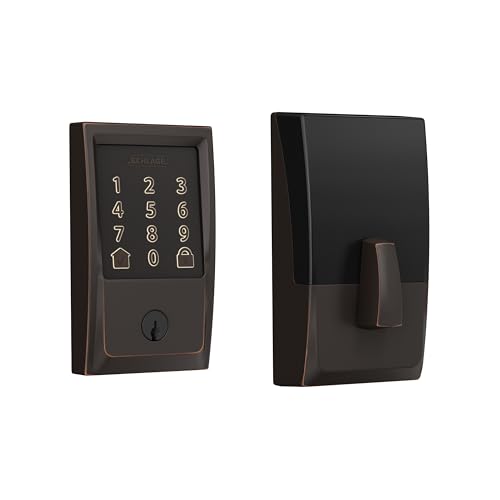
- Built-in Wi-Fi and Schlage Home app control
- Works with Google Home voice commands
- Up to 100 access codes with auto-lock
Best For: Homeowners who want Schlage Encode features in an aged bronze finish
Thread-Ready Premium Pick

- Built-in Wi‑Fi plus Matter over Thread
- Works with Google Assistant, Alexa, and Apple Home
- Fingerprint, keypad, app, web, and key entry
Best For: buyers who want a feature-rich smart lock with Google Home support and flexible access methods
Simple Wi‑Fi Keypad Pick
Schlage Arrive Smart Wi‑Fi Deadbolt

- Google Home and Alexa compatible
- Built-in Wi‑Fi with Schlage Home app control
- Up to 250 access codes plus backlit keypad
Best For: front-door buyers who want a trusted keypad deadbolt with Google Home voice control
Budget Fingerprint Pick

- Google Assistant and Alexa compatible
- Fingerprint, passcode, app, and backup key access
- Built-in Wi‑Fi with IP55 weather resistance
Best For: budget shoppers who want a fingerprint smart lock with Google Home voice control
Google Home-ready Wi-Fi lock
Fingerprint Keyless Entry Deadbolt

- Built-in 2.4 GHz Wi-Fi for remote app control
- 5 unlock methods including fingerprint and voice
- Supports 100 fingerprints, 100 passcodes, and guest codes
Best For: Families and Airbnb hosts who want remote access and Google Assistant control.
Full handle-set smart lock

- Built-in Wi-Fi with no hub required
- 6-in-1 entry: app, fingerprint, passcode, IC card, key, voice
- Auto-lock timer plus instant one-touch locking
Best For: Buyers who want a complete front-door handle set with Google Assistant support.
Silver Google Home-compatible lock

- Built-in Wi-Fi with remote app control
- 6 unlock methods plus voice support
- Stores 100 fingerprints and 100 passcodes
Best For: Homeowners who prefer a silver finish and want Google Assistant-compatible access control.
Premium Wi-Fi Touchscreen Pick – Schlage Encode Wi-Fi Deadbolt, Matte Black
If you want smart door locks compatible with Google Home that also feel like a traditional premium deadbolt, the Schlage Encode is an easy fit. Its built-in Wi-Fi lets you control and monitor the lock from the Schlage Home app, and voice control works with Google Home when paired with a voice-enabled device.
Best For: Homeowners who want a full-featured Wi-Fi deadbolt with Google Home voice support and keypad access.
Pros:
- Built-in Wi-Fi for remote locking, unlocking, and lock history without a separate hub
- Works with Google Home and Alexa for hands-free voice control
- Supports up to 100 access codes and customizable notifications
- Includes a touchscreen keypad, auto-lock, and one physical backup key
Cons:
- Voice control requires pairing with the Schlage Home app and a voice-enabled device
- Uses four AA batteries, so battery changes are part of ownership
- Only fits standard door thickness and backset ranges
This is a strong all-around choice if you want a polished, Wi-Fi-enabled smart deadbolt with broad access-code management and reliable Google Home compatibility.
Matter-Ready Google Hub Pick – Yale Snow Smart Deadbolt
For shoppers focused on smart door locks compatible with Google Home, the Yale Snow stands out because it is built around Google Home access and Matter support. It lets you manage codes, track activity, and use Google Assistant voice control, while also working with compatible Google hubs for a more integrated setup.
Best For: Google Home users who want Matter support and a lock designed to work with Google devices.
Pros:
- Works with the Google Home app for access management and entry codes
- Supports Google Assistant voice control for hands-free locking
- Built with Matter onboard for broader smart home flexibility
- Compatible with Google hubs like Nest Hub, Nest Hub Max, and Nest Wi-Fi Pro
Cons:
- Remote access requires a Matter-enabled hub
- Only works on 2.4 GHz Wi-Fi
- Limited to the U.S. and Canada
This is a good match if you already use Google hardware and want a modern deadbolt that leans into Matter and Google Home rather than a more general-purpose smart lock approach.
Fingerprint Plus Wi-Fi Pick – ULTRALOQ U-Bolt Pro WiFi
If you want smart door locks compatible with Google Home and prefer extra unlocking options, the ULTRALOQ U-Bolt Pro WiFi is a feature-heavy choice. It combines built-in Wi-Fi, fingerprint access, keypad entry, and voice control with Google Assistant, making it useful for busy homes and rentals.
Best For: Families, rentals, and offices that want fingerprint access plus Google Home control.
Pros:
- Built-in Wi-Fi supports remote control without an extra hub
- Works with Google Home and Google Assistant for voice control
- Offers fingerprint ID, passcodes, app control, auto unlock, and eKey sharing
- Includes a door sensor, alerts, and ANSI Grade 1 security
Cons:
- Uses 2.4 GHz Wi-Fi only
- Not recommended for metal doors
- Setup is simple, but the many features may be more than some buyers need
Overall, this model makes sense if convenience is your priority and you want a highly versatile lock that pairs Google Home support with fingerprint access and strong security claims.
Classic Finish Wi-Fi Pick – Schlage Encode Wi-Fi Deadbolt, Aged Bronze
This Schlage Encode option is a strong choice if you want smart door locks compatible with Google Home in a warmer finish. It has the same built-in Wi-Fi, app control, and Google Home voice support as the matte black version, but the aged bronze styling may fit more traditional front doors.
Best For: Buyers who want the Schlage Encode platform in an aged bronze finish for a more traditional look.
Pros:
- Built-in Wi-Fi for remote access and monitoring through the Schlage Home app
- Works with Google Home for optional hands-free voice control
- Manages up to 100 access codes and includes lock history and notifications
- Includes auto-lock, touchscreen entry, and a backup key
Cons:
- Voice control depends on the Schlage Home app and a voice-enabled device
- Battery-powered operation means periodic battery replacement
- Fit is limited to standard door thickness and backset requirements
Choose this version if you like the Encode feature set but want a finish that blends better with classic hardware and exterior trim.
Thread-Ready Premium Pick – ULTRALOQ Bolt SE Smart Lock
If you want smart door locks compatible with Google Home and prefer a model with plenty of unlock options, the ULTRALOQ Bolt SE is a strong all-around choice. It combines built-in Wi‑Fi, Matter over Thread support, and Google Assistant voice control, so it can fit into a modern smart home without a separate hub.
Best For: Homeowners who want fingerprint access, Matter/Thread compatibility, and flexible remote control.
Pros:
- Supports Google Assistant, Alexa, Apple Home, and Matter-enabled ecosystems
- Offers fingerprint ID, passcodes, app access, web portal, eKey sharing, and 2 mechanical keys
- Built-in Wi‑Fi and Thread support for remote control and longer battery life
- Weather-resistant zinc alloy build with IP65 waterproof rating
Cons:
- Google Home compatibility is voice-control focused, so setup may depend on your broader ecosystem
- Door sensor is not included
- Uses AAA batteries, which may matter if you prefer rechargeable power
Overall, this lock stands out for combining Matter over Thread, fingerprint entry, and broad smart-home support in one package. It is a practical pick for buyers who want a feature-rich deadbolt that can handle everyday family use and remote access.
Simple Wi‑Fi Keypad Pick – Schlage Arrive Smart Wi‑Fi Deadbolt
For shoppers comparing smart door locks compatible with Google Home, the Schlage Arrive keeps things straightforward: built-in Wi‑Fi, app control, and Google Home compatibility for voice control and routines. It is designed for users who want a familiar keypad deadbolt with remote access rather than a long list of extra unlock methods.
Best For: Front-door owners who want an easy-install Wi‑Fi deadbolt with Google Home voice control.
Pros:
- Works with Google Home and Alexa for voice control and smart routines
- Built-in Wi‑Fi supports remote lock and unlock through the Schlage Home app
- Stores up to 250 access codes and shows lock history and notifications
- Backlit, all-weather push-button keypad is practical for everyday use
Cons:
- Keypad-first design means no fingerprint unlock
- Uses the Schlage Home app ecosystem, so it is less flexible than Matter-based options
- Heavier focus on access codes than on advanced biometric features
This is a good fit if you value dependable brand security, clear app management, and Google Home integration without overcomplicating the setup. It feels especially suitable for households that mainly want a reliable keypad lock with remote control.
Budget Fingerprint Pick – TEEHO TE012W WiFi Smart Lock
The TEEHO TE012W is a practical option if you want smart door locks compatible with Google Home and need a feature set that covers the basics well. It connects directly to 2.4GHz Wi‑Fi, supports Google Assistant voice control, and adds fingerprint entry for fast everyday access.
Best For: Budget-minded buyers who want fingerprint entry, Wi‑Fi control, and Google Assistant support.
Pros:
- Compatible with Alexa and Google Assistant for hands-free voice control
- Built-in Wi‑Fi with app control, user sharing, and remote management
- Fingerprint unlock plus passcodes, backup keys, and voice control
- BHMA Grade 3 certified and IP55 weather resistant for outdoor use
Cons:
- Works on 2.4GHz Wi‑Fi only
- Fingerprint capacity is limited to 20 users
- Uses the KK Home app instead of a more universal smart-home platform
This lock delivers a strong mix of convenience and affordability, especially if fingerprint access matters most. It is a sensible choice for front doors, rentals, or side doors where you want Google Assistant support without paying for premium ecosystem extras.
Google Home-ready Wi-Fi lock – Fingerprint Keyless Entry Deadbolt
If you want smart door locks compatible with Google Home for a front door upgrade, this Ghome model combines built-in 2.4 GHz Wi-Fi, fingerprint entry, and voice control in one practical package. It is designed for everyday convenience, whether you need remote access, guest codes, or quick hands-free unlocking.
Best For: Families, Airbnb hosts, and homeowners who want app control plus Google Assistant voice access.
Pros:
- Built-in Wi-Fi lets you lock and unlock remotely through the app without a hub.
- Offers 5 ways to unlock, including fingerprint, keypad, app, physical key, and voice control.
- Supports up to 100 fingerprints and 100 passcodes for shared access.
- 10,000mAh rechargeable battery is rated for up to 10 months, with low-battery alerts.
Cons:
- Only works with 2.4 GHz Wi-Fi.
- Best suited to users comfortable managing access through an app.
Overall, this is a feature-rich option for buyers who want a straightforward smart lock with strong access flexibility and practical security features. The local data storage, auto-lock, and temporary guest codes make it especially useful for busy homes and short-term rentals.
Full handle-set smart lock – Built-in WiFi Handle Deadbolt
For shoppers comparing smart door locks compatible with Google Home, this Firstriver handle-and-deadbolt set stands out for built-in Wi-Fi and voice control without needing a hub. It blends app access, biometric entry, and passcode management into one door set that suits front doors, side doors, or garage entries.
Best For: Homeowners who want a full handle set with Google Assistant voice control and fast fingerprint entry.
Pros:
- Built-in Wi-Fi connects directly to 2.4 GHz home networks, so no hub is required.
- 6 unlocking methods include app, fingerprint, passcode, IC card, key, and voice control.
- Fast fingerprint access unlocks in under 1.5 seconds and supports up to 100 fingerprints.
- Auto-lock can be set from 5 to 900 seconds, with instant one-touch locking available.
Cons:
- Designed for standard U.S. doors, so fit will depend on your door setup.
- Full handle-set format may be more than buyers need if they only want a deadbolt.
This is a strong pick if you want both convenience and a more complete front-door hardware upgrade. The app alerts, access logs, and voice support make it easy to manage day-to-day entry while keeping control visible and organized.
Silver Google Home-compatible lock – Silver Handle Deadbolt Set
This silver version is another practical choice among smart door locks compatible with Google Home, offering built-in Wi-Fi, fingerprint access, and voice control from the same front-door format. It is built for buyers who want the same connected features with a different finish.
Best For: Homeowners who want a silver smart handle set with Google Assistant compatibility and app-based access management.
Pros:
- Direct 2.4 GHz Wi-Fi connection allows remote locking and unlocking without a hub.
- Supports 6 entry methods, including fingerprint, passcode, IC card, key, app, and voice.
- Stores up to 100 fingerprints and 100 passcodes for family or shared access.
- Auto-lock timing can be adjusted from 5 to 900 seconds.
Cons:
- Essentially the same feature set as the black version, so color may be the main difference.
- Requires a standard U.S. door fit for installation.
If you like the Firstriver feature set but prefer a silver finish, this model keeps the same connected convenience and security tools. It is a clean fit for buyers who value app control, voice commands, and straightforward installation.
How We Picked These Smart Door Locks Compatible with Google Home
We focused on models that offer reliable Google Home integration, straightforward setup, and the kinds of features most homeowners actually use: keypad entry, app control, auto-lock, voice access, and remote sharing for family or guests. We also looked at connectivity options such as built-in Wi-Fi, Matter support, and Thread, since those can affect responsiveness and long-term compatibility.
Quick Comparison
Some Smart Door Locks Compatible with Google Home are built around convenience-first features like fingerprints and app-based unlocks, while others emphasize broad platform support, stronger accessory ecosystems, or easier retrofit installation. A Wi-Fi model is often the simplest route for remote access, while Matter-enabled options may appeal to buyers who want more flexible smart home integration.
Key Buying Factors for Smart Door Locks Compatible with Google Home
Compatibility and Connectivity
Check whether the lock works directly with Google Home through Wi-Fi, Matter, or a supported bridge. Direct Wi-Fi is usually easiest for voice control and remote management, while Matter can be a smart choice for future-proofing.
Entry Methods
Think about how people will use the lock every day. Keypads are great for families and guests, fingerprint access speeds up arrival, and app control adds convenience when you are away from home.
Power and Reliability
Battery life matters more than many shoppers expect. Look for low-battery alerts, backup power options, and a lock that still offers a mechanical key or emergency access method if needed.
Fit and Installation
Before buying, confirm whether you need a deadbolt-only replacement or a full handle set. Door thickness, backset measurements, and left/right swing considerations can all affect compatibility.
Who Should Buy Which Smart Door Locks Compatible with Google Home?
If you want the simplest Google Home experience, choose a built-in Wi-Fi deadbolt with keypad control. If you already use a broader smart home setup, a Matter-capable model may be the better long-term fit. For busy households or rentals, fingerprint access and guest code management can save time every day. For buyers replacing older hardware, prioritize a lock that matches your existing door prep so installation stays painless.
In short, the best choice depends on whether you care most about convenience, smart home flexibility, or easy installation. Focus on the features you will use regularly, and you will end up with a lock that feels secure and genuinely helpful.
