

Looking for smart door locks without subscription that still deliver modern convenience? The best options now combine fingerprint access, keypad entry, app control, and auto-lock features without adding another monthly bill.
Below, we focus on practical picks that make everyday entry easier for families, renters, and hosts while keeping setup simple and security features straightforward.
Best 10 Smart Door Locks Without Subscription Picks for 2026
Budget Fingerprint Deadbolt
TEEHO TE002 Keyless Front Door Lock

- Fingerprint, keypad, and backup key access
- Auto-lock plus silent and away modes
- Up to 365-day battery life
Best For: Households wanting a straightforward fingerprint deadbolt with no ongoing subscription costs.
Wi-Fi App Lock
eufy C220 Fingerprint Smart Deadbolt

- Built-in Wi-Fi with remote app control
- 6-way unlocking including fingerprint and voice
- About 8 months battery life
Best For: Buyers who want built-in Wi-Fi and app control without a subscription.
Rental-Ready Smart Lock

- Fingerprint, keypad, app, FOB, and key access
- Guest codes and access logs for rentals
- Optional WiFi Gateway enables remote control
Best For: Airbnb hosts, rentals, and families who want flexible keyless entry.
Multi-User App Lock
Veise VE017 Fingerprint Smart Door Lock

- 8-in-1 access with app, code, fob, and key
- Remote user management with activity logs
- Local AES128-encrypted storage
Best For: Multi-tenant properties and households that need detailed access control.
Host-Friendly Built-In WiFi
Built-in WiFi Fingerprint Smart Door Lock

- Built-in WiFi with no extra gateway required
- 6-in-1 access: fingerprint, code, card, app, key, voice
- Stores 200 codes and 100 fingerprints
Best For: Homeowners and rental hosts who want hub-free remote access
Flexible App-Control Knob

- Fingerprint, passcode, fob, key, and app access
- Remote unlock needs a separately sold WiFi gateway
- Quick DIY install on many standard wooden doors
Best For: Rentals and homes that want app management with optional remote access
Deadbolt With Built-In Wi‑Fi

- Built-in Wi-Fi remote control with no hub needed
- App, passcode, fingerprint, key, and voice unlock
- Supports up to 100 custom passcodes
Best For: Homeowners who want a Wi‑Fi deadbolt with easy guest code sharing
Philips Wi‑Fi Deadbolt Choice
Philips WiFi Smart Keypad Deadbolt Lock

- Built-in Wi‑Fi with no hub required
- Works with app, voice, passcode, and keys
- Up to 100 passwords with auto-lock and alerts
Best For: Buyers who want a dependable keypad deadbolt with voice control and simple app management.
TEEHO Privacy-Focused Wi‑Fi Lock
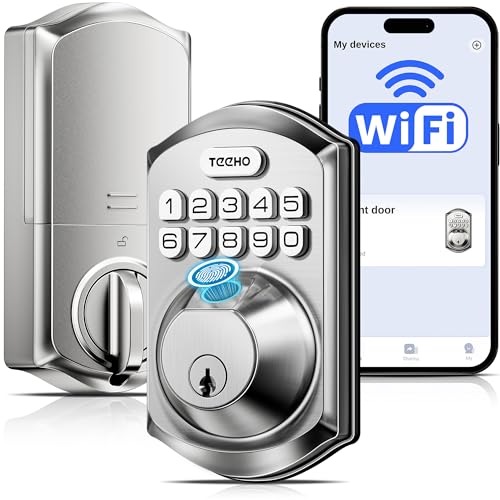
- Built-in Wi‑Fi with local AES-128 protected storage
- Five unlock methods, including fingerprint and voice
- 8 AA batteries for longer runtime and stable connectivity
Best For: Security-minded buyers who want local storage, strong battery capacity, and flexible access sharing.
Budget Fingerprint Deadbolt – TEEHO TE002 Keyless Front Door Lock
If you want smart door locks without subscription fees, the TEEHO TE002 keeps things simple with local fingerprint, keypad, and key access. It’s a practical fit for everyday home use, especially if you want quick entry, auto-lock convenience, and a lock that doesn’t rely on a paid app service.
Best For: Households wanting a straightforward fingerprint deadbolt with no ongoing subscription costs.
Pros:
- Supports 4 unlock methods: fingerprints, passcodes, 2 backup keys, and one-time PINs.
- Fast fingerprint recognition with AI-powered learning for quicker everyday use.
- Auto-lock, silent mode, and away mode add convenience and privacy.
- Up to 365-day battery life with low-battery warning and IP54 weather resistance.
Cons:
- Uses nonconnected smart home compatibility, so it doesn’t offer app-based remote control.
- Compatible with standard U.S. doors using 2-1/8" door holes only.
This is a solid pick if your priority is dependable keyless entry without paying for extras you won’t use. It focuses on the essentials: fingerprint access, temporary codes, and easy install.
Wi-Fi App Lock – eufy C220 Fingerprint Smart Deadbolt
The eufy Security Smart Lock C220 is a strong choice if you want smart door locks without subscription costs and still want remote control built in. It combines fingerprint access, app management, and Wi-Fi connectivity in one deadbolt, so you can monitor and control entry without adding a monthly fee.
Best For: Buyers who want built-in Wi-Fi and app control without a subscription.
Pros:
- Built-in Wi-Fi enables remote control through the eufy Security app with no bridge required.
- Offers 6 unlock methods, including fingerprint, app, keypad, physical key, Apple Watch, and voice.
- Self-learning AI improves fingerprint recognition over time.
- Rated for IP53 waterproofing and about 8 months of battery life.
Cons:
- Battery life depends on usage and may vary.
- Runs on 8 AA batteries, which is more than some simpler locks.
If you want app access, activity logs, and remote control without paying for a service plan, this model is an easy fit. It stands out for convenience while staying practical for front doors and everyday use.
Rental-Ready Smart Lock – Sifely S Handle with Keypad
For smart door locks without subscription fees, the Sifely S is geared toward families, hosts, and property managers who want flexible access control. It supports fingerprint, keypad, app, FOB, and key entry, making it useful when you need easy local access plus optional remote features through the WiFi Gateway.
Best For: Airbnb hosts, rentals, and families who want flexible keyless entry.
Pros:
- Five access options: fingerprint, keypad, app, FOB, and key.
- Guest access codes and remote logs are useful for Airbnb and rental management.
- DIY installation is designed to be quick, with a reversible handle for left- or right-hand doors.
- Compatible with Alexa and Google Assistant when paired with the optional WiFi Gateway.
Cons:
- Remote access from anywhere requires the separate WiFi Gateway.
- Voice control also depends on that optional gateway.
This lock makes sense if you want a versatile setup for shared access and property turnover. It’s especially appealing when you need code sharing and app management, but don’t want a subscription-based system.
Multi-User App Lock – Veise VE017 Fingerprint Smart Door Lock
The Veise VE017 is aimed at buyers who want smart door locks without subscription fees but still need strong access management. With app control, multiple unlock methods, and local AES128-encrypted storage, it’s built for homes or multi-tenant properties that need flexible entry control without adding a monthly service.
Best For: Multi-tenant properties and households that need detailed access control.
Pros:
- 8-in-1 access options include fingerprint, app, code, fob card, voice, and mechanical key.
- Smart user management lets you grant, pause, or delete access remotely in the app.
- Local AES128-encrypted storage keeps access data on the lock for added privacy.
- Includes auto-lock, silent mode, away mode, and detailed activity logs.
Cons:
- Alexa and Google voice control require the G1 Gateway.
- Battery life details in the provided notes are incomplete, so long-term runtime is less clear than some rivals.
This is a feature-rich option if you manage multiple users and care about security visibility. It offers plenty of flexibility while avoiding the recurring costs associated with subscription-based smart access systems.
Host-Friendly Built-In WiFi – Built-in WiFi Fingerprint Smart Door Lock
If you want smart door locks without subscription fees or extra hardware, this built-in WiFi model is built around app-based remote access, real-time status, and eKey sharing with no gateway required. It also gives you multiple entry options, so families, guests, and service providers can use the method that fits them best.
Best For: Homeowners, Airbnb hosts, and rental managers who want built-in WiFi control and flexible guest access.
Pros:
- Built-in WiFi supports remote control, status checks, alerts, and eKey sharing without an extra gateway.
- 6-in-1 unlocking includes fingerprint, keypad, RFID card, app, physical key, and Alexa/Google voice commands.
- Stores 200 codes and 100 fingerprints, which is useful for homes and short-term rentals.
- Easy DIY install on many standard US doors with a screwdriver only.
Cons:
- Only fits certain door thickness and backset measurements, so compatibility needs checking first.
- Battery life is up to 6 months, but it still depends on battery maintenance and low-power alerts.
Overall, this is a practical pick if you want built-in remote access and broad unlocking flexibility in one package. Its strongest advantage is that it covers host-friendly features without requiring a separate hub.
Flexible App-Control Knob – Yamiry Fingerprint Smart Knob
For shoppers comparing smart door locks without subscription costs, this keypad smart knob keeps things simple with app control, passcodes, fingerprint access, and standard keys. Remote unlocking is possible too, but only with a separately sold WiFi gateway, so it works best if you mainly want local smart access with optional expansion.
Best For: Budget-minded buyers, landlords, and short-term rental users who want easy app-based access management.
Pros:
- 6-in-1 unlocking gives you fingerprint, app, passcode, key fob, mechanical key, and Alexa voice unlock with a gateway.
- Quick DIY installation, with the notes saying it can fit most standard American wooden front doors in about 10 minutes.
- App management supports permanent or temporary access, one-time passcodes, and unlock records.
- Works well for landlords and Airbnb-style property management through a single app.
Cons:
- Remote control requires a separately sold WiFi gateway.
- It is designed for most standard wooden front doors, so fit should be checked before buying.
This is a sensible pick if you want smart access features without overcomplicating the setup. The tradeoff is that full remote functionality is not built in, so gateway costs matter if that feature is important.
Deadbolt With Built-In Wi‑Fi – Philips Wi-Fi Door Lock
If you want smart door locks without subscription fees and prefer a straightforward deadbolt format, this Philips model focuses on built-in Wi-Fi, app control, and flexible entry methods. It combines fingerprint, passcode, voice, and key access with remote control from your phone, making it a practical fit for everyday home use.
Best For: Families and homeowners who want built-in Wi-Fi remote control and a deadbolt form factor.
Pros:
- Built-in Wi-Fi provides remote lock and unlock control from your smartphone without an extra hub.
- Multiple entry methods include app, passcode, fingerprint, physical key, and Alexa/Google voice control.
- Stores up to 100 custom passcodes and supports one-time or scheduled guest codes.
- Auto-lock, real-time alerts, and access history add useful everyday security features.
Cons:
- Only supports 2.4 GHz Wi-Fi.
- Batteries are not included, and the product notes say to use 4 or 8 AA alkaline batteries.
- Door thickness compatibility is limited to 1-3/8″ to 2″.
This model is a strong choice if you want built-in remote access, broad unlocking options, and a familiar deadbolt style. Just make sure your door and Wi-Fi setup match the stated requirements before you buy.
Built-In Wi-Fi Fingerprint Pick – Keyless Entry Door Lock with App Remote Control
If you want smart door locks without subscription fees, this built-in Wi‑Fi model is a practical pick for a front door. It connects directly to your home network with no hub required, adds fingerprint entry, and lets you manage users, passcodes, and access settings in the app.
Best For: Homeowners who want a flexible, app-managed lock with fingerprint access and no hub.
Pros:
- Built-in Wi‑Fi works without a separate hub
- Multiple unlock methods: fingerprint, code, app, IC card, and key
- Fast fingerprint recognition and support for up to 200 users
- Custom auto-lock and anti-peep password features add convenience and privacy
Cons:
- App does not support direct remote lock/unlock
- Remote access is request-based through the # key on the keypad
- Best fit is a standard US deadbolt installation, so door compatibility still matters
This is a strong everyday option if you want a no-subscription smart lock with broad access options and simple installation. The request-based remote access is useful, but buyers who want full tap-to-lock control from anywhere should note the limitation.
Philips Wi‑Fi Deadbolt Choice – Philips WiFi Smart Keypad Deadbolt Lock
For smart door locks without subscription costs, this Philips deadbolt focuses on straightforward control and reliable everyday use. It has built-in Wi‑Fi, works with the Philips Home Access app, and adds voice support through Alexa and Google Assistant for hands-free operation.
Best For: Buyers who want a dependable keypad deadbolt with voice control and simple app management.
Pros:
- Built-in Wi‑Fi with no hub required
- Supports app control, voice control, passcode entry, and physical keys
- Up to 100 custom passwords with permanent, one-time, and timed options
- Auto-lock, low-battery alerts, and weather-resistant construction
Cons:
- Uses physical buttons instead of a touchscreen
- Batteries are not included
- Remote control is tied to the Philips Home Access app
This is a sensible pick if you prefer a more traditional keypad feel over a touchscreen. Its password options and built-in Wi‑Fi make it a well-rounded choice for an entry door without adding recurring fees.
TEEHO Privacy-Focused Wi‑Fi Lock – TEEHO TE012W WiFi Smart Lock
If you’re comparing smart door locks without subscription commitments, the TEEHO TE012W stands out for its local data storage and built-in Wi‑Fi. It combines fingerprint entry, keypad access, app control, and voice compatibility, making it a versatile front-door option for homes or rentals.
Best For: Security-minded buyers who want local storage, strong battery capacity, and flexible access sharing.
Pros:
- Built-in Wi‑Fi with no hub required
- Local AES-128 protected storage for app data and permissions
- Five unlock methods, including fingerprint, passcode, app, keys, and voice
- 8 AA batteries for longer runtime and more stable Wi‑Fi connectivity
Cons:
- Fingerprint support is limited to 20 users
- Voice control depends on Alexa or Google Assistant setup
- Works only with 2.4GHz Wi‑Fi
TEEHO packs in many of the features shoppers usually want from a modern smart lock, while keeping privacy in focus with local storage. The stronger battery setup and weather rating make it a solid pick for busy entrances and outdoor exposure.
How We Picked the Best Smart Door Locks Without Subscription
We focused on Smart Door Locks Without Subscription that offer the most useful everyday features: multiple entry methods, reliable app control, quick installation, and strong backup access options. Preference went to models that reduce friction for households, guests, and short-term rental use.
We also looked for clear compatibility with common front-door setups, practical battery life features, and smart functions that work without forcing a paid plan to unlock core controls.
Quick Comparison
Most of the locks in this roundup fall into three buyer-friendly groups: fingerprint-first models for fast daily entry, keypad deadbolts for shared access and guest codes, and Wi-Fi-enabled locks for remote control from anywhere. If you want the simplest upgrade, a keypad deadbolt is often the easiest place to start. If you want faster entry with fewer codes to manage, fingerprint access is usually the better fit. For remote unlocking, activity checks, and app-based control, choose a built-in Wi-Fi model.
Key Buying Factors for Smart Door Locks Without Subscription
Entry Methods
Look for at least two ways to unlock the door. Fingerprint, keypad, physical key, and app access are the most useful combinations. More options matter when batteries run low or one user needs a backup.
Wi-Fi Vs. Bluetooth
Built-in Wi-Fi is best if you want remote access without an extra hub. Bluetooth-only locks can still be great for local control, but they usually require you to be nearby.
Security and Convenience Features
Auto-lock, temporary guest codes, anti-peep keypads, and emergency power access all add real value. For households with kids or frequent visitors, these features often matter more than app extras.
Installation and Door Fit
Check thickness compatibility, backset size, and whether the lock replaces a deadbolt or a full handle set. The easiest smart upgrades are usually designed for standard front doors and do not require extensive drilling.
Who Should Buy Which Smart Door Locks Without Subscription?
Families: Choose a fingerprint or keypad model for fast, low-fuss access.
Renters and Airbnb hosts: Prioritize locks with app control, guest code management, and simple rekey-free operation.
Frequent travelers: Pick a built-in Wi-Fi lock so you can check status and unlock remotely.
Budget-focused buyers: A basic keypad deadbolt with auto-lock can deliver the best value without a subscription.
In short, the best Smart Door Locks Without Subscription are the ones that match how you actually use your front door every day. Focus on access flexibility, reliable hardware, and the features you will use most often, not just the longest spec sheet.
