

Choosing the right NAS can make home media feel instant, organized, and easy to share. The best models for streaming combine fast networking, solid transcoding support, and enough drive expansion for your library.
Below, we focus on network attached storage devices for media streaming that balance performance, app support, and value for different types of buyers.
Best 10 Network Attached Storage Devices for Media Streaming Picks for 2026
Creator-Friendly Media Hub
UGREEN NAS DXP2800 2-Bay for Home Media

- Up to 80TB capacity
- 2.5GbE and 4K HDMI
- AI photo album tools
Best For: Content creators and households starting a media-focused NAS
Private Cloud Starter
Synology DS223j for Simple Media Access

- Private cloud with data ownership
- Easy media sharing and syncing
- Automated backups for multiple devices
Best For: Home users wanting simple private cloud media access
High-Speed Media Workhorse
UGREEN NAS DXP4800 Plus for Heavy Streaming

- 4-bay design up to 144TB
- 10GbE and 10Gbps USB
- Docker and virtual machine support
Best For: Power users and small offices needing fast, expandable media storage
Shared Media Server
Synology DS425+ for Office Streaming

- Up to 278 MB/s media sharing
- 10+ user concurrent access
- RAID, backups, and snapshots
Best For: Offices and advanced users sharing media across multiple people
Performance-First Media Hub
UGREEN NAS DXP4800 GT 4-Bay Desktop NAS

- Dual 10GbE for fast media transfers and stable streaming
- Expandable RAM plus NVMe and U.2 support
- Runs Plex, Emby, Jellyfin, Docker, and VMs
Best For: Power users who want a fast, expandable NAS for streaming and self-hosting
Simple Private Streaming Server
Synology DS225+ Private Cloud Media Server

- Intel CPU with hardware transcoding for smoother playback
- Streams 4K movies, shows, photos, and music
- Up to 282 MB/s transfers with backup and snapshot tools
Best For: Home users who want a reliable private media server with easy backup support
Beginner-Friendly Media Vault
UGREEN NAS DH2300 2-Bay Desktop NAS

- Entry-level 2-bay NAS for personal media and backups
- AI photo tagging helps organize memories quickly
- Up to 64TB capacity with automatic cross-device backups
Best For: Beginners who want a simple private NAS for photos, videos, and everyday backup
Quiet 2-Bay Media Hub
TERRAMASTER F2-425 for Home Streaming

- Intel quad-core CPU with 4GB RAM for multitasking
- 4K H.265 decoding with Plex, Emby, Jellyfin, and DLNA
- Very quiet 19dB(A) operation with tool-free trays
Best For: Quiet home users who want a compact NAS for streaming and backups
Hybrid 4K Library NAS
ORICO MetaBox HS200-2 for Streaming and Sharing

- Two HDD bays plus two NVMe SSD slots for hybrid storage
- Dual 2.5GbE ports and remote access for family sharing
- 4K@60Hz playback with auto-scraping media library tools
Best For: Home users who want flexible storage and a polished 4K media library
Creator-Ready 4-Bay Streamer
Asustor Lockerstor 4 Gen2+ for Fast Media Streaming
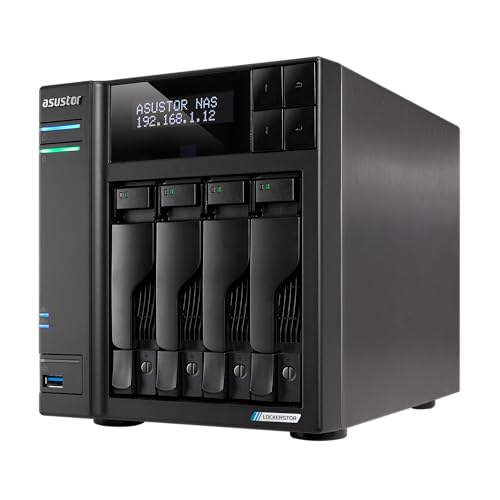
- Dual 5GbE ports for faster transfers and shared access
- Hardware 4K transcoding plus HDMI output for playback
- Four M.2 NVMe slots and expandable RAM for growth
Best For: Creators and power users who want speed, expansion, and streaming support
Creator-Friendly Media Hub – UGREEN NAS DXP2800 2-Bay for Home Media
If you want network attached storage devices for media streaming with a balance of speed, simple setup, and room to grow, the UGREEN DXP2800 is a strong fit. Its 2-bay design, Intel N100 CPU, 8GB DDR5 RAM, 2.5GbE networking, and 4K HDMI output make it practical for organizing photos, videos, and shared media in one local system.
Best For: Content creators, enthusiasts, and small households that want a flexible starter NAS for streaming and media organization.
Pros:
- Supports up to 80TB, giving it plenty of room for photos, videos, and backups.
- Simple setup and file sharing across Windows, macOS, Android, iOS, web browsers, and smart TVs.
- AI-powered photo album can sort faces, scenes, objects, and locations while removing duplicates.
- 4K HDMI and 2.5GbE add useful performance and display options for a home media setup.
Cons:
- Drives are not included, so the real setup cost is higher than the diskless unit price.
- Two bays are fine for a starter system, but expansion is more limited than on larger NAS models.
The DXP2800 is a good entry point if you want a modern NAS that can centralize media without feeling complicated. It is especially appealing when you want local storage, easy sharing, and smart photo management in one compact box.
Private Cloud Starter – Synology DS223j for Simple Media Access
The Synology DS223j is a practical pick among network attached storage devices for media streaming if you want a straightforward private cloud with broad device access. It is built for secure file and media sharing, automatic backups, and everyday home use rather than raw performance-focused workloads.
Best For: Home users who want an easy private cloud for media access, backups, and basic sharing.
Pros:
- Private cloud approach gives you full data ownership and access from anywhere.
- Safe sharing and syncing make it easy to keep media available across devices.
- Automated backups can protect Macs, PCs, and mobile devices to multiple destinations.
- Supports home security use with multiple IP cameras and remote viewing.
Cons:
- Two-bay layout limits storage flexibility compared with larger NAS systems.
- It is positioned as a simple home device, so it is not the best choice for heavy multitasking or advanced media workflows.
DS223j makes sense when your priority is reliability and easy access instead of premium hardware features. It is best viewed as a low-friction NAS for storing and sharing media, not as a high-speed media workstation.
High-Speed Media Workhorse – UGREEN NAS DXP4800 Plus for Heavy Streaming
For buyers comparing network attached storage devices for media streaming, the UGREEN DXP4800 Plus stands out as a more powerful 4-bay option with faster networking and room for demanding workloads. Its Intel Pentium Gold 8505 CPU, 8GB DDR5 RAM, built-in SSD, 10GbE port, and 4K HDMI output make it well suited to centralized storage, backups, and smooth file access across multiple devices.
Best For: Small offices, power users, and media-heavy households that want faster transfers and more headroom.
Pros:
- 4-bay design with up to 144TB capacity gives it strong long-term storage potential.
- 10GbE and 10Gbps USB ports support very fast transfers.
- Works with Docker and virtual machines for more advanced use cases.
- Private cloud features and flexible permissions help protect files while sharing them.
Cons:
- Drives are not included, so you will need to budget for HDDs or SSDs separately.
- Wired Ethernet only, so it does not support Wi-Fi.
The DXP4800 Plus is the strongest performance option here for users who want faster data movement and more expansion room. It is especially compelling if you expect your media library, backups, and collaboration needs to keep growing.
Shared Media Server – Synology DS425+ for Office Streaming
Synology DS425+ Private Cloud Media Server - Stream, Back Up & Share Files (4-Bay Diskless NAS)
Check Price On AmazonThe Synology DS425+ is aimed at users who want network attached storage devices for media streaming with business-friendly sharing features. It supports centralized storage, granular access control, and fast media delivery, making it a solid option for offices or shared environments where multiple people need reliable access.
Best For: Offices and advanced home users that need shared media access, backups, and stronger collaboration tools.
Pros:
- Streams media and shares large files with speeds up to 278 MB/s.
- Supports concurrent access from 10+ users.
- Includes RAID redundancy, automated backups, and snapshot technology for data protection.
- Can also support up to 30 IP cameras for surveillance use.
Cons:
- Drives are not included, so it is a diskless purchase.
- Its feature set is geared more toward shared environments than simple plug-and-play home use.
DS425+ is a strong choice when media streaming is just one part of a larger storage and collaboration setup. If you need file sharing, protection, and multi-user access in one box, it fits that role well.
Performance-First Media Hub – UGREEN NAS DXP4800 GT 4-Bay Desktop NAS
If you’re comparing network attached storage devices for media streaming, the UGREEN NAS DXP4800 GT is built for users who want fast transfers, strong multitasking, and room to grow. Its AMD R2514 CPU, expandable RAM, dual 10GbE, and SSD expansion make it a solid fit for streaming libraries, 4K/8K editing, and heavy home or office workloads.
Best For: Power users, smart home enthusiasts, and small teams who want a high-speed NAS that can handle streaming and more.
Pros:
- AMD Ryzen Embedded R2514 with 4 cores, 8 threads, and up to 3.70GHz for multitasking
- Dual 10GbE plus M.2 NVMe and U.2 SSD expansion for fast transfers and stable streaming
- UGOS Pro supports Docker, VMs, Plex, Emby, Jellyfin, and Home Assistant workflows
- Built-in Surveillance Center, SD slot, USB-C, USB-A, USB 2.0, and 4K HDMI add flexibility
Cons:
- Diskless, so storage drives must be purchased separately
- More advanced than a basic personal NAS, so it may be more than casual users need
- Premium hardware focus may not suit buyers looking for the simplest setup
This is the strongest pick here for buyers who want a high-performance media server that can stream smoothly while also acting as a broader self-hosted platform. If you need speed, expansion, and flexibility in one enclosure, it stands out.
Simple Private Streaming Server – Synology DS225+ Private Cloud Media Server
For shoppers focused on network attached storage devices for media streaming, the Synology DS225+ is a straightforward two-bay option built around personal media access and dependable local storage. It supports 4K movie, show, and photo streaming without monthly fees, and its Intel CPU adds hardware transcoding for smoother playback across devices.
Best For: Households and solo users who want an easy private media server with reliable streaming and backup tools.
Pros:
- Builds a personal streaming library for 4K movies, shows, photos, and music
- Intel CPU with hardware transcoding helps with playback on different devices
- Up to 282 MB/s transfer speeds for fast file access
- Supports backup features, snapshot technology, and up to 30 IP cameras
Cons:
- 2-bay design limits raw expansion compared with larger NAS systems
- Diskless model means you still need to add your own drives
- Less geared toward advanced apps and DIY server workloads than more expandable models
The DS225+ is a practical choice if your main goal is to stream your own library and keep it protected with simple, proven NAS tools. It balances media playback, backups, and surveillance support without pushing into overly complex territory.
Beginner-Friendly Media Vault – UGREEN NAS DH2300 2-Bay Desktop NAS
If you want network attached storage devices for media streaming without the learning curve, the UGREEN NAS DH2300 is designed as an entry-level personal storage hub. It focuses on simple photo, video, and file storage, automatic backups, and easy organization, making it a practical first NAS for people moving away from cloud storage or scattered drives.
Best For: Beginners and personal users who want a simple, private NAS for media, photos, and backups.
Pros:
- Entry-level 2-bay design built for personal entertainment and photo storage
- Supports up to 64TB for a large local media library
- AI photo tools tag faces, locations, texts, and objects for easier searching
- Automatic backups and cross-device support for Windows, iOS, Android, and macOS
Cons:
- Does not support Docker or virtual machines
- 1GbE and 4GB RAM make it a limited-performance option for heavier workloads
- Wireless networking requires an external USB adapter
This is the most approachable option in the group if you mainly want simple private storage and lightweight media access. It is less about advanced server features and more about making everyday storage and organization easy.
Quiet 2-Bay Media Hub – TERRAMASTER F2-425 for Home Streaming
If you want network attached storage devices for media streaming that can also handle everyday family file sharing, the TERRAMASTER F2-425 is built for the job. Its Intel x86 quad-core CPU, 4GB RAM, and hardware-level 4K H.265 decoding give it a strong mix of playback support and responsive multitasking for a home media server.
Best For: Quiet home users who want a compact NAS for Plex, Emby, Jellyfin, and photo backups.
Pros:
- Supports hardware-level 4K H.265 decoding and works with Plex, Emby, Jellyfin, and DLNA.
- 2.5GbE LAN helps with faster transfers and multi-user access.
- Runs quietly at 19dB(A), making it suitable for bedrooms or other quiet spaces.
- Tool-free HDD trays make drive installation fast and simple.
Cons:
- Diskless model means you must supply your own drives.
- Only two bays, so expansion is more limited than larger NAS units.
Overall, the F2-425 is a sensible pick if you want a quiet, easy-to-manage media server with solid streaming support and flexible home backup features. Its mix of 4K playback capability, app-based setup, and cloud sync tools makes it a practical choice for a living-room or bedroom NAS.
Hybrid 4K Library NAS – ORICO MetaBox HS200-2 for Streaming and Sharing
For buyers comparing network attached storage devices for media streaming, the ORICO MetaBox HS200-2 stands out for its hybrid storage layout and entertainment-focused features. With two HDD bays, two M.2 NVMe slots, dual 2.5GbE ports, and built-in Plex support, it is designed to serve both as a private cloud and a 4K movie library.
Best For: Home users who want a feature-packed NAS for 4K streaming, remote sharing, and flexible storage.
Pros:
- Two HDD slots plus two M.2 NVMe SSD slots provide flexible hybrid storage.
- Dual 2.5GbE ports support fast network access and remote sharing.
- Built for 4K@60Hz movie playback with auto-scraping for a Netflix-style library.
- AI album features include semantic search, image search, facial recognition, and scene/location sorting.
Cons:
- Diskless design means storage must be added separately.
- Feature set may be more complex than a simple plug-and-play media NAS.
The HS200-2 is a strong option if you want a NAS that can do more than stream video, since it also supports Docker, virtual machines, and remote access. If you value a polished media library and broad storage flexibility, it offers a lot in one enclosure.
Creator-Ready 4-Bay Streamer – Asustor Lockerstor 4 Gen2+ for Fast Media Streaming
The Asustor Lockerstor 4 Gen2+ is aimed at users who want network attached storage devices for media streaming with more headroom for expansion and faster networking. Its Intel quad-core CPU, dual 5GbE ports, HDMI output, and support for hardware 4K transcoding make it a strong fit for Plex-based home entertainment and heavier file workflows.
Best For: Creators and power users who want a fast, expandable NAS for media streaming and shared storage.
Pros:
- Dual 5GbE ports deliver faster networking than standard Gigabit NAS units.
- Supports hardware 4K transcoding and HDMI output for smooth media playback.
- Four M.2 NVMe SSD slots improve cache performance and responsiveness.
- Expandable RAM up to 16GB adds flexibility for multitasking and 24/7 workloads.
Cons:
- Diskless configuration means drives are not included.
- Better suited to users who need performance and expansion than to basic media-only buyers.
Compared with smaller home NAS units, this Asustor model gives you more bandwidth, more cache options, and more room to grow. That makes it especially appealing if your streaming setup shares space with video editing, collaboration, or broader private cloud use.
How We Picked the Best Network Attached Storage Devices for Media Streaming
We looked for Network Attached Storage Devices for Media Streaming that offer a strong mix of streaming performance, expansion options, and everyday usability. Key priorities included CPU capability, RAM, network speed, storage flexibility, and support for popular media apps and remote access.
We also favored models that make sense for real homes and small studios, not just benchmark charts. That means good thermal design, practical bay counts, and a clear upgrade path as your library grows.
Quick Comparison
In general, 2-bay units are best for simple setups, smaller libraries, or first-time NAS buyers. 4-bay models are better if you want more usable capacity, stronger RAID options, and longer-term growth. Faster Ethernet, such as 2.5GbE, 5GbE, or 10GbE, matters most when multiple users stream at once or when you move large video files regularly.
Key Buying Factors for Network Attached Storage Devices for Media Streaming
Transcoding and CPU Power
If you stream to mixed devices, look for a CPU that can handle hardware transcoding. This is especially helpful for 4K files, remote playback, and users who rely on apps that do not match your original file format.
Network Speed
For a single household streamer, 1GbE may be enough, but 2.5GbE or higher improves file transfers and reduces bottlenecks during simultaneous use. If you edit media directly from the NAS or run multiple streams, faster ports become much more valuable.
Drive Bays and Expansion
More bays usually mean better flexibility. Two-bay models keep costs lower, while four-bay systems offer more storage headroom and better RAID choices for protecting a growing library.
Software and Media Features
Look for easy remote access, reliable mobile apps, photo management, and support for common media servers. A polished operating system can matter as much as raw hardware, especially for beginners.
Who Should Buy Which Network Attached Storage Devices for Media Streaming?
Choose a 2-bay NAS if you want a straightforward media hub for a few users and a smaller budget. Pick a 4-bay model if you plan to store lots of video, want better redundancy, or expect your collection to expand over time.
Power users, creators, and households with multiple 4K streams should prioritize stronger CPUs and faster networking. Beginners should focus on easy setup, clear software, and dependable remote access rather than the highest specs on paper.
