

Choosing the right NAS for Plex can make the difference between smooth streaming and constant buffering. The best setups balance CPU power, drive bays, network speed, and easy media management.
This roundup of the best network attached storage devices for Plex servers focuses on practical home and enthusiast use cases, from simple direct play libraries to heavier transcoding and multi-user streaming.
Best 10 Network Attached Storage Devices for Plex Servers Picks for 2026
Private Cloud Media Server
Synology DS225+ for Plex Streaming

- Intel CPU with hardware transcoding support
- Streams 4K movies, shows, and photos
- Automated backups with snapshots and cloud options
Best For: Home users who want a reliable Plex-ready NAS with built-in transcoding
Value Home Cloud
Synology DS223j for Simple Storage

- Private cloud with multi-platform access
- Automated backups for computers and mobile devices
- Supports home security camera recording
Best For: Budget-conscious users who mainly want private cloud storage and backup
DIY Plex Home Server
ZimaBlade 7700 NAS Kit for Plex
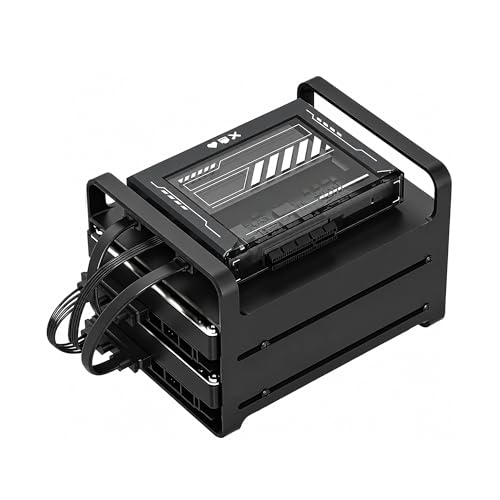
- Intel x86 platform with broad software compatibility
- CasaOS preinstalled for self-hosting and Docker
- Plex direct play ready with 16GB RAM
Best For: Tinkerers and homelab users who want a customizable Plex-capable NAS kit
Budget Home Cloud
Buffalo LinkStation 210 with HDD Included

- Includes 6TB of storage in the box
- Subscription-free personal cloud for media
- Closed system with SSL encryption and backups
Best For: Buyers who want an easy, subscription-free NAS with included storage
Compact Hybrid Home Media Hub

- 2 SATA bays plus 2 M.2 NVMe slots
- 2.5GbE networking and 4K HDMI 2.0
- Tool-free trays and privacy-focused local storage
Best For: Home Plex users who want a compact hybrid NAS with direct 4K output
Creator-Focused Speed NAS

- Intel Core i3-1315U with 8GB DDR5
- Dual 10GbE and up to 2090 MB/s via SMB Multichannel
- Hardware 4K decoding with Plex, Emby, and Jellyfin support
Best For: Power users who want a fast Plex NAS with creator-grade networking
Balanced Plex and Hybrid Storage Pick
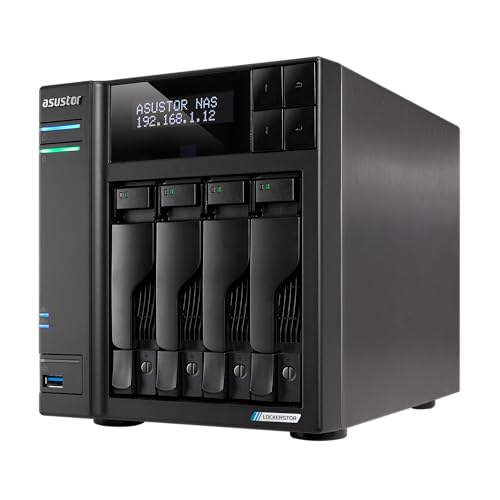
- Dual 5GbE ports for faster transfers
- Four M.2 NVMe slots for cache or tiered storage
- Hardware 4K transcoding with HDMI output
Best For: Plex users who want a flexible 4-bay NAS with strong media features
Editor’s Pick
LincStation S1 6-Bay NAS for Plex

- Intel N97 with up to 16GB DDR5 for Plex and multitasking
- Unraid license included for flexible storage setups
- 4 SATA bays, 2 NVMe slots, and dual 2.5GbE
Best For: Home media servers and power users who want flexible Unraid storage
Quiet Pick
TerraMaster F2-425 2-Bay Plex NAS

- Intel x86 quad-core CPU with 4GB RAM for 4K transcoding
- Hardware-level 4K H.265 decoding with Plex support
- Ultra-quiet 19dB(A) design with tool-free trays
Best For: Home users who want a quiet, simple Plex and backup NAS
Value Creator Pick

- Intel N100 CPU with 8GB DDR5 for everyday NAS use
- Dual 2.5GbE and 2 M.2 NVMe slots for speed
- Supports up to 80TB with Plex-friendly media management
Best For: Content creators and enthusiasts who want a compact, modern Plex NAS
Private Cloud Media Server – Synology DS225+ for Plex Streaming
If you’re comparing network attached storage devices for Plex servers, the Synology DS225+ is a strong pick for building a private media library with hardware transcoding support. It’s designed to stream 4K movies, shows, and photos to multiple devices, while also handling backups and everyday file access as a compact 2-bay NAS.
Best For: Home users who want a reliable Plex-ready NAS with built-in transcoding and broader private-cloud features.
Pros:
- Intel CPU with hardware transcoding support for smoother media streaming
- Can stream 4K movies, shows, and photos to any device
- Fast transfer speeds up to 282 MB/s for media and file access
- Supports automated backups, snapshots, and cloud/external/remote NAS backup options
Cons:
- Diskless 2-bay unit means you’ll need to supply your own drives
- Storage capacity depends on the drives you install
- More expensive than basic home NAS options
The DS225+ stands out as a balanced choice if you want Plex streaming plus dependable backup tools in one appliance. It offers more headroom than entry-level boxes, making it a practical long-term media server.
Value Home Cloud – Synology DS223j for Simple Storage
For buyers looking at network attached storage devices for Plex servers on a simpler budget, the Synology DS223j is more of a private cloud and backup box than a performance-first media machine. It still works well for storing and sharing media, but its main appeal is easy centralized access, automated backup protection, and straightforward home use.
Best For: Budget-conscious users who mainly want private cloud storage, syncing, and backup with light media sharing.
Pros:
- Private cloud access with multi-platform file and media sharing
- Automated backups for Macs, PCs, and mobile devices
- Supports multiple IP cameras for home security use
- Compact 2-bay design with Synology software support
Cons:
- Diskless and sold as a more basic 2-bay model
- Does not advertise hardware transcoding for Plex
- Best suited to lighter workloads than higher-end NAS units
The DS223j is a sensible pick if your priority is affordable shared storage and backups first, with Plex as a secondary use. It’s a practical starter NAS when simplicity matters more than server performance.
DIY Plex Home Server – ZimaBlade 7700 NAS Kit for Plex
If you want network attached storage devices for Plex servers but prefer a flexible DIY platform, the ZimaBlade 7700 is closer to a home server kit than a locked-down NAS. It’s built on an Intel x86 platform, comes with CasaOS preinstalled, and is aimed at users who want to run Plex, Docker, and other self-hosted services on one compact machine.
Best For: Tinkerers and homelab users who want a customizable Plex-capable NAS kit with room to expand.
Pros:
- Intel quad-core x86 platform with broad software compatibility
- CasaOS preinstalled for easier self-hosting and container use
- 16GB RAM helps with multiple lightweight services at once
- Supports Plex direct play for smooth 4K streaming on compatible devices
Cons:
- More DIY-oriented than a traditional appliance-style NAS
- Designed for direct play rather than heavy transcoding
- Best for users comfortable building and configuring their own setup
The ZimaBlade 7700 makes sense if you want a Plex server that can grow into a broader homelab. It offers more flexibility than most consumer NAS units, but that freedom comes with a hands-on setup approach.
Budget Home Cloud – Buffalo LinkStation 210 with HDD Included
Among network attached storage devices for Plex servers, the BUFFALO LinkStation 210 is a basic, budget-friendly option that prioritizes simple centralized storage over advanced media-server features. Because it includes a 6TB hard drive, it’s a convenient all-in-one choice for users who want a straightforward home cloud or backup destination without buying drives separately.
Best For: Buyers who want an easy, subscription-free NAS with included storage for backup and simple media access.
Pros:
- Includes 6TB of storage in the box
- Subscription-free personal cloud for videos, music, and photos
- Closed system design and SSL encryption for secure transfers
- Supports automated backups and folder-level access restrictions
Cons:
- Single-bay design limits expansion and redundancy options
- More of a storage and backup device than a Plex performance model
- Basic feature set compared with higher-end NAS systems
The LinkStation 210 is best viewed as a simple, ready-to-use network storage device rather than a feature-packed Plex server. It’s a practical fit if you value convenience and included capacity over advanced media handling.
Compact Hybrid Home Media Hub – LincStation E1 4-Bay NAS
If you want network attached storage devices for Plex servers in a small, desktop-friendly package, the LincStation E1 is built around a hybrid 4-bay layout with SATA drives and M.2 NVMe slots. Its 2.5GbE port, 4K HDMI 2.0 output, and hardware-focused design make it a practical choice for a private media library and local streaming setup.
Best For: Home users who want a compact NAS for Plex playback, local 4K media output, and simple private cloud storage.
Pros:
- Hybrid storage combines 2 SATA bays with 2 M.2 NVMe slots for flexible speed and capacity.
- 2.5GbE networking helps move media files faster than standard Gigabit NAS models.
- HDMI 2.0 with native 4K video decoding supports direct TV or monitor use.
- Tool-free trays and mobile-first LincOS make setup and day-to-day use approachable.
Cons:
- Diskless configuration means you need to buy all storage separately.
- 4GB RAM is modest if you plan to stack on heavier multitasking workloads.
- Best suited to home media and private storage rather than demanding creator workflows.
Overall, the E1 stands out for buyers who want a neat, privacy-focused NAS that can serve as a Plex-friendly media box without taking over a desk. The hybrid design and direct HDMI output give it useful flexibility, while the 2.5GbE port adds a solid speed boost for everyday transfers.
Creator-Focused Speed NAS – TerraMaster F6-425 Pro
For buyers comparing network attached storage devices for Plex servers, the TerraMaster F6-425 Pro is the performance-heavy option here. With an Intel Core i3-1315U, 8GB DDR5, dual 10GbE ports, and hardware 4K decoding with Plex support, it is aimed at users who want fast transfers, strong multitasking, and room to run more advanced media or workflow apps.
Best For: Creators and power users who want a high-speed Plex NAS that can also handle containers, backups, and heavy file transfers.
Pros:
- Intel Core i3-1315U and 8GB DDR5 provide strong headroom for multitasking.
- Dual 10GbE ports can reach up to 2090 MB/s via SMB Multichannel.
- Three M.2 NVMe slots and Hyper Cache help keep performance high.
- Hardware 4K decoding plus native Plex, Emby, and Jellyfin support fit media streaming well.
Cons:
- More advanced hardware may be unnecessary for a simple home Plex library.
- Diskless design means total cost rises once drives are added.
- Its feature set is broader than many casual users need, which can add complexity.
In practical terms, this TerraMaster is best when you care as much about speed and expansion as you do about streaming. It has the networking, caching, and media support to serve as a serious Plex host, but its strengths really show when paired with demanding workloads beyond basic playback.
Balanced Plex and Hybrid Storage Pick – Asustor Lockerstor 4 Gen2+
If you are shopping for network attached storage devices for Plex servers and want a balanced mix of media features and flexibility, the Asustor Lockerstor 4 Gen2+ is easy to place on a short list. It pairs an Intel Celeron N5105 CPU with dual 5GbE ports, four M.2 NVMe slots, and HDMI output with hardware 4K transcoding, making it a versatile home or small office media server.
Best For: Plex users who want a flexible 4-bay NAS with strong networking, cache expansion, and HDMI media output.
Pros:
- Dual 5GbE ports offer faster transfers than basic Gigabit NAS systems.
- Four M.2 NVMe slots support cache acceleration or tiered storage.
- Hardware 4K transcoding and HDMI output suit Plex and home entertainment use.
- Expandable DDR4 memory and RAID support add useful room to grow.
Cons:
- 4GB RAM is fine for basics but may feel limited for heavier workloads.
- Diskless configuration requires separate drive purchases.
- Its strengths are balanced rather than extreme, so it is not the fastest choice here.
The Lockerstor 4 Gen2+ is a smart middle-ground option if you want media playback, quick networking, and storage flexibility without jumping to a more expensive workstation-class NAS. It should fit well for a Plex-focused setup where reliable hybrid storage matters as much as raw speed.
Editor’s Pick – LincStation S1 6-Bay NAS for Plex
If you want network attached storage devices for Plex servers with strong transcoding headroom and flexible expansion, the LincStation S1 is built for that role. Its Intel N97 processor, 8GB DDR5 RAM, and dual 2.5GbE ports make it a practical choice for handling media streaming, Docker, and file transfers in one compact desktop unit.
Best For: Home media servers and power users who want a flexible, Unraid-based NAS for Plex, virtualization, and mixed storage.
Pros:
- Intel N97 CPU with 8GB DDR5 RAM, expandable up to 16GB, supports Plex transcoding and multitasking.
- Unraid license included, with flexible drive mixing and no traditional RAID restrictions.
- 4 SATA bays plus 2 M.2 NVMe slots give you room for HDDs and faster storage tiers.
- Dual 2.5GbE ports help with faster transfers, link aggregation, and failover.
Cons:
- Diskless model means you still need to buy your own drives.
- Six-bay expansion and Unraid flexibility may be more than casual users need.
The S1 stands out if you want a Plex-ready NAS that can also grow into a broader home lab or media server. It combines fast networking, flexible storage, and a preinstalled Unraid license in a compact desktop design.
Quiet Pick – TerraMaster F2-425 2-Bay Plex NAS
The TERRAMASTER F2-425 is a straightforward option if you are comparing network attached storage devices for Plex servers and want quiet, reliable home streaming support. With an Intel x86 quad-core CPU, 4GB RAM, and hardware-level 4K H.265 decoding, it is positioned for smooth media playback and everyday multitasking in a small footprint.
Best For: Home users who want a quiet two-bay NAS for Plex, photos, and simple everyday backups.
Pros:
- Intel x86 quad-core processor and 4GB RAM handle 4K transcoding and multitasking.
- Hardware-level 4K H.265 decoding and Plex support make it a solid media server choice.
- Very quiet 19dB(A) operation suits bedrooms and other low-noise spaces.
- Tool-free Push-Lock trays make drive installation quick and easy.
Cons:
- Only two bays, so expansion is more limited than larger NAS options.
- Plastic enclosure may feel less premium than metal-bodied competitors.
For a simple Plex-focused home NAS, the F2-425 covers the essentials without adding much complexity. Its quiet operation, 2.5GbE networking, and media-friendly decoding make it a practical everyday server.
Value Creator Pick – UGREEN DXP2800 Plex-Ready NAS
The UGREEN DXP2800 is a strong fit if you want network attached storage devices for Plex servers with creator-friendly hardware and an easy setup experience. It pairs an Intel N100 quad-core CPU with 8GB DDR5 RAM, dual 2.5GbE, and 2 M.2 NVMe slots, giving you a compact platform for storing, organizing, and streaming media locally.
Best For: Content creators, enthusiasts, and small households wanting a user-friendly Plex NAS with fast networking and modern storage options.
Pros:
- Intel N100 quad-core processor and 8GB DDR5 RAM provide capable everyday NAS performance.
- Dual 2.5GbE plus 2 M.2 NVMe slots add speed and storage flexibility.
- Supports up to 80TB, making it suitable for large media libraries and backups.
- AI photo tools and app support across phones, computers, and smart TVs improve usability.
Cons:
- Diskless design means storage drives are an extra purchase.
- Two-bay layout is less expandable than larger multi-bay NAS systems.
The DXP2800 offers a balanced mix of performance, app usability, and local storage control. If you want a compact Plex NAS that can also serve as a home media and photo hub, it is an appealing all-rounder.
How We Picked the Best Network Attached Storage Devices for Plex Servers
We focused on Network Attached Storage Devices for Plex Servers that offer the most useful mix of performance, expandability, and everyday reliability. Priority went to systems with x86 processors, hardware transcoding support where applicable, at least 2-bay flexibility, and modern connectivity such as 2.5GbE or faster. We also considered RAM capacity, drive expansion, NVMe support, and whether each model makes sense for a home media library now and later.
Quick Comparison
If you want the simplest Plex setup, a 2-bay NAS with an Intel-based processor is usually the sweet spot. If you expect multiple streams, 4K playback, or heavier transcoding, step up to a stronger CPU, more memory, and faster networking. For large libraries or mixed workloads, 4-bay and 6-bay models offer better growth and more storage flexibility.
Key Buying Factors for Network Attached Storage Devices for Plex Servers
CPU and Hardware Transcoding
Plex performance depends heavily on the processor. Intel chips with Quick Sync are especially useful for hardware transcoding, which helps when clients cannot direct play the file format. If your household mostly direct plays media on compatible TVs and devices, you can get by with less CPU power.
Drive Bays and Storage Growth
More bays mean more room for a larger media library and more flexibility with RAID or mirrored protection. A 2-bay unit is enough for many users, but 4-bay and 6-bay models are better for long-term growth and better capacity planning.
Network Speed
Fast Ethernet matters when multiple users are streaming or when you are moving large video files. 2.5GbE is a strong baseline for modern home Plex servers, while 5GbE and 10GbE can help power users and shared households.
Memory, NVMe, and App Support
Extra RAM helps with multitasking, metadata handling, and container workloads. NVMe slots can improve responsiveness for caching or apps, though they are not a replacement for good hard-drive storage for a media library. Also check the operating system’s app ecosystem if you plan to run Docker, photo backup, or other services alongside Plex.
Who Should Buy Which Network Attached Storage Devices for Plex Servers?
Choose a compact 2-bay model if you want a straightforward Plex server for one or two users and do not expect huge storage needs. Pick a stronger midrange NAS if you stream 4K, use transcoding often, or want room to expand. Go for a 4-bay or 6-bay system if you are building a serious media library, want better RAID options, or plan to run Plex plus other home server apps on the same box.
For most buyers, the best Network Attached Storage Devices for Plex Servers are the ones that match real streaming habits first, then add enough headroom for tomorrow’s library growth.
