

Looking for fast, quiet, and reliable shared storage? The best SSD-focused NAS options can speed up everyday file access, media streaming, backups, and remote collaboration.
This roundup highlights 10 picks with a buyer-first focus on performance, expandability, ease of use, and value so you can choose the right setup for home or business.
Best 10 Network Attached Storage Devices with SSD Storage Picks for 2026
SSD-Ready Gaming NAS

- Includes 3 x 1TB SSDs
- Four M.2 NVMe slots
- Dual 2.5GbE networking
Best For: Gamers and streamers wanting bundled SSD storage
Entry Home Cloud NAS

- 2-bay Synology enclosure
- Private cloud and backup features
- Diskless, so drives are extra
Best For: Home users who want a Synology enclosure and choose drives separately
All-Flash Creator NAS

- Six M.2 NVMe SSD slots
- Dual 2.5GbE ports
- Quiet compact all-flash design
Best For: Creators needing a quiet all-SSD NAS
Compact SSD Bundle NAS
Synology DS419slim with 4TB SSD

- Includes 4TB SSD storage
- Compact 4-bay chassis
- Dual 1GbE with link aggregation
Best For: Buyers wanting a compact Synology NAS with included SSDs
Beginner-Friendly Personal NAS

- Made for beginners and personal storage
- AI photo organization and duplicate cleanup
- Up to 64TB with 1GbE and 4GB RAM
Best For: First-time NAS users who want simple private storage and backups
Compact SSD-Powered NAS

- Includes 2TB of SSD storage
- DSM tools for backup, file, and media tasks
- AES 256-bit encryption and 2-factor authentication
Best For: Users who want a compact Synology NAS with included SSDs
High-Capacity Hybrid NAS

- 4 HDD bays plus 2 M.2 NVMe slots
- Up to 136TB capacity with dual 2.5G+1G LAN
- Pre-installed 128GB PCIe 3.0 SSD and 8GB RAM
Best For: Power users building a customizable high-capacity NAS
Compact SSD NAS
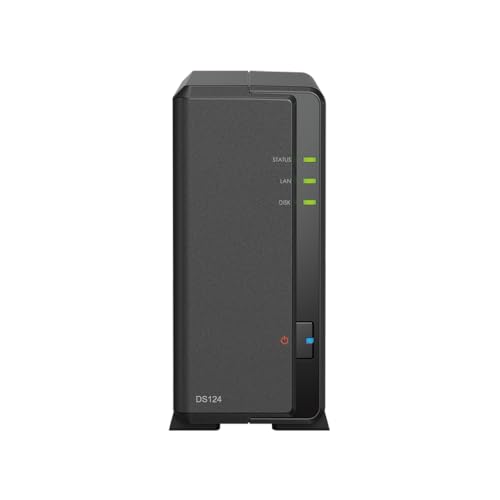
- 2TB 2.5-inch SSD included
- Btrfs snapshots add protection
- 10.7W operation keeps power use low
Best For: Home backup and file syncing in a compact SSD NAS
Performance-First SSD NAS

- Built-in 128GB SSD and dual NVMe slots
- Core i3-1315U with 8GB DDR5 RAM
- 10GbE plus 2.5GbE for faster transfers
Best For: Power users who want a fast, expandable NAS for demanding workflows
Budget SSD NAS
- 8TB SATA 2.5-inch SSD storage included
- AES 256-bit encryption and 2FA support
- Two USB 3.2 ports for basic expansion
Best For: Budget buyers needing simple backup and media storage
SSD-Ready Gaming NAS – Asustor AS5402T 2-Bay Bundle
If you want network attached storage devices with SSD storage for gaming, streaming, and fast file access, the Asustor AS5402T is built around an Intel Celeron N5105, dual 2.5GbE, and four M.2 NVMe slots. This bundle includes 3 x 1TB SSDs, so you get an SSD-equipped setup that is ready to use without planning a separate drive purchase.
Best For: Gamers and live streamers who want an SSD-based NAS bundle with strong network and expansion options.
Pros:
- Includes 3 x 1TB SSDs for an out-of-box SSD storage bundle
- Four M.2 NVMe slots support all-flash expansion
- Dual 2.5GbE ports help with faster transfers and collaboration
- HDMI 2.0b and USB 3.2 Gen 2 add useful connectivity
Cons:
- Only 4GB of DDR4 RAM installed
- 2-bay chassis may limit traditional drive expansion
- Focused more on performance than budget simplicity
This model stands out if you value SSD speed, bundled storage, and flexible NVMe growth in a compact NAS. It is especially practical when low-latency file access and network performance matter more than maximum raw capacity.
Entry Home Cloud NAS – Synology DS223j Diskless
The Synology DS223j is a simple 2-bay NAS for private cloud, backup, and media access, but it is sold diskless, so it is not an SSD-storage bundle out of the box. If you are comparing network attached storage devices with SSD storage, this model is better viewed as a flexible enclosure that lets you choose your own drives and storage setup.
Best For: Home users who want an affordable Synology NAS enclosure and plan to add their own drives.
Pros:
- Supports secure private cloud access and file sharing
- Automated backup options for Macs, PCs, mobile devices, and external destinations
- Supports home security camera recording and remote viewing
- Synology software support and 2-year warranty
Cons:
- Diskless design means storage must be purchased separately
- Not specifically configured with SSDs in the listing
- Entry-level hardware is aimed at basic home use
This is a practical pick if you want Synology’s software and a straightforward 2-bay chassis, but it will require separate drive selection. Buyers specifically seeking SSD-ready NAS hardware should factor in the extra setup step.
All-Flash Creator NAS – Asustor Flashstor 6 FS6706T
For buyers focused on network attached storage devices with SSD storage, the Asustor Flashstor 6 FS6706T is an all-flash NAS with six M.2 NVMe SSD slots and dual 2.5GbE ports. Its compact, low-noise design and HDMI 2.0b output make it a strong match for creative workloads, media libraries, and fast file transfers.
Best For: Creators and studio users who want a quiet all-SSD NAS for fast workflows.
Pros:
- Six M.2 NVMe SSD slots for all-flash storage
- Dual 2.5GbE ports support high-speed networking
- Compact design keeps heat and noise low
- 4K media playback and hardware transcoding support
Cons:
- Diskless, so SSDs must be added separately
- 4GB RAM may feel limited for heavier multitasking
- Best value depends on the cost of NVMe drives
This model is one of the clearest all-SSD NAS options in the lineup, especially if quiet operation matters. It pairs speed-oriented hardware with flexible connectivity, making it a solid choice for professional file workflows and media use.
Compact SSD Bundle NAS – Synology DS419slim with 4TB SSD
The Synology DS419slim is a compact 4-bay NAS that includes 4TB of SSD storage in the listing, making it relevant for buyers seeking network attached storage devices with SSD storage in a smaller desktop format. It combines file sharing, backup, and media features with dual 1GbE networking and a sealed chassis design.
Best For: Users who want a compact Synology NAS bundle with included SSD storage.
Pros:
- Includes 4TB of SSD storage in the listing
- Compact 4-bay design fits smaller spaces
- Dual 1GbE ports support link aggregation and failover
- Synology features include backup, sync, and QuickConnect
Cons:
- 512MB DDR3 memory is modest
- 1GbE networking is slower than 2.5GbE options
- Chassis arrives sealed, with installation required
This is a practical compact NAS if you want an SSD-equipped Synology option rather than a bare enclosure. It is more about convenience and space savings than cutting-edge speed, but the included SSD bundle makes it easy to evaluate.
Beginner-Friendly Personal NAS – UGREEN DH2300 2-Bay Diskless
If you want network attached storage devices with SSD storage-style convenience, but need something simpler and more affordable to start with, the UGREEN NAS DH2300 is aimed at first-time NAS buyers. This 2-bay desktop enclosure is built for personal storage, photo libraries, and easy backups, with remote access, AI photo organization, and broad device support across Windows, iOS, Android, and macOS.
Best For: Beginners moving off cloud storage or external drives who want a private home NAS for photos, videos, and backups.
Pros:
- Beginner-friendly setup focused on personal storage and easy backup use cases
- AI photo tools help tag faces, locations, text, and objects, plus find duplicates
- Supports up to 64TB capacity and automatic backups across major platforms
- Includes 1GbE networking, 4GB RAM, and 4K HDMI output
Cons:
- Diskless, so you still need to buy drives separately
- Does not support Docker or virtual machines
- Wi-Fi is not built in and requires an external USB adapter
Overall, the DH2300 is a practical entry point if you want local storage without cloud subscription fees and do not need advanced server features. It prioritizes ease of use, privacy, and everyday media backup over power-user flexibility.
Compact SSD-Powered NAS – Synology DS220j with 2TB SSD
Among network attached storage devices with SSD storage, the Synology DiskStation DS220j stands out for buyers who want a ready-to-use SSD-based setup in a compact two-bay design. It is positioned for backup, file storage, email servers, and media servers, and it adds Synology’s DSM ecosystem plus security features like AES 256-bit encryption and two-factor authentication.
Best For: Buyers who want a small Synology NAS with included SSDs and a straightforward feature set for backup and media tasks.
Pros:
- Includes 2TB of SSD storage for fast, responsive local storage
- Supports backup, file management, media server, and email server roles
- Synology DSM adds tools like Hyper Backup, Synology Drive, and Security Advisor
- 1GbE LAN with link aggregation/failover support and two USB 3.2 ports
Cons:
- Only 512MB of memory, which is modest for heavier workloads
- Chassis ships sealed and requires installation work separately
- Single 1GbE port limits wired networking bandwidth unless supported by aggregation
In short, the DS220j is a good fit if you want a compact NAS with SSDs already included and prefer Synology’s software experience. It is best matched to straightforward storage and backup use rather than demanding multitasking.
High-Capacity Hybrid NAS – ACEMAGIC N3A 4-Bay Desktop
If you are comparing network attached storage devices with SSD storage for a more expandable home or office setup, the ACEMAGIC N3A gives you a lot of flexibility. It combines four HDD bays with two M.2 PCIe 3.0 NVMe slots, dual 2.5G plus 1G LAN, and a pre-installed 128GB PCIe 3.0 SSD, making it a strong choice for large local libraries, backups, and custom NAS builds.
Best For: Power users who want a customizable NAS platform with high capacity, SSD slots, and faster networking.
Pros:
- 4-bay design plus 2 M.2 NVMe slots for flexible storage expansion
- Supports up to 136TB total capacity
- Dual 2.5G + 1G LAN with link aggregation for faster transfers and redundancy
- Pre-installed 128GB PCIe 3.0 SSD and 8GB DDR4 RAM
Cons:
- Diskless overall, so you must buy HDDs/SSDs separately
- Designed more as a customizable platform than an out-of-box consumer appliance
- Advanced setup may be more involved for users who want simplicity
Overall, the N3A is best for buyers who want storage density, SSD-based acceleration options, and broad operating system support. It is less about plug-and-play convenience and more about building the NAS environment you want.
Compact SSD NAS – Synology DS124 2TB SSD
If you want network attached storage devices with SSD storage in a simple desktop form factor, the Synology DiskStation DS124 is built around a 2TB SATA SSD and a low-power 4-core 1.7GHz CPU. It is aimed at straightforward file storage, syncing, and backup tasks, while the Btrfs file system and snapshot support add a useful layer of data protection.
Best For: Home users or small setups that want a compact SSD-based NAS for syncing, backup, and easy file access.
Pros:
- Includes 2TB of 2.5-inch SSD storage for fast, quiet operation
- Btrfs file system and snapshot technology support rollback and self-healing
- Low 10.7W operating power for energy-conscious use
- 1GbE LAN and DSM software keep the setup simple and familiar
Cons:
- Single-bay design limits expansion flexibility
- Only 1GB of memory is included
- 1GbE networking may be restrictive for larger transfers
Overall, the DS124 is a practical SSD NAS if you value efficiency and data protection over raw expandability. It fits best where a small, quiet storage box is more useful than a performance-heavy multi-bay system.
Performance-First SSD NAS – UGREEN DXP4800 Pro SSD NAS
For buyers comparing network attached storage devices with SSD storage in a performance-focused chassis, the UGREEN NAS DXP4800 Pro stands out with a built-in 128GB SSD, dual M.2 NVMe slots, and a 13th Gen Intel Core i3-1315U processor. It is designed for demanding workflows like Docker, virtual machines, media work, and photo management, while its 10GbE and 2.5GbE ports support fast transfers.
Best For: Power users, small teams, and creators who want a fast NAS platform with SSD caching or SSD-based storage options.
Pros:
- Intel Core i3-1315U with 8GB DDR5 RAM for strong multitasking
- Built-in 128GB SSD plus two M.2 PCIe 4.0 NVMe slots
- 10GbE and 2.5GbE networking for high-speed transfers
- Supports Docker, virtual machines, and AI-powered photo recognition
Cons:
- Sold diskless, so full storage requires separate drive purchases
- Advanced feature set may be more than casual users need
- Best performance depends on configuring the SSD and network setup well
The DXP4800 Pro is the most capable option here for users who want room to grow into heavier workloads. Its SSD features are paired with serious networking and CPU headroom, making it a flexible base for advanced home or office storage.
Budget SSD NAS – Synology DS220j 8TB SSD
If you are shopping for network attached storage devices with SSD storage and want a straightforward Synology setup, the DiskStation DS220j offers 8TB of 2.5-inch SATA SSD storage in a compact desktop chassis. It is positioned for home backup, file syncing, sharing, and multimedia storage, with DSM features like Hyper Backup, Synology Drive, and 2-factor authentication.
Best For: Budget-minded users who want a simple SSD NAS for backup, sync, and media storage.
Pros:
- Includes 8TB of SATA 2.5-inch SSD storage
- Good fit for backup, file sharing, and centralized multimedia
- Security features include AES 256-bit encryption and 2-factor authentication
- Two USB 3.2 ports add basic connectivity options
Cons:
- 1GbE LAN limits wired network speed
- 512MB of memory is modest for heavier workloads
- Single LAN port reduces networking flexibility
The DS220j is a practical entry point if you want SSD storage without moving into a more complex or expensive platform. It keeps the focus on dependable basic NAS tasks rather than advanced performance.
How We Picked the Best Network Attached Storage Devices with SSD Storage
We prioritized Network Attached Storage Devices with SSD Storage that balance real-world speed, intuitive software, and practical expansion. Key factors included CPU performance, RAM, number of drive bays, M.2 or all-flash support, network speed, and platform maturity. We also weighed setup simplicity, backup tools, and whether each model makes sense for beginners, power users, or small teams.
Quick Comparison
In simple terms: all-flash NAS units are the best fit when responsiveness matters most, while hybrid systems offer a better mix of capacity and cost. Entry-level desktop NAS models are usually ideal for backups and file sharing, while higher-end options with faster CPUs, more memory, and 2.5GbE or better networking are better for photo workflows, virtual machines, and multi-user access.
Key Buying Factors for Network Attached Storage Devices with SSD Storage
SSD Type and Expansion
Check whether the NAS supports 2.5-inch SATA SSDs, M.2 NVMe drives, or both. All-flash designs deliver the best latency and quieter operation, while hybrid systems can be a smarter value if you need large capacity.
Processor and Memory
A stronger CPU and more RAM help with multitasking, encryption, indexing, snapshots, and running apps. If you plan to use the NAS for photo libraries, backups from several devices, or containers, avoid underpowered models.
Networking Speed
For SSD-based storage, networking can become the bottleneck. 1GbE works for basic use, but 2.5GbE or faster is a better match for modern SSD performance and smoother transfers.
Software and Ease of Use
The best Network Attached Storage Devices with SSD Storage are not just fast; they are also easy to manage. Look for clear mobile apps, solid backup tools, remote access, and simple user permissions.
Capacity and Growth
Think about today’s needs plus future expansion. Two-bay units are compact and affordable, four-bay models add flexibility, and systems with extra M.2 slots can extend performance or cache options.
Who Should Buy Which Network Attached Storage Devices with SSD Storage?
Choose a compact 1-bay or 2-bay NAS if you mainly need personal backups, document syncing, and media streaming. Go for an SSD-ready 2-bay or 4-bay system if you want faster file access, quieter operation, and room to grow. Pick an all-SSD model if performance is the top priority, especially for creative work or multiple users. For home offices and small businesses, prioritize reliability, app support, and networking before chasing the largest raw capacity.
