

Choosing from smart baby monitors with split screens can make bedtime, naps, and nighttime check-ins much simpler. Instead of switching between cameras, you can see both spaces at once and react faster when something changes.
This roundup focuses on practical features that matter most: display quality, app access, night vision, battery life, and reliable two-camera monitoring for growing families.
Best 10 Smart Baby Monitors with Split Screens Picks for 2026
Wi‑Fi Split-Screen Flexibility
VTech 2 Cameras 5" HD Parent Unit

- 5" split-screen parent unit shows both rooms at once
- Free app supports remote viewing from anywhere
- Pan/tilt/zoom each camera independently
Best For: Parents who want split-screen viewing at home plus remote app access
Privacy-First Dual Camera Monitor
ARENTI 2-Camera 5-Inch Display

- Non-Wi‑Fi 2.4GHz FHSS design with encryption
- Two cameras with 355° pan/tilt and 4x zoom
- Night vision, motion alerts, and two-way audio
Best For: Families prioritizing secure local viewing over app-based split screens
Big-Screen Twin Monitoring
VTech Smart HQ Max Twin 7" Monitor

- 7" split-screen display is the largest in this group
- 2K sensors and wide-angle lenses capture more room detail
- App access and caregiver sharing add remote convenience
Best For: Families who want the largest easy-to-read split-screen monitor
No-Wi‑Fi Split Screen Portability
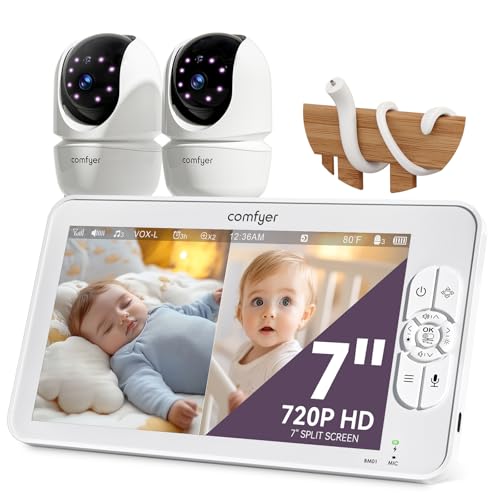
- 7" display supports 2/4 split-screen viewing
- Up to 13 hours video or 2 days audio-only VOX
- No-Wi‑Fi FHSS connection with encryption
Best For: Parents wanting a portable, secure split-screen monitor without Wi‑Fi
Split-Screen Smart Monitor Bundle
ieGeek 2-Camera 1080P Nursery View
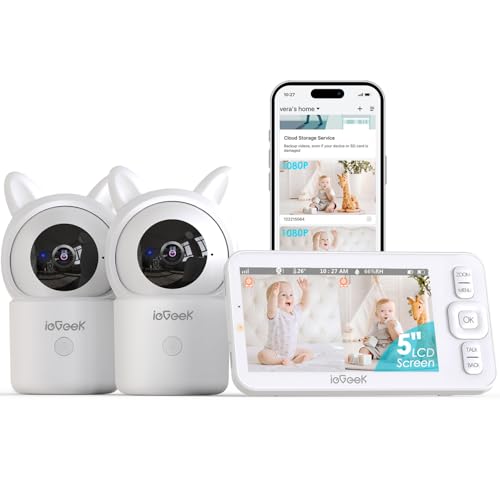
- Two 1080p cameras with split-screen viewing
- 5" screen plus free smart app access
- Motion tracking and danger-zone alerts
Best For: parents who want split-screen viewing plus app-based remote access
No-WiFi Split Screen Monitor

- 6" split-screen IPS display for two cameras
- No WiFi and private FHSS connection
- Up to 30 hours of battery in VOX/ECO mode
Best For: families who want a secure, no-WiFi split-screen monitor with long battery life
Touchscreen WiFi Split View Monitor

- 7" IPS touchscreen with split-screen viewing
- 4MP dual-lens cameras with 6X zoom
- AI auto tracking and optional app access
Best For: parents who want a touchscreen split-screen monitor with smart tracking and optional app viewing
Top Pick for Dual-Room Monitoring
Momcozy BM04 5" Split Screen WiFi Monitor

- 5-inch split screen shows two rooms at once
- Works with parent unit or Momcozy app
- Motion detection, electric fence, and night vision
Best For: Twins, siblings, or monitoring two areas with flexible viewing
Best No-WiFi Value
HelloBaby 5" Split Screen 2-Camera Monitor

- 5-inch split screen for side-by-side viewing
- No WiFi, app, or account needed
- Wide pan/tilt camera with night vision
Best For: Parents who want simple, private monitoring without app setup
Best Battery Life
GoodBaby 5" Split Screen 2-Camera Monitor
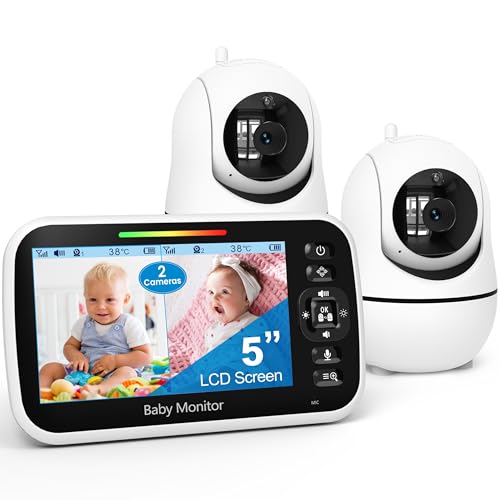
- 5-inch split screen shows both cameras
- Up to 30 hours of battery life in VOX mode
- Includes PTZ, night vision, and temp monitoring
Best For: Long-lasting monitoring with split-screen viewing and room alerts
Wi‑Fi Split-Screen Flexibility – VTech 2 Cameras 5" HD Parent Unit
If you want smart baby monitors with split screens for two rooms, this VTech setup makes it easy to keep both children in view at once. The 5″ parent unit shows both cameras side by side, and the free MyVTech Baby app lets you check in from anywhere when you are away from home.
Best For: Families who want one system to watch twins, siblings in separate rooms, or two children on different schedules.
Pros:
- Split-screen view on the 5″ parent unit keeps both rooms visible together.
- Free app access lets you see both cameras remotely from a phone.
- Pan, tilt, and zoom each camera independently from the app or parent unit.
- Night vision, motion, and temperature alerts help you monitor day and night.
Cons:
- The parent unit screen is smaller than the 7″ models in this roundup.
- It relies on Wi‑Fi for app viewing, so remote access depends on your network.
Overall, this is a flexible pick if you want both in-home split-screen viewing and remote app access in one package. It covers the practical basics well and adds caregiver sharing for households where more than one adult helps watch the kids.
Privacy-First Dual Camera Monitor – ARENTI 2-Camera 5-Inch Display
For shoppers comparing smart baby monitors with split screens, this ARENTI set stands out for its non-Wi‑Fi design and automatic camera movement. It does not offer a split-screen note in the supplied details, but it does pair two cameras with a 5-inch wireless display, making it a straightforward in-room monitoring option with strong privacy-focused features.
Best For: Parents who want a secure, no-Wi‑Fi monitor with dual cameras and simple local viewing.
Pros:
- Non-Wi‑Fi 2.4GHz FHSS connection with digital encryption for local monitoring.
- Two cameras with 355° pan, tilt, and 4x zoom for broad room coverage.
- Crisp infrared night vision plus sound and motion alerts.
- Two-way audio and VOX mode support hands-free everyday use.
Cons:
- The supplied notes do not mention split-screen viewing.
- Remote app-style access is not the focus here because it is a non-Wi‑Fi monitor.
This is best viewed as a privacy-first dual-camera monitor rather than a true split-screen app system. If you care more about secure local use, auto tracking, and easy setup than remote features, it is a solid candidate.
Big-Screen Twin Monitoring – VTech Smart HQ Max Twin 7" Monitor
If you want smart baby monitors with split screens and the biggest easy-to-read display in this group, this VTech model is built for that job. The 7″ parent unit shows both cameras at once, and the free MyVTech Baby Plus app adds remote viewing from your phone when you are out.
Best For: Twins, siblings, or two rooms where a larger split-screen display is the top priority.
Pros:
- Large 7″ split-screen parent unit makes both feeds easier to read.
- 2K sensors and wide-angle lenses help show more of each room.
- Free app supports remote access and caregiver sharing.
- Night light, lullabies, and two-way talk help settle one child without disturbing the other.
Cons:
- It is a feature-rich system, so it may be more than a basic monitor shopper needs.
- The larger screen makes the unit less compact than smaller parent monitors.
This is the strongest choice if screen size and seeing both rooms clearly matter most. The combination of a 7″ display, wide-angle cameras, and remote app viewing makes it especially practical for families watching two children at different times.
No-Wi‑Fi Split Screen Portability – Comfyer 7" HD Dual Camera Set
For buyers looking at smart baby monitors with split screens without wanting Wi‑Fi, this Comfyer system is a practical all-in-one option. The 7″ display supports 2-way and 4-way split viewing, so you can watch multiple babies or rooms at once while keeping audio locked to one camera or using scan mode.
Best For: Parents who want a large local monitor with split-screen viewing, long battery life, and no Wi‑Fi connection.
Pros:
- 7″ HD display with 2/4 split-screen viewing for multiple cameras.
- No-Wi‑Fi 2.4GHz FHSS connection with digital encryption.
- Up to 13 hours of video or 2 days of audio-only VOX use.
- 355° pan/120° tilt, 4x zoom, night vision, and two-way audio add useful coverage.
Cons:
- The screen is 720P HD, not a higher-resolution 2K display.
- Remote app viewing is not part of the no-Wi‑Fi design.
This monitor is a strong fit if you want split-screen flexibility without network dependence. The long battery life and flexible mounting add convenience, especially for nursery setups that need portability and quick repositioning.
Split-Screen Smart Monitor Bundle – ieGeek 2-Camera 1080P Nursery View
If you want smart baby monitors with split screens that also give you app access, this ieGeek bundle covers both bases well. It pairs two 1080p cameras with a 5″ screen and lets you switch to remote viewing through the free smart app, making it a practical choice for keeping an eye on two rooms or two babies.
Best For: Parents who want split-screen viewing plus app-based remote access in one dual-camera monitor.
Pros:
- Split-screen support for monitoring two babies or rooms at once
- Two 1080p cameras with 355° horizontal rotation, 100° vertical rotation, and 4x digital zoom
- 5″ 720p screen plus free smart app for local or remote viewing
- Motion tracking, two-way talk, night vision, and customizable danger-zone alerts
Cons:
- App connection requires first setup on 2.4GHz WiFi
- Screen display is 720p rather than 1080p
- SD cards are not included
This model stands out if you want a flexible monitor that blends a handheld screen with app control and alert-driven monitoring. It is especially appealing for families who want more automation without giving up a dedicated display.
No-WiFi Split Screen Monitor – HelloBaby 6" Dual-Cam Display
For shoppers comparing smart baby monitors with split screens, this HelloBaby model is built around simplicity and privacy. It uses a no-WiFi 2.4GHz FHSS connection, so you can view two cameras side by side on the 6″ IPS screen without dealing with apps, subscriptions, or internet setup.
Best For: Families who want a secure, no-WiFi split-screen monitor with long battery life.
Pros:
- 6″ split-screen IPS display for two cameras
- No WiFi, no app, and a private 2.4GHz FHSS connection
- Battery life up to 30 hours in VOX/ECO mode
- 355° pan, 120° tilt, night vision, two-way audio, and lullabies
Cons:
- Does not offer app-based remote monitoring
- Requires 2.4GHz connection only
- Screen is portable, but the cameras still need power
This is a strong pick if your priority is a straightforward monitor that stays off the internet while still giving you a broad two-camera view. The long battery life and split-screen layout make it especially practical for overnight use.
Touchscreen WiFi Split View Monitor – Babysense 7" Smart Dual-Cam
This Babysense option fits the smart baby monitors with split screens category if you want a large touchscreen and app support together. It combines local monitoring on the 7″ IPS display with remote access through the free Babysense app, while adding AI tools like auto tracking and focus-area control.
Best For: Parents who want a touchscreen split-screen monitor with smart tracking and optional app viewing.
Pros:
- 7″ IPS touchscreen with split-screen viewing
- Dual-camera setup with 4MP dual-lens cameras and 6X zoom
- AI auto tracking, focus area, cry/sound/motion alerts, and night vision
- Local mode plus free app support with no subscription fees
Cons:
- App access is available in the USA only
- Works on 2.4GHz WiFi only, not 5GHz
- microSD card is optional and not included
If you want a feature-rich split-screen monitor with a modern touchscreen interface, this one is easy to recommend. It offers a lot of viewing control for daily use while still keeping the option open for remote checking when needed.
Top Pick for Dual-Room Monitoring – Momcozy BM04 5" Split Screen WiFi Monitor
If you’re comparing smart baby monitors with split screens, the Momcozy BM04 is built for parents who want to watch two spaces at once without constantly switching views. The 5-inch split-screen display shows two camera feeds side by side, while the included parent unit and app-based WiFi access give you flexibility at home or away.
Best For: Parents monitoring twins, siblings, or a nursery and play area who want both split-screen viewing and app access.
Pros:
- Shows 2 camera feeds simultaneously on a 5-inch split screen
- Supports both a secure parent unit and WiFi app viewing
- Includes motion detection, electric fence, and clear night vision
- Supports up to 4 cameras and shared access for up to 20 users
Cons:
- WiFi pairing is limited to 2.4GHz networks
- Night vision performance depends on correct camera placement
The BM04 stands out if your priority is flexible monitoring with true split-screen convenience. It combines dual-camera viewing with extra smart features, making it a strong fit for busy households that want more than a basic video monitor.
Best No-WiFi Value – HelloBaby 5" Split Screen 2-Camera Monitor
The HelloBaby monitor is a straightforward choice if you want smart baby monitors with split screens but prefer to skip WiFi and app setup. Its 5-inch display shows two rooms side by side, and the remote camera controls plus night vision help you keep an eye on the nursery with a simple, private connection.
Best For: Parents who want a private, no-app split-screen monitor with easy room-to-room coverage.
Pros:
- Split-screen display lets you view two rooms side by side
- No WiFi, no app, and no account creation required
- Camera pans 318° and tilts 120° for broad room coverage
- Includes night vision and two-way talk
Cons:
- Notes say it can transmit with only one camera at a time
- Video resolution is listed at 720p
This model is a practical fit if you value simplicity and privacy over app-based features. It covers the essentials well and adds wide camera movement for parents who need more than a fixed-angle view.
Best Battery Life – GoodBaby 5" Split Screen 2-Camera Monitor
The GoodBaby monitor is a strong option for smart baby monitors with split screens when battery life and all-day monitoring matter most. It shows both cameras on a 5-inch HD display, adds remote PTZ control, and uses VOX mode to help the battery last longer between charges.
Best For: Families who want long battery life, split-screen viewing, and a no-WiFi setup with room-temperature alerts.
Pros:
- Split screen displays both cameras on one 5-inch HD screen
- Up to 30 hours of battery life in VOX mode
- Remote 355° pan, 120° tilt, and 2x zoom provide broad coverage
- Includes night vision, two-way audio, lullabies, and temperature monitoring
Cons:
- Audio focus stays on one camera at a time
- Best battery life depends on using VOX mode
If your priority is staying unplugged for longer stretches, this monitor offers a useful balance of split-screen convenience and battery endurance. It is especially appealing for nurseries where temperature alerts and long standby time are practical everyday benefits.
How We Picked These Smart Baby Monitors with Split Screens
We prioritized monitors built for real-world family use: clear split-screen viewing, dependable audio, strong low-light performance, and setup that does not feel overly complicated. We also looked for options that work well for twins, sibling rooms, and nursery-plus-playroom monitoring.
Quick Comparison
Some models lean toward app-connected convenience and higher-resolution video, while others focus on privacy, long battery life, and simple local monitoring without Wi-Fi. If you want remote viewing from anywhere, choose a Wi-Fi model. If you prefer a more closed, dedicated system, a no-Wi-Fi monitor may be the better fit.
Key Buying Factors for Smart Baby Monitors with Split Screens
Screen Size and Split View Quality
A larger display can make split-screen viewing easier to interpret at a glance. Look for crisp image quality so both camera feeds remain usable, especially at night.
Camera Resolution and Night Vision
Higher-resolution cameras help preserve detail when the screen is split. Good infrared night vision matters just as much, since many checks happen after dark.
Wi-Fi Versus No Wi-Fi
Wi-Fi models add app access and remote viewing, which is helpful if you travel or want to check in from work. No-Wi-Fi models can be simpler and may appeal to parents who want a more private, self-contained monitor.
Battery Life and Portability
For bedside use, battery endurance is critical. Longer runtime means fewer interruptions overnight and less anxiety during naps or power fluctuations.
Two-Way Audio, Sensors, and Pan-Tilt-Zoom
Two-way talk, room temperature readings, sound or motion alerts, and remote camera movement all add convenience. These features are especially useful in Smart Baby Monitors with Split Screens because they reduce the need to walk into the room.
Who Should Buy Which Smart Baby Monitors with Split Screens?
If you need remote access and app control, choose a Wi-Fi split-screen model. If you want the simplest setup and maximum privacy, go with a no-Wi-Fi monitor. Families with twins or two children in separate rooms should prioritize a larger screen, stable dual-camera support, and strong night vision. If you mainly want all-night monitoring with minimal fuss, focus on battery life, clear audio, and easy controls over extra smart features.
