

Smart digital photo frames make it easy to keep grandparents connected with family moments, even when everyone lives far apart. With the right frame, new photos can appear automatically without confusing menus or complicated apps.
In this roundup, we focused on ease of use, display quality, storage, and sharing features to help you choose a frame that feels simple for seniors and convenient for the whole family.
Best 10 Smart Digital Photo Frames for Grandparents Picks for 2026
Premium Large-Screen Family Frame

- Large 15.6" Full HD IPS touchscreen
- 64GB storage with SD/USB expansion
- Frameo app sharing for photos and short videos
Best For: Grandparents who want a large, easy-to-view frame with app sharing
Easy-Share Everyday Frame

- AiMOR app sharing from phone to frame
- 10.1" IPS touchscreen with 1280 x 800 resolution
- 32GB storage with auto-rotate and brightness sensor
Best For: Families wanting a compact, app-connected frame for grandparents
Premium Gift-Ready Cloud Frame

- Free unlimited cloud storage with no subscription
- Auto-cropping, brightness control, and auto on/off
- Can be preloaded with photos, videos, and a message
Best For: Gift-givers who want a premium frame with effortless sharing
Feature-Rich Family Organizer Frame
10.1" Frameo Smart Photo Frame

- Frameo app sharing with photo and short video support
- 32GB storage plus Micro SD expansion
- Calendar sync, collage mode, weather, and clock
Best For: Grandparents who want a feature-packed frame with extra organization tools
Easy Setup Pick
Skylight Frame 10" Black WiFi Digital Picture Frame

- Plug-and-play Wi‑Fi setup
- 10-inch Full HD touch screen
- Gift Mode for preloaded photos
Best For: Grandparents who want simple photo sharing and an easy gift setup
Family Sharing Pick
Miroir 10.1" Frameo WiFi Touch Frame

- Frameo app for instant sharing
- 32GB storage with Micro SD support
- Auto-brightness and sleep mode
Best For: Families that want simple app sharing and useful smart automations
Large Display Pick
BIGASUO 15.6" Frameo FHD WiFi Photo Frame

- Large 15.6-inch Full HD touchscreen
- 64GB storage for 100,000+ photos
- Frameo app and USB/SD import
Best For: Grandparents who want a big, sharp screen with lots of storage
Large Family Sharing Frame

- 15.6-inch FHD IPS screen
- Frameo app plus non-Wi‑Fi uploads
- 32GB storage for 50,000+ photos
Best For: Grandparents who want a big screen and easy family sharing
Easy Setup Gift Frame
10.1" Frameo Wi‑Fi Photo Display
- Quick touchscreen setup
- Private photo sharing with Frameo app
- 32GB memory plus Micro SD expansion
Best For: Grandparents who want simple setup and family photo sharing
Grandma-Friendly Smart Frame
- Instant photo updates through Frameo
- 32GB storage for 40,000+ photos
- Extra tools like calendar, weather, and collage
Best For: Grandparents who want a low-maintenance frame updated by family
Premium Large-Screen Family Frame – 15.6" Frameo WiFi Photo Frame
For smart digital photo frames for grandparents, this 15.6-inch Frameo model stands out if you want a bigger screen and simple sharing from anywhere. It supports the Frameo app for private photo and video sharing, plus touch controls, auto-rotate, and useful display settings that make it easy to live with day to day.
Best For: Grandparents who want a large, easy-to-view frame with app-based sharing and video support.
Pros:
- 15.6-inch 1920 x 1080 IPS Full HD display with wide viewing angles
- 64GB built-in storage, with SD card and USB flash drive support for import/export
- Frameo app sharing works over Wi-Fi for photos and up to 15-second videos
- Touchscreen controls plus extras like weather/clock, brightness, sleep mode, and slideshow
Cons:
- Only supports 2.4GHz Wi-Fi
- Frameo app video uploads are limited to 15 seconds
- USB port does not support transferring photos from a computer
This is a strong pick if screen size and flexible storage matter most. It has the kind of features that help families keep memories flowing without making the frame feel complicated.
Easy-Share Everyday Frame – 10.1" AiMOR Touch Photo Frame
If you’re comparing smart digital photo frames for grandparents, this 10.1-inch AiMOR frame is built around quick sharing and straightforward everyday use. It combines a touch display, app-based photo and video transfers, and practical features like auto-rotate and adaptive brightness to keep the viewing experience simple.
Best For: Families who want an easy-to-use frame with app sharing, touch controls, and compact sizing.
Pros:
- AiMOR app lets family members send photos and videos remotely
- 10.1-inch IPS touchscreen with 1280 x 800 resolution
- 32GB internal storage holds over 50,000 photos
- Light sensor, auto-rotate, slideshow, and sleep mode add convenience
Cons:
- Videos are limited to 15 seconds when sent through the app
- Micro SD cards can be used for import/export, but media does not play directly from the card
- Smaller screen than larger family-room frames
It’s a practical middle-ground option: easy to set up, easy to share to, and compact enough for most spaces. The built-in memory and touch interface make it especially friendly for daily use.
Premium Gift-Ready Cloud Frame – Aura 10" WiFi Picture Frame
Aura HD Digital Picture Frame | Carver: The Best Frame for Gifting (Gravel Mat, 10")
Check Price On AmazonFor smart digital photo frames for grandparents, Aura is the polished option for people who want a premium look and very simple app-based sharing. It offers free unlimited cloud storage, no subscription fees, and smart image handling features that help photos look good without much setup.
Best For: Gift-givers who want a premium, polished frame with effortless photo sharing and cloud storage.
Pros:
- Free unlimited cloud storage with no subscription fees
- Easy setup and photo sharing through the Aura app on iOS and Android
- Smart features include photo cropping, brightness control, and auto on/off
- Can be preloaded with photos, videos, and a gift message before opening
Cons:
- No touchscreen; it uses a touch bar instead
- Landscape frame only, so it is not as flexible for portrait use
- Smaller 10-inch display than larger frames
This is the most gift-focused pick in the group, especially if you want a premium presentation and hands-off operation. The unlimited cloud storage is a major advantage for families that plan to keep adding memories over time.
Feature-Rich Family Organizer Frame – 10.1" Frameo Smart Photo Frame
Among smart digital photo frames for grandparents, this 10.1-inch Frameo model is a strong all-rounder if you want more than just a slideshow. It supports private app sharing, built-in memory, and extras like weather, clock, collage, and calendar sync to make the frame useful as well as sentimental.
Best For: Grandparents who want a feature-packed frame with family sharing and daily organization tools.
Pros:
- Frameo app sharing for photos and up to 15-second videos
- 32GB built-in storage with Micro SD card expansion
- 10.1-inch IPS touch screen with 1280 x 800 resolution
- Includes calendar sync, collage mode, captions, weather, and clock displays
Cons:
- App video uploads are limited to 15 seconds
- Micro SD expansion is for import/export rather than direct playback
- Smaller display than larger-format frames
This frame is best if you like the idea of extra everyday usefulness beyond photo sharing. The calendar and display options give it more utility, while the Frameo app keeps family updates easy.
Easy Setup Pick – Skylight Frame 10" Black WiFi Digital Picture Frame
If you want smart digital photo frames for grandparents that are simple to set up and easy to enjoy, the Skylight Frame keeps the process straightforward. Just plug it in, connect to Wi‑Fi, and use the Skylight email address to send photos and videos from anywhere.
Best For: Grandparents who want a no-fuss, touch-screen frame with easy remote sharing and a gift-ready setup.
Pros:
- Plug-and-play setup with Wi‑Fi and a unique email address
- 10-inch Full HD touch screen with 1280×800 resolution
- Cloud-based storage, so no SD card is needed
- Gift Mode lets you preload photos before it is unboxed
Cons:
- Wi‑Fi is required to receive or upload new photos
- Only 8 GB of storage capacity is listed
The Skylight Frame is a strong choice if ease of use matters more than extra features. Its simple sharing method and offline viewing mode make it practical for older adults who mainly want new family photos arriving without hassle.
Family Sharing Pick – Miroir 10.1" Frameo WiFi Touch Frame
For smart digital photo frames for grandparents that make sharing feel effortless, the Miroir 10.1-inch Frameo model focuses on quick app-based sending and easy everyday use. Family members can send photos and short videos through the Frameo app, while the frame adds helpful automation like auto-rotation and scheduled sleep mode.
Best For: Families who want a well-rounded Wi‑Fi frame with app sharing, flexible storage, and helpful smart features.
Pros:
- Frameo app lets family send photos and 15-second videos instantly
- 32GB built-in storage plus Micro SD card support
- Auto-brightness, scheduled sleep mode, and auto-rotation
- One account can link multiple frames and phones
Cons:
- Display is 10.1 inches, which is smaller than larger family-room options
- Video clips are limited to 15 seconds through the app
This model is a practical middle ground if you want more flexibility than a basic frame without moving up to a very large display. It balances easy family sharing with storage and automation features that can make day-to-day use smoother for grandparents.
Large Display Pick – BIGASUO 15.6" Frameo FHD WiFi Photo Frame
If you are comparing smart digital photo frames for grandparents and want a bigger screen, the BIGASUO 15.6-inch model stands out for its Full HD display and large built-in storage. It uses the Frameo app for instant sharing, and the frame can also import media from SD cards or USB drives.
Best For: Grandparents who would appreciate a larger, sharper display and plenty of room for a big family photo library.
Pros:
- 15.6-inch 1920×1080 IPS touchscreen with wide viewing angles
- 64GB built-in storage holds 100,000+ photos
- Frameo app supports instant sharing from anywhere
- Can import media via SD card or USB drive
Cons:
- SD card and USB compatibility notes recommend FAT32 formatting
- Best compatibility note suggests using 32GB cards or drives
This is the most display-focused option in the group, making it a good fit for rooms where a larger frame will be easy to see and enjoy. If storage capacity and a vivid screen matter most, it offers a strong combination of size and convenience.
Large Family Sharing Frame – 15.6" Frameo Touch Display
If you’re shopping for smart digital photo frames for grandparents, this 15.6-inch Frameo model is built for easy viewing and simple sharing. The large FHD touchscreen, Wi‑Fi photo and video sharing, and non-Wi‑Fi transfer options make it flexible for families who want a frame that works for both tech-savvy senders and seniors who prefer a straightforward setup.
Best For: Grandparents who will enjoy a big, easy-to-see frame and families who want multiple ways to send photos without hassle.
Pros:
- Large 15.6-inch 1920×1080 IPS display for clear, detailed photos.
- Frameo app sharing supports photos and short videos from anywhere.
- 32GB built-in memory plus support for external storage and computer transfer.
- Non-Wi‑Fi upload options via SD card, USB drive, or Windows computer help simplify use for seniors.
Cons:
- USB drive support requires FAT32 format.
- Computer transfer is Windows only.
- Video clips are limited to 15 seconds.
Overall, this is a strong pick if display size matters most and you want a frame that can adapt to different family setups. It balances premium presentation with practical upload options that can make life easier for grandparents.
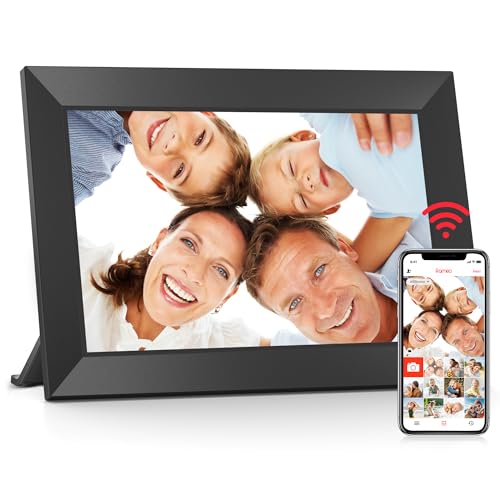
Easy Setup Gift Frame – 10.1" Frameo Wi‑Fi Photo Display
For shoppers comparing smart digital photo frames for grandparents, this 10.1-inch Frameo model focuses on simplicity and everyday use. It offers quick setup, touchscreen controls, and private photo sharing from a phone, making it a practical gift for parents and grandparents who want a frame that is easy to manage.
Best For: Grandparents who want a smaller, user-friendly frame and families who want secure app-based sharing.
Pros:
- Frameo app sharing is private and lets family send photos and videos from anywhere.
- 10.1-inch IPS touchscreen with 1280×800 resolution for crisp viewing.
- 32GB built-in memory with Micro SD card expansion.
- Helpful viewing options include auto-rotate, slideshow, brightness adjustment, sleep mode, and album creation.
Cons:
- Display is smaller than 15.6-inch alternatives.
- Video and photo importing are designed around mobile sharing and memory card use.
- Only one year of replacement service is listed.
This frame is a sensible choice if you want an easy gift that grandparents can enjoy without a steep learning curve. It keeps the focus on simple setup, reliable sharing, and a clean touchscreen experience.
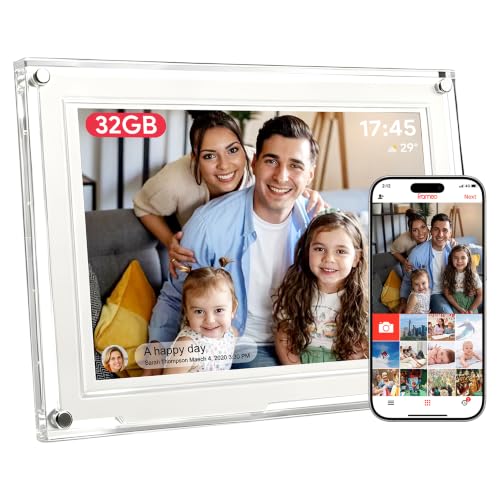
Grandma-Friendly Smart Frame – 10.1" Frameo Memory Frame
This smart digital photo frame for grandparents is designed around hands-off convenience. It focuses on instant Frameo sharing, a clear 10.1-inch IPS touchscreen, and a setup process meant to be managed once by family so grandma can just enjoy the photos each day.
Best For: Grandparents who want a low-maintenance frame that relatives can update remotely.
Pros:
- Photos appear in seconds through the Frameo app, with support for 15-second videos.
- 10.1-inch HD IPS touchscreen with 178° wide viewing angle.
- 32GB storage is rated for over 40,000 photos.
- Extra features include calendar sync, collage mode, date, clock, weather, brightness, and volume controls.
Cons:
- USB port supports flash drives only and does not support computer photo transfer.
- Display size is smaller than large-screen alternatives.
- Some added features may be more than needed if you only want a basic photo frame.
As a gift, this model leans into ease of use and everyday usefulness rather than complexity. It’s a good fit if you want a frame grandparents can simply look at while family members handle the updates from afar.
How We Picked the Best Smart Digital Photo Frames for Grandparents
We prioritized frames that are easy to set up, simple to use day to day, and reliable for remote photo sharing. For Smart Digital Photo Frames for Grandparents, the most important factors are a clear screen, intuitive touch controls, strong Wi-Fi performance, and family-friendly sharing options from phones or email.
We also looked for models with good storage, automatic rotation, useful auto-on/off scheduling, and support features that reduce frustration if setup help is needed.
Quick Comparison: What Matters Most
If you want the shortest decision path, compare these factors first: screen size, resolution, ease of sending photos, storage capacity, and whether the frame supports multiple family contributors. Larger 15.6-inch models are better for living rooms and visual clarity, while 10.1-inch frames are usually more compact and easier to place on a shelf or bedside table.
HD or Full HD displays matter more than extra features if you want photos to look crisp and readable from across the room.
Key Buying Factors for Smart Digital Photo Frames for Grandparents
Ease of Setup
Choose a frame with a straightforward app, clear onboarding, and simple Wi-Fi pairing. If grandparents will interact with it directly, a responsive touch screen and uncomplicated menu are especially helpful.
Display Size and Quality
A brighter, sharper screen makes family photos look more natural. Higher-resolution 15.6-inch frames can showcase detail well, while smaller frames work best where space is limited.
Photo Sharing Workflow
The best systems let family members send photos from a phone without needing to manage the frame itself. App-based sharing, email uploads, and cloud support are all useful, but the process should stay simple.
Storage and Playback Features
Built-in storage is important if you plan to load many photos or videos. Auto-rotate, slideshow controls, and motion or schedule-based power features can make the experience more flexible and hands-off.
Who Should Buy Which Smart Digital Photo Frames for Grandparents?
If you want the simplest gift, pick a model known for easy setup and strong support. If your priority is a larger, more premium-looking display, choose a 15.6-inch option with Full HD resolution. If you want a balanced everyday choice, a 10.1-inch Wi-Fi frame with 32GB storage is often the most practical middle ground.
For families sending lots of photos, look for a frame that supports quick sharing from multiple users. For grandparents who mainly want an easy, low-maintenance experience, favor the most intuitive frame over the one with the most features.
