

Smart digital photo frames with cloud storage make it easy to keep favorite moments on display without constant syncing or manual uploads. They are especially useful for families, grandparents, and gift buyers who want simple sharing from a phone.
In this roundup, we focus on frames that balance display quality, app usability, storage options, and everyday convenience so you can choose the right one with confidence.
Best 10 Smart Digital Photo Frames with Cloud Storage Picks for 2026
Editor's Pick
Aura 10" HD WiFi Digital Picture Frame

- Free unlimited cloud storage
- Send photos from phone easily
- Auto on/off for simple daily use
Best For: Families wanting a premium frame for older relatives
Private Sharing Choice

- Frameo app sends photos and short videos
- Built-in 32GB memory with Micro SD support
- IPS touch screen with auto-rotate and collage
Best For: Families who want private app sharing and flexible storage
Premium Remote Manager
Pix-Star LUX 10.4" Wi-Fi Frame

- Unlimited cloud storage with no fees
- Manage up to 25 frames remotely
- Sends via app, email, cloud services, USB, or SD
Best For: Tech-savvy families needing remote control and flexible sharing
Large Display Upgrade

- Large 15.6-inch Full HD touch screen
- 64GB storage plus SD and USB expansion
- Frameo sharing with video and sound support
Best For: Buyers who want a big-screen family photo display
Editor’s Pick

- App, web, and email uploads
- Secure U.S.-based cloud storage
- Auto-rotation and face-centering AI
Best For: Families wanting easy cloud sharing and a premium gift-ready frame
Best Value

- Invite-only app sharing from phone
- 32GB storage for over 80,000 photos
- 1280x800 IPS touchscreen with collage mode
Best For: Users who want big local storage and easy family sharing
Cloud Sharing Pick

- Free cloud storage with secure sharing
- App, web, and email uploads
- Works with Alexa and auto-rotate
Best For: Families wanting cloud sharing plus voice and multi-frame support
Instant Sharing Pick
10.1" Touchscreen Frame with AiMOR App

- AiMOR app enables quick wireless sharing.
- 32GB storage holds over 50,000 photos.
- IPS touchscreen includes auto-rotate and light sensor.
Best For: Families wanting easy sharing and large local storage
Feature-Rich Family Display

- VPhoto app supports instant photo and video sharing.
- Adds calendar, weather, clock, alarm, and music.
- Wall-mountable touchscreen with auto-rotate.
Best For: Gift buyers and families who want extra everyday functions
Gift-Ready Cloud Frame
10.1" Anna Bella AiMOR Photo Frame
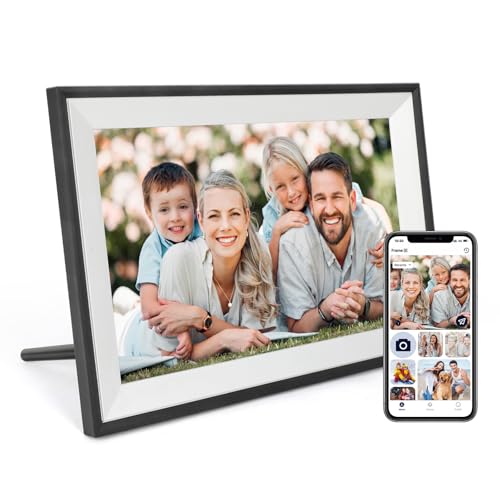
- AiMOR app supports wireless sharing from phones.
- 32GB storage expands with SD cards up to 128GB.
- Auto-rotate and light sensor improve daily use.
Best For: Families and gift givers who want easy sharing and expansion
Editor's Pick – Aura 10" HD WiFi Digital Picture Frame
Aura HD Digital Picture Frame | Carver: The Best Frame for Gifting (Cool White Mat, 10")
Check Price On AmazonIf you want smart digital photo frames with cloud storage that feel polished and easy to live with, the Aura 10″ HD WiFi frame is a strong fit. It focuses on simple sharing from a phone, unlimited cloud storage, and a clean setup that works well for everyday family use.
Best For: Families who want a premium, low-maintenance frame for parents and grandparents.
Pros:
- Free unlimited cloud storage with no subscription fees
- Send photos from a phone with quick, one-time setup
- Auto on/off helps it fit into daily routines
- 1080p 10.1-inch display with a white mat finish
Cons:
- No local storage details are highlighted in the notes
- Touch Bar control may be less familiar than a full touchscreen
Overall, this model stands out for keeping the experience simple while still delivering unlimited cloud backup and easy sharing. It is a practical choice if you want a frame that is meant to stay set up and be enjoyed without ongoing fees.
Private Sharing Choice – FRAMEO 10.1" Smart WiFi Frame
This FRAMEO smart frame is a practical pick if you want smart digital photo frames with cloud storage-style sharing through an app, plus local memory for flexible use. It lets friends and family send photos or short videos directly from anywhere, while the frame handles display settings and organization tools.
Best For: Households that want private app-based sharing and plenty of built-in storage.
Pros:
- Frameo app sharing from anywhere in the world
- Built-in 32GB memory plus Micro SD support
- 10.1-inch IPS touch screen with 1280×800 resolution
- Useful extras like auto-rotate, weather, clock, and collage mode
Cons:
- Video clips are limited to 15 seconds via the app
- Some features may take time to dial in with custom settings
For buyers who care about private sharing and strong everyday controls, this frame covers a lot of ground. The combination of app sending, internal memory, and touch-based features makes it a versatile family display.
Premium Remote Manager – Pix-Star LUX 10.4" Wi-Fi Frame
If you’re comparing smart digital photo frames with cloud storage, the Pix-Star LUX is built for people who want remote control and broad sharing options. It combines lifetime free cloud backup with app, email, Google Photos, Dropbox, OneDrive, and offline transfer support.
Best For: Tech-savvy families who want remote management and multiple ways to send photos.
Pros:
- Unlimited cloud storage with no subscription fees
- Can manage up to 25 frames remotely
- Multiple sharing paths: app, email, cloud services, USB, and SD
- No-glare 10.4-inch IPS display with motion sensor
Cons:
- More features may be more than some casual users need
- Screen is 4:3, so image composition depends on your photo format
This frame is strongest when you want storage, remote administration, and flexibility all in one place. It is especially appealing for families managing several devices or for anyone who wants a richer feature set than a basic WiFi frame.
Large Display Upgrade – 15.6" Frameo FHD WiFi Frame
For buyers who want smart digital photo frames with cloud storage-style app sharing on a bigger screen, this 15.6-inch Frameo model is focused on visibility and memory. It pairs a Full HD display with built-in storage, expandable options, and a set of family-friendly features.
Best For: Anyone who wants a large, bright frame for displaying photos and short videos.
Pros:
- 15.6-inch 1920 x 1080 IPS Full HD touch screen
- 64GB built-in memory with SD and USB support
- Frameo app sharing from anywhere
- Speaker support for videos with sound
Cons:
- Frameo app video uploads are limited to 15 seconds
- Only supports 2.4GHz Wi-Fi
- USB support is limited to flash drives, not computer transfers
This is a good choice if screen size matters as much as sharing convenience. The large display, generous storage, and video playback support make it a strong option for feature-focused gifting and home display use.
Editor’s Pick – Nixplay 10.1" HD Touch Frame
If you want smart digital photo frames with cloud storage that are simple to share across a family, this Nixplay model is built around convenience and privacy. It supports uploads from the app, web, or email, and its secure U.S.-based cloud storage is end-to-end encrypted for safer photo sharing.
Best For: Families and gift buyers who want an easy-to-use frame with secure cloud sharing and touch control.
Pros:
- Uploads photos and videos via app, web, or email
- Secure cloud storage with end-to-end encryption and CCPA/GDPR compliance
- 10.1-inch HD touchscreen with auto-rotation and face-centering AI
- Activity sensor helps power the frame on and off automatically
Cons:
- 720p resolution is lower than some 1280×800 competitors
- Touchscreen controls may be more than some buyers need
Overall, this is a strong pick if you value straightforward setup, flexible sharing, and a polished gifting experience. Its cloud-based workflow makes it easy to keep photos current without dealing with removable storage.
Best Value – Frameo 10.1" WiFi Touch Frame
For shoppers comparing smart digital photo frames with cloud storage, this Frameo model stands out for its mix of private app sharing and generous onboard memory. It lets invited friends and family send photos and short videos directly to the frame, while the built-in 32GB storage gives you room to keep a large library on hand.
Best For: Buyers who want roomy local storage, easy app sharing, and a senior-friendly touchscreen.
Pros:
- Frameo app sharing from iOS and Android with invite-only privacy
- 1280×800 IPS HD touchscreen with wide viewing angles
- 32GB internal memory stores over 80,000 photos
- MicroSD slot supports direct video uploads beyond the app limit
Cons:
- App video uploads are limited to 15 seconds
- MicroSD cards over 32GB may not work properly
This is a practical choice if you want a frame that balances cloud-style sharing with lots of local storage. The extra calendar and collage features add usefulness beyond simple slideshow viewing.
Cloud Sharing Pick – Nixplay-Powered Alexa Frame
If you’re looking for smart digital photo frames with cloud storage and a simple family-sharing setup, this Nixplay-powered ApoloSign frame covers the essentials well. It supports app, web, and email uploads, includes free cloud storage, and is designed for easy multi-user sharing across multiple frames.
Best For: Households that want cloud-based photo sharing, Alexa support, and easy multi-frame syncing.
Pros:
- Free cloud storage with private, secure sharing
- Uploads via Nixplay app, desktop web app, or email
- Supports Alexa and smart sound sensing
- Auto-rotates content in portrait or landscape mode
Cons:
- SD card is not supported
- Storage details are centered on cloud use rather than expandable physical media
This model is best if you want a connected frame that feels hands-off once set up. The combination of cloud storage, multi-user access, and voice support makes it a strong family hub for shared memories.
Instant Sharing Pick – 10.1" Touchscreen Frame with AiMOR App
If you want smart digital photo frames with cloud storage that make sharing effortless, this 10.1-inch model focuses on quick uploads, easy touch control, and family-friendly setup. The AiMOR app lets multiple people send photos and short videos to the frame, while the built-in 32GB memory gives you room to keep a large personal gallery on the device.
Best For: Families who want simple remote sharing, touch controls, and a bright everyday display for photos and short videos.
Pros:
- AiMOR app supports instant wireless sharing from multiple contributors.
- 10.1-inch IPS touchscreen with 1280 x 800 resolution and auto-rotate.
- 32GB built-in storage plus Micro SD support up to 64GB for importing media.
- Built-in light sensor helps adjust brightness to room conditions.
Cons:
- Videos are limited to 15 seconds when sent through the app.
- Photos and videos cannot play directly from the SD card; they must be imported first.
Overall, this frame is a strong fit if your priority is simple sharing and generous onboard storage. It balances ease of use with the practical features most households want in a cloud-connected photo frame.
Feature-Rich Family Display – 10.1" Wood Brown Cloud Frame
For shoppers comparing smart digital photo frames with cloud storage, this Dragon Touch option stands out for its broad feature set and easy app-based sharing. The 10.1-inch touch display pairs with the VPhoto app for wireless uploads, while extras like calendar, weather, music, clock, and alarm make it useful beyond just photo display.
Best For: Families or gift buyers who want a cloud-connected frame with useful everyday features and a wall-mountable design.
Pros:
- VPhoto app supports instant sharing from Android and iOS devices.
- Wall-mountable 10.1-inch touchscreen with 1280 x 800 resolution.
- Includes practical extras such as calendar, weather, music playback, clock, and alarm.
- Free app access allows multiple users to connect to one frame.
Cons:
- Cloud-sharing experience depends on Wi-Fi setup and app use.
- It does not list built-in storage capacity in the supplied details.
This is a versatile pick if you want a photo frame that doubles as a helpful household display. Its mix of sharing tools and daily-use functions makes it especially appealing as a gift.
Gift-Ready Cloud Frame – 10.1" Anna Bella AiMOR Photo Frame
This Anna Bella model is a practical choice if you want smart digital photo frames with cloud storage for gifting and everyday family sharing. It uses the AiMOR app for remote photo and short video transfers, includes 32GB of internal storage, and adds thoughtful display features like auto-rotate and a built-in light sensor.
Best For: Gift givers and families who want a simple Wi-Fi frame with strong sharing features and dependable onboard storage.
Pros:
- AiMOR app works with both Android and iOS for remote sharing.
- 32GB storage plus support for up to 128GB SD expansion.
- Auto-rotate, zoom & crop, slideshow, and sleep mode add flexibility.
- Built-in light sensor adjusts brightness automatically.
Cons:
- Software has been upgraded to AiMOR, not Frameo.
- Product notes do not specify video length limits.
As a family gift, this frame covers the basics well and adds enough storage to keep a large photo collection on hand. It is especially appealing if you want a straightforward setup with useful customization options.
How We Picked the Best Smart Digital Photo Frames with Cloud Storage
We prioritized frames that are easy to set up, support reliable remote photo sharing, and offer features that matter in daily use, such as auto-rotate, touch controls, and sensible storage options. We also weighed display quality, app experience, and whether the frame feels practical for gifting or long-term family use.
Quick Comparison
When comparing Smart Digital Photo Frames with Cloud Storage, the biggest differences usually come down to screen size, resolution, app sharing limits, included memory, and whether the brand requires a subscription. Smaller frames are often better for desks and nightstands, while larger models make more sense for living rooms and shared spaces.
Key Buying Factors for Smart Digital Photo Frames with Cloud Storage
Display Size and Resolution
Look for a size that fits the room and viewing distance. A 10-inch frame is versatile, while larger 15.6-inch models offer more impact. Resolution matters too: higher pixel density produces sharper photos, especially for portraits and close-up shots.
Cloud Sharing and App Experience
The best Smart Digital Photo Frames with Cloud Storage make it simple to send images from a phone, invite multiple family members, and manage albums without friction. A smooth app matters more than raw feature counts if the frame will be used by less technical users.
Storage, Subscription, and File Support
Some frames rely mostly on cloud access, while others include built-in memory for offline use. Check whether cloud storage is free or tied to a subscription, and confirm support for photos plus videos if that matters to you.
Usability Features
Auto-rotation, motion sensors, auto on/off, touch screens, and wall-mounting can make a big difference in everyday convenience. These extras are especially valuable for gifting, shared family albums, and rooms where the frame will stay powered on for long periods.
Who Should Buy Which Smart Digital Photo Frames with Cloud Storage?
If you want the simplest family-sharing setup, choose a frame with an easy app and free cloud access. If image quality is your top priority, focus on higher-resolution displays and larger screen sizes. If you are buying a gift, pick a model with straightforward setup and helpful automation features. For households that want to rotate lots of photos, prioritize generous memory, strong app tools, and no-fuss cloud syncing.
