

Smart digital photo frames with video playback make it easy to keep favorite memories moving, not just displayed. They’re especially useful for families who want to share photos and short clips instantly from a phone.
In this roundup, we focused on frames that are simple to set up, easy to update remotely, and strong on display quality, storage, and everyday convenience.
Best 10 Smart Digital Photo Frames with Video Playback Picks for 2026
Wi-Fi Multimedia Pick
Brookstone 10 Inch Wi-Fi Digital Picture Frame with Video Playback

- Wi‑Fi sharing from smartphones
- 32GB built-in local storage
- Touchscreen with speaker and utilities
Best For: compact home use with video and smart display features
Large Family Display
64GB 15.6" Frameo Digital Picture Frame

- 15.6-inch Full HD touchscreen
- Video with sound plus Frameo sharing
- 64GB storage with SD/USB expansion
Best For: large, easy-to-view family photo and video sharing
Cloud Sharing Choice
Digital Picture Frame Powered by Nixplay 10.1"

- App, email, and web sharing options
- Free cloud storage and multi-frame sync
- SenseMe sensor plus Alexa support
Best For: private cloud-based sharing with smart automation
Offline-Friendly Pick
Frameo 10.1 Inch Smart WiFi Digital Photo Frame
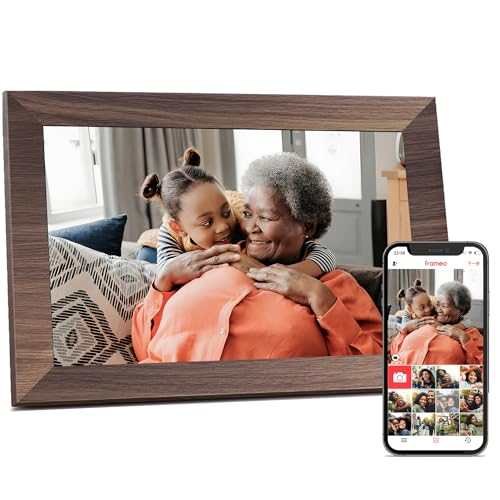
- Frameo app sharing with 15-second videos
- 32GB storage plus TF/USB transfer
- Auto-rotate, react, and sleep mode
Best For: easy gifting with both Wi‑Fi and offline upload options
Editor’s Pick
15.6" WiFi Frame with 64GB Storage

- Large 15.6-inch 1080p IPS touchscreen
- Shares photos and 15-second videos via AiMOR
- 64GB storage plus SD card expansion
Best For: Families wanting a big, easy-to-share frame
Gift-Friendly Pick
10.1" Frameo Frame with React Features

- Frameo app shares photos and 15-second videos
- 10.1-inch IPS touchscreen with auto-rotate
- 32GB storage plus React emojis and sleep mode
Best For: Gift shoppers who want a compact, interactive frame
Smart Value Pick
10.1" Frameo Frame with Calendar Tools

- Uploads photos and 15-second videos via FRAMEO
- 32GB storage with microSD expansion
- Includes calendar sync, collage mode, and captions
Best For: Families who want sharing plus organization features
Flexible Family Sharing
Frameo 10.1'' Smart Frame with Flexible Transfer Options

- Frameo app sharing for photos and MP4 videos
- 32GB storage with micro SD and USB-C options
- 10.1-inch IPS touchscreen with auto-rotate
Best For: Families who want private sharing and offline transfer backups
Quick App Sharing
AiMOR 10.1" Frame with 15-Second Video Playback

- AiMOR app sharing from phone to frame
- Supports 15-second videos with sound
- 10.1-inch IPS touchscreen with 32GB storage
Best For: People who want easy app sharing and short video clips
Secure Everyday Display
Frameo 10.1" Smart Frame with Calendar Features

- Frameo app sharing with private invites
- Calendar sync plus collage mode for up to 6 photos
- 32GB storage with SD and USB transfer
Best For: Families who want secure sharing and everyday organization tools
Wi-Fi Multimedia Pick – Brookstone 10 Inch Wi-Fi Digital Picture Frame with Video Playback
If you want smart digital photo frames with video playback that do more than loop pictures, this Brookstone 10-inch model is built for everyday use. It combines Wi‑Fi sharing, local storage, and a touchscreen interface with useful extras like weather, clock, and calendar views.
Best For: Families or households that want an easy tabletop or wall-mounted frame with video, wireless sharing, and practical home-dashboard features.
Pros:
- Built-in Wi‑Fi lets friends and family upload photos or videos remotely.
- 32GB internal memory stores thousands of images and clips locally.
- Touchscreen display includes automatic rotation and built-in speaker support for video playback.
- Also shows weather forecast, clock, and calendar information.
Cons:
- Smaller 10-inch display than larger family-room frames.
- Video playback depends on the built-in speaker and compact screen size.
This is a strong pick if you want a compact frame that acts like a small smart display, not just a photo viewer. The mix of remote sharing, 32GB storage, and utility features makes it especially practical for busy homes.
Large Family Display – 64GB 15.6" Frameo Digital Picture Frame
Among smart digital photo frames with video playback, this 15.6-inch Frameo model stands out for its large Full HD screen and flexible sharing options. It supports private app-based sharing, expandable storage, and video with sound, making it a good fit when you want a frame that feels closer to a mini digital display.
Best For: Parents and grandparents who want a large, easy-to-view frame for photos, short videos, and family sharing.
Pros:
- 15.6-inch 1920 x 1080 IPS Full HD touchscreen delivers vivid, wide-angle viewing.
- Frameo app enables private sharing of photos and up to 15-second videos.
- 64GB built-in memory plus SD card and USB support for import/export and backup.
- Built-in speaker supports video with sound.
Cons:
- Frameo app video uploads are limited to 15 seconds.
- Wi‑Fi support is limited to 2.4GHz networks.
- USB port does not support photo transfer from a computer.
This model is a smart choice if screen size matters most. The larger panel, strong storage options, and sound-enabled video playback make it especially useful for shared family memories.
Cloud Sharing Choice – Digital Picture Frame Powered by Nixplay 10.1"
If you prefer a connected frame built around cloud sharing, this Nixplay-powered 10.1-inch model offers a streamlined approach to smart digital photo frames with video playback. It supports app, email, and web uploads, plus automatic rotation and smart sensor controls for hands-off use.
Best For: Users who want private cloud-based sharing across multiple frames with Alexa support and simple setup.
Pros:
- Nixplay app, desktop web app, and email uploads make sharing flexible.
- Free cloud storage helps manage and sync photos across frames.
- SenseMe sensor wakes the frame when someone is nearby and sleeps it when the room is empty.
- Supports Alexa and auto-rotation for portrait or landscape use.
Cons:
- SD card is not supported.
- 10.1-inch display is smaller than larger wall-friendly options.
This frame is strongest when you value convenience, privacy, and cloud management over local storage. It works well for households that want a polished, connected sharing setup without much manual effort.
Offline-Friendly Pick – Frameo 10.1 Inch Smart WiFi Digital Photo Frame
This Frameo 10.1-inch model is a practical option if you want smart digital photo frames with video playback but also need offline transfer options. It supports app sharing, local storage, and USB or TF card uploads, which makes it easier to use for families with mixed tech comfort levels.
Best For: Gift buyers and seniors who want an easy frame with both Wi‑Fi sharing and no-Wi‑Fi transfer methods.
Pros:
- Frameo app lets you share photos and videos privately from anywhere.
- 32GB built-in memory stores more than 50,000 photos.
- Supports TF card, USB drive, and computer transfer when Wi‑Fi is not needed.
- Auto-rotate, brightness, volume, sleep mode, and react features add convenience.
Cons:
- App video uploads are limited to 15 seconds.
- External storage is limited to up to 32GB.
- USB support is restricted to FAT32-formatted drives.
This is a flexible everyday frame with a good balance of app convenience and offline simplicity. It makes sense if you want an approachable gift or a backup-friendly frame that still handles videos and photos well.
Editor’s Pick – 15.6" WiFi Frame with 64GB Storage
If you want smart digital photo frames with video playback and a larger, more premium viewing area, this 15.6-inch Humblestead model is built for easy sharing from anywhere. It supports wireless photo and short video transfers through the AiMOR app, has a 1080p IPS touchscreen, and gives you flexible setup with desktop placement or wall mounting.
Best For: Families who want a large, easy-to-use frame for sharing photos and short videos remotely.
Pros:
- 15.6-inch 1920×1080 IPS touchscreen for a sharp, roomy display
- Supports wireless sharing of photos and short videos up to 15 seconds via the AiMOR app
- Built-in 64GB storage with SD card expansion for a large media library
- Auto-rotate and wall-mount option add placement flexibility
Cons:
- Video clips are limited to short 15-second uploads
- Requires Wi-Fi for app-based remote sharing
Overall, this is a strong pick if screen size and simple remote sharing matter most. The large display, generous storage, and touch controls make it a practical choice for households that want a centerpiece frame rather than a compact desk model.
Gift-Friendly Pick – 10.1" Frameo Frame with React Features
This Frameo-based digital frame is a practical option if you want smart digital photo frames with video playback in a smaller, gift-ready size. It lets you send photos and short videos from anywhere through the Frameo app, includes 32GB built-in storage, and adds touch controls plus handy extras like auto-rotate and sleep mode.
Best For: Gift buyers who want a compact frame with easy app sharing and reaction features.
Pros:
- Frameo app sharing for photos and videos up to 15 seconds
- 10.1-inch 1280×800 IPS touchscreen for clear everyday viewing
- 32GB built-in memory with support for external storage
- Useful extras like React emojis, auto-rotate, brightness control, and sleep mode
Cons:
- Smaller screen than 15.6-inch alternatives
- Video playback is limited to short clips
This model stands out for its blend of gifting appeal and social features. If you want a frame that feels interactive without being complicated, the Frameo ecosystem and built-in reaction tools make it easy to stay connected.
Smart Value Pick – 10.1" Frameo Frame with Calendar Tools
For buyers comparing smart digital photo frames with video playback, this 10.1-inch FRAMEO model adds a useful mix of sharing, customization, and organization features. It supports app-based photo and short video uploads, includes 32GB internal memory with microSD expansion, and adds extras like calendar sync, collage mode, and caption display.
Best For: Users who want a feature-rich frame for everyday sharing and family organization.
Pros:
- Shares photos and short videos up to 15 seconds through the FRAMEO app
- 10.1-inch 1280×800 IPS touchscreen with auto-rotate support
- 32GB built-in memory plus microSD support for more storage
- Calendar sync, collage mode, emoji reactions, and custom album tools
Cons:
- 10.1-inch display is less immersive than larger frames
- Video support is limited to short MP4 clips
This frame is a solid all-rounder if you want more than basic photo playback. The calendar integration and collage options make it especially useful for families who want one screen to handle memories and daily planning.
Flexible Family Sharing – Frameo 10.1'' Smart Frame with Flexible Transfer Options
If you want smart digital photo frames with video playback that are easy for the whole family to use, this 10.1-inch Frameo model is built around simple sharing. The Frameo app lets you send photos and short MP4 videos over Wi-Fi, while the touchscreen makes setup and browsing straightforward. It also adds useful backup options, so you can keep memories flowing even when Wi-Fi is not available.
Best For: Families, grandparents, and gift buyers who want private app sharing plus offline transfer options.
Pros:
- Frameo app supports instant photo and video sharing from anywhere over 2.4GHz Wi-Fi.
- 32GB built-in storage plus micro SD, USB-C drive, and USB-C cable transfer options.
- 10.1-inch 1280×800 IPS touchscreen with auto-rotate for portrait or landscape viewing.
- Supports JPG/JPEG/BMP/PNG images and MP4 videos, with sleep mode for energy savings.
Cons:
- Requires corded power and must stay plugged in.
- Wi-Fi support is limited to 2.4GHz networks.
- External storage support is capped at 32GB and media transfer relies on FAT32 formatting.
Overall, this Frameo frame is a practical pick if you want a familiar app experience with flexible ways to load content. Its mix of Wi-Fi sharing, local transfer, and video support makes it a strong everyday family display.
Quick App Sharing – AiMOR 10.1" Frame with 15-Second Video Playback
This smart digital photo frame with video playback focuses on quick app sharing and a bright 10.1-inch display. The AiMOR app makes it easy to send memories straight from a phone, and the frame supports short MP4 clips so your favorite moments feel more alive. It also includes practical extras like light-sensing brightness control and easy touch navigation.
Best For: Buyers who want fast app sharing, simple setup, and short videos with sound.
Pros:
- AiMOR app lets family and friends share photos and videos wirelessly after Wi-Fi setup.
- Supports 15-second videos with sound, making clips more engaging.
- 10.1-inch IPS HD touchscreen with 1280×800 resolution and intuitive touch controls.
- 32GB internal storage, plus Micro SD expansion up to 64GB for import/export use.
Cons:
- Videos longer than 15 seconds must be trimmed to a 15-second highlight.
- Photos and videos do not play directly from the SD card; they must be imported first.
- Designed for corded power, so it is not a portable frame.
For households that value quick sharing and a polished display, this model covers the essentials without feeling complicated. Its short-video support and light-adaptive screen make it a solid pick for daily viewing.
Secure Everyday Display – Frameo 10.1" Smart Frame with Calendar Features
If you are comparing smart digital photo frames with video playback, this Frameo option stands out for its privacy-focused sharing and extra daily-use features. You can send photos and short videos from anywhere through the free Frameo app, then use the frame for more than just slideshows with calendar, clock, weather, and collage tools. The touchscreen and auto-rotate design keep it easy to use for all ages.
Best For: Families who want secure sharing plus useful everyday display features.
Pros:
- Free Frameo app supports secure sharing of photos and videos up to 15 seconds.
- 32GB storage holds a large photo library, with SD card and USB port transfer options.
- Includes calendar sync, collage mode for up to 6 photos, and themed greetings.
- IPS HD touchscreen with auto-rotate and senior-friendly touch controls.
Cons:
- App video uploads are limited to 15 seconds.
- Longer videos require direct transfer through SD card or USB flash drive.
- Best compatibility is listed for storage devices up to 32GB formatted as FAT32.
This frame is a strong all-around choice if you want the photo display to pull double duty as a family organizer. The added calendar and collage functions make it more versatile than a basic picture frame.
How We Picked the Best Smart Digital Photo Frames with Video Playback
We prioritized models that balance ease of use, reliable wireless sharing, and practical display quality. That means strong app support, straightforward setup, and enough storage for photos and short videos without constant micromanaging.
We also favored frames with useful extras like touchscreens, auto-rotate, wall-mount options, and larger panels for living rooms or shared spaces. For shoppers comparing Smart Digital Photo Frames with Video Playback, those details matter as much as resolution.
Quick Comparison
Smaller 10.1-inch frames are usually the best fit for desks, nightstands, and gifts, while 15.6-inch models offer a more immersive view in common areas. If you expect to send a lot of video, look for larger storage and an interface that makes sharing from a phone fast and painless.
Key Buying Factors for Smart Digital Photo Frames with Video Playback
Display Size and Resolution
Choose size based on where the frame will live. A 10-inch display is flexible and compact, while a 15.6-inch Full HD panel is better for viewing from across the room. Higher resolution also helps photos and video look sharper, especially on larger screens.
Sharing Methods and App Experience
The best frames make it simple to send content by app, email, or cloud service. If multiple family members will contribute, look for easy account sharing and a setup process that does not require technical troubleshooting.
Storage and Video Support
Built-in storage affects how many photos and clips you can keep on the frame. More capacity is helpful if you want to save videos locally or rotate through large albums without frequent deletions.
Convenience Features
Touchscreens, auto-rotate, calendars, clocks, and weather widgets can make a frame more useful day to day. Wall-mount capability is also valuable if you want a cleaner look in a kitchen, hallway, or office.
Who Should Buy Which Smart Digital Photo Frames with Video Playback?
Pick a smaller, simpler frame if you want a gift, a bedside display, or an easy family sharing solution. Choose a larger 15.6-inch model if you want a centerpiece frame for the home and care most about screen size and viewing comfort.
If your priority is effortless sharing from multiple people, focus on brands with strong app ecosystems and dependable video playback. If you want the most versatile option, choose a model with ample storage, touchscreen controls, and flexible placement options.
