

Smart digital photo frames without subscriptions make it easy to share photos and short videos without monthly fees. They are ideal for families, grandparents, and anyone who wants a simple, always-on display for favorite memories.
In this roundup, we focus on frames that offer practical features like app sharing, cloud or local storage, touchscreen controls, and auto-rotate support, with an emphasis on value and ease of use.
Best 10 Smart Digital Photo Frames Without Subscriptions Picks for 2026
Family-Friendly No-Subscription Sharing
PhotoSpring 10in WiFi Digital Picture Frame

- No subscription fees ever
- Easy setup with touchscreen control
- Shares photos by email, app, web, or USB
Best For: Families wanting simple, fee-free sharing
Private App-Controlled Sharing
FRAMEO 10.1in Smart WiFi Frame

- Private sharing through the FRAMEO app
- Built-in 32GB memory plus micro SD support
- Auto-rotate, collage, and display controls
Best For: Users who want private sharing and customization
Premium No-Subscription Frame
Aura 10in HD WiFi Picture Frame

- Free unlimited cloud storage
- No subscription required
- Auto on/off with phone photo sharing
Best For: Buyers seeking a premium-feeling frame with no fees
Frameo Easy Share

- Frameo app sharing with unlimited members
- 32GB storage plus micro SD and USB-C import
- 10.1-inch IPS touchscreen with auto-rotate
Best For: Families and gift buyers who want flexible sharing without subscription dependence
Cozyla No-Fee Cloud

- No subscription fees with unlimited cloud storage
- Shares via app, Google Photos, web, or email
- Supports long video plus AI restoration
Best For: Families wanting unlimited cloud storage and easy remote sharing
Large Frameo Display

- 15.6-inch Full HD IPS touchscreen
- 64GB storage with SD and USB flash support
- Video with sound plus secure Frameo sharing
Best For: Buyers who want a bigger display and offline import flexibility
Crystal-Style Gift Frame
Uhale 7 Inch Acrylic WiFi Photo Frame
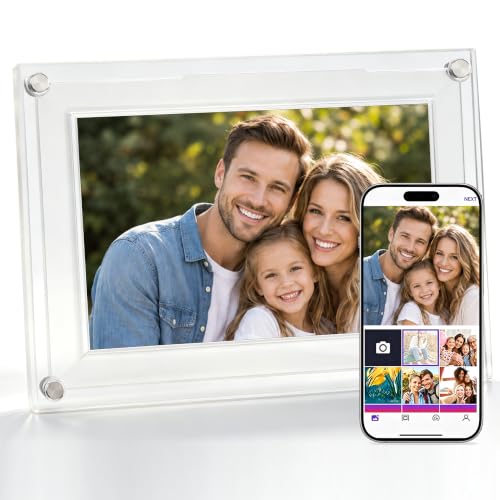
- Frameless acrylic design with a floating-photo look
- Free app and email sharing with no subscription
- 32GB storage plus microSD import/export support
Best For: Stylish gifting and decor-first buyers
Large Touchscreen Family Frame
Frameo 10.1 Inch Smart WiFi Frame

- 10.1-inch HD IPS display with auto-rotate
- Frameo app for instant remote sharing
- Wall-mount option plus adjustable stand
Best For: Families wanting a larger easy-share frame
Memory-Rich App Frame
Linkdaze 10.1 Inch AiMOR Digital Frame

- 32GB storage for over 50,000 photos
- AiMOR app sharing with unlimited contributors
- Auto-rotate and light sensor for easier viewing
Best For: Heavy photo sharers who want lots of built-in storage
Family-Friendly No-Subscription Sharing – PhotoSpring 10in WiFi Digital Picture Frame
If you want smart digital photo frames without subscriptions, PhotoSpring is built around simple family sharing and no ongoing fees. The 10-inch touchscreen makes setup quick, while email, app, web, or USB transfers give you flexible ways to send photos and short videos.
Best For: Families who want an easy, fee-free frame for shared memories.
Pros:
- No subscription fees or extra feature charges.
- Easy touchscreen setup in about 5 minutes.
- Send photos from email, app, web, or USB.
- Supports videos up to about 5 minutes.
Cons:
- 10-inch display is smaller than some larger-frame options.
- Video limit is shorter than the product’s photo-sharing focus.
Overall, this is a straightforward pick if you care more about hassle-free family sharing than premium extras. The 32GB storage, customization options, and no-fee model make it a practical all-around choice.
Large-Screen Gift Pick – ARZOPA 15.6in FHD Touchscreen Frame
For shoppers comparing smart digital photo frames without subscriptions, this ARZOPA model stands out for its larger 15.6-inch FHD touchscreen and free cloud storage. It also emphasizes easy gifting, with pre-set Wi-Fi and the ability to pre-upload photos and videos before the frame arrives.
Best For: Anyone who wants a bigger display and flexible gift-ready sharing.
Pros:
- Free cloud storage with no subscription required.
- Large 15.6-inch 1080p IPS touchscreen.
- Pre-set Wi-Fi and pre-upload gifting support.
- Useful extras like weather, alarm clock, calendar, and sleep mode.
Cons:
- TF card expansion is supported, but the card is not included.
- Larger size may be less ideal for compact spaces.
This is a strong option if display size matters and you want a frame that feels ready to gift. The no-subscription cloud setup and practical extras make it versatile for everyday use, too.
Private App-Controlled Sharing – FRAMEO 10.1in Smart WiFi Frame
If you’re looking for smart digital photo frames without subscriptions, the FRAMEO 10.1-inch model focuses on private sharing and useful display controls. Photos and short videos can be sent through the FRAMEO app, and the built-in 32GB memory plus micro SD support give you solid storage flexibility.
Best For: People who want private mobile sharing with lots of customization.
Pros:
- Private photo and video sharing through the FRAMEO app.
- Built-in 32GB memory with micro SD expansion.
- Auto-rotate, brightness control, sleep mode, and collage options.
- Displays caption, weather, and clock information.
Cons:
- Video clips are limited to 15 seconds.
- 10.1-inch screen is smaller than larger premium frames.
It’s a good fit if you want more control over how photos look on the frame and how they’re organized. The private app-based workflow and feature set make it practical for families and gifting.
Premium No-Subscription Frame – Aura 10in HD WiFi Picture Frame
Aura HD Digital Picture Frame | Carver: The Best Frame for Gifting (Black Mat, 10")
Check Price On AmazonAmong smart digital photo frames without subscriptions, Aura is the polished premium-style choice with free unlimited cloud storage and easy phone sharing. The 10-inch HD display, auto on/off, and app-based sending are aimed at making the frame feel simple for everyday use and easy to gift.
Best For: Buyers who want a clean, premium-feeling frame with no subscription.
Pros:
- Free unlimited cloud storage with no subscription.
- Send photos directly from a phone.
- Auto on/off adds convenience for daily use.
- 10-inch HD WiFi design with a clean black mat finish.
Cons:
- Only the supplied notes emphasize photo sharing, not extra media features.
- 10-inch size may not suit users wanting a larger screen.
This is a strong pick if you want a simple, polished frame that focuses on presentation and ease of sharing. The no-subscription cloud model makes it especially appealing for gifting to parents or grandparents.
Frameo Easy Share – 10.1" Frameo WiFi Touchscreen
If you want smart digital photo frames without subscriptions, this 10.1-inch Frameo model is built around simple sharing and flexible transfer options. It supports WiFi sharing through the Frameo app, but it also includes non-WiFi options like micro SD, USB-C drive, and USB-C cable transfers, which makes it practical for households that want convenience without depending on one method.
Best For: Families, grandparents, and gift buyers who want easy app sharing plus offline transfer options.
Pros:
- Frameo app sharing is secure, private, and supports unlimited members.
- 10.1-inch 1280 x 800 IPS touchscreen gives clear viewing from different angles.
- 32GB built-in storage plus support for external storage up to 32GB.
- Works with photos and videos, including auto-rotate and sleep mode.
Cons:
- Requires constant power; it is not battery-operated.
- Only supports 2.4GHz WiFi.
- External storage and USB-C drive are not included.
This is a well-rounded pick if you want an easy-to-use smart frame that can still function without WiFi. Its combination of app sharing, offline importing, and gift-ready presentation makes it especially practical for parents and grandparents.
Cozyla No-Fee Cloud – 10.1" WiFi Frame with Stand
For shoppers comparing smart digital photo frames without subscriptions, Cozyla stands out for its unlimited cloud storage and no-fee model. It lets you share photos and videos through the app, Google Photos, web, or email, while keeping setup straightforward for people who want a more polished, always-connected frame experience.
Best For: Families and long-distance gifting when you want unlimited storage without ongoing fees.
Pros:
- No subscription fees and unlimited cloud storage.
- Multiple sharing methods: app, Google Photos, web, and email.
- Supports long videos, not just short clips.
- AI photo restoration and voice memories add extra personalization.
Cons:
- Uses cloud storage rather than a built-in offline-first setup.
- No SD card needed for storage, which may matter to users who prefer local backup options.
- Still requires Wi-Fi and corded power.
Cozyla is a strong pick if your priority is a subscription-free frame with unlimited storage and lots of sharing options. The included stand, easy setup, and long-video support make it especially useful for family gifting and ongoing remote updates.
Large Frameo Display – 15.6" Full HD WiFi Frame
If you want smart digital photo frames without subscriptions and prefer a larger display, this 15.6-inch Frameo model gives you plenty of screen space and generous built-in storage. It works with the Frameo app for private sharing, but it also supports SD cards and USB flash drives for importing, exporting, and backing up content without relying only on Wi-Fi.
Best For: People who want a large, high-resolution frame for parents, grandparents, or living-room display.
Pros:
- Large 15.6-inch 1920 x 1080 IPS Full HD touchscreen.
- 64GB built-in storage, with support for SD cards and USB flash drives.
- Frameo app sharing is private and secure.
- Built-in speaker supports video with sound from SD/USB or the app.
Cons:
- Frameo app video uploads are limited to 15 seconds.
- USB port does not support photo transfer from a computer.
- Only supports 2.4GHz Wi-Fi.
This model makes sense if screen size and storage matter more than compact design. The Full HD panel, audio playback, and multiple import options make it a strong choice for a more immersive family photo display.
Crystal-Style Gift Frame – Uhale 7 Inch Acrylic WiFi Photo Frame
If you want smart digital photo frames without subscriptions, this Uhale 7-inch model stands out for its frameless acrylic look and simple wireless sharing. It pairs a decorative desk-friendly design with Wi‑Fi app and email uploads, so it works well when you want a frame that feels more like home decor than a gadget.
Best For: Stylish gifting, couples, moms, and anyone who wants a decorative frame with easy sharing.
Pros:
- Frameless acrylic design creates a floating-photo effect.
- Free app and email sharing with no subscription fees.
- 32GB built-in memory with microSD support for easy importing and exporting.
- IPS touch screen plus auto-rotate for portrait or landscape viewing.
Cons:
- 7-inch display is smaller than many tabletop alternatives.
- MicroSD support is limited to 32GB and FAT32 format.
- Video sharing is limited to clips up to 120 seconds.
Overall, this is a strong pick if design matters as much as functionality. It delivers the core features buyers want in a subscription-free smart frame, while the acrylic finish gives it a more polished, gift-ready presence.
Large Touchscreen Family Frame – Frameo 10.1 Inch Smart WiFi Frame
This Frameo model fits the search for smart digital photo frames without subscriptions by combining app-based sharing with a roomy 10.1-inch HD IPS display. It’s aimed at families who want easy setup, reliable remote sending, and a larger screen that works well in living rooms, offices, or shared spaces.
Best For: Families and gift buyers who want a larger screen with simple app sharing.
Pros:
- 10.1-inch HD IPS screen with 1280×800 resolution.
- Instant photo and video sharing through the Frameo app.
- 16GB internal memory stores over 50,000 pictures, with microSD expansion to 32GB.
- Wall-mount option and adjustable stand add placement flexibility.
Cons:
- Internal storage is smaller than some 32GB models.
- Frameo app ecosystem may be less flexible if you prefer a different platform.
- No mention of built-in premium materials or decorative styling.
For buyers who value ease of use over extras, this frame checks the important boxes. The larger display and straightforward sharing make it a practical choice for displaying family photos without monthly fees.
Memory-Rich App Frame – Linkdaze 10.1 Inch AiMOR Digital Frame
If you’re comparing smart digital photo frames without subscriptions, this Linkdaze frame stands out for its 32GB built-in storage and flexible sharing through the AiMOR app. The 10.1-inch IPS touchscreen, auto-rotate, and light-sensing brightness adjustment make it a good fit for people who want a feature-rich frame that still feels easy to manage.
Best For: Users who want more storage, video support, and app sharing in one frame.
Pros:
- 32GB internal storage holds over 50,000 photos.
- AiMOR app supports instant sharing from unlimited family and friends.
- 10.1-inch HD IPS touch display offers wide viewing angles.
- Auto-rotate and light sensor help optimize viewing in different spaces.
Cons:
- SD card content must be imported before it can play on the frame.
- Video clips are limited to 15 seconds.
- Product details do not emphasize wall-mounting or premium decor styling.
This is a practical choice for households that want to share a lot of media without paying recurring fees. The bigger built-in memory and helpful display automation make it especially appealing for everyday use.
How We Picked the Best Smart Digital Photo Frames Without Subscriptions
We prioritized models that let you share photos easily without forcing recurring fees. That means looking at storage options, app or email sharing, display quality, and the overall setup experience. We also favored frames with useful extras such as auto-rotate, wall-mounting, touch controls, and video support where it adds real value.
Quick Comparison: What Matters Most
The best choice often comes down to screen size and how you plan to use it. Smaller 7-inch and 10-inch frames are great for desks, nightstands, and gifting, while 15.6-inch models better suit living rooms and shared family spaces. Higher-resolution screens look sharper for close viewing, and larger internal storage can help if you plan to keep many photos on the device.
Key Buying Factors for Smart Digital Photo Frames Without Subscriptions
Sharing Method
Check whether the frame supports app uploads, email sharing, web uploads, or direct cloud access. The easiest systems let multiple family members send photos from anywhere with minimal setup.
Storage and Subscription Terms
Some frames advertise free cloud storage, while others rely more on built-in memory or local transfers. Make sure the no-subscription promise applies to the features you care about most, especially remote sharing and ongoing storage.
Display Quality
For a better viewing experience, look for IPS panels, full HD on larger displays, and anti-glare finishes if the frame will sit in bright rooms. Touchscreen controls can make setup and daily use simpler, especially for older users.
Video and Orientation Support
If you want to share clips as well as photos, confirm the supported video length. Auto-rotate and landscape/portrait flexibility are also important if you want the frame to adapt to different image formats.
Placement and Size
Think about where the frame will live. Compact frames work well on desks and shelves, while larger models can serve as statement pieces. Wall-mountable designs are useful for permanent placement.
Who Should Buy Which Smart Digital Photo Frames Without Subscriptions?
Choose a compact 7-inch or 10-inch frame if you want a simple gift, a bedside display, or a family-friendly option that is easy to set up. Pick a larger 15.6-inch frame if screen clarity and shared-room visibility matter more than portability. If you value easy remote sharing, focus on models with strong app and cloud tools; if you prefer simplicity, a frame with generous built-in storage and direct upload options may be the better fit.
For most buyers, the best Smart Digital Photo Frames Without Subscriptions are the ones that balance easy sharing, reliable storage, and a display size that fits the space where the frame will actually be used.
