

Smart dimmer switches with motion sensors can make everyday lighting feel effortless. They turn lights on when you enter, dim for comfort, and help save energy without constant manual control.
Below, we focus on the best options for common home setups, from no-neutral installs to app-connected smart switches that work with Alexa, Google, or both.
Best 10 Smart Dimmer Switches with Motion Sensors Picks for 2026
Hands-Free Dimmer for Everyday Rooms
Kasa Smart Motion Sensor Dimmer Switch

- Motion-triggered on/off control
- Daylight detection helps avoid daytime lighting
- Dims from 1% to 100%
Best For: Rooms where you want automatic lighting plus app and voice control
Wireless Whole-Room Trigger
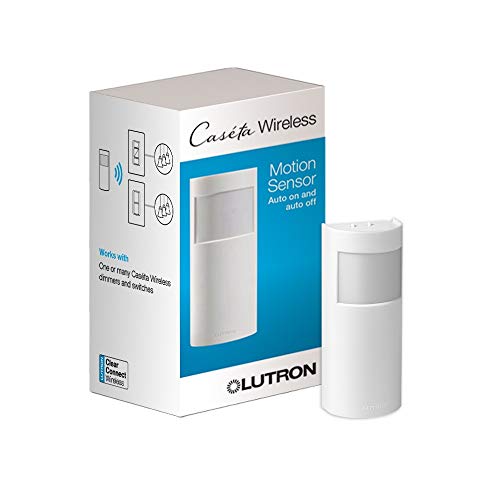
- No wires required and battery powered
- Controls multiple Caseta devices
- Active hours and customizable settings
Best For: Caseta users who want a wire-free motion sensor for whole-room automation
Reliable In-Wall Motion Dimmer
Lutron Maestro LED+ Motion Sensor Dimmer

- No neutral wire required
- Fine-motion sensing helps avoid false shutoffs
- Custom time-out and vacancy-only modes
Best For: Large rooms and workspaces where dependable motion dimming matters most
Motion-Sensing Dimmer for Rooms That Need Local Control

- PIR motion sensor with occupancy and vacancy modes
- Dimmer saves the last-used brightness level
- No neutral wire required for single-pole installs
Best For: Bathrooms, kitchens, and offices needing automatic lighting with manual dimming
Feature-Rich Motion Dimmer for Smart Homes
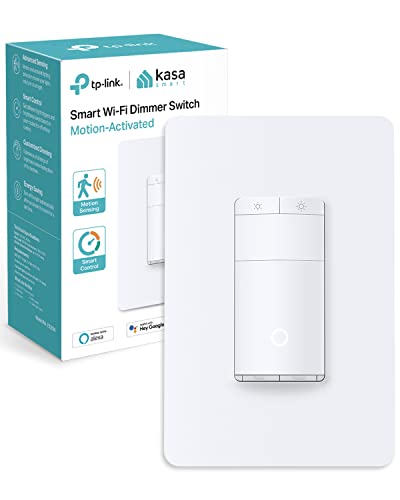
- Motion control with daylight detection and preset delay
- Dimming adjusts from 1% to 100%
- Works with Alexa, Google Assistant, SmartThings, and Kasa
Best For: Single-pole rooms needing connected motion dimming and daylight sensing
Two-Pack Alexa Value Bundle
Amazon Basics Smart Motion Sensor Dimmer Switch 2-Pack

- Two switches for multi-room use
- Alexa app handles motion routines
- Voice, app, and touch control
Best For: Alexa households upgrading multiple single-pole lights
Hands-Free Dimmer for Everyday Rooms – Kasa Smart Motion Sensor Dimmer Switch
If you want smart dimmer switches with motion sensors for spaces where lights should just work, this Kasa option is built for hands-free convenience. It automatically turns lights on when motion is detected, dims from 1% to 100%, and can skip daytime activation with daylight detection.
Best For: Bedrooms, hallways, restrooms, and other rooms where you want motion-based lighting with app and voice control.
Pros:
- Advanced motion detection turns lights on and off automatically.
- Daylight detection helps prevent unnecessary daytime activation.
- Full dimming range from 1% to 100% for flexible lighting control.
- Works with Alexa, Google Assistant, Samsung SmartThings, and the Kasa app.
Cons:
- Requires a neutral wire.
- Needs 2.4 GHz Wi-Fi.
- Best suited for single-pole wiring setups.
Overall, this is a practical pick if you want a motion-aware dimmer that ties into a broader smart home setup. The two-pack format also makes it easier to outfit multiple rooms at once.
Wireless Whole-Room Trigger – Lutron Caseta Motion Sensor
For smart dimmer switches with motion sensors that do not need wiring at the sensor itself, this Lutron Caseta option is designed to control compatible devices after you leave a room. It can be placed almost anywhere, uses a battery, and lets you customize which devices it affects and when it is active.
Best For: Bathrooms, laundry rooms, hallways, garages, and other spots where a wire-free motion sensor is easier to place.
Pros:
- No wires required; battery powered with a typical 10-year battery life.
- Can control multiple Caseta dimmers, switches, fan controls, and Serena shades.
- Active hours feature lets you set when motion triggers are enabled.
- Detects fine motion with a 180° field of view.
Cons:
- Requires a Lutron Caseta Smart Hub.
- Designed for Caseta devices only.
- Uses a CR123A battery.
This is a strong choice if you want flexible placement and room-level automation rather than a replacement wall switch. It works best as part of a Caseta system where you want one sensor to manage several devices.
Reliable In-Wall Motion Dimmer – Lutron Maestro LED+ Motion Sensor Dimmer
If you need smart dimmer switches with motion sensors that behave like a traditional wall switch, this Lutron Maestro model focuses on dependable in-room automation. It turns lights on to a favorite dimmed level, supports fine-motion detection, and can be set for vacancy-only use where required.
Best For: Larger rooms, private offices, bathrooms, and garages where you want motion-activated dimming without needing a neutral wire.
Pros:
- Automatically turns lights on and off at a favorite dimmed level.
- XCT sensing detects fine motion like typing or reading.
- No neutral wire required for installation.
- Can be programmed for vacancy-only mode and custom time-outs.
Cons:
- Coordinating wallplate sold separately.
- Not a full app-driven smart switch experience.
- Multi-location use requires an additional companion device.
This model is a practical pick if you care more about proven motion-dimming performance than app-first features. It is especially appealing for rooms where you want the lights to stay on reliably while someone is still active.
Most Connected Smart Dimmer – Leviton Decora Motion Sensing Dimmer
For smart dimmer switches with motion sensors that fit into a broader connected-home setup, this Leviton model stands out for its platform support and customization. It offers full-range dimming, motion-based lighting, and options like night settings, fade rates, and room response control.
Best For: Users who want motion sensing, dimming, and broad smart home compatibility in one wall switch.
Pros:
- Motion sensing turns lights on automatically and off when no longer needed.
- Full-range dimming with customizable fade rates and preset light levels.
- Works with My Leviton, Alexa, Google Assistant, Apple Home/Siri, SmartThings, and Sonos.
- Supports wired or wire-free 3-way setups.
Cons:
- Neutral wire required.
- Rated for specific load limits, including 300W dimmable LED or CFL.
- Setup may be more involved if you want advanced smart-home integrations.
This is a versatile choice if you want a motion-sensing dimmer that can do more than basic automation. It is especially appealing if your home already mixes Apple, Alexa, Google, or SmartThings devices.
Motion-Sensing Dimmer for Rooms That Need Local Control – TOPGREENER PIR Dimmer Switch
If you want smart dimmer switches with motion sensors without relying on Wi-Fi or an app, this TOPGREENER model is a practical pick. It combines a PIR occupancy/vacancy sensor with manual dimming, so lights can turn on automatically and still be adjusted to the last-used brightness level.
Best For: Bathrooms, kitchens, home offices, and other single-pole spaces where you want motion-triggered lighting with manual dim control.
Pros:
- PIR sensor helps reduce false triggers and covers up to 1200 sq. ft.
- Occupancy and vacancy modes let you choose auto-on/auto-off or manual-on/auto-off behavior.
- Dimmer remembers the last-used light level and fades/brightens gradually.
- No neutral wire required, which can simplify some installations.
Cons:
- Single-pole use only, so it is not meant for 3-way circuits.
- Requires dimmable bulbs and has wattage limits for LED/CFL.
- Configuration controls are under the face cover, so setup is more hands-on than app-based switches.
This is a good choice if you want reliable motion sensing plus local dimming in one switch. It is more of a hardwired convenience upgrade than a connected smart-home product, but it covers the basics well.
Alexa-Only 3-Way Motion Dimmer – Amazon Basics Smart Motion Dimmer
For shoppers comparing smart dimmer switches with motion sensors for a 3-way setup, this Amazon Basics option keeps things simple inside the Alexa ecosystem. It can turn lights on when motion is detected, then switch them off after a preset time created in the Alexa app.
Best For: Alexa users who want a 3-way motion dimmer without adding a separate hub or third-party app.
Pros:
- Works with Alexa only, with voice control and Alexa-app management.
- Supports 3-way dimmer replacement use cases.
- No hub or third-party app required.
- Motion settings can be adjusted remotely through the Alexa app.
Cons:
- Requires neutral wires and 2.4 GHz Wi-Fi.
- Only compatible with Alexa, so it is not a fit for broader smart-home platforms.
- Motion shutoff timing is set through Alexa routines rather than on-device controls.
This is a straightforward upgrade if your home is already built around Alexa and you need motion-triggered dimming in a 3-way location. It trades platform flexibility for simpler setup inside one app.
Feature-Rich Motion Dimmer for Smart Homes – Kasa ES20M Motion Switch
If you want smart dimmer switches with motion sensors that add more control, the Kasa ES20M stands out with daylight detection, adjustable brightness, and app-based routines. It is built for single-pole installs and gives you both automatic motion response and manual smart-home control.
Best For: Single-pole rooms like bedrooms, hallways, and restrooms where you want motion sensing plus app and voice control.
Pros:
- Motion sensing can turn lights on and off automatically with a preset delay.
- Daylight detection helps keep lights off during the day.
- Dimming is adjustable from 1% to 100% for finer control.
- Works with Alexa, Google Assistant, SmartThings, and the Kasa app.
Cons:
- Requires a neutral wire and 2.4 GHz Wi-Fi.
- Single-pole only, so it is not meant for 3-way circuits.
- Supports up to 150W dimmable LED bulbs, which may be limiting for some setups.
This Kasa switch is the most feature-packed of the group for connected-home buyers. If you want automatic motion lighting plus daylight awareness and flexible dimming, it is an easy model to shortlist.
Alexa-Only Motion Dimmer – Amazon Basics Smart Motion Sensor Dimmer Switch
If you want smart dimmer switches with motion sensors for a single-pole light, this Amazon Basics model keeps things simple. It works with Alexa only, connects over 2.4 GHz Wi-Fi, and lets you use the Alexa app to automate motion-triggered lighting and adjust settings remotely.
Best For: Alexa households that want a basic motion-activated dimmer without a hub.
Pros:
- Automatically turns lights on when motion is detected and off after an Alexa routine delay
- No hub or third-party app required for setup and control
- Supports voice control and remote adjustments through the Alexa app
- Comes with guided installation steps in the user manual
Cons:
- Only compatible with Alexa, not other smart home platforms
- Requires neutral wires and 2.4 GHz Wi-Fi
- Designed for single-pole use only
Overall, this is a straightforward pick if your home already runs on Alexa and you want motion sensing plus dimming in one switch. It focuses on core automation rather than broad ecosystem support, which may be exactly what many buyers need.
No-Neutral Motion Dimmer – GE CYNC Smart Dimmer Light Switch & Motion Sensor
This GE CYNC option is built for smart dimmer switches with motion sensors when you want broad convenience and no neutral wire requirement. It uses Bluetooth and Wi-Fi, works with Alexa and Google Home, and can trigger lights based on motion and ambient light levels through the Cync app.
Best For: Homes without a neutral wire that want motion-based dimming and voice control.
Pros:
- No neutral wire required, which helps with older electrical setups
- Motion and ambient light detection can automate on/off behavior
- Works with Google Home and Amazon Alexa for voice control
- Remote dimming, scheduling, and scenes are available in the Cync app
Cons:
- Requires a ground wire and 2.4 GHz Wi-Fi
- Bulb compatibility should be checked for pre-1980s homes
- Limited to supported Cync/C by GE ecosystem devices and bulbs
For buyers who need a no-neutral install, this is the most flexible of the group on wiring. Its motion and ambient light sensing make it a practical choice for energy-conscious rooms, especially when paired with voice assistants.
Two-Pack Alexa Value Bundle – Amazon Basics Smart Motion Sensor Dimmer Switch 2-Pack
If you are outfitting more than one room, this 2-pack of smart dimmer switches with motion sensors gives you the same Alexa-based automation as the single-pack version in a value-friendly bundle. It uses 2.4 GHz Wi-Fi, requires neutral wires, and lets you manage motion settings and dimming from the Alexa app.
Best For: Buyers upgrading multiple single-pole lights at once in an Alexa-only setup.
Pros:
- Includes two switches for multi-room or multi-light projects
- Motion detection can turn lights on automatically and off after a preset routine
- No hub or third-party app required, only the Alexa app
- Supports voice, app, and touch control
Cons:
- Alexa only, so it will not fit mixed-platform smart homes
- Requires neutral wires and 2.4 GHz Wi-Fi
- Single-pole design limits installation use cases
This 2-pack makes the most sense when you already know Alexa is your control center and want to cover more than one switch location. It is essentially a convenient way to scale the same motion-activated dimming setup across the home.
How We Picked the Best Smart Dimmer Switches with Motion Sensors
We prioritized Smart Dimmer Switches with Motion Sensors that balance reliability, easy setup, and practical features homeowners actually use. That means motion detection quality, dimming performance, app and voice compatibility, wiring requirements, and support for common room types like hallways, bathrooms, closets, and living spaces.
We also looked for products that fit different installation scenarios, including no-neutral homes, neutral-wire setups, and multi-way wiring needs.
Quick Comparison
If you want the simplest setup, look first at models that match your existing wiring. No-neutral switches are often easier for older homes, while neutral-required options may offer broader smart-home support and more stable performance. For basic automation, a motion-only dimmer may be enough; for whole-home convenience, app control and voice assistant compatibility are worth the upgrade.
Key Buying Factors for Smart Dimmer Switches with Motion Sensors
Wiring Compatibility
Check whether your box has a neutral wire, and whether you need single-pole or 3-way support. This is the most important filter because an otherwise great switch can be unusable if the wiring does not fit.
Motion Behavior and Modes
Look for occupancy and vacancy modes if you want the light to turn on automatically and either turn off after a delay or only when you manually activate it. Adjustable timeout settings are helpful in bedrooms, bathrooms, and family rooms.
Dimming Range and Bulb Support
Not every dimmer handles every LED bulb well. Confirm LED wattage limits and bulb compatibility to avoid flicker, buzzing, or limited dimming range.
Smart Home Integration
If you already use Alexa, Google Assistant, or an app-based ecosystem, choose a switch that fits it cleanly. Some options work broadly across platforms, while others are more limited but simpler to use.
Installation and Everyday Use
For renters or quick upgrades, easy installation and straightforward controls matter. For homeowners, better automation settings and room-specific tuning may be worth paying more for.
Who Should Buy Which Smart Dimmer Switches with Motion Sensors?
Choose a no-neutral model if your home wiring is older or you want an easier retrofit. Choose a neutral-wire smart dimmer if you want broader compatibility and are comfortable with a more traditional install. If your priority is basic hands-free convenience, a motion dimmer with simple occupancy control is usually enough. If you want the best long-term smart-home experience, pick one of the smarter app-connected options with strong assistant support and flexible scheduling.
In short, the best Smart Dimmer Switches with Motion Sensors are the ones that fit your wiring, your room, and the way you actually use the lights.
