

Smart displays can do more than show the weather or play music—they can become the command center for your connected home. If you want simpler control across rooms, a Matter-compatible display can help unify lighting, locks, sensors, and routines.
In this roundup, we focus on smart displays compatible with Matter that balance screen size, voice assistant support, smart home control, and everyday usability. The goal is to help you choose a display that fits how you actually live.
Best 10 Smart Displays Compatible with Matter Picks for 2026
Wall-Mount Smart Home Control Panel

- Built-in hub supports Matter and Thread devices
- Custom dashboard for lights, cameras, and routines
- Wall-mount design suits a permanent control panel setup
Best For: Alexa users who want a dedicated wall-mounted Matter control panel
Compact Google Smart Display

- 7-inch screen for compact placement
- Voice and touchscreen control for smart devices
- Handles music, photos, timers, and reminders
Best For: Small-space Google Assistant smart home control
Large Full-HD Smart Display

- 11-inch Full-HD screen with extra viewing area
- Built-in hub manages thousands of Alexa devices
- Good mix of video calls, media, and home control
Best For: Alexa households wanting a larger display with hub features
Security-Focused Smart Display

- Automatic alerts for doorbell and camera events
- Shows four live feeds on one screen
- Local event downloads enable instant playback
Best For: Homes built around eufy cameras and doorbell monitoring
Kitchen Hub
Amazon Echo Show 15 (newest model)

- 15.6-inch Full HD display for shared spaces
- Built-in Fire TV for streaming and entertainment
- Widgets and smart home dashboard keep families organized
Best For: Families wanting a large all-in-one kitchen display
DIY Dashboard
reTerminal E1002 7.3" Color E Ink Display
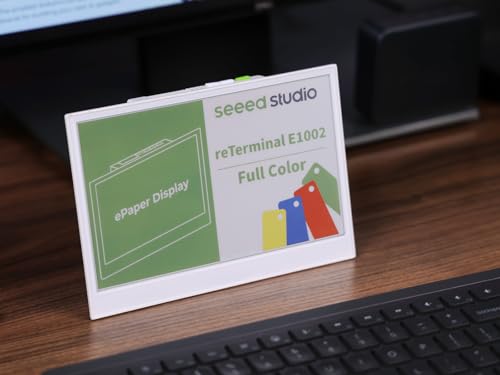
- Color E Ink screen stays clear in bright light
- Up to 3 months of battery life in deep-sleep mode
- Works with Home Assistant, ESPHome, and maker tools
Best For: Makers building low-power smart home dashboards
Compact Display
Amazon Echo Show 5 (newest model)
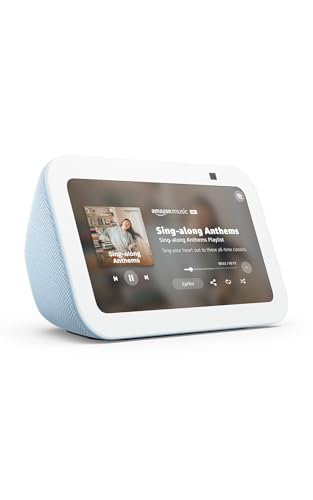
- Compact 5.5-inch display for small spaces
- Controls compatible lights and thermostats
- Improved bass and clearer vocals for media
Best For: Small rooms and bedside smart display use
Matter-ready art display
SMARTWIZ+ art 7.3" full-color E Ink frame

- Matter certified with Wi‑Fi connectivity
- Full-color Spectra6 E Ink display
- Ultra-low power, battery-powered design
Best For: Decor-focused buyers who want a compact smart display for art and messages
Wall control panel
Shelly Wall Display XL 10.1-inch smart panel
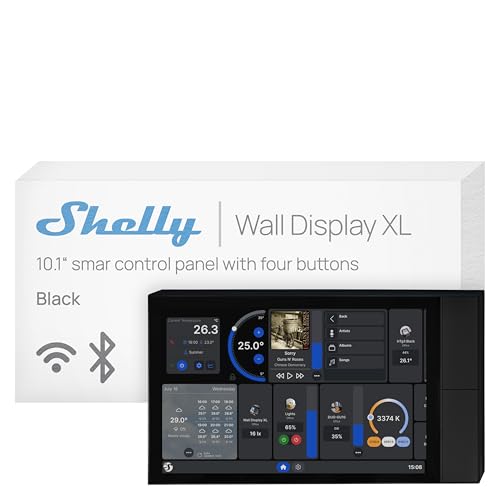
- 10.1-inch touchscreen wall panel
- Built-in relay and 4 programmable buttons
- Alexa, Google, HomeKit, and Home Assistant support
Best For: Wall-mounted smart-home control in homes, hotels, or offices
Family dashboard pick
DAKboard 22-inch touchscreen wall display

- 21.5-inch 1080p IPS touchscreen
- Customizable dashboard for calendars and chores
- Supports photos plus some smart-home controls
Best For: Families wanting a wall-mounted organizer with smart-home features
Wall-Mount Smart Home Control Panel – Echo Hub for Alexa Homes
If you want one of the most practical smart displays compatible with Matter, the Echo Hub is built to act like a dedicated control center for your home. It combines a touchscreen dashboard with Alexa voice control and a built-in smart home hub, so you can manage lights, plugs, cameras, locks, thermostats, and routines from one place.
Best For: Wall-mounted smart home control in an Alexa-based home with Matter and Thread devices.
Pros:
- Built-in hub supports WiFi, Bluetooth, Zigbee, Matter, Sidewalk, and Thread devices.
- Customizable dashboard makes it easy to access widgets, cameras, and routines quickly.
- Works with thousands of Alexa-compatible devices, including locks and thermostats.
- Can be wall mounted near an outlet for a cleaner, permanent setup.
Cons:
- Music playback requires connecting your preferred external speaker.
- Power-over-Ethernet adapter and tabletop stand are sold separately.
For buyers focused on control rather than media, the Echo Hub is one of the most useful options here. Its Matter support and built-in hub make it especially appealing if you want a central panel that keeps smart home management simple and organized.
Compact Google Smart Display – Nest Hub 7-Inch Chalk
Google Nest Hub 7” Smart Display with Google Assistant (1st Gen) - Chalk (Bulk Packaging)
Check Price On AmazonThe Google Nest Hub is a compact smart display compatible with Matter-friendly Google Assistant ecosystems for simple voice and touch control. It is aimed at everyday household tasks, from checking weather and reminders to managing compatible smart lights, cameras, thermostats, plugs, and speakers from the screen or by voice.
Best For: A small, affordable Google Assistant smart display for kitchens, desks, and nightstands.
Pros:
- 7-inch display keeps the footprint small and easy to place in tight spaces.
- Controls compatible smart home devices with voice commands or touchscreen input.
- Handles entertainment and daily tasks like music, photos, timers, and reminders.
- Language can be changed to English after setup through the Google Home app or device settings.
Cons:
- This is the 1st Gen Korean/international version, not a standard U.S. retail model.
- Bulk packaging may be less appealing if you want a full retail presentation.
If you mainly want a small screen for smart home control and everyday help, this Nest Hub stays straightforward. It is a good fit for users who prefer Google Assistant and do not need a large display or advanced home-hub hardware.
Large Full-HD Smart Display – Echo Show 11 for Alexa+
Among smart displays compatible with Matter, the Echo Show 11 stands out if you want a bigger screen for home control and entertainment. It adds a built-in smart home hub, so you can pair and manage thousands of Alexa-compatible devices directly from the display or by voice, while also using it for video calls, recipes, and photo slideshows.
Best For: Users who want a large Alexa smart display with hub features and room to spread out content.
Pros:
- 11-inch Full-HD touchscreen offers 60% more viewing area than Echo Show 8 (2025 release).
- Built-in smart home hub supports control of thousands of Alexa-compatible devices.
- Spatial audio, up to 2x bass, and a centered auto-framing camera improve media and calls.
- Supports routines and smart home actions through the display, voice, and Omnisense features.
Cons:
- Large size may be more than you need for a bedside table or tight counter space.
- Some advanced features are tied to Alexa+ experiences.
This is the best pick if screen size matters as much as smart home control. It gives you a more immersive display for recipes, calls, and video while still serving as a capable Matter-ready hub for everyday automation.
Security-Focused Smart Display – eufy Smart Display E10
If your priority is security monitoring, the eufy Smart Display E10 is a specialized option among smart displays compatible with Matter-style connected home setups, though its focus is clearly on eufy security devices. It can show live feeds automatically on doorbell rings or camera detections, display four views at once, and keep downloaded events ready for instant playback.
Best For: Monitoring doors, cameras, and home security activity from one dedicated touchscreen.
Pros:
- Instant door alerts automatically bring up live feeds and voice alerts.
- Four-view screen lets you monitor multiple camera feeds at the same time.
- Historical events are downloaded locally for instant playback without buffering.
- Daily reports summarize key security events using facial and package recognition.
Cons:
- Its feature set is centered on eufy security hardware rather than broad smart home control.
- Compatibility details are limited to the supplied notes, so it is less universal than Alexa or Google displays.
The E10 makes the most sense if you want a dedicated security dashboard instead of a general-purpose smart display. It is especially useful for households that want fast access to camera feeds and door alerts without waiting for cloud playback.
Kitchen Hub – Amazon Echo Show 15 (newest model)
If you want a large smart display compatible with Matter-style home control workflows and built for everyday family use, the Echo Show 15 is aimed squarely at the kitchen or main living area. Its 15.6-inch Full HD screen, customizable widgets, Fire TV apps, and smart home dashboard make it more than just a display—it’s a command center for organization and entertainment.
Best For: Families who want a big wall-friendly display for schedules, streaming, smart home controls, and shared photo viewing.
Pros:
- Large 15.6-inch Full HD display is easy to read from across the room
- Customizable widgets help surface calendars, to-do lists, weather, and smart home info
- Built-in Fire TV adds access to major streaming apps like Prime Video, Netflix, and YouTube
- Smart home dashboard and live camera viewing put controls in one place
Cons:
- Designed more as a hub than a compact bedside display
- Subscription may be required for some streaming services
- Its feature set is broad, so it may be more display than some buyers need
This is the strongest pick if you want a smart display that doubles as a family organizer and entertainment screen. The privacy shutter and mic/camera-off button are also useful touches for a device that may live in a high-traffic part of the home.
DIY Dashboard – reTerminal E1002 7.3" Color E Ink Display
The reTerminal E1002 is a smart display compatible with Matter-adjacent DIY home automation setups in the sense that it’s built to integrate with modern smart home platforms like Home Assistant and ESPHome. Instead of focusing on media, it’s designed for dashboards, reminders, and live information boards, with a color E Ink screen that stays readable in bright light and uses very little power.
Best For: Makers and smart home tinkerers who want a low-power dashboard panel for Home Assistant, ESPHome, or custom builds.
Pros:
- 7.3-inch color E Ink Spectra 6 screen stays readable in bright light
- Ultra-low power design can run up to 3 months in deep-sleep mode
- No-code SenseCraft HMI makes dashboard creation easier
- Supports Home Assistant, ESPHome, and maker-focused expansion options
Cons:
- Not a full-featured entertainment smart display
- Best suited to dashboards and information boards rather than voice-first use
- Requires more setup than a consumer display out of the box
If your priority is a flexible information panel rather than a media screen, this model stands out. The combination of long battery life, E Ink readability, and software/platform compatibility makes it especially appealing for custom smart home projects.
Compact Display – Amazon Echo Show 5 (newest model)
The Echo Show 5 is a compact smart display compatible with Matter-era smart home routines when you want voice control, quick status checks, and a small footprint. Its 5.5-inch screen is better suited to a nightstand or desk than a busy wall, but it still covers the essentials: weather, compatible cameras, video calls, music, and simple smart device control.
Best For: Bedrooms, desks, and small spaces where a compact Alexa display is more useful than a larger hub.
Pros:
- Small footprint fits easily on nightstands and desks
- Deeper bass and clearer vocals improve music and media playback
- Can control compatible smart devices like lights and thermostats
- Built-in camera supports video calls and home check-ins
Cons:
- 5.5-inch screen is relatively small for multitasking
- Less suited to family command-center use than larger smart displays
- Best as a secondary display rather than a main hub
This is the practical choice when you want the benefits of a smart display without giving up much space. It’s focused on everyday convenience, with privacy controls and a camera shutter adding peace of mind.
Matter-ready art display – SMARTWIZ+ art 7.3" full-color E Ink frame
For shoppers comparing smart displays compatible with Matter, SMARTWIZ+ art takes a different route: it focuses on calm, art-first home display rather than a traditional dashboard. The 7.3-inch full-color E Ink screen is meant for photos, artwork, and messages, with low power use and a paper-like look that fits well in living spaces, bedrooms, or entryways.
Best For: Buyers who want a compact, decor-friendly smart display for sharing art, notes, and personal messages.
Pros:
- Full-color Spectra6 E Ink display with a paper-like texture
- Matter certified and Wi-Fi connected for smart-home compatibility
- Ultra-low power design with battery-powered operation
- App-controlled sharing from a smartphone, including custom artwork
Cons:
- Small 7.3-inch screen limits how much content it can show
- Not a general-purpose touchscreen dashboard; controls are button-based
- Mesh Wi-Fi setups may need hotspot-based initial setup in some cases
Overall, this is a strong pick if your idea of a smart display is more about visual ambiance than a wall-mounted control panel. It stands out for its Japanese design approach and energy-efficient E Ink presentation, while still fitting into a Matter-compatible smart home setup.
Wall control panel – Shelly Wall Display XL 10.1-inch smart panel
If you want a large smart display compatible with Matter-style smart-home control workflows, the Shelly Wall Display XL Black is built as a dedicated wall panel rather than a media tablet. Its 10.1-inch touchscreen, built-in relay, and four customizable buttons are aimed at quick control of lights, HVAC, scenes, and other devices from one fixed location.
Best For: Homes, hotels, or offices that want a wall-mounted control panel for Shelly devices and automations.
Pros:
- Large 10.1-inch touchscreen designed for wall installation
- Built-in 5A relay plus four customizable buttons for instant control
- Works with Alexa, Google, HomeKit, and Home Assistant
- Energy monitoring and remote management through the Shelly Smart Control App
Cons:
- Neutral wire required for installation
- Primarily built around Shelly ecosystems and integrations
- Not positioned as a general entertainment tablet or family organizer
This model makes the most sense if you want a purpose-built in-wall smart control point with plenty of flexibility for automations. It is less about browsing content and more about giving you immediate, app-free access to the devices and scenes you use most.
Family dashboard pick – DAKboard 22-inch touchscreen wall display
For buyers looking at smart displays compatible with Matter-adjacent home control, the DAKboard Touchscreen Wall Display 22″ is more of a shared household dashboard than a voice assistant screen. It combines calendars, weather, chore lists, photos, and smart-home controls into a customizable wall display that can be tailored to how your family actually organizes the day.
Best For: Families who want a large customizable wall dashboard for schedules, reminders, and smart-home tasks.
Pros:
- Large 21.5-inch 1080p touchscreen with a bright IPS panel
- Drag-and-drop layout for calendars, weather, chores, photos, and more
- Works with Google Calendar, iCloud, OneDrive, Trello, To-Doist, Amazon Photos, and others
- Can directly control smart home devices through supported platforms like Home Assistant and SmartThings
Cons:
- Listed smart home compatibility says it is not smart home compatible
- Large size makes it better suited for a dedicated wall space
- Most useful when you already rely on supported calendar and cloud services
DAKboard is the most lifestyle-focused option here, especially if your priority is organizing family information on one display. It is less of a pure smart-home controller and more of a central command center for schedules, tasks, and visual information.
How We Picked These Smart Displays Compatible with Matter
We prioritized screens that can serve as practical home hubs, not just entertainment devices. That means looking at ecosystem support, smart home control quality, display size and readability, mounting or placement flexibility, and whether the device makes daily tasks easier for a household.
We also favored models that fit different use cases, from compact bedside units to wall-mounted dashboards and larger kitchen or family-command displays.
Quick Comparison
Smaller displays are usually better for nightstands, desks, or quick voice-and-touch interactions. Mid-size panels tend to work best for hallway and kitchen control, while larger screens are better for shared family calendars, camera views, and multi-person households. If you want Smart Displays Compatible with Matter for whole-home control, think first about where the screen will live and how often you will touch it.
Key Buying Factors for Smart Displays Compatible with Matter
Assistant and Platform Support
Check whether the display works best with Alexa, Google, HomeKit, or a broader dashboard platform. Matter improves device interoperability, but the display still needs the right ecosystem support to deliver a smooth experience.
Screen Size and Placement
A 5- to 8-inch display is convenient for bedrooms and desks. A 10- to 15-inch panel is better for kitchens, entryways, and shared spaces. Larger wall displays can show more at once, but they need more space and usually work best when mounted permanently.
Control Versus Content
Some smart displays are built mainly for voice assistance and quick touch control. Others are more like dashboards for calendars, photos, security feeds, and home automation. Choose based on whether you want a simple controller or a central information screen.
Connectivity and Device Access
Look for reliable Wi-Fi, responsive touch controls, and fast access to cameras, routines, and scenes. If you have many connected devices, prioritize displays that make it easy to see and manage everything in one place.
Who Should Buy Which Smart Displays Compatible with Matter?
If you want a compact everyday assistant, choose a smaller tabletop model. If your priority is whole-home visibility, a larger kitchen or wall display makes more sense. For households focused on security, a hub with quick camera access is especially useful. For people building a broader smart home dashboard, choose a display that works well with your preferred platform and can grow with your setup.
The best Smart Displays Compatible with Matter are the ones that fit your room, your ecosystem, and your routine—not just the ones with the biggest screen.
