

Choosing the right smart display can make everyday routines easier, especially for older adults who want clear visuals, voice help, and simple communication. The best options balance readability, reliability, and features that actually get used.
Below, we focus on smart displays for elderly users that can help with video calls, medication reminders, calendars, and hands-free assistance without adding unnecessary complexity.
Best 10 Smart Displays for Elderly Users Picks for 2026
Bedside Smart Clock Display
Amazon Echo Spot for nightstands and quick glances
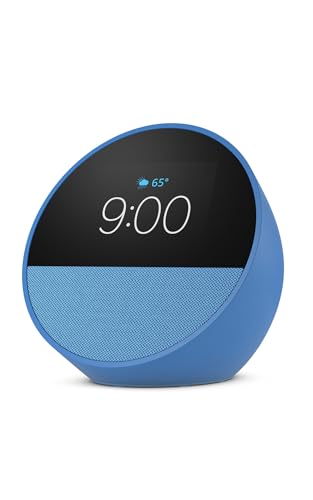
- Clock-style screen shows time, weather, and music info
- Alexa routines can wake users gently with light and sound
- Compact design fits bedrooms, kitchens, and small desks
Best For: Seniors who want a simple bedside smart display for alarms and reminders
Large Screen Family Display
Google Nest Hub Max with 10-inch screen

- 10-inch HD touchscreen is easier to read at a glance
- Built-in Nest Cam supports video calls and check-ins
- Handles smart home control and entertainment
Best For: Older adults and families who want a large display for calls and home control
All-Around Smart Display
Echo Show 8 with voice and camera features

- 8.7-inch HD screen gives a clear view for daily use
- Centered camera and noise reduction support video calls
- Built-in smart home hub handles lights and thermostats
Best For: Seniors who want one versatile display for calls, reminders, and home control
Large Planner Calendar
Missfly 15.6-inch smart wall calendar

- Large 15.6-inch touchscreen with adjustable font sizes
- Built-in camera supports stable video calls
- Medication and task reminders help with daily routines
Best For: Older adults who need a readable calendar for reminders and family connection
Family Hub Display
Echo Show 15 Full HD Smart Display

- 15.6-inch Full HD screen for easy visibility
- Widgets show calendars, weather, to-do lists, and more
- Built-in Fire TV and video calling features
Best For: Seniors who want a large all-in-one home hub
Reminder Clock
Large Day and Date Clock for Seniors

- 7-inch HD display with large time, date, and day readouts
- 20 alarms plus 20 custom reminders for routines
- Adjustable brightness, sleep mode, and themes
Best For: Seniors who need a clear clock with medication reminders
Compact Smart Display
Echo Show 5 with Clearer Sound
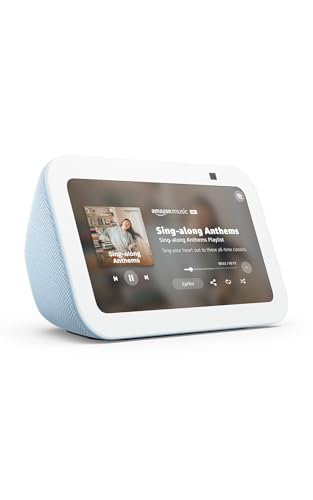
- Compact 5.5-inch display for bedside or desk use
- Shows weather, news, photos, and camera feeds
- Supports video calls, smart home control, and music
Best For: Seniors who want a small Alexa display for everyday tasks
Family Command Center
15.6" Smart Calendar Wall Touch Screen

- Syncs with Google, Outlook, and iCloud
- Large glare-free touchscreen for wall or desk use
- Includes photo frame, meal planner, and chore chart
Best For: Families wanting a shared organizer with easy-to-see scheduling for older adults.
Senior-Friendly Photo Hub

- Auto-answers video calls for hands-free use
- Family can share photos and videos remotely
- Adds captions, reminders, and weather updates
Best For: Seniors who want effortless video calls and photo sharing from family.
Best Simple Pick
10.1" ClearTime Digital Wall Calendar Clock

- Spoken medication and appointment reminders
- Large bold display with wide viewing angle
- Auto-syncs time, DST, and weather over Wi-Fi
Best For: Seniors needing a readable bedside clock with voice alerts and reminders.
Bedside Smart Clock Display – Amazon Echo Spot for nightstands and quick glances
If you’re comparing smart displays for elderly users, the Echo Spot is a practical pick for bedrooms, kitchens, or desks where a full-size screen is unnecessary. Its customizable clock display, Alexa routines, and easy voice control make it useful for checking time, weather, reminders, and smart home devices at a glance.
Best For: Seniors who want a simple bedside smart display for alarms, reminders, and basic Alexa controls.
Pros:
- Clear clock-style display shows time, weather, and song titles at a glance
- Alexa routines can gently wake users with music and gradual light
- Touch screen can dim lights and control compatible smart home devices
- Compact size works well on nightstands and small spaces
Cons:
- Smaller display than larger smart displays
- More focused on clock and assistant features than video viewing
- Best suited to basic everyday tasks rather than a full home hub setup
For older users who mainly need a readable clock, voice assistant, and simple home controls, the Echo Spot keeps the experience straightforward. It is a sensible choice when you want convenience without a large interface.
Large Screen Family Display – Google Nest Hub Max with 10-inch screen
For shoppers looking at smart displays for elderly users, the Nest Hub Max offers a larger screen that is easier to read from across a room. Its 10-inch HD touchscreen, smart home features, and built-in Nest Cam make it a strong option for staying connected and managing everyday tasks.
Best For: Older adults and families who want a large display for video calling, smart home viewing, and simple entertainment.
Pros:
- 10-inch HD touchscreen is easy to see and use
- Built-in Nest Cam supports staying in touch and checking in
- Works as a smart home center for management and control
- Useful for entertainment alongside everyday assistance
Cons:
- Larger footprint may take up more counter or shelf space
- Heavier than compact bedside displays
- More feature-rich than a simple calendar or clock device
The Nest Hub Max makes sense when visibility matters and a bigger screen is preferred. It combines communication and home control in one display, which can be helpful for households supporting an older family member.
All-Around Smart Display – Echo Show 8 with voice and camera features
Among smart displays for elderly users, the Echo Show 8 balances a readable screen with enough features for daily convenience. The 8.7-inch HD display, spatial audio, centered auto-framing camera, and smart home hub support make it a versatile choice for calls, photos, recipes, and device control.
Best For: Seniors who want an all-around smart display for video calls, reminders, photos, and smart home management.
Pros:
- 8.7-inch HD touchscreen offers more viewing area than the prior Echo Show 8
- Centered, auto-framing camera supports natural video calls
- Built-in smart home hub helps control lights, thermostats, and more
- Photo slideshow and voice features add everyday usefulness
Cons:
- Not as compact as a simple smart clock
- Feature set may be more than some users need
- Best results depend on Alexa-compatible devices and services
This is a well-rounded choice if you want one display to handle several daily tasks without going too large. It should suit older users who value both visibility and flexibility.
Large Planner Calendar – Missfly 15.6-inch smart wall calendar
If your goal is specifically smart displays for elderly users, the Missfly wall calendar stands out as a schedule-first option. Its large 15.6-inch touchscreen, adjustable font sizes, voice control, video calling, and medication reminders are designed to make daily organization easier for seniors and parents.
Best For: Older adults who need a large, easy-to-read calendar for reminders, medication alerts, and family connection.
Pros:
- 15.6-inch screen with adjustable large text for easier reading
- Built-in camera supports stable video calls with family
- Can send remote task reminders from a smartphone
- Medication alerts help users stay on schedule with doses
Cons:
- More specialized for planning than general smart display use
- Wall-calendar format may not suit every room or setup
- Focuses on organization rather than entertainment features
For seniors who need a clear daily planner more than a streaming display, this model is highly practical. It puts reminders and visibility first, which can make it easier to support independent living.
Family Hub Display – Echo Show 15 Full HD Smart Display
If you want one of the most capable smart displays for elderly users, the Echo Show 15 is best approached as a large, easy-to-see household command center. Its 15.6-inch Full HD screen, customizable widgets, and voice-enabled smart home controls make it useful for staying organized, checking the weather, viewing photos, and making video calls without juggling multiple devices.
Best For: Seniors who want a large-screen display for calendars, reminders, video calls, and photo viewing in one central place.
Pros:
- Large 15.6-inch 1080p display is easier to read from across a room.
- Customizable widgets can show calendars, to-do lists, weather, and smart home info at a glance.
- Built-in Fire TV adds access to streaming apps like Prime Video, Netflix, YouTube, and Apple TV.
- Centered camera with auto-framing, 3.3x zoom, and noise reduction supports more natural video calling.
Cons:
- Largest and most feature-packed option here, so it may be more than some users need.
- Best use cases depend on Alexa and compatible smart home devices.
For an older adult who benefits from a bigger screen and a highly visible home dashboard, this model offers the most flexibility of the group. It works especially well when the goal is combining organization, entertainment, and communication in one place.
Reminder Clock – Large Day and Date Clock for Seniors
This is one of the most practical smart displays for elderly users when the main priority is clear time awareness and reminders. The 7-inch display shows the time, date, day of the week, and time-of-day icons in large text, while the alarm and reminder system is built for medication, appointments, and daily routines.
Best For: Seniors who need a simple, highly readable clock with reminders for medication, appointments, and daily tasks.
Pros:
- Large 7-inch HD screen shows time, date, day, and time periods in clear text and icons.
- Up to 20 alarms and 20 custom reminders help support medication and routine management.
- Adjustable brightness, sleep mode, and multiple themes make it easier to use day or night.
- Battery backup preserves settings during power cuts while AC power keeps it running.
Cons:
- Focused on clocks and reminders rather than broader smart display features like video calls or streaming.
- Requires outlet power for normal use.
If the priority is clarity, structure, and reminder support, this clock is a strong fit. It keeps the interface straightforward while offering enough customization to suit different vision needs and daily schedules.
Compact Smart Display – Echo Show 5 with Clearer Sound
The Echo Show 5 is a smaller smart display for elderly users who want Alexa features without a large footprint. It can show the time, weather, news, photos, and video calls on a 5.5-inch screen, while also handling smart home controls, camera viewing, and music playback in a compact bedside or desk-friendly design.
Best For: Seniors who want a compact Alexa display for bedside use, calls, photos, and basic smart home control.
Pros:
- Compact 5.5-inch screen fits easily on a nightstand, desk, or side table.
- Can show news, weather, song titles, photos, and compatible camera feeds at a glance.
- Built-in camera supports video calls and checking in on home or front door views with compatible devices.
- Rotating photo slideshow and voice control add everyday convenience.
Cons:
- Smaller screen may be harder to read than larger smart displays.
- Best features still depend on Alexa-compatible devices and services.
For older adults who prefer a smaller, less intrusive device, this model balances ease of use with useful everyday features. It is a good option when space is limited but basic visual access to information still matters.
Family Command Center – 15.6" Smart Calendar Wall Touch Screen
If you want smart displays for elderly users that also help the whole household stay organized, this 15.6-inch wall touch screen is built to do more than show the date. It combines a family calendar, meal planner, chore chart, and digital photo frame, with Wi‑Fi syncing for Google, Outlook, and iCloud so everyone stays aligned in real time.
Best For: Multi-generational families who want one shared screen for schedules, reminders, and photos.
Pros:
- Real-time sync with Google, Outlook, iCloud, and other platforms
- Large 15.6-inch glare-free HD touchscreen with flexible wall or desktop mounting
- Works as a digital photo frame with 32GB storage and AI photo restoration
- No subscription fees for the calendar features
Cons:
- More of a household organizer than a purpose-built senior reminder device
- Batteries are not included
- Some families may not need the chore chart and meal-planning features
This is a strong choice if you want a shared family hub that can still be easy for grandparents to view at a glance. Its value is in bringing schedules, photos, and planning into one visible place without adding monthly costs.
Senior-Friendly Photo Hub – 15.6" ViewClix Smart Frame
For smart displays for elderly users that focus on staying connected, the ViewClix Smart Frame is designed around simple video calls and remote photo sharing. It lets family members send photos and videos from a phone or computer, and it can auto-answer calls for a hands-free experience on the senior side.
Best For: Grandparents who want an easy, private way to receive photos, videos, reminders, and video calls.
Pros:
- Auto-answer video calling for hands-free use by seniors
- Remote sharing from the free mobile app or web portal
- Can display captions, scheduled reminders, and weather updates
- Private share list and encrypted video calls
Cons:
- Premier membership is required after the included month
- Touchscreen input is limited; control is via buttons and remote
- Best features depend on ongoing app and membership use
This frame is a good fit if your priority is simple family connection rather than a full calendar system. The hands-free calling and remote management make it especially practical for seniors who should not have to learn much to stay in touch.
Best Simple Pick – 10.1" ClearTime Digital Wall Calendar Clock
Among smart displays for elderly users, this Dekala ClearTime model is built most directly for day-to-day support. Its large 10.1-inch HD IPS touchscreen shows bold day, date, and time information, and it adds voiced medication reminders, alarms, and automatic DST syncing over Wi‑Fi.
Best For: Older adults, visually impaired users, and caregivers who need a readable reminder clock with spoken alerts.
Pros:
- Large 10.1-inch HD IPS display with a wide viewing angle
- Voiced medication reminders and repeat notifications
- Wi‑Fi auto-sync for time and daylight saving changes
- Auto-dimming and adjustable volume for bedroom use
Cons:
- Tabletop design may not suit users who want a wall-mounted display
- Focuses on reminders and timekeeping more than family content sharing
- Screen size is smaller than some competing smart displays
If the main goal is clarity and dependable reminders, this is the most senior-focused option in the group. The spoken alerts, bright readable layout, and weather/time automation make it especially useful for routines that need consistency.
How We Picked the Best Smart Displays for Elderly Users
We focused on displays that are easy to read, easy to hear, and easy to control. That means larger text options, responsive touchscreens, dependable voice assistants, and features that support daily independence, like reminders and video calling.
We also gave priority to models that are practical in real homes. A good smart display for elderly users should fit a nightstand, kitchen counter, or wall space, while keeping setup and day-to-day use straightforward for both the user and family members.
Quick Comparison: What These Smart Displays Do Best
Some picks are better for video calls and photo sharing, while others are built around schedules, medication reminders, and family coordination. Smaller tabletop models tend to work well for bedrooms and offices, while larger wall-mounted screens are better for calendars, chores, and household planning.
If your main goal is communication, look for strong camera and calling features. If your priority is organization, choose a larger calendar-style display with clear day, date, and reminder layouts. For all-around ease, voice control and simple menus matter as much as screen size.
Key Buying Factors for Smart Displays for Elderly Users
Readability
Look for large text, bright screens, and easy-to-understand layouts. High contrast and adjustable brightness are especially helpful in bedrooms, kitchens, and low-light spaces.
Voice Control and Simplicity
Voice assistants can reduce frustration, but only if commands are intuitive and reliable. The best Smart Displays for Elderly Users respond clearly and don’t require complicated navigation for common tasks.
Reminders and Daily Support
Medication alerts, appointment prompts, alarms, and calendar sync are valuable for independence. If the user manages multiple daily tasks, a display with customizable reminders is worth prioritizing.
Calling and Family Connection
For staying in touch, video calling and photo sharing can make a big difference. Some models are better for frequent family contact, while others are more focused on organization than communication.
Placement and Size
Choose a size that matches the room and viewing distance. Compact models suit nightstands; larger 10-inch to 15.6-inch screens are better for wall mounting or shared family spaces.
Who Should Buy Which Smart Displays for Elderly Users?
If you want a simple bedside helper, a compact smart display or digital clock-style model is often the easiest choice. If the main need is family communication, choose a screen with strong video calling and photo sharing.
For households that need scheduling help, wall-mounted calendar displays are usually the most useful. And if you want a flexible assistant for both entertainment and daily tasks, an Alexa- or Google-powered display may be the best fit.
In short, the right smart display for elderly users depends on whether the priority is reminders, calls, organization, or all-around convenience. Pick the one that matches the user’s routines first, not just the longest feature list.
