

Smart displays with built-in cameras can do a lot more than show the weather or play videos. The best models help with video calls, home monitoring, family coordination, and even team collaboration.
This 2026 roundup focuses on practical choices for homes, offices, and classrooms, with options that balance screen size, camera quality, smart features, and ease of use.
Best 10 Smart Displays with Built-In Cameras Picks for 2026
Kitchen Hub & Entertainment Center

- 15.6-inch Full HD smart display
- Built-in Fire TV streaming support
- Centered camera with privacy shutter
Best For: Families wanting a large organization hub with video calls and entertainment
Interactive Meeting Wall
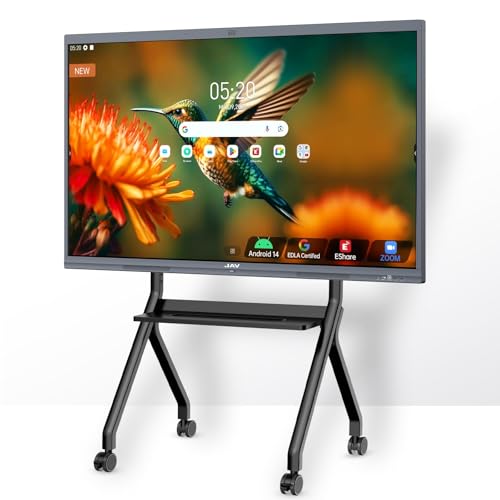
- 75-inch 4K interactive whiteboard
- 48MP AI camera with auto-framing
- Zoom, Meet, Teams, and Webex support
Best For: Classrooms and offices needing a large interactive conferencing display
Compact Video Assistant
Echo Show 5 with Built-In Camera

- Compact 5.5-inch smart display
- 2 MP camera for calls and check-ins
- Privacy shutter and camera-off button
Best For: Small spaces and personal use with basic video calling and monitoring
Security Control Panel

- Auto-updates with door and camera alerts
- Four simultaneous live feeds
- Local playback with daily event reports
Best For: Households wanting a dedicated home security monitoring screen
Compact Alexa Display
Echo Show 5 with 2x Bass and Clearer Sound
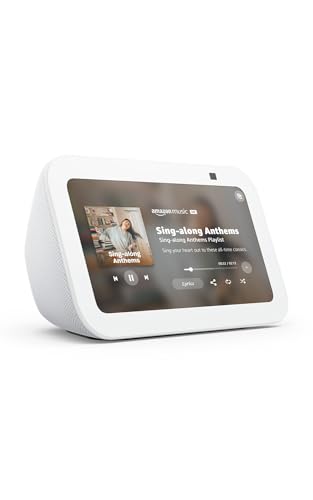
- 5.5-inch screen for quick glances
- Built-in camera for calls and check-ins
- Mic/camera off button and shutter
Best For: Small rooms and everyday Alexa check-ins
Hybrid Classroom Smart Board
Shiarffe X5 86-Inch Smart Board with 48MP Camera
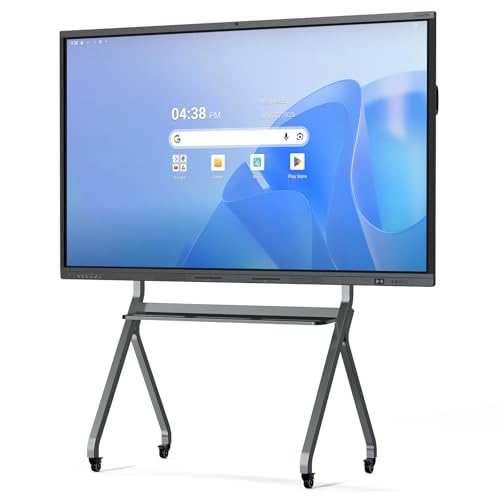
- 86-inch 4K touchscreen with 20-point touch
- Built-in 48MP camera, mics, and speaker
- Google EDLA certified with no subscription fees
Best For: Classrooms and hybrid collaboration spaces
Large-Format Meeting Board
86-inch 4K Interactive Whiteboard
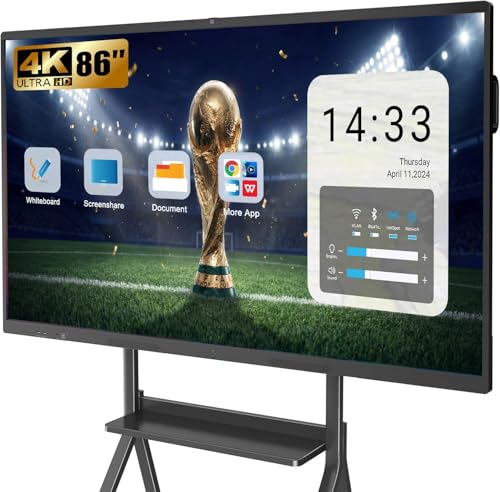
- 13MP camera with 8 mics and dual 20W speakers
- 86-inch 4K touchscreen with 20-point multi-touch
- Open app ecosystem and 4-user wireless projection
Best For: Large offices, classrooms, and conference rooms
Desktop Smart Display
32-inch 4K Monitor with Webcam

- Detachable Full HD webcam for video calls
- webOS 23 with streaming apps and cloud PC access
- USB-C up to 90W plus 4K IPS panel
Best For: Home office desks and mixed work-entertainment setups
Mid-Size Collaboration Board

- Built-in camera and 8-array microphone setup
- 65-inch 4K panel with 20-point infrared touch
- Wireless casting for up to 4 devices
Best For: Teams and classrooms needing a room-friendly collaboration board
Kitchen Hub & Entertainment Center – Echo Show 15 with Fire TV
If you want smart displays with built-in cameras that can do more than show the weather, the Echo Show 15 is built for central placement in the kitchen or family room. Its 15.6-inch Full HD screen, Fire TV support, and Alexa-powered widgets make it a practical hub for calendars, to-do lists, smart home controls, and streaming.
Best For: Families who want a large wall-mounted organizer with entertainment, video calling, and home control in one place.
Pros:
- Large 15.6-inch Full HD display works well for shared viewing and household organization.
- Built-in Fire TV adds streaming from apps like Prime Video, Netflix, YouTube, and Apple TV.
- Centered, auto-framing camera with 3.3x zoom supports more natural video calls.
- Privacy shutter and mic/camera-off button help you control when the camera is active.
Cons:
- Its size is best suited to a dedicated spot rather than a small counter.
- Some streaming services may require separate subscriptions.
This is the most all-in-one option in the group if you want a big smart display to anchor daily routines, entertainment, and connected home controls. The camera and display are strong fits for family use, while the Fire TV integration gives it broader versatility than a basic assistant screen.
Interactive Meeting Wall – JAV 75-Inch Smart Board Pro
For smart displays with built-in cameras in meeting rooms, classrooms, or training spaces, the JAV 75-inch Smart Board Pro is designed as a heavy-duty collaboration surface. It combines a 4K touchscreen, a 48MP AI camera, and conferencing features for Zoom, Google Meet, Microsoft Teams, and Webex, making it far more office-focused than a typical home smart display.
Best For: Classrooms, offices, and enterprise teams that need a large interactive display with advanced video conferencing tools.
Pros:
- 75-inch 4K UHD touchscreen provides a large collaborative workspace.
- 48MP AI camera with auto-framing and speaker tracking is built for conference use.
- Supports Google Workspace tools, wireless casting, and multi-user whiteboarding.
- 8-array microphone and sound suppression features improve meeting audio.
Cons:
- Its size and feature set make it better for dedicated rooms than casual use.
- It is much more specialized than a home-oriented smart display.
This is the strongest pick if your priority is collaboration instead of household convenience. The camera, microphone array, and whiteboard tools make it a serious all-in-one meeting platform, while the Google EDLA certification and app support broaden its usefulness.
Compact Video Assistant – Echo Show 5 with Built-In Camera
If you want smart displays with built-in cameras in a smaller footprint, the Echo Show 5 is an easy fit for nightstands, desks, and compact counters. Its 5.5-inch screen can show weather, timers, compatible cameras, and video calls, while the built-in camera adds quick home monitoring and calling features without taking up much space.
Best For: Small rooms and personal spaces where you want a compact display for calls, camera checks, and everyday Alexa use.
Pros:
- Small 5.5-inch display fits neatly on a nightstand or desk.
- Built-in 2 MP camera supports video calling and home check-ins.
- Can show compatible cameras, weather, news, and photos at a glance.
- Privacy shutter and mic/camera-off button add useful camera controls.
Cons:
- Smaller screen is less ideal for shared viewing or family command-center use.
- Sound is improved, but still oriented toward a compact device.
The Echo Show 5 keeps the essentials simple: a screen, a camera, and Alexa in a compact package. It is a smart pick when you want basic video calling and monitoring features without dedicating much room to the device.
Security Control Panel – eufy Smart Display E10
For smart displays with built-in cameras focused on security, the eufy Smart Display E10 acts like a dedicated home monitoring panel. It automatically wakes with door alerts, shows four live feeds on one screen, and keeps local history ready for instant playback, which makes it more security-centric than a general-purpose smart display.
Best For: Homeowners who want a simple touchscreen hub for live camera monitoring and door alerts.
Pros:
- Instant door alerts automatically bring up live video and voice notifications.
- Four-view layout lets you monitor multiple cameras at once.
- Local storage enables instant playback without buffering.
- Daily reports summarize key security events and recordings.
Cons:
- It is aimed at security monitoring rather than entertainment or general smart-home use.
- The experience depends on compatible eufy devices and camera ecosystem features.
This model stands out if your main goal is seeing what is happening around the house quickly and clearly. Its always-ready alerts, multi-camera view, and local playback make it a practical security dashboard for families, kids, or seniors.
Compact Alexa Display – Echo Show 5 with 2x Bass and Clearer Sound
If you want smart displays with built-in cameras for a small room, the Echo Show 5 is a practical pick. Its 5.5-inch screen is useful for quick glances at weather, news, song titles, and camera feeds, while the built-in 2 MP camera adds video calling and home check-ins.
Best For: Bedrooms, desks, and other spaces where you want a compact Alexa display with video calling and camera viewing.
Pros:
- 5.5-inch display keeps news, weather, and media info visible at a glance
- Built-in camera supports check-ins, Drop In, and video calls
- Deeper bass and clearer vocals for music, podcasts, and shows
- Privacy features include a mic/camera off button and built-in camera shutter
Cons:
- Small screen size may feel limited for extended viewing
- 2 MP camera is basic compared with larger smart display options
The Echo Show 5 is a straightforward option if you mainly want a compact smart display with built-in camera features and simple Alexa control. It balances everyday convenience with privacy tools, making it easy to place almost anywhere.
Hybrid Classroom Smart Board – Shiarffe X5 86-Inch Smart Board with 48MP Camera
For smart displays with built-in cameras in a classroom or training room, the Shiarffe X5 is built around group interaction and hybrid teaching. The 86-inch 4K touchscreen combines multi-touch writing, screen sharing, and a built-in 48MP camera with microphones and speaker for remote participation.
Best For: Schools, training spaces, and business rooms that need a large interactive display with integrated video conferencing hardware.
Pros:
- 86-inch 4K anti-glare IPS display with 20-point multi-touch support
- Built-in 48MP camera, microphones, and speaker system for hybrid learning
- Google EDLA certified with access to Google Classroom and teaching apps
- Includes HDMI, USB, Type-C, and LAN connectivity for flexible setups
Cons:
- Large format is better suited to dedicated rooms than small spaces
- Designed for classroom and business use, so it may be more display than casual users need
This model makes sense when the camera is part of a bigger collaboration setup rather than a simple consumer smart screen. Its scale, connectivity, and classroom-focused features point clearly toward structured group use.
Smart Monitor Alternative – Samsung 32-inch M8 4K Smart Monitor
If you’re comparing smart displays with built-in cameras, the Samsung 32-inch M8 stands out more as a connected monitor than a webcam-focused display. It streams content directly, supports smart home control, and brings 4K UHD resolution with a 32-inch workspace for entertainment and everyday computing.
Best For: Users who want a 4K smart monitor for streaming, smart home control, and a clean all-in-one desk setup.
Pros:
- 32-inch 4K UHD display with AI picture optimization
- Streams content directly and supports Samsung TV Plus
- Smart home controls with 3D Map View and device management
- USB-C, HDMI, and USB-A ports simplify multi-device connectivity
Cons:
- No built-in camera is listed in the supplied notes
- Less focused on video calling than dedicated smart displays with cameras
The M8 is a strong choice if you want a premium smart monitor that doubles as a media hub and workspace. It is best approached as a feature-rich display for streaming and productivity rather than a camera-first smart display.
Large-Format Meeting Board – 86-inch 4K Interactive Whiteboard
If you want smart displays with built-in cameras for conference rooms, training spaces, or a classroom front wall, this 86-inch YCKJNB board is built around collaboration. It combines a 4K UHD touch display with a built-in 13MP camera, 8 array mics, and dual 20W speakers, so it can handle presentations, video calls, and whiteboarding in one station.
Best For: Large offices, classrooms, and home learning setups that need an all-in-one interactive board with video conferencing tools.
Pros:
- Built-in 13MP camera plus 8 array mics and dual 20W speakers for meetings and lessons
- 86-inch 4K UHD touchscreen with 20-point infrared multi-touch for notes and annotations
- Open app ecosystem lets you download software that fits your workflow
- Supports wireless screen projection for up to 4 users and reverse touch control
Cons:
- Large 86-inch footprint is best suited to dedicated rooms
- Wall mount is included, but a mobile stand is a separate choice
Overall, this is a strong pick when the goal is to replace several meeting-room tools with one interactive board. It leans more toward shared collaboration and presentation than casual desktop use, but that focus is exactly what makes it useful.
Desktop Smart Display – 32-inch 4K Monitor with Webcam
For shoppers comparing smart displays with built-in cameras for a desk setup, this LG smart monitor lands in a very practical middle ground. It gives you a 32-inch 4K panel, webOS 23 streaming features, USB-C with up to 90W power delivery, and a detachable Full HD webcam for video calls without adding extra accessories.
Best For: Home office users, streamers, and mixed work-play setups that need a monitor with built-in smart features and a webcam.
Pros:
- Detachable Full HD webcam and built-in speakers for calls and meetings
- webOS 23 supports streaming apps and cloud PC services without a separate computer
- USB-C with up to 90W power delivery keeps cable clutter down
- 4K IPS panel with 95% DCI-P3 and HDR 10 for sharp, vibrant visuals
Cons:
- 32-inch size is less suited to group presentation spaces
- Designed more as a desktop monitor than a room-scale collaboration board
In practice, this is the easiest choice if you want a smart monitor that doubles as a work screen, streaming hub, and video-call display. It is much more compact than an interactive board, but it adds the right features for a personal workstation.
Mid-Size Collaboration Board – 65-inch 4K Smart Whiteboard
This 65-inch MWE board is a strong fit if you want smart displays with built-in cameras in a more manageable size than an 86-inch unit. It pairs a 4K touchscreen with a 13MP-class built-in camera, 8-array microphone array, and Android 13 ecosystem support, making it useful for meetings, classroom interaction, and wireless collaboration.
Best For: Teams, teachers, and training rooms that want a 65-inch interactive board with video-conference hardware and app flexibility.
Pros:
- Built-in camera and 8-array mic setup support conferencing and remote collaboration
- 65-inch 4K touchscreen with 20-point infrared touch for writing and annotation
- Wireless casting for up to 4 devices plus HDMI, USB-C, Wi-Fi, and AirPlay support
- Android 13 with app store access and APK sideloading for added flexibility
Cons:
- Still a large display that needs a dedicated room or wall space
- Only one HDMI port is listed in the supplied specs
For buyers who want a collaboration board that is still room-friendly, this model is a compelling compromise. It keeps the interactive whiteboard experience while trimming the size and installation demands of the largest boards.
How We Picked These Smart Displays with Built-In Cameras
We prioritized devices that combine a useful display, an integrated camera, and features people actually use day to day. That means strong video-call support, clear visuals, reliable voice or touch control, and a layout that fits the intended environment, whether that’s a kitchen counter, desk, meeting room, or classroom wall.
We also looked at ecosystem compatibility, screen size, mounting or placement flexibility, and whether the device is better suited for personal use, shared household control, or professional collaboration.
Quick Comparison: Which Type Fits Your Needs?
Compact smart displays are best for bedside tables, desks, and small kitchens. Larger Smart Displays with Built-In Cameras and all-in-one boards are a stronger fit for conference rooms, classrooms, and shared workspaces where screen space and visibility matter more than portability.
If you want voice-first convenience and simple family organization, choose a home-focused model. If you need app support, whiteboarding, and better conferencing tools, look at the larger interactive display category.
Key Buying Factors for Smart Displays with Built-In Cameras
Screen Size and Placement
Smaller displays are easier to place and usually feel more personal. Larger units improve visibility for multiple viewers and make video meetings, dashboards, and presentations much easier to manage.
Camera and Call Quality
Check camera resolution, field of view, and whether the camera is positioned for natural eye contact. For Smart Displays with Built-In Cameras used in meetings, a wide-angle lens and better low-light performance can make a big difference.
Software and Ecosystem
Make sure the device works with the platform you already use. Alexa, Google-based systems, Android apps, and proprietary smart home hubs each serve different needs, and compatibility often matters more than raw specs.
Audio, Controls, and Extra Features
Look for clear speakers, responsive touch controls, and useful extras such as smart home dashboards, video apps, whiteboarding, or door alerts. The best models reduce the number of separate devices you need.
Who Should Buy Which Smart Displays with Built-In Cameras?
Buy a compact smart display if you want a simple smart-home assistant with video calling and everyday convenience. Choose a mid-size model if you want a better balance of entertainment, communication, and home organization. Go with a large interactive board if you need a collaborative tool for classrooms, offices, or shared workspaces.
In short, the right choice depends on whether your priority is personal convenience, household control, or professional collaboration. Pick the smallest model that still gives you the screen size, camera performance, and software support you’ll actually use.
