

Choosing the right hub can make your smart home faster, more reliable, and much easier to automate. If you want Apple Home control without juggling multiple apps, the best smart home hubs compatible with HomeKit can bring devices together under one system.
This roundup focuses on hubs that support key standards like Matter, Thread, Zigbee, and Wi-Fi, so you can match the right hub to your current devices and future upgrades.
Best 10 Smart Home Hubs Compatible with HomeKit Picks for 2026
Advanced Automation Hub
Aqara Smart Hub M3 with Matter Bridge

- Zigbee, Thread, Wi-Fi, Bluetooth, and IR in one hub
- Local automations and Matter bridge support
- Dual-band Wi-Fi plus PoE and USB-C power
Best For: HomeKit users building a local-first Aqara and Matter setup
Budget Multi-Pack Plug
EIGHTREE Matter Smart Plug for HomeKit

- Apple HomeKit support through Matter
- Local network control with no extra cloud needed
- 4-pack with timers, schedules, and remote control
Best For: Apple Home users who want affordable Matter-enabled plugs
Premium Lighting Hub
Philips Hue Bridge Pro for Home
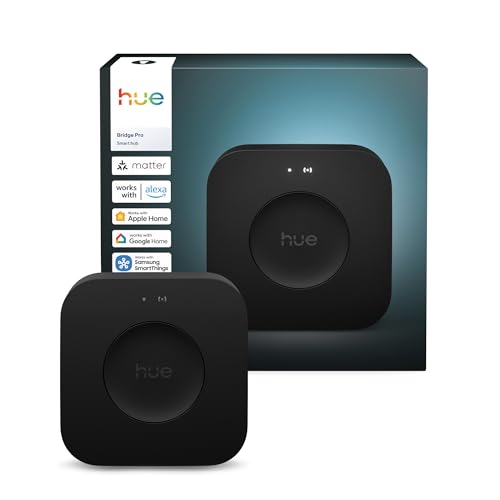
- Supports 150+ lights and 50+ accessories
- Fast 1.7 GHz processing with 4 GB memory
- HomeKit-friendly Hue lighting hub with MotionAware
Best For: HomeKit users building a large Philips Hue lighting system
Compact Matter Bridge
Aqara Smart Hub M100 for HomeKit

- Matter Bridge for Aqara Zigbee and Thread devices
- Local automations with fast response times
- Compact USB-A powered design with adjustable placement
Best For: Smaller HomeKit users who want a compact Aqara bridge
Long-Range Button Hub
Flic Hub LR for HomeKit-triggered automations

- Triggers HomeKit routines with Flic Buttons
- Bluetooth 5.1 and dual-band Wi‑Fi for broader coverage
- Supports up to 63 Flic Buttons or Twists
Best For: HomeKit users who want button-triggered automations
All-in-One Matter Hub
Aeotec Smart Home Hub for SmartThings

- Certified for Matter, Zigbee, Z-Wave Plus, Wi‑Fi, Alexa, and Google Home
- Supports Wi‑Fi or Ethernet setup
- Many automations run locally for speed and reliability
Best For: Homes that want broad protocol support and SmartThings automation
Lighting-First Bridge
Lutron Caseta Smart Hub with HomeKit support

- Works with Apple HomeKit, Alexa, Google Assistant, Ring, and Sonos
- Controls up to 75 Caseta devices
- Clear Connect avoids Wi‑Fi interference
Best For: Homeowners who want a dedicated hub for Lutron lighting
Tuya M Gateway
Multi-Protocol Hub for Advanced Automation

- Matter controller, Thread border router, and bridge roles
- Works with Zigbee, Bluetooth, Wi-Fi, and Ethernet
- Local automation can run when the network is broken
Best For: Mixed-protocol smart homes using HomeKit and Matter
Aqara M1S Gen 2

- Apple HomeKit, Alexa, Google Assistant, and IFTTT support
- Zigbee 3.0 hub for up to 128 Aqara devices
- Built-in speaker, RGB light, and illumination sensor
Best For: Aqara users who want HomeKit plus alarm features
Aqara M200

- Matter controller, Thread border router, and bridge
- Apple HomeKit support plus IR blaster functionality
- PoE, dual-band Wi-Fi, and local automation support
Best For: HomeKit users who want a versatile Aqara hub with IR
Advanced Automation Hub – Aqara Smart Hub M3 with Matter Bridge
If you’re comparing smart home hubs compatible with HomeKit, the Aqara Smart Home Hub M3 stands out for users who want local control, multi-protocol support, and a strong bridge for Aqara gear. It combines Zigbee, Thread, Wi-Fi, Bluetooth, and even IR in one hub, making it a flexible pick for building out an Apple-friendly setup with extra automation options.
Best For: HomeKit users who want a local-first hub with Aqara device support, Matter bridging, and IR control.
Pros:
- Supports Aqara Zigbee and Thread devices, plus Matter bridge functionality
- Prioritizes local automations and can migrate Zigbee devices from older Aqara hubs
- Includes a 360b0 IR blaster with learning and feedback for traditional remotes
- Offers dual-band Wi-Fi, PoE, and USB-C power options for flexible placement
Cons:
- Supports up to 127 Aqara Zigbee devices, not third-party Zigbee devices
- Apple Home exposure is recommended through Matter rather than HomeKit for AC integration
- Some cloud-based notifications still require internet access
This is a strong choice if you want a hub that does more than basic bridging and leans into reliable local automation. It is especially compelling for Aqara-centric setups that may later expand into Matter and Home Assistant ecosystems.
Budget Multi-Pack Plug – EIGHTREE Matter Smart Plug for HomeKit
For anyone shopping smart home hubs compatible with HomeKit accessories, this EIGHTREE Matter smart plug is an easy add-on for turning standard outlets into app- and voice-controlled devices. It works with Apple HomeKit through Matter, and the 4-pack makes it practical for lighting, fans, and small appliances across several rooms.
Best For: Apple Home users who want simple Matter plugs for everyday control and scheduling.
Pros:
- Works with Apple HomeKit, Alexa, Google Home, SmartThings, and other Matter platforms
- Uses local network communication with no extra cloud service required
- Supports remote control, timers, countdowns, and schedules
- Comes as a 4-pack for expanding multiple rooms at once
Cons:
- Requires a hub for Apple users, such as Apple TV 4K or HomePod mini
- Only supports 2.4GHz Wi-Fi
- Not intended for advanced hub-level automation on its own
This is a straightforward way to add HomeKit-compatible smart control without overcomplicating your setup. It is best treated as a practical accessory for a broader smart home rather than a central hub.
Premium Lighting Hub – Philips Hue Bridge Pro for Home
The Philips Hue Bridge Pro is a smart lighting hub built for HomeKit-friendly lighting setups that need speed, capacity, and room to grow. If your focus is smart lighting rather than whole-home control, this bridge is designed to handle large Hue systems while supporting Apple Home, Alexa, Google, and SmartThings.
Best For: HomeKit lighting setups that need higher capacity and faster response from a Hue hub.
Pros:
- Supports 150+ lights and 50+ accessories
- Offers faster performance with a 1.7 GHz Hue Chip Pro and quad-core CPU
- Stores up to 500 personalized scenes and more automations
- Includes MotionAware features and enhanced security controls
Cons:
- Works as a lighting hub rather than a general-purpose smart home controller
- Requires Hue devices to take advantage of its full feature set
- Uses wired Ethernet and corded power instead of wireless hub placement
If your HomeKit setup revolves around Philips Hue, this bridge is the most scalable option in the group. It is especially appealing for users who want more scenes, faster responsiveness, and a larger accessory ceiling.
Compact Matter Bridge – Aqara Smart Hub M100 for HomeKit
The Aqara Smart Hub M100 is a compact option for smart home hubs compatible with HomeKit, especially if you want Matter bridging and local automation without a large hub footprint. It supports Aqara Zigbee and Thread devices, and it can connect Aqara products into Apple Home and other Matter ecosystems.
Best For: Small HomeKit setups that need a compact Aqara hub with Matter and local control.
Pros:
- Acts as a Matter Bridge for Aqara Zigbee devices
- Supports local automations for Zigbee and Matter devices
- Handles up to 20 Aqara Zigbee devices and 20 Thread devices
- Small, flexible design with USB-A power and adjustable placement
Cons:
- Does not support third-party Zigbee devices
- Requires a continuously powered setup with a 5V/0.5A adapter not included
- Device limits are lower than larger hub models
The M100 makes sense if you want a lighter-weight Aqara bridge for a smaller system or an additional zone in your home. It keeps the focus on local performance and Matter compatibility rather than broad third-party Zigbee support.
Long-Range Button Hub – Flic Hub LR for HomeKit-triggered automations
If you’re comparing smart home hubs compatible with HomeKit and want a button-focused setup, the Flic Hub LR is built to trigger Apple HomeKit routines through Flic Buttons. It’s a practical pick for homes that need better room-to-room coverage, plus support for multiple Flic Buttons or Twists from one hub.
Best For: HomeKit users who want reliable button-triggered automations and long-range coverage.
Pros:
- Supports HomeKit routine triggers when paired with Flic Buttons and a Home Hub like Apple TV, iPad, or HomePod
- Bluetooth 5.1 plus dual-band Wi-Fi helps cover an average two-room apartment
- Connects up to 63 Flic Buttons or Twists to one hub
- Can keep buttons working even when you leave home
Cons:
- Requires a separate Flic Button to use the button-control features
- HomeKit routine triggering depends on having an Apple TV, iPad, or HomePod set up as a Home Hub
- IR Blaster is sold separately
For buyers who want a hub centered on physical controls rather than a full ecosystem controller, this Flic model is a focused option. It pairs well with HomeKit routines, but it makes the most sense if you already plan to use Flic Buttons and Apple Home infrastructure.
All-in-One Matter Hub – Aeotec Smart Home Hub for SmartThings
The Aeotec Smart Home Hub is a versatile option if you’re shopping for smart home hubs compatible with HomeKit-adjacent ecosystems through Matter support, while also covering SmartThings, Zigbee, Z-Wave, Wi-Fi, Alexa, and Google Home. It’s designed for broad device compatibility and automation, with setup through the SmartThings app on Android, iOS, or iPadOS.
Best For: Homes that want broad protocol support and SmartThings automation in one hub.
Pros:
- Certified for Matter, SmartThings, Z-Wave Plus, Zigbee, Wi-Fi, Google Home, and Alexa
- Supports Wi-Fi or Ethernet setup for flexible installation
- Many automations now run locally for improved speed and reliability
- Works with the SmartThings app on Android, iOS, and iPadOS
Cons:
- Designed for use in North America
- HomeKit support is not listed directly in the supplied notes
- Primarily centered on the SmartThings ecosystem rather than Apple Home specifics
This hub is strongest as a multi-protocol controller for mixed-device homes. If your priority is broad compatibility and local automation through SmartThings, it offers a lot of flexibility in a single box.
Lighting-First Bridge – Lutron Caseta Smart Hub with HomeKit support
Among smart home hubs compatible with HomeKit, the Lutron Caseta Smart Hub stands out if your main goal is lighting and fan control. It connects Lutron Caseta devices to Apple HomeKit, Alexa, Google Assistant, Ring, Sonos, and more, while keeping the setup simple with a router connection and the Lutron app.
Best For: Homeowners who want a dedicated hub for Lutron lights, fans, and shades with HomeKit support.
Pros:
- Compatible with Apple HomeKit, Alexa, Google Assistant, Ring, Serena shades, and Sonos
- Supports up to 75 Caseta devices
- Clear Connect technology does not interfere with Wi‑Fi connected devices
- Simple setup: plug in, connect to your router, and follow the app instructions
Cons:
- Works specifically with Lutron Caseta devices, so it is not a general-purpose hub for every brand
- Coordinating accessories are sold separately
- Alexa voice control requires compatible Alexa hardware and Caseta dimmers/switches sold separately
If you want the most dependable path to managing Lutron lighting in HomeKit, this hub is the cleanest fit. It’s less about broad-device variety and more about strong, reliable control over a focused lighting ecosystem.
Tuya M Gateway – Multi-Protocol Hub for Advanced Automation
If you want one of the more flexible smart home hubs compatible with HomeKit, the Tuya Smart Home Hub M Gateway stands out for its broad protocol support. It works as a Matter controller, Thread border router, and bridge, while also handling Zigbee, Bluetooth, and Wi-Fi. That makes it a practical pick if your setup mixes Tuya devices with Matter ecosystems and you want local automations when the network is down.
Best For: Users building a mixed-protocol smart home who want HomeKit and Matter integration with local automation support.
Pros:
- Supports Matter bridge, controller, and border router roles.
- Works with Tuya Zigbee, Bluetooth, Thread, Ethernet, and Wi-Fi connections.
- Can add compatible devices into Apple Home, Home Assistant, and SmartThings through the gateway.
- Local scenario and automation execution can continue even if the network is broken.
Cons:
- Supports Tuya Zigbee devices, not third-party Zigbee devices unless they follow Zigbee 3.0 standard.
- Thread repeaters are needed to reach the full Thread device capacity.
- Best performance depends on using supported ecosystem devices.
Overall, this is a strong choice if you want a hub that can bridge multiple ecosystems while keeping advanced automation options local. Its value is highest for users already invested in Tuya or Matter-friendly gear.
Aqara M1S Gen 2 – HomeKit Zigbee Alarm Hub
The Aqara Hub M1S Gen 2 is a straightforward option for buyers looking for smart home hubs compatible with HomeKit and centered on Aqara devices. It uses Zigbee 3.0 and requires a 2.4 GHz Wi-Fi network, so it is best suited to homes that can accommodate that setup. If you want a hub that combines automation, alarm features, and HomeKit support in one compact unit, this is an easy one to evaluate.
Best For: Aqara users who want HomeKit integration plus alarm and lighting features in a Zigbee hub.
Pros:
- Supports Apple HomeKit, Alexa, Google Assistant, and IFTTT.
- Zigbee 3.0 supports Aqara devices with up to 128 linked devices.
- Built-in speaker can act as an alarm or doorbell with customizable automations.
- Includes RGB light and an illumination sensor for automation use.
Cons:
- Requires a secure 2.4 GHz Wi-Fi network and does not support Wi-Fi 6.
- Only supports Aqara Zigbee devices, not third-party Zigbee devices.
- Needs Aqara Zigbee repeaters to reach the stated device limit.
This hub makes the most sense if you are committed to Aqara and want HomeKit-friendly control with extra security and alarm functions. Its network requirements and ecosystem limits are the main trade-offs.
Aqara M200 – Matter Hub with IR and PoE
The Aqara Smart Hub M200 is a feature-rich pick for smart home hubs compatible with HomeKit, especially if you want broader Matter and Thread support. It acts as a Matter controller, Thread border router, and Matter bridge, while also adding Zigbee, Bluetooth, Wi-Fi, PoE, and IR control. For homes that need a more versatile central hub, this model covers a lot of ground.
Best For: Users who want a HomeKit-compatible Aqara hub with Matter, Thread, IR, and PoE support.
Pros:
- Works as a Matter controller, Thread border router, and Matter bridge.
- Supports Apple HomeKit, Home Assistant, SmartThings, Alexa, and Google Home.
- Includes PoE and dual-band Wi-Fi with WPA3 for flexible installation.
- IR blaster can control air conditioners and other traditional remote devices.
Cons:
- Supports up to 40 Aqara Zigbee devices and 40 Thread devices, which is lower than some hubs.
- For Apple Home exposure, Matter integration is required instead of HomeKit for the IR AC feature.
- Only one AC device can be exposed to Matter.
In practice, the M200 is best for users who value integration breadth and flexible wiring options more than raw device count. Its IR learning and PoE support make it especially useful in more advanced home setups.
How We Picked the Best Smart Home Hubs Compatible with HomeKit
We focused on hubs that offer real HomeKit value: reliable Apple Home compatibility, broad device support, strong protocol coverage, and clear upgrade paths for Matter and Thread. We also favored products that help reduce app overload by acting as a central control point rather than a single-purpose accessory.
For Smart Home Hubs Compatible with HomeKit, the most useful models are the ones that balance ease of setup with long-term flexibility. That means support for popular ecosystems, stable wireless performance, and enough capacity for growing households.
Quick Comparison
Some hubs are best for lighting, others for multi-device automation, and others for adding legacy accessories to modern systems. If you mainly want HomeKit-friendly lighting control, a lighting-focused hub may be enough. If you want to connect sensors, switches, plugs, and scenes across brands, a broader multi-protocol hub is usually the better pick.
Key Buying Factors for Smart Home Hubs Compatible with HomeKit
Protocol Support
Check whether the hub supports Matter, Thread, Zigbee, Z-Wave, Bluetooth, or IR. The more relevant protocols it supports, the easier it is to connect mixed-device setups and keep older gear useful.
Apple Home Integration
Look for native HomeKit or Apple Home support when possible. That typically means smoother setup, simpler voice control with Siri, and more consistent automation inside the Apple Home app.
Device Capacity and Ecosystem Limits
Some hubs handle dozens of accessories, while others are designed for a specific brand or category. Make sure the hub can support your current inventory and any planned additions without hitting limits too soon.
Wired Vs. Wireless Setup
Ethernet or PoE can improve stability for a main hub location, while Wi-Fi-based models are easier to place anywhere. If reliability matters most, a wired option is often worth it.
Automation Needs
Think about whether you need simple scene control or more advanced routines that link lighting, sensors, switches, and entertainment devices. The best hub is the one that matches the complexity of your actual automations.
Who Should Buy Which Smart Home Hubs Compatible with HomeKit?
If you want a broad, future-proof center for mixed smart devices, choose a multi-protocol hub with Matter and Thread. If your priority is lighting, a dedicated lighting hub may offer the cleanest experience. If you already use Apple Home heavily, prioritize HomeKit-first compatibility and strong Siri integration.
For budget-conscious buyers, a smaller hub can be enough for a focused setup. For larger homes or expanding ecosystems, invest in a hub with stronger device support, better range, and room to grow.
