

Choosing a hub is the fastest way to make mixed-brand smart devices work together more reliably. The best smart home hubs for multiple protocols can unify Zigbee, Z-Wave, Thread, Bluetooth, Matter, and Wi‑Fi devices under one control system.
Below, you’ll find a buyer-focused roundup built to help you match the right hub to your devices, automation goals, and setup style in 2026.
Best 10 Smart Home Hubs for Multiple Protocols Picks for 2026
Multi-Protocol Smart Hub

- Zigbee, Z-Wave, and cloud-to-cloud support
- Single app for monitoring and automation
- Works with Alexa and Google Home
Best For: Homes centered on SmartThings-compatible multi-protocol control
Low-Power Sensor Hub

- Connects Tapo sensors, switches, and buttons
- Long-range low-power wireless design
- Built-in chime plus siren support
Best For: Tapo households focused on sensors and home alerts
All-in-One Gateway Hub

- Matter, Z-Wave, Zigbee, Wi-Fi, and SmartThings support
- Many automations can run locally
- Wi-Fi or Ethernet setup options
Best For: Mixed-protocol homes that want broad SmartThings and Matter support
Tuya Multi-Protocol Bridge
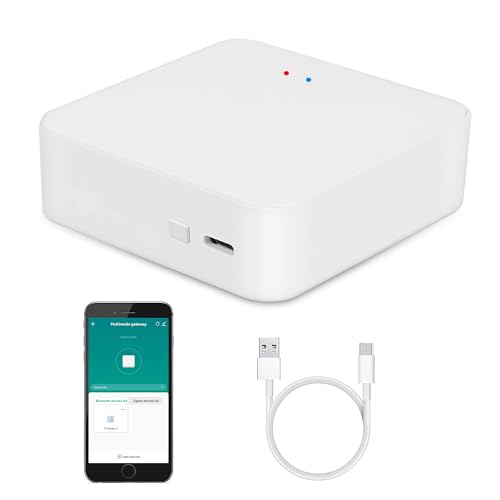
- Zigbee, Bluetooth Mesh, and Wi-Fi support
- Controls up to 128 devices in Smart Life
- Alexa, Google, and Siri voice control
Best For: Tuya-only setups that need one bridge for several protocols
Compact Matter Bridge for Aqara Homes

- Aqara Zigbee and Thread support with Matter bridging
- Local automations for fast, reliable control
- USB-A power and Wi-Fi 6 in a compact design
Best For: Aqara-focused smart homes needing a small multi-protocol hub
Simple Bridge for Bluetooth and Zigbee
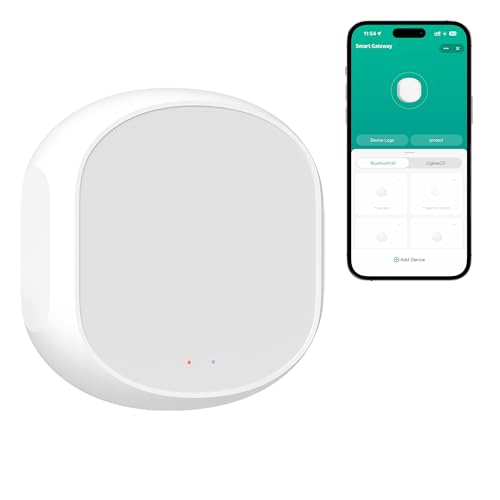
- Bridges Bluetooth and Zigbee devices in one gateway
- Remote app control and voice assistant support
- Cloud schedules and expanded device features
Best For: Compact Bluetooth and Zigbee setups that need basic remote control
Feature-Rich PoE Multi-Protocol Hub

- Supports Zigbee, Thread, Bluetooth, Wi-Fi, and PoE
- Matter Controller, Bridge, and Thread Border Router
- IR blaster adds control for legacy appliances
Best For: Aqara users wanting the most flexible multi-protocol hub with IR and PoE
Local-First Automation Hub
Hubitat C-8 Pro Multi-Protocol Control

- Runs automations locally for reliability.
- Supports Matter, Z-Wave, Zigbee, Bluetooth, and Wi-Fi.
- No required subscription or cloud dependency.
Best For: Homeowners who want advanced local control across many standards.
Matter Wired Gateway
Tuya Thread and Zigbee Smart Hub

- Combines Matter, Thread, and Zigbee support.
- Wired setup with wider signal coverage.
- Works with Google, Alexa, and Apple HomeKit.
Best For: Tuya households needing a wired hub for Thread and compatible Zigbee gear.
Multi-Mode Tuya Bridge

- Bridges Zigbee, BLE, and Bluetooth Mesh.
- Supports up to 128 Tuya devices plus 2 BLE devices.
- Offers Smart Life app control and voice assistant support.
Best For: Tuya users who want broad device consolidation with app and voice control.
Multi-Protocol Smart Hub – SmartThings Hub 3rd Gen
If you want smart home hubs for multiple protocols, the SmartThings Hub 3rd Generation is built to bring Zigbee, Z-Wave, and cloud-to-cloud devices into one app. It focuses on routine automation, so you can set compatible devices to react to doors opening, people arriving, and other home events.
Best For: Households that want a single hub for Zigbee and Z-Wave devices with broad app-based automation.
Pros:
- Supports Zigbee, Z-Wave, and cloud-to-cloud protocols.
- Lets you monitor and control compatible devices from one smartphone app.
- Works with Alexa and Google Home.
- Includes a power adapter, LAN cable, and wall-mount option.
Cons:
- Depends on compatible devices to unlock its full value.
- No built-in battery backup for power outages.
Overall, this hub is a practical pick if you are building around SmartThings-compatible gear and want straightforward automation in a compact, wired hub.
Low-Power Sensor Hub – Tapo H100 Smart Hub
The Tapo H100 is a focused option for smart home hubs for multiple protocols if your setup is built around Tapo sensors, buttons, and switches. It uses a low-power wireless protocol for stable long-range connections and can connect up to 64 Tapo devices through the Smart Life/Tapo ecosystem.
Best For: Tapo users who want a compact hub for sensors, buttons, and alerts with long-range coverage.
Pros:
- Supports Tapo smart sensors, switches, and buttons through a low-power wireless protocol.
- Can connect up to 64 Tapo devices.
- Designed for stable long-range connections up to 30 meters.
- Includes a built-in chime and can trigger a high-decibel siren.
Cons:
- Requires 2.4GHz Wi-Fi.
- Cannot directly connect Tapo smart plugs or smart lighting.
- Limited to Tapo-compatible devices.
This is best as a sensor-and-alert hub rather than a broad multi-brand controller, but it works well if you are building a Tapo-centric home monitoring setup.
All-in-One Gateway Hub – Aeotec Smart Home Hub
For shoppers comparing smart home hubs for multiple protocols, the Aeotec Smart Home Hub stands out because it works as a SmartThings hub and supports Matter, Z-Wave, Zigbee, Wi-Fi, Alexa, and Google Home. It is built for broad compatibility, with many automations able to run locally for faster and more reliable performance.
Best For: Users who want one hub to unify Matter, Zigbee, Z-Wave, Wi-Fi, and SmartThings devices.
Pros:
- Supports Matter, Z-Wave, Zigbee, Wi-Fi, SmartThings, Alexa, and Google Home.
- Many automations can run locally for improved speed and reliability.
- Works with the SmartThings app on Android, iOS, and iPadOS.
- Offers Wi-Fi or Ethernet setup for flexible installation.
Cons:
- Designed for North America only.
- Z-Wave Plus support applies to the V3 model only.
This is the strongest pick here if you want one central hub for a mixed-protocol home, especially if Matter support is important to your setup.
Tuya Multi-Protocol Bridge – Zigbee Bluetooth Mesh Gateway
If your smart home hubs for multiple protocols search is centered on the Tuya ecosystem, this gateway combines Zigbee, Bluetooth Mesh, and Wi-Fi control in one bridge. It is designed to manage compatible smart devices through the Smart Life app and supports voice control through Alexa, Google Assistant, and Siri.
Best For: Tuya users who want a compact multi-protocol bridge for Zigbee, Bluetooth Mesh, and Wi-Fi devices.
Pros:
- Supports Zigbee, Bluetooth Mesh, and Wi-Fi control together.
- Works with Smart Life/Tuya App for remote control and group control.
- Supports Alexa, Google Assistant, and Siri voice control.
- Can add and manage up to 128 smart devices.
Cons:
- Only supports Tuya smart devices.
- Best value depends on already using the Tuya ecosystem.
This gateway is a solid fit if you want a single Tuya bridge for multiple wireless protocols, but it is not the most flexible option for mixed-brand households.
Compact Matter Bridge for Aqara Homes – Aqara M100 Smart Hub
If you’re comparing smart home hubs for multiple protocols, the Aqara Smart Hub M100 is a compact option built around Aqara Zigbee and Thread support. It works as a Matter Bridge and Matter controller, so it can help connect Aqara devices into broader ecosystems like Apple Home, Alexa, Home Assistant, and more. It is aimed at users who want local automations, quick response times, and a simple USB-powered setup.
Best For: Aqara users who want a small, always-powered hub for Zigbee and Thread automations across Matter ecosystems.
Pros:
- Supports Aqara Zigbee and Thread, with Matter bridging for broader ecosystem integration
- Local automation helps keep Zigbee and Matter routines responsive even without cloud access
- Flexible USB-A power setup makes placement easy with power banks, routers, or wall adapters
- Wi-Fi 6 and WPA3 add modern wireless connectivity and security
Cons:
- Only supports Aqara Zigbee devices, not third-party Zigbee devices
- Power adapter is not included
- Designed around Aqara device limits, so it may not suit larger mixed-device networks
This is a focused hub rather than a broad universal gateway, but it is strong if your setup is built around Aqara. The M100 is a practical pick for users who want local control, Matter compatibility, and a small footprint.
Simple Bridge for Bluetooth and Zigbee – HomeHub Smart Gateway
For shoppers looking at smart home hubs for multiple protocols on a budget, the HomeHub Smart Gateway is a straightforward bridge for Bluetooth and Zigbee devices. It brings compatible devices into one system and adds remote app control, voice control, and cloud schedules where supported. Based on the supplied details, it’s best viewed as a simple gateway for expanding control over existing devices rather than a full advanced hub.
Best For: Users who want a compact Zigbee + Bluetooth gateway for remote control, voice assistants, and basic automation.
Pros:
- Combines Bluetooth and Zigbee devices through a single gateway
- Supports remote control via the Internet with supported devices
- Works with Alexa, Google Assistant, and Siri for voice control
- Can unlock cloud schedules beyond local device limits
Cons:
- Protocol support is limited to Bluetooth and Zigbee
- Advanced functionality may depend on cloud services and supported devices
- Primarily positioned as a gateway rather than a broad ecosystem controller
This gateway makes sense if your setup is centered on compatible Bluetooth and Zigbee products and you want easier remote access. It is a practical, low-profile choice, but users needing Thread, Matter, or deeper local automation will need a different class of hub.
Feature-Rich PoE Multi-Protocol Hub – Aqara M200 Smart Hub
If you want smart home hubs for multiple protocols with more flexibility, the Aqara Smart Hub M200 stands out for its wide feature set. It supports Zigbee, Thread, Bluetooth, Wi-Fi, and PoE, while also acting as a Matter Controller, Thread Border Router, and Matter Bridge. The result is a hub designed for users who want local automation, wired or wireless install options, and broader ecosystem support.
Best For: Aqara-centric smart homes that want a feature-rich multi-protocol hub with PoE and IR control.
Pros:
- Supports Zigbee, Thread, Bluetooth, Wi-Fi, and PoE in one hub
- Matter Controller, Thread Border Router, and Matter Bridge functions improve ecosystem compatibility
- Handles up to 40 Aqara Zigbee devices and 40 Thread devices
- Includes a 360° IR blaster with feedback and learning for legacy appliances
Cons:
- Supports Aqara Zigbee devices, not third-party Zigbee devices
- Only one AC device can be exposed to Matter
- Some features depend on the Matter integration app and specific setup choices
The M200 is the most versatile option in this group if you want both wired installation flexibility and broad protocol support. It is especially appealing for users who want to connect traditional IR devices, automate Aqara gear, and keep everything running locally when possible.
Local-First Automation Hub – Hubitat C-8 Pro Multi-Protocol Control
If you want smart home hubs for multiple protocols without giving up speed or privacy, the Hubitat Elevation C-8 Pro is built around local control. Automations run inside the home, so lights, locks, thermostats, and routines can keep working even if the internet goes down. It also supports Matter 1.5, Z-Wave 800 Series, Z-Wave Long Range, Zigbee 3.0, Bluetooth, and Wi-Fi, making it a strong fit for mixed-device setups.
Best For: Users who want local automations, broad protocol support, and no required subscription.
Pros:
- Local processing keeps automations running without cloud dependence.
- Supports Matter 1.5, Z-Wave 800 LR, Zigbee 3.0, Bluetooth, and Wi-Fi.
- Includes continuous software updates at no charge.
- No mandatory monthly fee for core features.
Cons:
- May be more advanced than casual users need.
- Best suited to people comfortable building out a broader smart home system.
This is the most flexible option here if your priority is a capable hub that keeps control local and supports many common standards. The AI-assisted automation and Rule Machine also give it room to grow as your setup becomes more complex.
Matter Wired Gateway – Tuya Thread and Zigbee Smart Hub
This wired gateway is a practical pick among smart home hubs for multiple protocols if your devices live in the Tuya ecosystem and you want Matter, Thread, and Zigbee support in one place. It uses a wired network connection and 2.4GHz Wi-Fi only for setup, and its built-in Zigbee signal transmitter is designed for better coverage through walls. Just note that it does not support Wi-Fi or Bluetooth devices directly, and not every Zigbee device will work unless it supports Matter boundary routing.
Best For: Tuya users who want a wired Matter gateway for Thread and compatible Zigbee devices.
Pros:
- Supports Zigbee and Thread in a single gateway.
- Built-in signal transmission for wider coverage and longer-distance control.
- Works with Google, Alexa, and Apple HomeKit.
- Remote control available through the Tuya, Smart Life, or Google Home apps.
Cons:
- Does not support Wi-Fi or Bluetooth devices.
- Only works with 2.4GHz Wi-Fi during configuration.
- Some Zigbee devices are not compatible unless they support Matter boundary routing.
For a home built around Tuya-compatible gear, this gateway offers a focused way to bridge multiple protocols and extend coverage room to room. It is best treated as a compatibility-specific hub rather than a universal solution.
Multi-Mode Tuya Bridge – Zigbee BLE Bluetooth Mesh Hub
If you are comparing smart home hubs for multiple protocols on a Tuya-based system, this multi-mode gateway brings Zigbee, BLE, and Bluetooth Mesh into one bridge. It is designed for indoor smart home networking with dynamic routing, and it can manage up to 128 Tuya Zigbee/Bluetooth Mesh devices plus 2 BLE devices at once. The hub also leans heavily on cloud-based control through the Smart Life app, so it is best for users who want convenient remote access and broad Tuya compatibility.
Best For: Tuya users who want one hub for Zigbee, BLE, and Bluetooth Mesh devices.
Pros:
- Supports Zigbee, BLE, and Bluetooth Mesh in one gateway.
- Can control up to 128 Tuya Zigbee/Bluetooth Mesh devices and 2 BLE devices.
- Remote control works through the Smart Life app.
- Voice control is supported with Alexa, Google Home, and Siri.
Cons:
- Only supports 2.4GHz Wi-Fi for setup.
- Best suited to Tuya platform devices rather than broad third-party ecosystems.
- Relies on cloud services for remote access and control.
This gateway makes sense if your main goal is to unify mixed Tuya devices without juggling separate bridges. It is especially appealing for users who value app-based control, voice integration, and high device capacity over local-only operation.
How We Picked the Best Smart Home Hubs for Multiple Protocols
We focused on hubs that combine broad protocol support, dependable local or cloud-assisted control, and compatibility with major ecosystems like Alexa, Google Home, Matter, and SmartThings. Priority also went to models with clear automation features, strong device pairing options, and flexible installation for different home sizes.
Quick Comparison: What Matters Most
If you already own Zigbee sensors, Thread accessories, or older Z-Wave gear, choose a hub that supports those standards natively. If you want the simplest path to future-proofing, Matter support is a major plus. If your setup includes mixed brands, look for a hub that handles more than one radio type instead of relying on a single-protocol bridge.
Key Buying Factors for Smart Home Hubs for Multiple Protocols
Protocol Coverage
The most important spec is supported wireless standards. Zigbee remains excellent for sensors and switches, Z-Wave is valued for range and reliability, Thread is important for newer low-power devices, and Bluetooth or BLE can help with nearby accessories. A good multi-protocol hub should support the standards your devices already use, not just the newest one.
Local Vs. Cloud Control
Local processing can improve response times and keep basic automations working during internet outages. Cloud-based control may be easier to set up and manage remotely, but it can add dependence on an external service. Many buyers prefer Smart Home Hubs for Multiple Protocols that offer a mix of both.
Ecosystem Compatibility
Check whether the hub works smoothly with your preferred app and voice assistant. Some hubs are strongest inside a single ecosystem, while others are more open and flexible. If you plan to expand over time, compatibility with Matter, SmartThings, Alexa, Google Assistant, and Apple Home-style workflows can matter a lot.
Power, Placement, and Extras
For larger homes, Ethernet, Wi‑Fi stability, or PoE can improve reliability. Built-in chimes, IR support, or sensor routing features may be useful depending on your setup, but they should be secondary to core protocol support and automation quality.
Who Should Buy Which Smart Home Hubs for Multiple Protocols?
Choose a simpler hub if you mainly need app control for a small number of devices. Pick a more advanced model if you want local automation, wider protocol coverage, or support for both legacy and next-gen devices. If you are building a mixed-brand smart home, the best value usually comes from a hub that can grow with your devices instead of forcing a platform switch later.
