

If you want your automations to keep working when the internet is slow or unavailable, smart home hubs without cloud access are the right place to start. They help reduce dependence on remote servers while improving response time and privacy.
In this roundup, we focus on 10 standout options for local control, cross-platform compatibility, and practical home automation setups that are easier to trust day to day.
Best 10 Smart Home Hubs Without Cloud Access Picks for 2026
Local-First Automation Hub

- Home Assistant OS preinstalled
- Keeps home data stored locally
- USB add-ons for Zigbee, Z-Wave, Thread
Best For: People who want an easy, privacy-focused Home Assistant hub
Sensor Network Hub

- Connects up to 64 Tapo devices
- Low-power wireless helps battery life
- Built-in chime plus 90 dB siren
Best For: Tapo households wanting simple sensor automations
Local Matter Bridge Hub

- Local automations work without Wi‑Fi or cloud access
- Bridges Aqara Zigbee to Matter ecosystems
- USB-A power and compact adjustable design
Best For: Aqara and Matter users who want fast local control
Wall-Mounted Control Hub

- 8-inch touchscreen dashboard
- Works with Zigbee, Matter, Thread, and more
- Built for Alexa routines and security control
Best For: Alexa users who want a dedicated smart home panel
Local Zigbee Control Hub
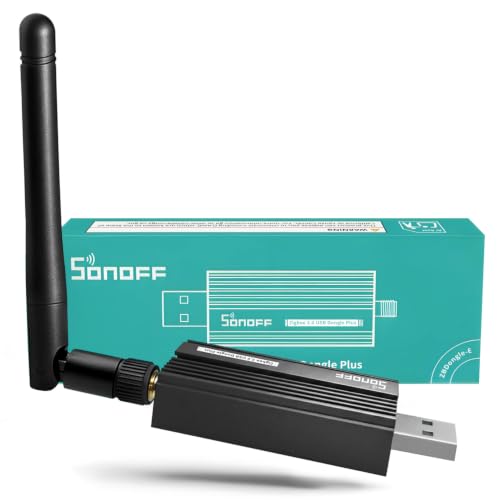
- Pre-flashed EZNet 6.10.3 coordinator firmware
- Local Zigbee control with no cloud dependency
- Designed for stronger range and mesh expansion
Best For: Linux and Raspberry Pi users building a local Zigbee network
Lighting-Focused Bridge
Caseta Smart Hub for Local Control

- Supports up to 75 Caseta devices
- Clear Connect avoids Wi-Fi interference
- Easy plug-in setup with wide ecosystem support
Best For: Caseta lighting and fan control with simple app setup
Privacy-Focused Multi-Protocol Hub

- Local automation with Zigbee, Thread, Wi-Fi, PoE, and IR
- Matter controller and Thread border router support
- Encrypted local storage with no mic or camera
Best For: Privacy-minded users building a mixed Aqara and Matter setup
Privacy-First Multi-Protocol Hub
Homey Bridge for flexible whole-home automation

- Z-Wave Plus, Zigbee, Wi‑Fi, BLE, and IR support
- Privacy-by-design with no profiling
- Voice links for Alexa, Siri Shortcuts, and Google Assistant
Best For: Users who want broad compatibility and a privacy-focused hub
Local-Automation Hub
Aqara M200 for Matter and Thread control

- Local execution for Zigbee and Matter automations
- Matter Controller, Thread Border Router, and Matter Bridge
- PoE, Wi‑Fi, and IR in one hub
Best For: Buyers who want local automations with Matter and Thread support
SmartThings-Compatible Hub
Aeotec hub with local automation support

- Many automations run locally for speed and reliability
- Supports Z-Wave, Zigbee, Matter, Wi‑Fi, Alexa, and Google Home
- Wi‑Fi or Ethernet setup with SmartThings app control
Best For: SmartThings households that want flexible protocol support and some local control
Local-First Automation Hub – Home Assistant Green
Home Assistant Green | Smart Home hub with Advanced Automation | Official Home Assistant Hardware
Check Price On AmazonIf you want smart home hubs without cloud access, Home Assistant Green is one of the most straightforward ways to build around local control. It arrives with Home Assistant already installed, uses Ethernet for setup, and keeps your home data stored on the device itself.
Best For: Buyers who want an easy entry into Home Assistant with local data storage and room to expand.
Pros:
- Home Assistant OS is preinstalled for fast setup
- Local data stays on the hub, supporting a privacy-first approach
- Fanless, silent design with low power use
- USB expansion supports Z-Wave, Zigbee, and Thread add-ons
Cons:
- Needs Ethernet for initial setup
- Wireless connectivity depends on external USB devices
Overall, this is a strong pick if you want a compact hub that emphasizes local automation and can grow with your smart home over time. It is especially appealing if you prefer to keep the core system simple and self-managed.
Sensor Network Hub – Tapo H100 Smart Hub
For smart home hubs without cloud access, the Tapo H100 is best understood as a local-style control point for Tapo sensors, buttons, and switches. It connects devices over a low-power wireless protocol and can trigger local actions like shortcuts, alarms, and device control based on sensor events.
Best For: Tapo users building a sensor-and-automation setup with long-range, low-power connections.
Pros:
- Supports up to 64 Tapo devices
- Low-power protocol can extend battery life of connected devices
- Built-in chime and up to 90 dB siren support home alerts
- Up to 30 m range in lab testing
Cons:
- Requires 2.4 GHz Wi-Fi for setup and some connected devices
- Works with Tapo devices rather than being a broad universal hub
This hub makes sense if your priority is reliable Tapo sensor coverage and simple automations, not a broad smart home platform. Its value is strongest in a tightly built Tapo ecosystem.
Local Matter Bridge Hub – Aqara Hub M100
If you are comparing smart home hubs without cloud access, the Aqara Hub M100 stands out for local automation and Matter bridging. It supports Aqara Zigbee and Thread devices, and its local execution helps automations run smoothly even without Wi-Fi or cloud access.
Best For: Aqara and Matter users who want fast local automations with flexible setup options.
Pros:
- Supports local execution for Zigbee and Matter automations
- Acts as a Matter Bridge for Aqara devices
- Very compact and powered through USB-A
- Works with Apple Home, Alexa, Home Assistant, and more
Cons:
- Only supports Aqara Zigbee devices, not third-party Zigbee
- Some features like push notifications still need cloud access
- Power adapter is not included
For a small hub with strong local response and broad ecosystem support, the M100 is a practical choice. It is especially compelling if your device lineup already includes Aqara or Matter-compatible gear.
Wall-Mounted Control Hub – Amazon Echo Hub
The Amazon Echo Hub is more of a central control panel than a privacy-first pick, so it is not the best match for shoppers seeking smart home hubs without cloud access. Still, it can simplify daily control if you already use Alexa and want a wall-mounted dashboard for lights, cameras, routines, and security features.
Best For: Alexa households that want a dedicated touchscreen dashboard for quick home control.
Pros:
- 8-inch display makes device control easy at a glance
- Supports Wi-Fi, Bluetooth, Zigbee, Matter, Sidewalk, and Thread devices
- Can arm and disarm compatible security systems
- Wall-mount design keeps it accessible in one place
Cons:
- Designed around Alexa and the Alexa app ecosystem
- Not positioned as a local-only or cloud-free hub
- PoE adapter and some mounting accessories are sold separately
This is a convenient control center if you already live in Amazon’s smart home ecosystem. For buyers focused on local-first control, the cloud dependence of the Alexa platform is the main limitation to keep in mind.
Local Zigbee Control Hub – Pre-Flashed Linux USB Dongle
If you want smart home hubs without cloud access, this Zigbee 3.0 USB dongle is built for local-first control on a Home Assistant or Zigbee2MQTT setup. It arrives pre-flashed with coordinator firmware and is designed for Linux and Raspberry Pi OS users who want a fast, straightforward way to bring Zigbee devices under one local roof.
Best For: Home Assistant and Zigbee2MQTT users who want a local Zigbee coordinator with minimal setup.
Pros:
- Pre-flashed with official EZNet 6.10.3 coordinator firmware for easier setup
- Local control keeps automations and device communication on your own network
- EFR32MG21 chip and +20dBm output gain are designed for stronger range and stability
- Can be used as a coordinator now or flashed as a router later for mesh expansion
Cons:
- Windows and macOS users may need manual driver installation
- Firmware-specific setup may still require some guidance for advanced use
- Works as a Zigbee coordinator, so it is not a full multi-protocol hub
For buyers building a private, responsive Zigbee network, this dongle is a practical pick. Its biggest advantage is that it replaces cloud dependence with direct local communication, while still leaving room to expand coverage as your home grows.
Lighting-Focused Bridge – Caseta Smart Hub for Local Control
For shoppers comparing smart home hubs without cloud access, the Lutron Caseta Smart Hub is more of a lighting bridge than an all-purpose automation brain. It plugs into your router, supports up to 75 Caseta devices, and works with major platforms like Alexa, Apple HomeKit, Google Home, Ring, Serena shades, and Sonos.
Best For: Homes centered on Lutron Caseta lights and fans that need a simple bridge to major smart platforms.
Pros:
- Supports up to 75 Caseta devices for a scalable lighting setup
- Clear Connect technology does not interfere with Wi-Fi-connected devices
- Simple plug-in setup with app-based installation
- Compatible with major ecosystems including Alexa, Apple HomeKit, and Google Home
Cons:
- It connects to your Wi-Fi router, so it is not a fully offline hub
- Primarily limited to Lutron Caseta devices and accessories
- Less suited to broad multi-protocol smart home builds
This hub makes sense if your priority is dependable lighting control rather than a broad automation platform. It is easy to set up and integrates widely, but its real strength is keeping Caseta lighting and fan control simple and organized.
Privacy-Focused Multi-Protocol Hub – Aqara M3 Edge Controller
If you are shopping for smart home hubs without cloud access, the Aqara M3 stands out for its local automation focus and multi-protocol design. It supports Zigbee, Thread, Bluetooth, Wi-Fi, PoE, and IR, while also serving as a Matter controller and Thread border router for mixed-device setups.
Best For: Users who want a privacy-minded hub for Aqara devices, Matter, and local automations.
Pros:
- Prioritizes local control and automation as an Edge Hub
- Supports Aqara Zigbee devices, Thread devices, Matter bridging, and IR control
- Offers wired options with PoE plus dual-band Wi-Fi for flexible placement
- Includes encrypted local storage and no microphone or camera components
Cons:
- Some cloud-based notifications still require internet access
- Supports up to 127 Aqara Zigbee devices, not third-party Zigbee devices
- Requires repeaters for the full Thread device count
This is the most feature-rich option in the group for people who want local automation with room to grow. Its mix of Matter, Thread, Zigbee, and IR makes it a strong fit for organized smart homes that still want privacy-minded control.
Privacy-First Multi-Protocol Hub – Homey Bridge for flexible whole-home automation
If you’re comparing smart home hubs without cloud access, Homey Bridge stands out for broad device support and privacy-first positioning. It connects over Z-Wave Plus, Zigbee, Wi‑Fi, BLE, and Infrared, so it can unify a mixed setup and let you build automations in the Homey app.
Best For: Users who want a versatile hub with strong privacy messaging and lots of brand compatibility.
Pros:
- Supports Z-Wave Plus, Zigbee, Wi‑Fi, BLE, and Infrared.
- Privacy-by-design approach; data is not used for profiling.
- Works with thousands of devices from brands like Philips Hue, Sonos, IKEA, Yale, and more.
- Can link with Alexa, Siri Shortcuts, or Google Assistant for voice control.
Cons:
- More than five devices requires a Homey Premium subscription.
- Cloud-free operation is not explicitly stated in the product details.
- Compatibility should be checked in the Homey App Store before buying.
Homey Bridge is a strong option if you want a flexible, privacy-minded controller, but the subscription limit and compatibility checks make it best for buyers willing to verify device support first.
Local-Automation Hub – Aqara M200 for Matter and Thread control
For shoppers focused on smart home hubs without cloud access, the Aqara Hub M200 is the most directly aligned choice here because it supports local execution for Zigbee and Matter automations. It also adds Matter Controller, Thread Border Router, PoE, Wi‑Fi, and IR in one compact hub.
Best For: Buyers who want local automations, Matter support, and wired or wireless setup options.
Pros:
- Supports local automation for Zigbee and Matter devices.
- Acts as a Matter Controller, Thread Border Router, and Matter Bridge.
- Includes dual-band Wi‑Fi and Power over Ethernet for flexible installation.
- Built-in IR blaster can control air conditioners and provide feedback.
Cons:
- Some functions, like cloud push notifications, still need a cloud connection.
- Only one AC device can be exposed to Matter.
- USB power adapter is not included.
The M200 is a compelling pick if local execution is your priority, especially for Zigbee and Matter setups. It combines modern connectivity with useful hardware extras, while still making clear that not every feature is fully offline.
SmartThings-Compatible Hub – Aeotec hub with local automation support
If you want smart home hubs without cloud access features in the mix, the Aeotec Smart Home Hub is worth a look because many automations now run locally for better speed and reliability. It works as a SmartThings hub and supports Z-Wave, Zigbee, Matter, Wi‑Fi, and common voice assistants.
Best For: SmartThings users who want a flexible hub with increasing local automation support.
Pros:
- Many automations now run locally for improved speed and reliability.
- Supports Z-Wave Plus, Zigbee, Matter, Wi‑Fi, Alexa, and Google Home.
- Can be set up with either Wi‑Fi or Ethernet.
- Designed to work with the SmartThings app on mobile devices.
Cons:
- Internet connectivity is still required.
- Availability is intended for North America only.
- Relies on the SmartThings app for setup and automation management.
This Aeotec model is a solid choice if you already use SmartThings and want a hub that can handle a wide mix of device types. It is not a fully offline hub, but the local automation support gives it a practical edge for reliability.
How We Picked These Smart Home Hubs Without Cloud Access
We prioritized hubs and coordinators that can run core automations locally, support widely used protocols such as Zigbee, Z-Wave, Thread, Bluetooth, IR, or Matter, and offer strong ecosystem compatibility. We also looked at ease of setup, automation flexibility, and whether the device is better suited to a whole-home controller, a lighting-focused system, or a DIY platform.
Quick Comparison
For maximum flexibility and advanced local automation, DIY-friendly controllers and USB coordinators are usually the strongest options. For polished everyday control, all-in-one hubs from Aqara, Lutron, and SmartThings-style systems are easier to live with. If you want a wall-mounted command center, a display-based hub may be the better fit.
Key Buying Factors for Smart Home Hubs Without Cloud Access
Local Automation Support
Look for hubs that can trigger scenes, routines, and device actions on the local network. If a hub depends heavily on cloud processing, it may lose speed and reliability when the internet is down.
Protocol Compatibility
Match the hub to the devices you already own. Zigbee is common for sensors and lights, Z-Wave is popular for reliable mesh coverage, Thread and Matter are increasingly important for newer gear, and IR still matters for TVs and AV equipment.
Controller Vs. Ecosystem
Some products are true hubs, while others act as coordinators or bridges for a larger platform. A USB dongle pairs well with Home Assistant or openHAB, while a branded hub may be simpler if you want a more guided setup.
Range, Power, and Placement
Mesh-based devices work best when hubs are centrally located and powered continuously. If you need broader coverage, look for support for repeaters, good antenna design, or wired options like PoE.
Who Should Buy Which Smart Home Hubs Without Cloud Access?
If you want maximum customization and the strongest local-first experience, choose a DIY controller or coordinator. If you prefer a simpler setup with broad device support, an ecosystem hub is easier. For lighting-first households, a dedicated lighting hub can be the smartest and most reliable choice. And if you want a command-center style interface, a display hub may be worth the tradeoff in flexibility.
Overall, the best Smart Home Hubs Without Cloud Access are the ones that balance local control, protocol support, and long-term reliability for the devices you actually plan to automate.
