

Smart kitchen displays for video calls can turn a countertop or wall into a family command center. The best options make it easy to chat, check calendars, and keep everyone on the same page.
In this roundup, we focus on displays that balance video calling, scheduling, visibility, and everyday kitchen convenience so you can choose a setup that actually gets used.
Best 10 Smart Kitchen Displays for Video Calls Picks for 2026
Natural Video Calling Hub

- Smart Camera keeps you in frame while moving
- Smart Sound helps voices come through clearly
- Camera and mic can be disabled for privacy
Best For: Home calling with automatic framing and simple controls
Compact Family Command Center
10.1-inch Digital Family Calendar

- Compact 10.1-inch hub fits small spaces
- Free calendar sync with no subscription fees
- 5MP camera supports one-touch video calls
Best For: Small kitchens needing a calendar hub with calling
Compact Alexa Smart Display
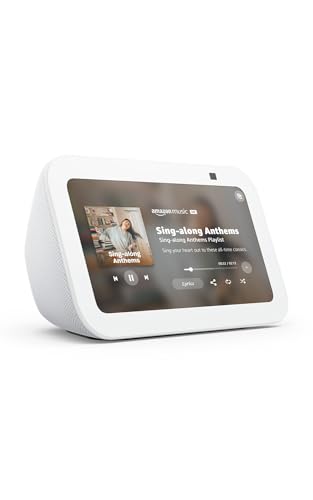
- 5.5-inch screen suits tight spaces
- 2 MP camera supports Alexa video calls
- Privacy shutter and mic/camera off button
Best For: Small kitchens needing Alexa calling and quick controls
Privacy-First Kitchen Family Hub
12.3-inch Digital Calendar Touchscreen

- Large 12.3-inch anti-glare screen for family planning
- HD calls plus a physical privacy shutter
- Calendar sync, chores, and meal planning built in
Best For: Families wanting a larger hub with privacy and calling
Large Family Hub Calendar
15.6-inch touchscreen family scheduler with privacy cover

- Large 15.6-inch IPS display for shared household planning
- Merges multiple calendar accounts and supports chores and recipes
- Privacy cover and mic support family video calls
Best For: Large households that need a central scheduling screen with built-in call privacy
Flagship Large-Screen Hub
15.6" Multi-Calendar Family Hub

- 15.6-inch IPS screen for easy room-wide viewing
- Syncs Google, iCloud, Outlook, and Cozi accounts in parallel
- Includes recipe storage, chores, and privacy lens cover
Best For: Large families needing a visible kitchen hub with shared calendars and calling support
Connected Wall Planner

- Syncs Google, iCloud, Outlook, Yahoo, and Cozi
- Built-in voice and video calling for family communication
- Shared tasks, weather, reminders, and photo-frame mode
Best For: Families wanting a mid-size kitchen calendar with calling and shared lists
Portable Video-Call Hub

- 25-inch 1080P touchscreen with 10-point touch
- Built-in battery and handle for cordless portability
- Front camera has shutter; dual mics support video calls
Best For: Families wanting a large portable screen for planning, calls, and app use
Natural Video Calling Hub – Meta Portal 10" Touch Screen
Meta Portal - Smart Video Calling for the Home with 10” Touch Screen Display - Black
Check Price On AmazonIf you’re looking for smart kitchen displays for video calls, Meta Portal is built around simple, family-friendly calling with a 10-inch touchscreen and hands-free convenience. Its Smart Camera follows you as you move, and Smart Sound helps keep your voice clear, making it easier to stay connected while you cook, clean, or multitask around the house.
Best For: Families who want an easy, home-focused video calling display with automatic camera framing.
Pros:
- Smart Camera adjusts automatically so you can move freely and stay in frame.
- Smart Sound is designed to help you be heard clearly during calls.
- Supports calling through Messenger and WhatsApp, even if others don’t have a Portal.
- Privacy controls include camera and microphone disable options plus a lens cover.
Cons:
- 10-inch display is smaller than some dedicated kitchen hub screens.
- Focused more on calling than on built-in family planning tools.
Overall, Meta Portal is a strong fit if your priority is smooth, natural video calls in a home setting rather than a full calendar-and-chore management center.
Compact Family Command Center – 10.1-inch Digital Family Calendar
For smart kitchen displays for video calls that also organize the household, this 10.1-inch family calendar combines scheduling, chore tracking, and one-touch calling in a slim format. It is designed for small spaces, with a clear 1080P IPS screen, subscription-free calendar syncing, and an HD camera that lets you check in with family from the kitchen or desk.
Best For: Small kitchens or desks that need a compact all-in-one family organizer with video calling.
Pros:
- Space-saving 10.1-inch design fits narrow counters and small rooms.
- Free cloud sync supports Google Calendar, Outlook, iCloud, Cozi, and Yahoo.
- Built-in 5MP front camera and noise-reducing microphone support one-touch video calls.
- Includes chore charts and meal planning tools for daily family coordination.
Cons:
- Video calling is integrated into a larger planner-style device, not a dedicated calling screen.
- Some calendar integrations are one-way rather than fully two-way.
This model makes the most sense if you want a compact kitchen hub that does more than video calls and helps keep the whole family on schedule.
Compact Alexa Smart Display – Amazon Echo Show 5
The Echo Show 5 is a compact choice for smart kitchen displays for video calls when you want a small screen that still handles everyday household tasks. With a 5.5-inch display, built-in camera, and Alexa support, it works well for quick calls, music, weather checks, smart home control, and photo display on a countertop or bedside table.
Best For: Buyers who want a small Alexa-powered display for quick video calls and kitchen convenience.
Pros:
- 5.5-inch display is compact and easy to place in tight spaces.
- 2 MP camera supports video calls with Alexa app users or Echo devices with screens.
- Can show photos, weather, news, and control compatible smart home devices.
- Includes privacy features like a mic/camera off button and built-in camera shutter.
Cons:
- Smaller display and 2 MP camera are more modest than larger kitchen hub devices.
- Best suited to quick calls rather than larger shared-family planning features.
If you want a compact smart display that blends calling with everyday Alexa functions, the Echo Show 5 is an easy, space-friendly pick.
Privacy-First Kitchen Family Hub – 12.3-inch Digital Calendar Touchscreen
If you want smart kitchen displays for video calls that also double as a serious family organizer, this 12.3-inch touchscreen is built for that role. It combines HD video calling, real-time calendar sync, chore charts, and meal planning with a mechanical privacy shutter and a countertop-or-wall-friendly design.
Best For: Families who want a larger kitchen hub with calling, planning, and strong privacy controls.
Pros:
- 12.3-inch anti-glare touchscreen gives you more room for schedules and family planning.
- Built-in noise-canceling microphone and HD camera support crisp video calls.
- Physical privacy shutter fully blocks the lens when not in use.
- Includes calendar sync, chore charts, meal planning, and a one-tap SOS button.
Cons:
- Larger footprint may be less ideal for very small counters.
- Designed as a full family hub, so it may be more than some users need for calling alone.
Overall, this is a well-rounded kitchen command center for households that want a bigger screen and built-in privacy alongside video calling.
Compact 5-in-1 Kitchen TV – 10.1-inch touchscreen mini TV with live TV and video calling
If you want smart kitchen displays for video calls that also handle everyday entertainment, this 10.1-inch mini TV is built to do a lot in a small footprint. It combines a touchscreen, streaming app support, local ATSC channels, calendar tools, photo frame mode, and video calling capability in one compact unit for kitchens, bedrooms, RVs, and campers.
Best For: Shoppers who want a flexible small-screen display for cooking spaces, travel use, and basic smart home tasks.
Pros:
- 5-in-1 design supports streaming, ATSC live TV, calendar viewing, photo display, and video calling through compatible apps.
- Built-in ATSC tuner lets you watch local channels without internet when reception is available.
- Touchscreen control makes app browsing and searching feel more tablet-like than a traditional TV remote.
- Dual power options add flexibility for everyday countertop use or portable setups with a power bank.
Cons:
- Streaming app compatibility may vary depending on app requirements.
- Portable use requires an external power source or power bank, since there is no built-in battery.
- OTA reception depends on local signal strength and antenna placement.
This is a practical pick if you need a compact all-in-one display rather than a single-purpose screen. Its biggest strength is versatility, especially for households that want one device to cover video calls, light entertainment, and home organization.
Large Family Hub Calendar – 15.6-inch touchscreen family scheduler with privacy cover
For smart kitchen displays for video calls that are designed around family organization, this 15.6-inch wall calendar focuses on schedule sharing, task planning, and easier check-ins. The large touchscreen supports multiple calendar accounts, household chores, recipe storage, and privacy-focused video calling features, making it a strong fit for busy homes that want a central command screen.
Best For: Larger families that need a big shared scheduling hub with video-call support and strong privacy features.
Pros:
- 15.6-inch IPS panel offers broad visibility for family schedules and shared planning.
- Supports parallel merging of Google, iCloud, Outlook, and Cozi calendars for multi-member households.
- Includes task management, recipe storage, and grocery organization tools.
- Auto-brightness plus mechanical lens cover and high-sensitivity mic add comfort and privacy for video calls.
Cons:
- Requires corded electric power, so it is not a portable option.
- Best suited to families who will use the calendar and task tools regularly.
- Its large size may be more display than needed for smaller households.
This model stands out when the main goal is coordination rather than entertainment. If you want a family hub that can organize schedules and handle video calls without constant app switching, it offers a focused, premium approach.
Touchscreen Family Planner Hub – 10.1-inch family calendar with one-touch video calling
This smart family planner is a straightforward choice if you are comparing smart kitchen displays for video calls and want a calendar-first setup. The 10.1-inch touchscreen combines shared scheduling, chore charts, photo display, weather updates, and one-touch video call access in a compact wall- or desk-mountable format.
Best For: Families who want a simple, all-in-one wall calendar with easy video calling and shared scheduling.
Pros:
- 10.1-inch touchscreen supports calendar views, photo frame mode, and easy home placement.
- Compatible with Google, iCloud, Outlook, Cozi, and Yahoo for multi-calendar syncing.
- One-touch video call feature is useful for checking in with kids or elders at home.
- Auto-brightness, auto-rotate, and smart sleep mode help the display stay practical in daily use.
Cons:
- More focused on family organization than on entertainment features.
- Best value depends on whether you will use the calendar, chore chart, and video call tools often.
- 10.1-inch size may feel modest compared with larger hub-style displays.
This is a well-rounded option for homes that want a dependable shared screen rather than a feature-heavy smart TV. Its combination of calendar syncing, video calling, and simple mounting makes it easy to place in kitchens, hallways, or offices.
Flagship Large-Screen Hub – 15.6" Multi-Calendar Family Hub
If you want smart kitchen displays for video calls and household planning in one larger screen, this 15.6-inch digital wall calendar is built for visibility and multi-user scheduling. It combines parallel calendar syncing, a big recipe library, and privacy-focused calling features, making it a strong fit for busy homes that need a central command center.
Best For: Large households that want a visible kitchen hub for shared calendars, recipes, and occasional video calls.
Pros:
- 15.6-inch IPS display offers wide, easy-to-read visibility in common areas.
- Supports parallel merging of multiple Google, iCloud, Outlook, and Cozi accounts.
- Includes task management plus a large recipe library with auto-sorted grocery categories.
- Ambient brightness adjustment and a mechanical lens cover support comfort and privacy.
Cons:
- Designed more as a family hub than a dedicated video-call device.
- Larger footprint may be more than smaller kitchens need.
- Best value is tied to households that will actually use the multi-account features.
Overall, this is the most display-forward option in the group, and its strengths are biggest when you need a shared wall hub that can also handle video calls privately.
Connected Wall Planner – 12.3" Voice & Video Calendar
For smart kitchen displays for video calls that also stay useful day to day, this 12.3-inch AI digital calendar covers the basics well. It syncs major calendar platforms, adds built-in voice and video calling, and includes shared lists, reminders, weather, and a photo-frame mode for flexible family use.
Best For: Families who want a mid-size wall planner with calling features, shared lists, and easy calendar syncing.
Pros:
- Syncs with Google Calendar, iCloud, Outlook, Yahoo, and Cozi.
- Built-in voice and video calling adds communication beyond scheduling.
- Shared tasks, grocery lists, and reminders help organize daily routines.
- Can switch to photo frame mode and supports wall or tabletop placement.
Cons:
- Smaller than the largest family-hub displays in this roundup.
- No battery or portability claims like the more mobile model.
- Calling is integrated, but the notes don’t emphasize advanced camera or audio specs.
This is a balanced pick if you want a practical kitchen display that does scheduling first and still gives you a direct way to make video calls from the same screen.
Portable Video-Call Hub – 25" Cordless Smart Calendar
If you need smart kitchen displays for video calls plus a screen that can move with the household, this 25-inch portable calendar stands out. It combines cordless battery-powered placement, Android app support, and a privacy shutter camera, so it works as both a large family planner and a capable communication hub.
Best For: Families who want a big portable touchscreen for shared schedules, entertainment, and secure video calls.
Pros:
- Large 25-inch 1080P touchscreen provides a clear family dashboard.
- Built-in battery and carry handle make it easy to move without cords.
- Video-call-ready camera includes a physical shutter plus dual mics.
- Runs Android and supports app downloads, screen casting, and smart organization tools.
Cons:
- At 25 inches, it may be bigger than many kitchens can comfortably accommodate.
- More feature-rich than simpler calendar-only displays, which may be overkill for basic needs.
- Portable design adds flexibility, but it is still a substantial device at 9.61 lbs.
This model is the most flexible of the three, especially if you want one screen that can travel from kitchen to another room while still handling video calls securely.
How We Picked These Smart Kitchen Displays for Video Calls
We focused on models that fit real kitchen use: readable screens, reliable calling features, family organization tools, and simple mounting or placement. We also gave extra weight to no-subscription options, since recurring fees can make a family hub much more expensive over time.
Quick Comparison: What Matters Most
Some Smart Kitchen Displays for Video Calls are built primarily for calling and smart-home convenience, while others lean into family planning, shared calendars, meal prep, and chore tracking. A smaller screen may work well on a counter, but larger wall-mounted models are usually better for shared households and busy kitchens.
Key Buying Factors for Smart Kitchen Displays for Video Calls
Screen Size and Placement
Choose a size that matches your kitchen layout. Compact 5- to 10-inch displays are easier to place near an outlet, while 12-inch and 15-inch models are better if multiple people need to view the screen at once. Larger 25-inch units can function more like a wall dashboard than a countertop device.
Video Calling Quality
Look for clear audio, responsive touch controls, and support for the calling platform you actually use. If your household already relies on Alexa, Google, or Apple services, compatibility matters more than a long feature list.
Family Organization Features
The best kitchen displays do more than make calls. Calendar syncing, shared reminders, chore charts, meal planning, and photo display can help the device earn a permanent spot in the kitchen instead of becoming novelty clutter.
Subscription Costs and Ecosystem Fit
Many buyers prefer Smart Kitchen Displays for Video Calls with no monthly fee, especially when the device is meant to replace a family bulletin board or planner. Check whether advanced features require a subscription, and decide whether that tradeoff is worth it.
Who Should Buy Which Smart Kitchen Displays for Video Calls?
If you want the simplest setup for casual video calling, a compact smart display is usually enough. If your main goal is family scheduling and task management, choose a larger touchscreen calendar hub with strong sync support. If you want one device to handle calling, planning, and kitchen visibility for the whole household, prioritize a larger wall-mounted model with bright display controls and multi-user organization tools.
For most households, the best choice is the model that fits your space first and your workflow second. A smart kitchen display should reduce friction, not add another screen to manage.
