

Smart kitchen displays with large screens can turn a busy kitchen into a command center for family schedules, meal planning, and connected home control. The best models balance visibility, touch response, and useful software without adding clutter.
In this roundup, we focus on screens that are easy to read across the room and practical for everyday use, whether you want a wall-mounted family calendar, a smart home hub, or an all-in-one display for notes and routines.
Best 10 Smart Kitchen Displays with Large Screens Picks for 2026
Premium Alexa Kitchen Hub

- 11-inch Full-HD display with more viewing area
- Spatial audio plus stronger bass for media
- Built-in hub for Alexa smart home control
Best For: Alexa users who want a large all-purpose kitchen display
Wall-Mounted Family Planner
10.1" Digital Calendar Planner

- Syncs with Google, iCloud, and Outlook
- Tracks chores, meals, and grocery lists
- Includes photo slideshow and weather display
Best For: Busy families needing a shared planning hub
Security-Focused Smart Display

- Four live camera views on one screen
- Instant door and camera alerts
- Local playback with no buffering
Best For: Users who want a dedicated home security monitor
Extra-Large Family Planner

- 16-inch HD touchscreen with adjustable readability
- Syncs across many major calendar services
- Chore rewards, meals, and photo slideshow built in
Best For: Large households needing a highly visible family organizer
Large Family Hub
15.6" Google Calendar Smart Display

- 15.6-inch anti-glare FHD touchscreen
- Supports Google Calendar and Android apps
- Built-in battery, voice assistant, and speakers
Best For: Families needing a large shared calendar and photo hub
Compact Family Scheduler

- 10.1-inch HD IPS screen with auto-brightness
- Quick sync with Google, Apple, and Outlook calendars
- Adjustable stand for portrait or landscape use
Best For: Small-space family scheduling on counters or desks
Decor-Friendly Family Hub
15.6" Walnut Smart Calendar Display
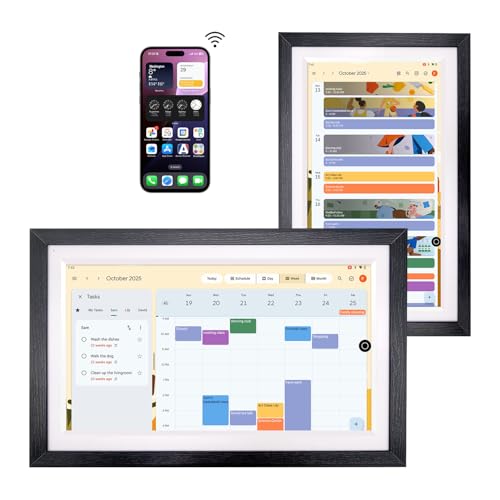
- 15.6-inch anti-glare FHD touchscreen
- Google Calendar and Google Play app support
- Walnut frame with stylus and built-in battery
Best For: Homes wanting a large calendar display with a wood finish
Family Command Center
10.1-Inch Smart Calendar & Photo Frame

- Syncs with Google Calendar, iCloud, Outlook, and more
- Functions as a calendar, photo frame, and art display
- Supports up to 20 users with no subscription fees
Best For: Families wanting a compact shared organizer for kitchen or desk use
Kitchen Dashboard Upgrade
15.6-Inch Family Calendar Display

- Large 15.6-inch anti-glare HD touchscreen
- Dual mode for simple calendar use or customizable Android mode
- Adds chore tracking, meal planning, and smart-home control
Best For: Families wanting a larger wall planner with extra smart features
Custom Family Planner
10.1-Inch Smart Chore Chart Display

- Customizable dashboard with draggable widgets
- Syncs with Google Calendar, iCloud, Outlook, and more
- Includes chore rewards, meal plans, and grocery lists
Best For: Families wanting a flexible no-fee organizer with photo display
Premium Alexa Kitchen Hub – Amazon Echo Show 11
The Amazon Echo Show 11 is a strong pick if you want smart kitchen displays with large screens that do more than just show the time. Its 11-inch Full-HD touchscreen gives you more room for recipes, calendars, video calls, and streaming, while spatial audio makes it more useful in a busy kitchen or family space.
Best For: People who want a large, versatile Alexa display for recipes, smart home control, and entertainment.
Pros:
- 11-inch Full-HD screen with 60% more viewing area than Echo Show 8 (2025 release)
- Spatial audio with clearer vocals, wider sound stage, and up to 2x bass versus Echo Show 8 (2023 release)
- Built-in smart home hub for controlling compatible Alexa devices without a separate hub
- Centered auto-framing camera supports natural video calls and live view
Cons:
- Larger display may take up more counter space than smaller smart displays
- Several premium features are tied to Alexa+ experiences
If you want a kitchen-friendly display that balances screen size, audio, and smart home control, this model offers the broadest all-around feature set in the group.
Wall-Mounted Family Planner – 10.1" Digital Calendar Planner
This 10.1-inch wall-mounted planner is a practical choice for smart kitchen displays with large screens when your main goal is household organization. It syncs with Google, iCloud, and Outlook, and the touchscreen layout keeps schedules, chores, meal planning, and family reminders visible in one shared place.
Best For: Families who want a wall-mounted digital calendar with chore tracking, meal planning, and photo slideshow features.
Pros:
- Real-time sync with Google, iCloud, and Outlook calendars
- Built-in chore tracker with points and rewards for kids
- Meal planning and grocery lists sync across the family
- Photo slideshow and weather display add everyday usefulness
Cons:
- Smaller than the biggest wall planners in this roundup
- More focused on planning than entertainment or voice assistant features
For households that want a shared command center instead of a media screen, this planner stands out for practical family scheduling and task management.
Security-Focused Smart Display – eufy Smart Display E10
The eufy Smart Display E10 is a compact option in the smart kitchen displays with large screens category, but its focus is clearly home monitoring rather than cooking or entertainment. The 8-inch touchscreen shows four live camera views at once, delivers instant alerts, and keeps playback local for quick review of security events.
Best For: Homeowners who want an easy-to-use security display for door alerts and multi-camera monitoring.
Pros:
- Instant hands-free alerts when someone rings the doorbell, unlocks the door, or is detected
- Four live views on one screen for broader property monitoring
- Local storage enables instant playback with no waiting or buffering
- Simple touchscreen design is suitable for kids and seniors
Cons:
- 8-inch screen is smaller than other large-format display options
- Best suited to security monitoring rather than general kitchen use
If your priority is seeing security events at a glance, this display is one of the most focused choices here and does the monitoring job well.
Extra-Large Family Planner – 16" Smart Digital Calendar
This 16-inch smart calendar is one of the best fits for smart kitchen displays with large screens if you want maximum visibility for the whole family. The HD touchscreen, adjustable font sizes, and flexible wall or desk placement make it easy to keep calendars, chores, meals, and photos visible in busy household spaces.
Best For: Large families that want a big, easy-to-read shared organizer with meal planning and chore rewards.
Pros:
- 16-inch HD touchscreen with adjustable font size and brightness
- Supports Google, iCloud, Outlook, Cozi, Yahoo, and TeamSnap sync
- Built-in chore and reward system helps motivate kids
- Includes meal planning, recipe library access, and photo/video slideshow features
Cons:
- Bulkier than smaller countertop displays
- Primarily designed for organization rather than voice-assistant convenience
For households that need a large shared screen in the kitchen or entryway, this model offers the most spacious planning layout in the list.
Large Family Hub – 15.6" Google Calendar Smart Display
If you’re comparing smart kitchen displays with large screens, this 15.6-inch model stands out for turning everyday scheduling into a visible family hub. It combines a full HD anti-glare touchscreen, Google Calendar support, and Android app access, so it can handle meal planning, chores, and shared calendars in one place.
Best For: Families who want a large, wall-or-desk smart display for calendars, photos, and basic voice-controlled home use.
Pros:
- 15.6-inch 1080p anti-glare touchscreen with a paper-like look
- Works with Google Calendar and supports installing other calendar apps through Google Play
- Built-in battery, voice assistant support, and built-in speakers for flexible use
- Can be used on a desk or mounted on a wall
Cons:
- Requires a Google account for the core calendar workflow
- Larger size may be more display than smaller kitchens need
- Some advanced app use depends on what you install through Google Play
This is a strong fit if you want a large-screen smart display that does more than show dates. Its mix of family scheduling, photo display, and smart-home voice control makes it especially practical in busy shared spaces.
Compact Family Scheduler – 10.1" Family Calendar Display
For shoppers looking at smart kitchen displays with large screens, this 10.1-inch calendar is a compact option that focuses on quick syncing and family coordination. It uses an HD IPS panel with wide viewing angles, plus support for major calendar platforms so it can fit into an existing household setup without much fuss.
Best For: Families who want a smaller smart calendar for counters, desks, or bedside tables with easy cross-device syncing.
Pros:
- 10.1-inch HD IPS screen with 178° viewing angle and auto-brightness
- Quick setup and compatibility with Google Calendar, Apple iCloud, Outlook, and more
- Real-time sync across phones, tablets, and computers
- Adjustable stand supports landscape or portrait placement
Cons:
- Smaller display than 15.6-inch alternatives
- Best suited to calendar and family coordination use rather than app-heavy tasks
- Designed for plug-and-play use, so it is less feature-rich than larger smart displays
This model makes sense if you want a simple family scheduling screen that is easy to place almost anywhere. The quick setup and broad calendar support are the main selling points, while the smaller size keeps it more flexible for tight spaces.
Decor-Friendly Family Hub – 15.6" Walnut Smart Calendar Display
If you want smart kitchen displays with large screens and a warmer look, this 15.6-inch walnut version leans into both style and function. It offers the same Google Calendar-driven family organization, anti-glare FHD touchscreen, and voice control features, while the wood frame makes it easier to blend into a home interior.
Best For: Households that want a large smart display with a more decorative walnut finish for shared scheduling and home use.
Pros:
- 15.6-inch anti-glare 1080p touchscreen with full-lamination for reduced reflection
- Supports Google Calendar and calendar apps from Google Play
- Built-in battery, stylus pen, and voice control add convenience
- Walnut frame gives it a more furniture-like appearance
Cons:
- Core calendar experience still centers on Google account use
- Large format may be unnecessary for very small kitchens
- Style preference matters more here because the hardware features closely mirror similar models
This is a good choice if you want the functionality of a big family calendar screen but prefer a finish that looks more at home in shared living spaces. The walnut frame is the main differentiator, and the rest of the package is built for practical household organization.
Family Command Center – 10.1-Inch Smart Calendar & Photo Frame
If you want smart kitchen displays with large screens that also work as a household planner, this 10.1-inch model keeps schedules, chores, and reminders in one compact touch display. It syncs with major calendar apps like Google Calendar, iCloud, Cozi, Yahoo, Outlook, and TeamSnap, and it can sit on a counter or mount on the wall.
Best For: Busy homes that want a smaller shared organizer for the kitchen counter, wall, or desk without subscription fees.
Pros:
- Syncs with major scheduling apps for shared family planning
- Works as a calendar, photo frame, and digital art display
- Supports up to 20 users with real-time updates and no subscription needed
- Includes wall-mount and desktop setup options
Cons:
- 10.1-inch screen is smaller than some full kitchen command centers
- Focused more on organization than advanced smart-home controls
This is a practical pick if you want a flexible, space-saving organizer that blends scheduling and photo sharing. It does the basics well and should fit neatly into most kitchen or home office setups.
Kitchen Dashboard Upgrade – 15.6-Inch Family Calendar Display
For shoppers comparing smart kitchen displays with large screens, this 15.6-inch Apolosign model stands out with a bigger touch display and a more full-featured dashboard. It syncs with popular calendar services, adds chore tracking and meal planning, and can switch between a simple calendar view and a customizable Android mode.
Best For: Families who want a larger wall planner that can also handle widgets, apps, and smart-home tasks.
Pros:
- Large 15.6-inch touchscreen with anti-glare HD clarity
- No subscription fee and supports calendar syncing with major platforms
- Dual mode lets you choose calendar simplicity or Android customization
- Includes chore charts, meal planning, photo/video display, and voice assistant support
Cons:
- Bigger feature set may be more than families need for basic scheduling
- Designed around wall planning, so it may take more space than a compact counter unit
If you want a larger smart family display that can do more than show dates, this one has strong range. The mix of scheduling, widgets, and home control makes it especially useful in a busy kitchen or family hub.
Custom Family Planner – 10.1-Inch Smart Chore Chart Display
This 10.1-inch smart calendar is a straightforward option for smart kitchen displays with large screens when you want family organization without subscription fees. It offers a customizable dashboard, calendar syncing, chore tracking, meal planning, and photo display in a wall- or desk-mount format.
Best For: Families that want a flexible, no-fee organizer for schedules, meals, lists, and photos.
Pros:
- Customizable dashboard with draggable widgets for calendars, tasks, meals, and photos
- Syncs with Google Calendar, iCloud, Outlook, and similar services
- Includes chore charts, reward tracking, and shared meal/grocery planning
- 1080P HD touchscreen supports wall or desk placement
Cons:
- 10.1-inch screen is smaller than larger family wall displays
- Feature depth may be more than needed if you only want basic calendar viewing
It delivers a lot of everyday usefulness in a compact format, especially if your family wants both planning tools and a photo slideshow. For a no-subscription organizer, it covers the core bases well.
How We Picked the Best Smart Kitchen Displays with Large Screens
We prioritized screen size, readability, touch responsiveness, calendar and app compatibility, setup simplicity, and features that fit real kitchen use. That means strong visibility in bright rooms, reliable syncing, and layouts that make schedules and tasks easy to manage at a glance.
We also favored options that reduce friction for families, including shared calendars, chore tracking, meal planning tools, and smart home integrations where relevant.
Quick Comparison
If you want the simplest summary: Alexa-focused displays are best for voice control and smart home access, while dedicated digital calendars are better for planning and family organization. Larger 15.6-inch and 16-inch models tend to be the easiest to read from across the kitchen, while 10.1-inch displays are more compact and wall-friendly.
Key Buying Factors for Smart Kitchen Displays with Large Screens
Screen Size and Visibility
For kitchen use, size matters. A larger panel improves readability for schedules, shopping lists, and shared reminders. Anti-glare finishes and higher-resolution panels help in bright daylight and under overhead lighting.
Software and Sync Options
Look for Google Calendar, iCloud, or third-party calendar sync if your household already uses those systems. If you want a family organizer, chore charts, meal planning, and shared notes are often more valuable than extra entertainment features.
Mounting and Placement
Wall-mountable models are ideal for keeping counters clear. If you prefer flexibility, consider a display with a stand or battery option so it can move between the kitchen, office, or entryway.
Smart Home and Extra Functions
Some Smart Kitchen Displays with Large Screens double as smart home hubs, photo frames, or app-enabled tablets. These extras are useful if you want one device to handle alerts, cameras, voice assistance, and household coordination.
Who Should Buy Which Smart Kitchen Displays with Large Screens?
Choose a smart home hub-style display if your priority is voice control, door alerts, and connected-device management. Choose a dedicated digital calendar if your main goal is family scheduling, meal planning, and chore tracking. For the best all-around kitchen visibility, larger 15.6-inch or 16-inch models usually offer the strongest balance of screen space and practical daily use.
If your kitchen is compact, a 10.1-inch model may be enough. If multiple family members need to view the screen from different angles or across the room, a larger display will usually be the better long-term choice.
