

Smart power strips can make a home office cleaner, safer, and easier to manage. With app control, scheduling, and energy monitoring, they help reduce standby waste while keeping essential gear ready to use.
Below, we focus on options that balance outlet count, USB charging, surge protection, and smart-home compatibility so you can choose the right strip for your desk setup.
Best 10 Smart Power Strips for Home Offices Picks for 2026
Compact Desk Control
Kasa 3-Outlet Power Strip with USB

- 3 individually controlled smart outlets
- 2 always-on USB charging ports
- Works with Alexa and Google Assistant
Best For: Small home offices that need simple smart control and USB charging
High-Capacity Desk Hub

- 6 smart outlets plus 2 always-on outlets
- 1200 joules of surge protection
- 6-foot cord with Alexa and Google voice control
Best For: Busier home offices that need extra outlet capacity
Alexa-Centric Charging Strip
Amazon Basics 6-Outlet Power Strip

- 6 individually controlled outlets
- 3 USB ports including USB-C
- Works with Alexa only, no hub required
Best For: Alexa households that want outlet control plus USB charging
Most Feature-Rich Option
POWSAV 8-Outlet Smart Power Strip

- 4 smart outlets and 4 always-on outlets
- 4 USB ports plus 1680-joule surge protection
- Alexa and Google Home compatible
Best For: Larger home offices needing many outlets and strong protection
Compact Smart Hub with Night Light
Govee Smart Plug Outlet Extender
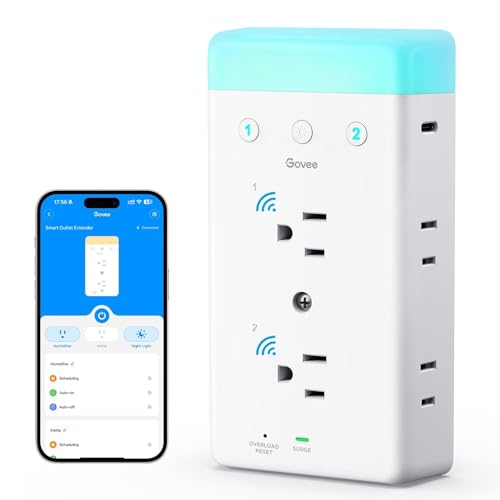
- 2 smart outlets and 4 always-on outlets
- 2 USB ports and RGB night light
- Surge, overload, and fire-retardant shell
Best For: Small home offices and tight desk setups
Full-Control Energy Monitor

- 6 individually controlled outlets
- Energy monitoring and scheduling
- Matter-compatible with major platforms
Best For: Users who want outlet-by-outlet control and energy tracking
High-Output App-Control Strip
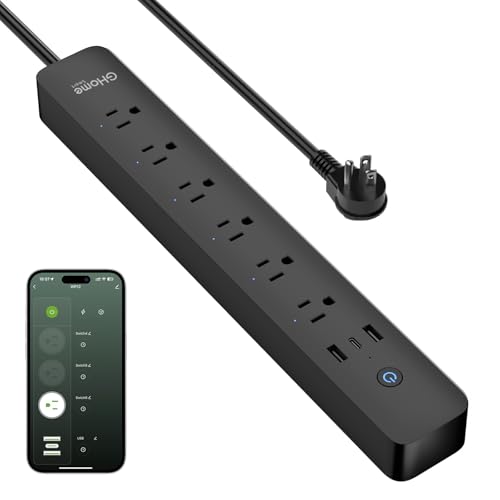
- 6 smart outlets and 3 USB ports
- 30W USB-C fast charging
- Timers, schedules, and energy monitoring
Best For: Remote workers needing fast charging and simple automation
Most Versatile Outlet Extender
GHome Smart 9-outlet extender with 3 smart outlets and 3 USB
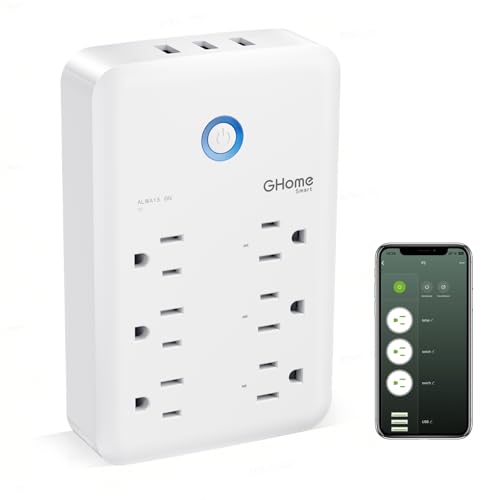
- 3 individually controlled smart outlets
- 3 USB ports plus 3 always-on outlets
- 15A/3450W with surge and overload protection
Best For: Users who want a compact desk-side extender with both smart and always-on power
Best Beginner Smart Strip
GHome Smart strip with 3 outlets, 3 USB, and easy app control

- Alexa and Google Assistant voice control
- 3 smart outlets with individual or group control
- Timer, schedule, countdown, and random modes
Best For: Small offices and beginners automating lights and low-power devices
Best for Flexible Desk Placement
GHome Smart 3-outlet strip with 3 USB and a 4-foot cord

- 3 individually controlled WiFi outlets
- 4-foot extension cord for desk placement
- 3 USB ports with 3.1A total charging
Best For: Desks and workspaces that need a short cord plus smart control
Compact Desk Control – Kasa 3-Outlet Power Strip with USB
If you want smart power strips for home offices that keep a small workstation organized, this Kasa model is a practical fit. It gives you three individually controlled smart outlets plus two always-on USB ports, so you can manage a few key devices while still charging phones, tablets, or accessories.
Best For: Smaller home offices that need app control, voice commands, and built-in USB charging.
Pros:
- 3 smart outlets can be controlled separately from the Kasa app
- 2 always-on USB ports handle charging without using outlet space
- Works with Alexa and Google Assistant for voice control
- ETL-certified surge protection adds a layer of protection for electronics
Cons:
- Only 3 outlets are smart-controlled, so larger desks may need more capacity
- USB ports are always on, not app-controlled
Overall, this is a straightforward choice if you want a simple smart strip with easy setup, scheduling, and enough flexibility for a compact office desk.
High-Capacity Desk Hub – Geeni Surge Ultra 8-Outlet
For smart power strips for home offices with more devices to manage, this Geeni Surge Ultra offers a higher outlet count and solid surge protection. It includes six smart outlets, two always-on outlets, and a 6-foot cord, making it useful when you need flexible placement and control over multiple peripherals.
Best For: Busier home offices that need more outlets and app or voice control in one strip.
Pros:
- 8 total outlets, including 6 smart outlets for individual control
- 2 always-on outlets keep essential devices powered
- 1200 joules of surge protection helps shield electronics
- 6-foot cord gives more placement flexibility
Cons:
- No USB ports are listed in the supplied details
- Only works through Wi-Fi and voice assistants, so network setup matters
This is a strong pick if your desk has several devices and you want a single strip with more smart-controlled capacity than entry-level options.
Alexa-Centric Charging Strip – Amazon Basics 6-Outlet Power Strip
If your setup is built around Alexa, this Amazon Basics option fits the smart power strips for home offices category without adding extra complexity. It provides six individually controlled outlets and three USB ports, including USB-C, so you can handle both powered devices and charging needs from one strip.
Best For: Alexa-based home offices that want independent outlet control and extra USB charging.
Pros:
- 6 individually controlled outlets support flexible device management
- 3 USB ports include 2 USB-A and 1 USB-C
- Works with Alexa app routines and schedules, no hub required
- 790 joules of surge protection adds basic protection for office gear
Cons:
- Works with Alexa only, not Google Assistant
- Surge protection rating is lower than some higher-capacity options
It’s a good fit if your office already uses Alexa and you want a straightforward strip that combines outlet control with modern USB charging.
Most Feature-Rich Option – POWSAV 8-Outlet Smart Power Strip
When you need smart power strips for home offices with a heavier device load, this POWSAV model gives you a lot of flexibility. It has four smart outlets, four always-on outlets, and four USB ports, along with app scheduling and voice control through Alexa or Google Assistant.
Best For: Larger home office desks that need multiple smart outlets, USB charging, and strong surge protection.
Pros:
- 8 AC outlets split between 4 smart and 4 always-on
- 4 USB ports support charging for phones, tablets, and other USB devices
- 1680 joules of surge protection is the highest in this group
- Works with Alexa and Google Home, plus scheduling and timer controls
Cons:
- Requires 2.4 GHz Wi-Fi only
- USB ports and always-on outlets are not app-controlled
This is the most feature-rich option here if you want a single strip to cover both desk electronics and charging accessories with minimal outlet juggling.
Compact Smart Hub with Night Light – Govee Smart Plug Outlet Extender
If you want smart power strips for home offices that save space without skimping on convenience, this Govee outlet extender is built around compact utility. It combines smart outlets, always-on outlets, USB charging, and an RGB night light in one small hub, making it easier to power a laptop, router, lamp, and phone charger from a crowded desk area.
Best For: Small home offices, bedside workstations, and anyone who wants a compact all-in-one power hub with a built-in night light.
Pros:
- 2 smart outlets plus 4 always-on outlets and 2 USB ports give you flexible device coverage.
- Alexa, Google Assistant, and Govee Home App control make remote switching straightforward.
- Surge and overload protection, plus a 5VA fire-retardant shell, add helpful safety peace of mind.
- Wide outlet spacing and retaining screw installation help keep bulky plugs in place.
Cons:
- Only the two smart outlets are app- and voice-controlled; the other AC outlets are always on.
- The USB ports are basic charging additions, not high-output fast chargers.
- The RGB night light feature may be unnecessary if you only want a plain power strip.
This is a good fit if your desk setup needs a tidy, space-saving power solution with a few smart features layered in. It is less about maximum outlet count and more about making a small office corner feel organized and easy to manage.
Full-Control Energy Monitor – Tapo P316M Smart Power Strip
For smart power strips for home offices where control and insight matter, the Tapo P316M stands out with six individually controlled outlets, three USB ports, and energy monitoring. It is designed for users who want to schedule devices, track usage, and manage a desk or office setup through major smart home platforms.
Best For: Home office users who want per-outlet control, energy tracking, and broad smart home compatibility.
Pros:
- 6 individually controlled AC outlets let you manage each device separately.
- Energy monitoring helps you track consumption and use schedules to cut waste.
- Matter compatibility supports Alexa, Google Home, Apple HomeKit, and Samsung SmartThings.
- 3 always-on USB ports add extra charging convenience.
Cons:
- The USB ports are always on, so they do not offer individual smart switching.
- Its focus is utility and control rather than added extras like lighting or specialty design features.
- The 3-foot cord may feel short if your outlet is far from the desk.
If you want a smart office power strip that is built around control, scheduling, and energy awareness, this is the most feature-rich option in the group. It is especially useful when you want a reliable hub for multiple devices rather than just a simple plug extender.
High-Output App-Control Strip – GHome Smart Power Strip 15A
If you need smart power strips for home offices with more charging muscle, the GHome Smart Power Strip focuses on high output and practical app control. It combines six app-controlled outlets, three USB ports with 30W fast charging, and scheduling tools in a flat-plug design that suits desks, bedrooms, and small office spaces.
Best For: Remote workers and small office setups that need fast USB charging, app control, and simple automation.
Pros:
- 6 smart outlets plus 3 USB ports, including USB-C fast charging up to 30W.
- No hub required; works with Alexa, Google Assistant, and the GHome app over 2.4GHz Wi-Fi.
- Timers, schedules, countdowns, cycle schedules, and random modes add useful automation.
- Built-in energy monitoring and multiple safety protections support daily use.
Cons:
- Only 2.4GHz Wi-Fi is supported, so it will not work on 5GHz networks.
- The energy monitor tracks total consumption, not per-outlet usage.
- It is feature-rich, but the design is more functional than compact.
This is a strong pick if you want a power strip that can handle several office devices while also charging phones and accessories quickly. The flat plug and long cord make it easier to place behind desks or in busier work areas.
Most Versatile Outlet Extender – GHome Smart 9-outlet extender with 3 smart outlets and 3 USB
If you’re comparing smart power strips for home offices, this GHome plug extender stands out for squeezing a lot of control into a compact wall-mounted design. It gives you three individually controlled smart outlets, three USB ports, and three always-on outlets, so you can organize office gear without giving up charging or backup power.
Best For: Home office users who want a compact, high-capacity smart extender with mixed smart and always-on outlets.
Pros:
- 3 smart outlets support individual control in the GHome app and with Alexa or Google Home.
- 3 USB ports and 3 always-on outlets add flexibility for charging and constant-power devices.
- Rated 15A/3450W with surge, overload, overcurrent, and fuse protection.
- Built-in prongs make setup simple, and the unit is FCC and ETL certified.
Cons:
- Smart control requires 2.4GHz WiFi only.
- USB ports only offer group control, not individual control.
- Compact outlet-extender format may not suit users who want a long cord.
This is a strong pick if you want a practical desk-side smart extender with more outlets than a typical small strip. It is especially useful when you need a mix of app control, voice control, charging, and always-on power in one unit.
Best Beginner Smart Strip – GHome Smart strip with 3 outlets, 3 USB, and easy app control
For shoppers focused on smart power strips for home offices, this GHome model is a straightforward way to add app, timer, and voice control to a small workstation. It combines three WiFi outlets with three USB ports, making it handy for lamps, coffee makers, and other everyday office essentials.
Best For: Small home offices and beginner smart-home users who want easy automation for basic devices.
Pros:
- Controls work with Alexa or Google Assistant for hands-free use.
- Three smart outlets can be managed individually or as a group.
- Timer, schedule, countdown, cycle, and random modes support simple automation.
- ETL and FCC certified with built-in surge protection.
Cons:
- 2.4GHz WiFi only.
- 10A/1200W rating is better for lighter loads than high-wattage equipment.
- Best suited to stable networks and non-critical devices.
This strip makes sense if you want a simple, affordable way to automate desk lighting and small appliances without a complicated setup. It is less about heavy-duty power and more about convenient everyday control.
Best for Flexible Desk Placement – GHome Smart 3-outlet strip with 3 USB and a 4-foot cord
If you want smart power strips for home offices with a little more reach, this GHome unit adds a 4-foot extension cord to a familiar 3-outlet, 3-USB layout. It is built for practical desk setups, giving you individual outlet control, app access, and voice support without taking up much space.
Best For: Home office desks, dorms, and travel setups that need app control plus a short extension cord.
Pros:
- 3 WiFi outlets can be controlled individually through the app.
- Works with Alexa, Google Home, and the GHome app for voice and remote control.
- 3 USB ports provide a combined 3.1A for charging accessories.
- 4-foot cord adds placement flexibility for desks and workspaces.
Cons:
- 10A maximum current limits use with higher-power equipment.
- 2.4GHz WiFi only.
- USB ports are for charging, not smart individual control.
This is a solid fit when you need a compact strip that can sit a little farther from the wall while still handling routine office devices. It offers useful smart control in a simple, travel-friendly format.
How We Picked These Smart Power Strips for Home Offices
For Smart Power Strips for Home Offices, we prioritized practical features that matter at a desk: enough spaced outlets for monitors, laptops, printers, and chargers; reliable app and voice control; surge protection; and USB ports for everyday accessories. We also looked for models with individually controlled outlets, because that makes it easier to cut power to one device without shutting down your whole setup.
Compatibility matters too. The best choices work smoothly with Alexa, Google Home, or Matter, and the best app experiences make it simple to set schedules, create routines, and monitor usage without extra hassle.
Quick Comparison: What Different Setups Need
If you run a basic laptop-and-accessories desk, a compact strip with 3 to 4 smart outlets may be enough. If your workspace includes a monitor, dock, printer, lamp, speakers, and chargers, a larger 6- to 8-outlet model will usually be the better fit. USB ports are especially useful for phones, earbuds, tablets, and other low-power devices, since they reduce the need for extra wall chargers.
Also consider whether you want all outlets to be smart or prefer a mix of smart and always-on sockets. A hybrid layout can be helpful when you need one device, like a router or a docking station, to stay powered continuously.
Key Buying Factors for Smart Power Strips for Home Offices
Outlet Spacing and Count
Bulky plugs and adapters can block neighboring sockets, so wider spacing is important. Count the devices you use every day, then add one or two extra outlets for future gear.
USB and Charging Needs
USB-A is still useful for older accessories, while USB-C is better for newer phones, tablets, and peripherals. If you charge several devices at once, look for multiple USB ports rather than relying on a separate charger.
Automation and Control
Scheduling, timers, and app-based control are the main reasons to buy a smart strip. These features can help shut off nonessential devices after work hours and reduce energy use without manual unplugging.
Safety and Protection
Surge protection is essential in a home office, especially if your desk holds expensive electronics. Check for ETL listing or other recognized safety certifications when possible.
Platform Compatibility
Make sure the strip works with the voice assistant or smart-home system you already use. Alexa and Google support cover most households, while Matter compatibility adds flexibility if you want easier multi-platform control.
Who Should Buy Which Smart Power Strips for Home Offices?
Choose a compact smart strip if you have a minimal setup and want simple control over a few devices. Pick a larger, multi-outlet model if your desk includes several peripherals, shared charging needs, or equipment you want to automate by schedule. If you care most about convenience, look for USB-rich models; if you care most about long-term flexibility, choose a Matter-compatible option with strong surge protection and individually controlled outlets.
In short, the best Smart Power Strips for Home Offices are the ones that match your actual desk layout, charging habits, and automation goals—not just the highest outlet count.
