

Smart power strips can make a cluttered desk, entertainment center, or home office much easier to manage. With individually controlled outlets, you can turn off only the devices you want without unplugging everything.
Below, we focus on practical options that balance smart features, surge protection, USB charging, and app or voice control so you can pick the right strip for your space.
Best 10 Smart Power Strips with Individually Controlled Outlets Picks for 2026
Editor’s Pick
Tapo P316M 6-Outlet Matter Smart Strip

- 6 individually controlled outlets
- Matter support with major voice assistants
- Energy monitoring and scheduling
Best For: smart home users who want broad compatibility and per-outlet control
Value Pick
Geeni Surge Ultra 8-Outlet Smart Protector

- 6 smart outlets and 2 always-on outlets
- 1200 joules surge protection
- No hub required with app and voice control
Best For: buyers who want an easy smart strip with surge protection
Alexa Only Pick
Amazon Basics 6-Outlet Alexa Smart Strip

- 6 individually controlled outlets
- 3 USB ports with USB-C included
- No hub required, Alexa only
Best For: Alexa households that want simple per-outlet control
Smart Split Pick
POWSAV 8-Outlet WiFi Strip with USB

- 4 individually controlled smart outlets
- 4 always-on outlets plus 4 USB ports
- 1680-joule surge protection
Best For: setups that need both smart control and always-on power
Compact 3-Outlet Control

- 3 individually controlled smart outlets
- 2 always-on USB ports for charging
- Alexa, Google Assistant, and app control
Best For: Simple home or office automation with three smart outlets
High-Wattage Wall Extender
GHome 9-in-1 Smart Outlet Extender
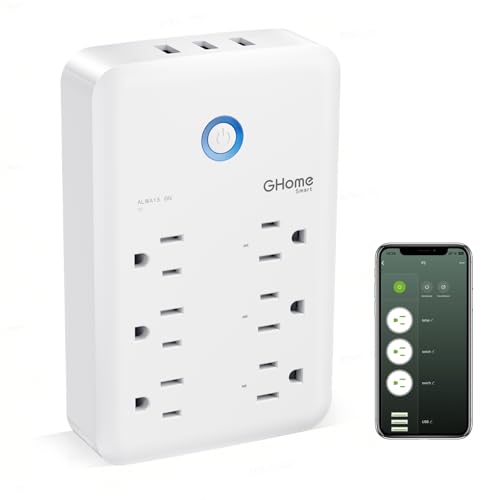
- 3 individually controlled smart outlets
- 3 smart USB ports and 3 always-on outlets
- 15A/3450W rating with surge protection
Best For: Compact setups that need high wattage and extra outlet capacity
Fast-Charging 6-Outlet Pick

- 6 individually controlled smart outlets
- 4 USB ports plus 20W USB-C charging
- Alexa, Google Assistant, and app scheduling
Best For: Users who want the most outlets and charging options in one strip
Budget-Friendly 6-Outlet Smart Strip
6-outlet WiFi power strip with app, voice, and scheduling

- Six individually controlled AC outlets
- Alexa/Google voice control plus app access
- ETL/FCC listed with surge protection
Best For: Beginners automating lamps, coffee makers, and small appliances
Desk-Ready Smart Strip With USB Charging
3-outlet smart strip with 3 USB ports and app control

- Three individually controlled smart outlets
- Three USB ports with 3.1A total output
- Alexa, Google, timer, and group control support
Best For: Desk, dorm, and travel setups needing outlet control and USB charging
High-Capacity 6-Outlet Smart Strip
High-capacity smart strip with energy monitoring and USB-C
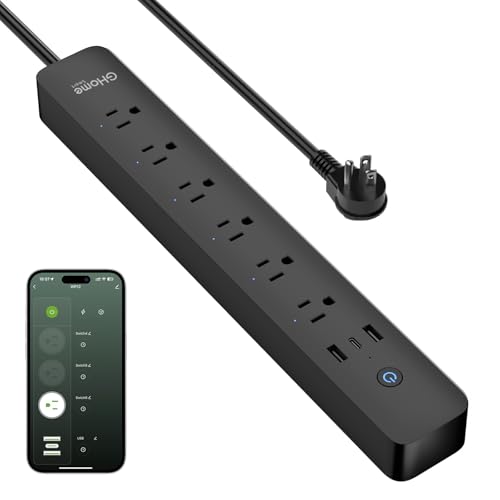
- Six individually controlled outlets with app grouping
- 15A / 1800W capacity plus energy monitoring
- Two USB-A and one USB-C fast-charging ports
Best For: Larger setups that need higher power capacity and usage tracking
Editor’s Pick – Tapo P316M 6-Outlet Matter Smart Strip
If you want smart power strips with individually controlled outlets and broad smart home support, the Tapo P316M is built for flexible everyday use. It gives you six independently managed AC outlets plus three always-on USB ports, with energy monitoring and scheduling to help you control usage across a home office, entertainment setup, or shared room.
Best For: Buyers who want Matter compatibility, per-outlet control, and energy tracking in one strip.
Pros:
- 6 individually controlled AC outlets for granular device management
- 3 always-on USB ports for charging phones and accessories
- Energy monitoring plus schedules and timers for each outlet
- Matter-certified with Alexa, Google Home, Siri, and SmartThings support
Cons:
- USB ports are always on, not individually controlled
- 3-foot cord may be short for some layouts
- Best features depend on using a compatible smart home platform
Overall, this is a strong choice if you want broad compatibility and detailed control without giving up useful USB charging. The combination of Matter support, outlet-level scheduling, and energy monitoring makes it especially practical for organized smart homes.
Value Pick – Geeni Surge Ultra 8-Outlet Smart Protector
The Geeni Surge Ultra is a practical option if you’re shopping for smart power strips with individually controlled outlets and want a simple, no-hub setup. It combines six smart outlets, two always-on outlets, and 1200-joule surge protection, making it a straightforward fit for mixed device setups that need both automation and constant power.
Best For: Shoppers who want a budget-friendly smart strip with surge protection and no hub required.
Pros:
- 6 individually controlled smart outlets plus 2 always-on outlets
- 1200 joules of surge protection for connected electronics
- Works with the Geeni app, Alexa, and Google Assistant
- 6-foot cord gives more placement flexibility
Cons:
- No hub, but it still depends on Wi-Fi connectivity
- Always-on outlets cannot be app controlled
- Fewer feature details than some premium Matter-compatible options
This model covers the core smart-strip basics well: independent outlet control, voice support, and surge protection. It’s a solid pick when you want a simple setup for everyday automation without extra accessories.
Alexa Only Pick – Amazon Basics 6-Outlet Alexa Smart Strip
The Amazon Basics smart power strip is a clean, no-hub choice for Alexa users who want smart power strips with individually controlled outlets. It offers six independently controlled outlets and three USB ports, plus scheduling and remote control through the Alexa app for bedrooms, desks, dorm rooms, and other small setups.
Best For: Alexa users who want an easy, app-based smart power strip with per-outlet control.
Pros:
- 6 individually controlled outlets for separate device control
- 3 USB ports, including USB-A and USB-C
- Works with Alexa only and requires no hub
- Supports routines and schedules through the Alexa app
Cons:
- Alexa-only compatibility limits platform flexibility
- 790-joule surge protection is lower than some competitors
- Only supports 2.4 GHz Wi-Fi
For Alexa households, this strip keeps the setup simple while still delivering the outlet-level control that matters most. It’s especially appealing if you want USB charging built in and do not need multi-platform support.
Smart Split Pick – POWSAV 8-Outlet WiFi Strip with USB
The POWSAV strip is a good fit if you want smart power strips with individually controlled outlets and a mix of smart and always-on power. It includes four controllable outlets, four always-on outlets, four USB ports, and 1680-joule surge protection, so it works well for setups that need both automation and constant charging.
Best For: Users who want a mix of app-controlled outlets, always-on sockets, and higher surge protection.
Pros:
- 4 individually controlled smart outlets for selective automation
- 4 always-on outlets for gear that should stay powered
- 1680 joules of surge protection
- 4 USB ports for charging accessories and small devices
Cons:
- 2.4 GHz Wi-Fi only, with no 5G support
- Always-on outlets and USB ports are not app controlled
- Requires Smart Life app setup for full control features
This model stands out if you want a clear separation between smart outlets and always-on power. It’s a practical choice for media areas, apartments, or desks where a few devices need automation and others should remain constantly powered.
Compact 3-Outlet Control – Kasa KP303 Smart Power Strip
If you want smart power strips with individually controlled outlets for a desk, entertainment setup, or small appliance cluster, the Kasa KP303 keeps things simple. It gives you three independently controlled smart outlets plus two always-on USB ports, so you can automate the devices you care about while still charging phones and tablets.
Best For: Home or office users who want straightforward app, voice, and scheduling control for three devices without needing a hub.
Pros:
- 3 individually controlled smart outlets for separate device control
- 2 always-on USB ports for charging phones, tablets, and accessories
- Works with Alexa and Google Assistant, with no hub required
- ETL-certified surge protection and app-based schedules/timers
Cons:
- USB ports are always on, not individually smart-controlled
- Only 3 smart outlets, so it may be limiting for larger setups
The KP303 is a practical pick if you want reliable individual outlet control in a compact strip. It focuses on the essentials: remote control, voice support, surge protection, and easy setup through the Kasa app.
High-Wattage Wall Extender – GHome 9-in-1 Smart Outlet Extender
For shoppers comparing smart power strips with individually controlled outlets, the GHome Smart outlet extender stands out for packing a lot into a very compact body. It combines 3 individually controlled smart outlets, 3 smart USB ports, and 3 always-on regular outlets, making it useful when you need flexible control plus extra plug space.
Best For: Users who want a compact wall-mounted extender with high wattage support and a mix of smart and always-on outlets.
Pros:
- 3 smart outlets with individual control and app/voice support
- 3 smart USB ports plus 3 always-on outlets for added flexibility
- Rated 15A/3450W, which is suited to higher-wattage devices
- Includes surge, overload, overcurrent, and fuse protection
Cons:
- Only works with 2.4GHz WiFi, not 5GHz
- USB ports are group-controlled rather than individually smart-controlled
This model is a strong fit if you need more than a basic strip and want a built-in wall extender layout. Its mix of smart outlets, regular outlets, and safety protections makes it especially appealing for busy home or office setups.
Fast-Charging 6-Outlet Pick – BN-LINK Smart Power Strip
The BN-LINK strip is a good fit if you want smart power strips with individually controlled outlets and also need USB charging built in. It offers six smart outlets, four USB ports, and a USB-C port with up to 20W output, so it can handle both automation and everyday charging in one strip.
Best For: Home office and apartment users who want six individually manageable outlets plus fast USB charging.
Pros:
- 6 individually controlled smart outlets for flexible automation
- 4 USB ports plus a 20W USB-C fast-charging port
- Works with Alexa and Google Assistant, with app-based scheduling and remote control
- 1200-joule surge protection and ETL-certified support
Cons:
- Requires 2.4GHz WiFi, not 5GHz
- Android app experience may vary during app upgrade periods
Overall, this is the most feature-packed option in the group for users who want both outlet-by-outlet control and strong charging support. The six smart outlets make it easy to separate devices, while the USB section reduces the need for extra chargers.
Budget-Friendly 6-Outlet Smart Strip – 6-outlet WiFi power strip with app, voice, and scheduling
If you want smart power strips with individually controlled outlets for simple home or office automation, this GHome model keeps the setup straightforward. It offers six AC outlets, app control, Alexa and Google Assistant support, plus timers and scheduling for everyday routines like lamps, coffee makers, and small appliances.
Best For: Beginners who want affordable individual outlet control for basic smart home routines.
Pros:
- Each outlet can be controlled separately or grouped in the app.
- Voice control works with Alexa and Google Assistant.
- Includes timer, schedule, countdown, cycle, and random modes.
- ETL and FCC listed with built-in surge protection.
Cons:
- 2.4GHz WiFi only.
- 10A / 1200W max rating limits heavier loads.
- Best suited to non-critical devices and stable networks.
This is a practical pick if you mainly need app-based control and separate switching for a few household devices. It covers the basics well, but it is clearly aimed at light-duty, everyday use rather than demanding equipment.
Desk-Ready Smart Strip With USB Charging – 3-outlet smart strip with 3 USB ports and app control
For buyers comparing smart power strips with individually controlled outlets, this GHome strip stands out because it combines three app-controlled AC outlets with three USB ports. It is a convenient choice for desk setups, dorms, and travel when you want to manage lamps, fans, and chargers from Alexa, Google Home, or the app.
Best For: Home office, dorm, and travel users who want separate outlet control plus USB charging.
Pros:
- Three smart outlets can be controlled individually in the app.
- 3 USB ports provide 3.1A total charging for accessories.
- Works with Alexa and Google Home, with remote app control.
- Supports timers, schedules, and group control.
Cons:
- 2.4GHz WiFi is required.
- Only three AC outlets are smart-controlled.
- 10A rating is best for lighter household and office devices.
This model is a strong fit if USB charging matters as much as outlet control. It keeps smart automation simple while adding extra usefulness for cluttered workspaces and portable setups.
High-Capacity 6-Outlet Smart Strip – High-capacity smart strip with energy monitoring and USB-C
If you need smart power strips with individually controlled outlets and more headroom, this GHome model is the most capable option here. It offers six app-controlled AC outlets, three USB ports, a 15A / 1800W rating, energy monitoring, and support for Alexa or Google Assistant through 2.4GHz WiFi.
Best For: Larger home, office, or small business setups that need higher capacity and energy tracking.
Pros:
- Six outlets can be controlled individually in the app.
- 15A / 1800W rating supports heavier everyday loads than the smaller models.
- Built-in energy monitoring tracks total power use in the app.
- Includes 2 USB A ports and 1 USB C port with 30W fast charging support.
Cons:
- 2.4GHz WiFi only.
- Smart control depends on keeping the strip connected for stable operation.
- Still intended for home, office, and small business use rather than specialized equipment.
This is the best pick if you want a more robust smart strip with separate outlet control and extra charging options. The higher amperage and energy-monitoring feature make it especially appealing for busy setups that benefit from both convenience and visibility.
How We Picked the Best Smart Power Strips with Individually Controlled Outlets
We looked for Smart Power Strips with Individually Controlled Outlets that offer the features most buyers actually use: reliable app control, voice assistant support, surge protection, and a useful mix of AC outlets and USB ports. We also favored models with clear outlet grouping, better cord lengths for real-world setups, and options that fit different room sizes and device counts.
Quick Comparison
If you want the most outlets and charging flexibility, choose a larger strip with six smart outlets and multiple USB ports. If you only need a few controllable devices, a compact 3-outlet model is easier to fit behind a desk or TV stand. For mixed use, consider a hybrid design with some smart outlets and some always-on outlets so you can keep essential devices powered while controlling the rest.
Key Buying Factors for Smart Power Strips with Individually Controlled Outlets
Outlet Count and Layout
Match the number of controllable outlets to your setup. A good rule is to count every device you may want to switch separately, then add one or two extra outlets for future needs. Also check spacing, since bulky plugs and adapters can block neighboring sockets on tightly packed strips.
USB Ports and Charging Speed
USB ports are useful for phones, tablets, smart speakers, and accessories, but not all USB ports charge at the same speed. If you regularly charge modern devices, look for USB-C support or higher-wattage charging claims rather than standard low-power ports.
Smart Home Compatibility
Most Smart Power Strips with Individually Controlled Outlets work with Alexa, Google Home, or both. If you already use a voice assistant, pick a model that supports it natively to avoid extra setup steps. Matter compatibility can also be helpful if you want broader ecosystem flexibility.
Safety and Power Protection
Surge protection, ETL or similar safety listings, and a grounded design matter just as much as app control. Make sure the strip is rated for the devices you plan to connect, especially if you are powering computers, monitors, networking gear, or other sensitive electronics.
Who Should Buy Which Smart Power Strips with Individually Controlled Outlets?
Choose a 6-outlet smart strip if you want the most control for a desk, media center, or shared workspace. Choose a 3-outlet model if you need a simpler, smaller option for bedside charging or a compact office. If you need to keep some devices always on, such as a router or modem, look for a strip that includes always-on outlets alongside smart ones. For buyers focused on convenience, the best pick is usually the model that matches your outlet count, USB needs, and smart home platform first, then adds the strongest safety and charging features second.
