

Finding the right remote can make TV time easier, safer, and far less frustrating. For older adults, the best option usually combines large buttons, clear labeling, and simple navigation.
This roundup of smart universal remotes for elderly users focuses on ease of use first, along with compatibility, backlighting, and setup flexibility for everyday living.
Best 10 Smart Universal Remotes for Elderly Users Picks for 2026
Simple Senior TV Remote
Big Button TV Remote for Simple IR Control
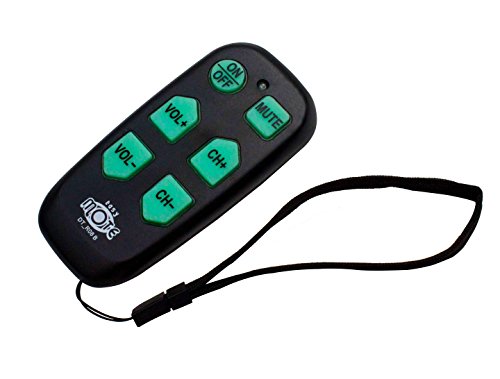
- 6 large backlit buttons
- Controls TV and cable box
- Learning mode and quick search
Best For: Seniors who want a very simple IR remote
Advanced All-in-One Remote
Touchscreen Hub Remote for Whole-Home Control

- Supports IR, Bluetooth, Wi‑Fi, and RF
- Custom activities with one tap
- Backlit screen plus charging dock
Best For: Users who want one remote for a complex setup
Simplest TV Control
Big Button Universal TV Remote for Seniors

- Oversized buttons and tactile feedback
- Easy TV-only setup
- Works with major TV brands
Best For: TV-only control for seniors who need a very simple remote
Most Streamlined Pick
Flipper Big Button Universal TV Remote

- Large color-coded tactile buttons
- TV-only or TV plus cable box support
- Favorites can store up to 25 channels
Best For: A minimal TV-and-cable remote with favorites for easier channel access
Premium OneTouch Choice

- OneTouch setup is very simple
- Fully backlit keypad aids visibility
- Controls two devices, including a soundbar
Best For: Seniors who want easy setup plus backlit multi-device control
Simple Senior TV Remote – Big Button TV Remote for Simple IR Control
If you’re shopping for smart universal remotes for elderly users, the EasyMote keeps things deliberately simple. It controls a TV and cable box with IR, uses just 6 large backlit buttons, and adds learning plus quick search features for basic setup flexibility without a complicated layout.
Best For: Seniors, caregivers, and anyone who wants a very simple TV-and-cable remote with large, easy-to-read buttons.
Pros:
- 6 large backlit buttons with clear, big text for easier visibility
- Controls both TV and cable box using infrared
- Quick Search and learning mode for custom setup
- Includes a wrist strap to help reduce misplacement
Cons:
- Supports only 1 device setup
- Batteries are not included
- IR-based control may not fit every streaming setup
The EasyMote is a practical pick when the priority is reducing confusion and keeping the most important functions close at hand. It’s especially appealing for assisted living or low-vision use where a minimal button count matters more than advanced features.
Advanced All-in-One Remote – Touchscreen Hub Remote for Whole-Home Control
For buyers comparing smart universal remotes for elderly users, the SofaBaton X2 is the most advanced option here. It combines a touchscreen, backlit buttons, a charging dock, and hub-based control for IR, Bluetooth, Wi‑Fi, and RF devices, so it’s built for homes with more complex entertainment setups.
Best For: Households that want one remote for many devices, including TV, streaming gear, and smart home equipment.
Pros:
- Works with IR, Bluetooth, Wi‑Fi, and RF devices
- Touchscreen shortcuts reduce menu scrolling
- Custom activities can control multiple devices at once
- Backlit buttons, raise-to-wake screen, and charging dock
Cons:
- More complex than a basic senior-friendly remote
- Best suited to users who will actually use app setup and automation
- Hub-based system may be more than needed for a simple TV-only room
The X2 stands out when convenience means automation, not just bigger buttons. It’s a strong choice if the user needs voice control, smart home integration, and one-tap activities rather than a stripped-down remote.
Simple TV-Only Senior Remote – Easy Big Button TV Remote for Seniors
The EZclicker is a straightforward pick for smart universal remotes for elderly users who mainly need TV control. It uses an easy big-button layout with tactile feedback, supports major TV brands, and is designed for simple programming without extra features that can get in the way.
Best For: Seniors and people with limited dexterity or vision who want a simple TV-only remote.
Pros:
- Extra-large enter button and tactile feedback
- Works with major TV brands
- Simple hold-and-release programming process
- Compact and lightweight for easy handling
Cons:
- Does not work with cable boxes or streaming devices
- Batteries are not included
- Only supports TV control, not multi-device setups
This model makes sense if the goal is to remove complexity, not add features. It is a practical TV remote replacement for users who need an easy-to-grip, easy-to-read controller with minimal setup.
Plug-and-Play TV Remote – Big Button TV Remote with No Programming
If you want smart universal remotes for elderly users that feel as close to plug-and-play as possible, the Gvirtue remote is a solid candidate. It’s designed for compatible TVs from many major brands and requires no programming—just insert batteries and use it, which keeps setup extremely simple.
Best For: People who want a no-fuss TV remote replacement with a familiar button layout and no setup steps.
Pros:
- No programming required
- Compatible with many major TV brands
- Ergonomic and lightweight design
- Large 39-button layout with big-button accessibility
Cons:
- Not compatible with streaming devices or cable boxes
- TV-only use limits flexibility
- Warranty description is very short in the supplied details
This remote is best when ease of use is the top requirement and the user just wants the television to work immediately. It trades advanced functionality for a straightforward, low-effort experience that may suit older users well.
Simplest TV Control – Big Button Universal TV Remote for Seniors
If you want smart universal remotes for elderly users that focus on the basics, this big-button TV remote keeps things simple. It is designed for television control only, with oversized buttons, tactile feedback, and a large enter key that make everyday use easier for seniors, people with limited dexterity, or anyone who finds standard remotes confusing.
Best For: Seniors or caregivers who need a straightforward TV-only remote with very large buttons.
Pros:
- Extra-large buttons and tactile feedback help with visibility and ease of use.
- Simple setup: point at the TV and hold the Mute button to program.
- Works with major TV brands and is limited to one TV device for simplicity.
- Compact, lightweight design is easy to hold and store.
Cons:
- Does not work with cable boxes, Fire TV, Roku sticks, or streaming devices.
- AAA batteries are required but not included.
For buyers who want the least complicated remote possible, this model is a strong fit. Its narrow TV-only focus helps reduce accidental button presses, but it is not the right choice if the user needs streaming or cable-box control.
Flexible Learning Remote – Backlit Big Button Universal TV Remote
Among smart universal remotes for elderly users, this learning remote stands out for customization. It supports hundreds of TV brands, includes backlit buttons for easier viewing, and can be programmed in two ways, including a learning mode that copies buttons from the original remote when needed.
Best For: Families who want a customizable senior-friendly remote and still have the original remote for setup.
Pros:
- Backlit buttons improve visibility in dim rooms.
- Learning function lets you customize buttons to match personal needs.
- Can support up to 20 devices, adding flexibility for IR TV setups.
- Includes both code setup and learning setup options.
Cons:
- Original remote is required for learning mode.
- Batteries are not included.
- Only works with IR televisions, so compatibility depends on the device.
This is a practical pick if you need more control than a basic senior remote can offer. The learning feature adds flexibility, but setup is more involved than a simple preset remote, so it suits caregivers or users who can handle initial programming.
Most Streamlined Pick – Flipper Big Button Universal TV Remote
If you are comparing smart universal remotes for elderly users and want the most stripped-down option, the Flipper is built around just the essentials. It uses large color-coded tactile buttons, supports TV-only or TV plus cable box setups, and can store up to 25 favorite channels to make channel surfing simpler.
Best For: Seniors or caregivers who want a very simple TV and cable remote with favorites support.
Pros:
- Large, color-coded tactile buttons are easy to identify.
- Can work with TV only or TV plus a cable set-top box.
- Favorites feature can save up to 25 channels for quicker access.
- Designed to avoid unnecessary controls and accidental reprogramming.
Cons:
- Does not work with streaming apps or streaming-style set-top boxes.
- Requires direct line of sight to the device.
- AA batteries are required but not included.
The Flipper is a strong choice when simplicity matters more than features. It keeps the control set minimal while still covering many common TV and cable setups, but it is not suitable for streaming-dependent homes.
Easy-Learn Backlit Pick – Backlit Big Button Universal Remote
If you want smart universal remotes for elderly users that stay simple to operate, this backlit big-button model is built around readability and quick setup. It works with many TV brands and other IR devices, but it does require your original remote for learning, so it is best for replacing a familiar setup rather than starting from scratch.
Best For: Seniors who want large, easy-to-read buttons and backlit visibility in dim rooms.
Pros:
- Large, simplified buttons are easier to read and navigate.
- Backlit keys help in dark or dimly lit rooms.
- Learning setup can be completed in a few minutes with your old remote.
- Supports many TV brands and other IR devices, including set-top boxes and DVD players.
Cons:
- Requires the original remote to program the new one.
- Number buttons will not work if the old remote did not have number buttons.
- Battery is not included.
For households that can provide the original remote, this is a practical low-complexity choice with the added benefit of backlighting and a straightforward control layout.
Simple Senior-Friendly Pick – Big Button Universal TV Remote
This option fits the smart universal remotes for elderly users category by focusing on a very simple button layout and easy programming. It is designed for major TV brands and is a TV-only remote, so it makes sense if the goal is reducing confusion rather than controlling extra devices.
Best For: Seniors, people with low vision, or anyone who wants an uncomplicated TV remote.
Pros:
- Big buttons and tactile feedback make it easier to feel and press controls.
- Extra-large enter button supports clearer navigation.
- Compatible with many major TV brands, including Samsung, LG, VIZIO, Sony, and more.
- Simple programming process is designed to be quick.
Cons:
- Not compatible with streaming devices, cable boxes, or unrelated TV platforms.
- Only supports televisions, not multiple device types.
- No backlight is listed in the supplied details.
If you need a basic remote for TV control only, this model keeps the learning curve low and the button layout intentionally straightforward.
Premium OneTouch Choice – Philips BigEZ OneTouch Remote
Among smart universal remotes for elderly users, this Philips model stands out for its one-button setup and backlit, vision-friendly layout. It is pre-programmed for Samsung, LG, Sony, Vizio, and Roku TVs, and it also supports a second device such as a set-top box, cable/satellite box, streaming player, or soundbar.
Best For: Seniors who want a pre-programmed, backlit remote with support for a second device.
Pros:
- OneTouch setup keeps programming simple after battery installation.
- Fully backlit keypad improves visibility in low light.
- Pre-programmed TV buttons cover Samsung, LG, Sony, Vizio, and Roku TVs.
- Controls up to two devices, including a soundbar or streaming player.
Cons:
- Only supports two devices total.
- Requires two AA batteries, which are not included in the notes.
- AUX is preset for Roku boxes unless reset to another device.
For buyers who want the least complicated setup with a more polished feature set, this Philips remote offers an especially strong balance of accessibility and flexibility.
How We Picked the Best Smart Universal Remotes for Elderly Users
We focused on Smart Universal Remotes for Elderly Users that reduce confusion and support everyday TV control without extra complexity. Priority went to models with oversized buttons, simple layouts, backlit keys, strong brand compatibility, and setup methods that do not require advanced tech skills. We also considered whether a remote works well for basic TV-only use or for TV plus cable boxes and streaming devices.
Quick Comparison: What Matters Most
At a glance, the best choice depends on the user’s comfort level. Some shoppers need the simplest possible remote with just the core buttons. Others may want learning capability, favorites, or app-based customization. Universal remotes with hubs and touch screens are more powerful, but they are usually better for caregivers or advanced users than for someone who wants a truly minimal experience.
Key Buying Factors for Smart Universal Remotes for Elderly Users
Button Size and Layout
Large, well-spaced buttons are critical for reducing mis-presses. Look for remotes that keep the most-used controls prominent and avoid cluttered keypads.
Backlighting and Visibility
Backlit buttons can help in dim rooms and at night. High-contrast labeling is also useful for users with low vision.
Setup and Learning Features
Some remotes are ready to use out of the box, while others require programming or a learning step using the original remote. If setup assistance is available, that can be a major plus for caregivers.
Device Compatibility
Check whether the remote supports the user’s TV brand and any connected cable box or streaming hardware. For households with mixed devices, compatibility matters more than extra features.
Special Simplicity Features
For many buyers, sleep timers, favorites, and dedicated power/volume/channel controls are more useful than app control or advanced macros. The best Smart Universal Remotes for Elderly Users keep the interface focused on daily essentials.
Who Should Buy Which Smart Universal Remotes for Elderly Users?
If the goal is maximum simplicity, choose a big-button TV remote with a basic layout and broad brand support. If the user needs control of both TV and cable, pick a model that clearly supports both. If a caregiver wants more customization, a learning remote or a more advanced hub-based system may be the better fit. For the easiest day-to-day experience, prioritize readability and familiarity over feature count.
