

Searching for a dependable way to control your projector without juggling multiple remotes? The best smart universal remotes for projectors can simplify power, input switching, playback, and menu navigation in one setup.
In this roundup, we focused on compatibility, ease of use, and features that make everyday projector control faster and less frustrating.
Best 10 Smart Universal Remotes for Projectors Picks for 2026
Broad Brand Replacement
Universal Replacement for Major Projector Brands

- Fits many major projector brands
- IR remote with 30 buttons
- Needs setup before first use
Best For: Replacing a lost or broken projector remote on a supported brand
Backlit Air Mouse Option
Backlit Dual-Mode Remote for Projector Use
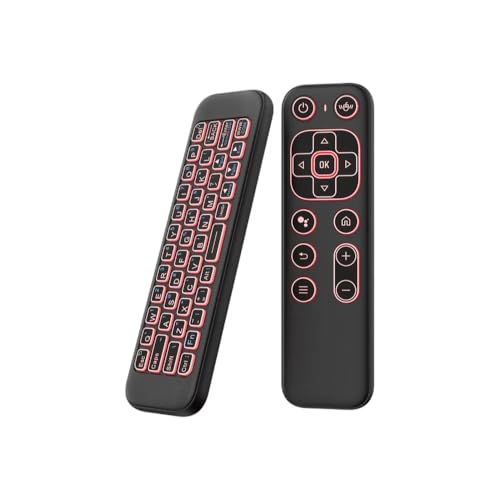
- Bluetooth and 2.4GHz dual-mode
- Air mouse with gyroscope cursor control
- 7-color backlight for dark rooms
Best For: Projector setups that need typing, browsing, and pointer control
Model-Matched Mini Remote
HY300/HY300Pro Series Replacement

- Made for specific mini projector models
- IR remote with simple button control
- Batteries not included
Best For: Owners of supported HY300/HY300Pro-style portable projectors
Advanced Home Theater Remote
All-in-One Remote with Macro and Voice Control

- Works with IR, Bluetooth, and RF
- Global macros trigger multi-device actions
- Air mouse mode for cursor navigation
Best For: Home theater users who want one advanced remote for a projector and other gear
Mini Projector Match
Replacement Remote for HY300Pro Series

- No programming needed
- Works with listed HY300Pro-style models
- Infrared, up to 10 meters
Best For: Supported mini projector owners needing a simple replacement remote
Smart Home Hub Pick
SofaBaton X1S Universal Remote

- Controls up to 60 devices
- Hub with 2 IR blasters
- Custom activities and voice support
Best For: Whole-home entertainment control with projector integration
Projector-First Choice
Anderic RR3720 Universal Remote

- Made for most major projector brands
- Learning function and full instructions
- 26 buttons with 30-foot range
Best For: Projector users wanting broad compatibility and simple programming
Pocket IR Pick
Universal Mini Smart IR Remote Controller

- USB-C or Micro USB Android controller
- No external battery or charging needed
- 8-10m IR range for projectors and more
Best For: Android users needing a compact projector remote
Premium Smart Hub

- Controls IR, Bluetooth, Wi-Fi, and RF devices
- Touchscreen plus hub and app control
- Works with Home Assistant, MQTT, Alexa, and Google
Best For: Advanced projector setups with smart-home integration
Best Balance
SofaBaton X1S Universal Remote

- IR, Bluetooth, and Wi-Fi compatibility
- Hub with 360-degree control and IR blasters
- One-click activities and remote finder
Best For: Users wanting broad projector control without the top-tier price
Broad Brand Replacement – Universal Replacement for Major Projector Brands
If you need one of the more practical smart universal remotes for projectors, this replacement is built for broad compatibility across many major brands, including Epson, Optoma, Samsung, Panasonic, ViewSonic, BenQ, Sony, Hitachi, Mitsubishi, and more. It uses infrared control and is meant as a straightforward substitute for an original projector remote, but it does require setup before it works.
Best For: Owners replacing a lost or broken projector remote on a supported brand who want a simple infrared replacement.
Pros:
- Compatible with a long list of major projector brands
- Setup guidance is provided for getting it working
- Uses 2 AAA alkaline batteries
- Lightweight, compact design with 30 buttons
Cons:
- Requires setup before use
- Works by infrared and needs clear line of sight
- Batteries are not included
Overall, this is a practical replacement choice if your projector is on the supported list and you want a remote that aims to mirror the basic functions of the original. The biggest tradeoff is the setup step, but the broad brand support makes it a useful first option for many projector owners.
Backlit Air Mouse Option – Backlit Dual-Mode Remote for Projector Use
Among smart universal remotes for projectors, this iPazzPort model stands out because it combines Bluetooth and 2.4GHz control with an air mouse and keyboard layout. It is aimed at projector users who also browse, type, or navigate apps from the couch, and the 7-color backlight makes it easier to use in the dark.
Best For: Projector users who want a compact keyboard remote with air mouse control for browsing and typing.
Pros:
- Bluetooth and 2.4GHz dual-mode support
- Air mouse with 6-axis gyroscope for cursor control
- 7-color backlit keys for low-light use
- Rechargeable battery and compact travel-friendly design
Cons:
- Power key needs IR learning before it functions
- Limited compatibility with some proprietary smart TV systems
- Cable for Type-C charging is not included
This is a strong pick if your projector setup benefits from more than basic navigation. The mix of keyboard, air mouse, and multi-mode connectivity makes it more versatile than a standard projector remote, especially for media apps and casual browsing.
Model-Matched Mini Remote – HY300/HY300Pro Series Replacement
If you are shopping for smart universal remotes for projectors but your device is a specific compact model, this replacement is built for a narrow compatibility list rather than broad universal use. It is intended for selected HY300/HY300Pro-series portable projectors and related models, so it is best treated as a model-matched replacement remote.
Best For: Owners of supported HY300/HY300Pro-style mini projectors who need a direct remote replacement.
Pros:
- Matches a defined list of supported projector models
- Infrared remote with simple button control
- Compact replacement for portable mini projectors
- Works with multiple listed ASIN-linked projector variants
Cons:
- Not compatible with all mini projectors
- Batteries are not included
- Compatibility is limited to the specified models
This remote makes sense only if your projector is on the supported list, because compatibility is tightly controlled. For the right model, it is a straightforward replacement; for everything else, you should look for a different option.
Advanced Home Theater Remote – All-in-One Remote with Macro and Voice Control
For buyers comparing smart universal remotes for projectors in a larger home theater setup, the SofaBaton U3 is the most feature-rich option here. It supports IR, Bluetooth, and RF devices, adds global macros, includes Google Assistant voice control on compatible Bluetooth devices, and even offers air mouse mode for easier on-screen navigation.
Best For: Home theater users who want one advanced remote for a projector plus multiple connected devices.
Pros:
- Supports IR, Bluetooth, and RF devices
- Global macro button can trigger multi-device actions
- Air mouse mode helps with cursor navigation
- Can stay paired to up to 3 Bluetooth devices at once
Cons:
- Voice control only works with compatible Google Assistant Bluetooth devices
- Not compatible with Apple TV Siri or Fire TV Alexa voice control
- More complex than a simple projector replacement remote
This is the best fit if you want a central remote for a projector-based entertainment system rather than a basic replacement. Its macro and multi-device features make it especially useful when your projector is part of a bigger setup with soundbars, streaming devices, and other components.
Mini Projector Match – Replacement Remote for HY300Pro Series
If you need smart universal remotes for projectors but only want a simple replacement for one compatible mini projector, this model keeps things straightforward. It is made for specific HY300Pro-style portable projectors and works without programming, so setup is as easy as inserting two AAA batteries.
Best For: Owners of supported HY300Pro-style mini projectors who want a no-setup replacement remote.
Pros:
- No programming or pairing steps required
- Compatible with a listed set of mini projector models
- Infrared control with up to 10 meters of range
- Simple button-control design using ABS construction
Cons:
- Not a true universal remote for all projector brands
- Only works with the specific compatible models listed
- Requires 2 AAA batteries, which are not included
This is the practical choice if you have one of the supported projectors and just need a dependable replacement. It is not built for broad device control, but it does deliver the convenience of a direct-fit remote with no setup hassle.
Smart Home Hub Pick – SofaBaton X1S Universal Remote
For shoppers comparing smart universal remotes for projectors as part of a full entertainment setup, the SofaBaton X1S is built for broad device control rather than a single projector alone. Its hub-based design, custom activities, and support for IR, Bluetooth, and WiFi devices make it a flexible option for people who want one remote to manage multiple components.
Best For: Users who want a feature-rich universal remote to control a projector plus an entire home entertainment system.
Pros:
- Controls up to 60 IR, Bluetooth, and WiFi devices
- Custom activities can trigger multiple commands at once
- Hub provides 360-degree control and includes 2 IR blasters
- Backlit buttons, raise-to-wake, and app-based find-my-remote feature
Cons:
- More complex than a basic projector replacement remote
- May be overkill if you only need to control one projector
- Setup and customization are more involved than plug-and-play remotes
This remote stands out when you want more than basic projector control. The strong database, activity macros, and hub-based signal coverage make it a serious all-in-one option for a living room or media room.
Projector-First Choice – Anderic RR3720 Universal Remote
If you want smart universal remotes for projectors in the traditional sense, the Anderic RR3720 is built specifically around projector compatibility. It is designed to work with most major projector brands and includes learning ability plus full instructions, making it a more focused option than a general home-theater remote.
Best For: Users who need a projector-specific universal remote with broad brand compatibility and easy programming.
Pros:
- Compatible with many major projector brands
- Learning ability adds flexibility for setup
- Includes full instructions for programming
- Infrared remote with 26 buttons and 30-foot range
Cons:
- Only supports one device at a time
- Requires 2 AAA batteries, which are not included
- No app, hub, or smart assistant features
This is a strong pick if projector control is the main goal and you want compatibility across many brands. It focuses on reliable, straightforward operation rather than app-driven smart features, which may be exactly what many projector users need.
Pocket IR Pick – Universal Mini Smart IR Remote Controller
If you want a simple, low-cost pick among smart universal remotes for projectors, this tiny Android IR controller is worth a look. It uses your phone or tablet for power, connects by USB-C or Micro USB, and can send IR signals from about 8-10 meters away, which makes it handy for everyday projector control without adding another battery to manage.
Best For: Android users who want a pocket-size IR remote for a projector or other basic home gear.
Pros:
- Works with Android devices through USB-C or Micro USB.
- No external battery or charging required.
- IR control can reach 8-10 meters and works without direct aiming.
- Can control projectors plus other IR devices like TVs, fans, and set-top boxes.
Cons:
- Android-focused, so it is not a universal fit for every phone type.
- Basic feature set compared with hub-based smart remotes.
- Best suited to IR devices rather than advanced wireless ecosystems.
For projector owners who mainly need a tiny, travel-friendly IR controller, this model keeps things straightforward. It is not the most advanced option here, but it does cover the essentials cleanly.
Premium Smart Hub – SofaBaton X2 Universal Remote
For a high-end option in smart universal remotes for projectors, the SofaBaton X2 leans into convenience and whole-room control. Its hub-based design supports IR, Bluetooth, Wi-Fi, and RF devices, includes a touchscreen, and can run custom activities that are useful when your projector is part of a larger entertainment setup.
Best For: Users who want a premium all-in-one remote for a projector setup with smart-home integration.
Pros:
- Supports IR, Bluetooth, Wi-Fi, and RF devices.
- Hub plus IR blasters help control gear through walls or inside cabinets.
- Touchscreen, app control, and customizable activities simplify complex setups.
- Works with Home Assistant, MQTT, Alexa, and Google Assistant.
Cons:
- More complex than a basic projector remote.
- Likely overkill if you only need simple projector power and input control.
- Premium feature set may be more than casual users need.
If your projector shares a room with streaming gear, lights, or hidden components, the X2 is built to tie everything together. It is the most feature-rich choice in this group and the strongest fit for a fully automated setup.
Best Balance – SofaBaton X1S Universal Remote
The SofaBaton X1S is a strong middle-ground choice in smart universal remotes for projectors. It supports IR, Bluetooth, and Wi-Fi devices, uses a hub with 360-degree control and IR blasters, and lets you build one-click activities for a cleaner, more organized projector setup.
Best For: People who want a capable all-in-one projector remote with hub convenience and broad compatibility.
Pros:
- Supports more than 500,000 devices across 6,000+ brands.
- Hub provides 360-degree control and helps avoid signal blind spots.
- One-click activities can power on multiple devices and set the right input.
- Backlit buttons, raise-to-wake screen, and remote finder add convenience.
Cons:
- Less advanced than the X2 model.
- No touchscreen interface.
- Still more involved than a basic IR-only projector remote.
For most projector owners who want smart features without going all the way to a premium touchscreen remote, the X1S hits a practical balance. It offers broad support and useful automation in a more straightforward package.
How We Picked the Best Smart Universal Remotes for Projectors
We prioritized broad compatibility, clear device support, and practical features that matter in real use. That includes IR range, learning functions, app control, rechargeable batteries, backlighting, and whether a remote supports projector-specific commands such as power, source, and keystone navigation.
For Smart Universal Remotes for Projectors, setup simplicity matters as much as features. A great remote should work with common projector brands and be easy to program, especially if you are replacing a lost or broken original remote.
Quick Comparison: What to Expect
Basic replacement remotes are best for straightforward projector control and low-cost backups. Learning remotes add flexibility when your projector uses uncommon buttons or custom commands. More advanced hub-and-app remotes are better for people who want one remote to manage a projector plus streaming devices, sound systems, or other home theater gear.
Key Buying Factors for Smart Universal Remotes for Projectors
Compatibility First
Start with your projector model and brand. Some remotes are designed for broad universal use, while others are made for specific projector families like compact LED projectors. If you buy the wrong type, features like menu control or source switching may not work even if power does.
Control Method and Range
Most projectors still rely on IR, so line-of-sight range is important. If your setup places the projector on a ceiling mount or in a cabinet, look for stronger signal performance or hub-based control. Bluetooth and Wi-Fi support can help when you also control streaming devices or other smart gear.
Setup and Learning Features
Learning capability is useful when you need to copy commands from the original remote. App-based remotes can make custom setup easier, while macro and activity buttons let you trigger multiple actions at once, such as powering on the projector and switching to the correct input.
Comfort and Everyday Use
Backlit buttons, rechargeable batteries, and a logical button layout can make a bigger difference than flashy extras. If you use your projector often in dark rooms, a well-lit remote is especially valuable.
Who Should Buy Which Smart Universal Remotes for Projectors?
If you want a simple, affordable replacement, choose a basic universal or model-specific remote. If you need more flexibility for mixed devices, a learning remote is the better middle ground. If you want one controller for a full media setup, advanced hub-and-app options are the strongest fit. The best Smart Universal Remotes for Projectors are the ones that match your projector, your room, and how much control you actually need.
