

Smart universal remotes with touchscreens can replace a cluttered stack of controllers with one cleaner, easier interface. They’re especially helpful if you switch between TV, soundbar, streamer, game console, and other devices often.
Below, we’ve narrowed the field to 10 standout options with a focus on usability, compatibility, and value so you can find the right remote for your setup.
Best 10 Smart Universal Remotes with Touchscreens Picks for 2026
Editor’s Pick
SofaBaton X2 Hub-Control Remote

- 2.4-inch HD touchscreen with charging dock
- Controls up to 49 IR, Bluetooth, RF, and Wi-Fi devices
- Home Assistant integration and cloud-based customization
Best For: People building a flexible all-in-one remote for TV and smart home control
Budget-Friendly Touchscreen Pick

- Supports up to 60 devices
- Backlit touchscreen remote
- 40-foot range for typical living rooms
Best For: Shoppers who want a simple touchscreen universal remote for IR-based setups
Classic Premium Pick
Logitech Harmony One Color Touch Remote
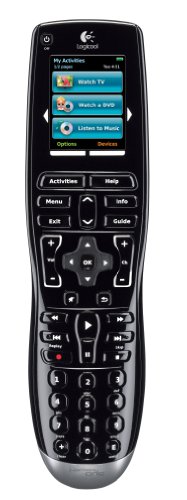
- Color LCD touchscreen with activity buttons
- Learns IR codes from existing remotes
- Backlit buttons and internet-based setup
Best For: Users who want a classic premium universal remote with a touchscreen interface
Smart Home Integration Pick

- Home Assistant integration with native MQTT support
- Controls IR, Bluetooth, Wi-Fi, and RF devices
- Quick-access touchscreen with charging dock
Best For: Smart-home users who want a remote that triggers automations and AV activities
Touchscreen Control for Up to 12 Devices
One for All Smart Control Pro Touch

- Supports up to 12 devices
- E-Ink touchscreen with auto motion detection
- Activity modes, backlight, and Find My Remote
Best For: People who want a simple touchscreen universal remote for everyday AV control
Hub-Based Smart Control with Raise-to-Wake
SofaBaton X1S Universal Remote

- Works with over 500,000 devices
- One-touch activities and custom app controls
- Backlit buttons with raise-to-wake
Best For: Users who want broad compatibility and hub-based automation
Touchscreen Smart Remote with Charging Dock

- 2.4-inch HD touchscreen interface
- Supports 500,000+ devices and 6,000+ brands
- Alexa, Google Home, and Home Assistant support
Best For: Shoppers who want a touchscreen remote with smart-home integration and hub control
Premium Touchscreen Hub Remote
SofaBaton X2 Universal Remote with Touchscreen

- 2.4-inch HD touchscreen with quick-access buttons
- Controls 500,000+ devices via IR, Bluetooth, RF, and Wi-Fi
- Alexa, Google Assistant, and Home Assistant support
Best For: Users building a fully connected home theater setup
Easy-Setup Smart Remote Pick
SofaBaton X1S Universal Remote

- Controls 500,000+ devices across major connection types
- One-click activities streamline TV and audio routines
- Backlit buttons plus Find My Remote improve convenience
Best For: Anyone who wants a reliable smart remote without a touchscreen
Touchscreen Theater Control
SofaBaton X2 with Charging Dock

- 2.4-inch touchscreen with quick-access macro panel
- One-tap activities can control AV gear and lights
- Charging dock keeps the remote ready to use
Best For: People who want a docked touchscreen remote for a smart living room
Editor’s Pick – SofaBaton X2 Hub-Control Remote
If you want smart universal remotes with touchscreens that can manage a full entertainment setup, the SofaBaton X2 is built for that job. It combines a 2.4-inch HD touchscreen, a charging dock, and broad compatibility across IR, Bluetooth, RF, and 2.4G Wi-Fi devices, so it can act as a true all-in-one controller for TV and smart home gear.
Best For: Users who want a highly customizable touchscreen remote for mixed AV and smart-home systems.
Pros:
- Supports up to 49 devices across IR, Bluetooth, RF, and 2.4G Wi-Fi.
- Touchscreen plus quick-access number keys and one-tap macros.
- App customization lets you remap buttons, build macros, and save settings to the cloud.
- Works with Home Assistant via MQTT and supports direct IP control for compatible devices.
Cons:
- Setup may take time if you want to customize activities and macros fully.
- IR extension and repeater-style whole-home coverage are limited by your room layout and optional accessories.
The X2 stands out if you want a touchscreen remote that does more than replace a few remotes. Its mix of hub-based control, app customization, and smart-home integration makes it especially appealing for users who want one remote to handle both entertainment and connected-home tasks.
Budget-Friendly Touchscreen Pick – SofaBaton X2 Touch Remote
This SofaBaton X2 version is a straightforward option for shoppers comparing smart universal remotes with touchscreens and wanting the core touchscreen experience. It offers a backlit design, a 40-foot range, and support for up to 60 devices, making it a practical fit for a simple universal remote upgrade.
Best For: Buyers who want a touchscreen universal remote with broad device support and a simpler feature set.
Pros:
- Supports up to 60 devices, which is a strong ceiling for a universal remote.
- Backlit design helps visibility in darker rooms.
- 40-foot range gives it usable reach for typical living-room setups.
- Touchscreen format keeps the interface modern and easy to navigate.
Cons:
- Supplied details only list infrared connectivity, so it is less versatile than hub-based models.
- Feature information is more limited than other X2 listings, so customization details are not clearly spelled out here.
For shoppers who mainly want touchscreen convenience and high device capacity without extra complexity, this X2 is an easy fit. It looks best suited to IR-based home theater setups where the main goal is replacing several remotes with one.
Classic Premium Pick – Logitech Harmony One Color Touch Remote
The Logitech Harmony One is an older but still notable entry in smart universal remotes with touchscreens, especially if you prefer a color LCD and dedicated activity buttons. It was designed around easy internet-based setup, live support, and the ability to learn IR codes from existing remotes, which makes it a polished option for basic universal control.
Best For: Buyers who want a classic color touchscreen remote with activity-based controls.
Pros:
- Color LCD touchscreen gives it a premium, easy-to-read interface.
- Dedicated on-screen activity buttons simplify common home theater actions.
- Can learn IR codes from existing remotes.
- Contoured backlit buttons improve usability in dark rooms.
Cons:
- Supplied specs list support for only 1 device, so its compatibility details are limited in this listing.
- It focuses on older control methods and does not include modern app-based smart-home features in the provided notes.
This model makes sense if you value the feel of a classic premium remote and want a touchscreen interface centered on activities. It is less about smart-home depth and more about simple, well-designed universal remote control for entertainment systems.
Smart Home Integration Pick – SofaBaton X2 Hub App Remote
If you are shopping for smart universal remotes with touchscreens and care about home automation, this SofaBaton X2 variant is one of the most feature-rich options in the group. It pairs quick-access touchscreen control with a charging dock, support for IR, Bluetooth, Wi-Fi, and RF devices, plus official Home Assistant integration and native MQTT support.
Best For: Smart-home users who want a touchscreen remote that can also trigger automation routines.
Pros:
- Official Home Assistant integration plus native MQTT support.
- Supports IR, Bluetooth, Wi-Fi, and RF devices in one remote.
- Touchscreen gives quick access to keypad, favorites, and custom macros.
- Activity control can trigger multiple devices at once, including lights and AV gear.
- Backlit buttons and raise-to-wake screen improve daily usability.
Cons:
- Many advanced features may be more than casual users need.
- Optional repeater is sold separately for larger whole-home coverage.
This version is strongest when you want the remote to sit at the center of both entertainment and automation. Between the touchscreen shortcuts, app customization, and smart-home support, it is built for users who want one controller to do far more than basic channel switching.
Touchscreen Control for Up to 12 Devices – One for All Smart Control Pro Touch
If you want smart universal remotes with touchscreens that still feel simple to use, the One for All Smart Control Pro Touch is built for straightforward whole-room control. It combines touchscreen navigation with app-based setup, infrared, Bluetooth, and customizable activities, so it can replace several remotes without making the interface feel cluttered.
Best For: Users who want a touchscreen universal remote for a TV, soundbar, streaming device, and other home theater gear.
Pros:
- Controls up to 12 devices in one remote
- E-Ink touch screen with clear, high-contrast display
- Custom activity modes with power and input macros
- Backlit buttons plus a Find My Remote feature
Cons:
- Requires setup through the One for All Advanced app
- Uses 4 AAA batteries instead of a built-in rechargeable pack
Overall, this is a practical option if you want a touchscreen remote that emphasizes easy daily control, simple activity switching, and a readable display rather than deep smart-home automation.
Hub-Based Smart Control with Raise-to-Wake – SofaBaton X1S Universal Remote
Among smart universal remotes with touchscreens, the SofaBaton X1S stands out more for app-driven control and hub coverage than for a full touchscreen interface. It supports a huge device library, one-touch activities, voice assistant compatibility, and customizable buttons, making it a strong choice if you want flexibility across a busy entertainment setup.
Best For: Households that need broad device compatibility, hub-based control, and customizable activities.
Pros:
- Works with over 500,000 devices through IR, Bluetooth, and Wi-Fi
- One-touch activities simplify TV, soundbar, and input switching
- Customizable app with button reassignment, favorite icons, and macros
- Raise-to-wake, backlit buttons, and remote tracker support
Cons:
- Does not include a touchscreen display
- Hub setup may be less convenient if devices are hidden in cabinets without the wired emitters
The X1S is best viewed as a powerful control hub remote: it prioritizes compatibility, automation, and customization, so it is better suited to users who care more about advanced control than a touchscreen-first design.
Touchscreen Smart Remote with Charging Dock – SofaBaton X2 Universal Remote
If you specifically want smart universal remotes with touchscreens, the SofaBaton X2 is the most direct fit in this group. It pairs a 2.4-inch HD touchscreen with hub-based control, a charging dock, and broad device support, so it is aimed at people who want a modern interface for managing a full entertainment setup.
Best For: Buyers who want a touchscreen universal remote with hub control and smart home integration options.
Pros:
- 2.4-inch HD touchscreen with quick-access panel for keypad and macros
- Cloud library supports over 500,000 devices from 6,000+ brands
- One-touch activities for multi-device routines
- Works with Alexa, Google Home, and Home Assistant integrations
Cons:
- Advanced smart-home features may be more than basic TV-only users need
- Hub-based setup may take more effort than a simpler universal remote
For buyers who want a touchscreen at the center of the experience, the X2 is the strongest match here. It combines modern controls, recharge convenience, and deep compatibility in a single remote built for more complex setups.
Premium Touchscreen Hub Remote – SofaBaton X2 Universal Remote with Touchscreen
If you want smart universal remotes with touchscreens that can truly replace a pile of remotes, the SofaBaton X2 is built for complex home entertainment setups. Its 2.4-inch HD touchscreen, powerful hub, and broad device support make it a strong pick for users who want modern control with serious automation options.
Best For: Home theater owners who want touchscreen control, hub-based reliability, and smart home integration.
Pros:
- Supports IR, Bluetooth, RF, and Wi-Fi for control across 500,000+ devices and 6,000+ brands.
- 2.4-inch HD touchscreen plus shortcut buttons for number pad and macros.
- One-touch activities and deep app customization for remapping, macros, and cloud backup.
- Works with Alexa, Google Assistant, and Home Assistant, including MQTT-based control.
Cons:
- Designed around app setup and activity programming, so initial setup may take time.
- Best suited to users who will actually use the touchscreen and automation features.
The X2 stands out if you want a more advanced smart remote that goes beyond basic channel and volume control. It combines touchscreen convenience with broad compatibility and home automation features, making it a strong centerpiece for a connected entertainment system.
Easy-Setup Smart Remote Pick – SofaBaton X1S Universal Remote
The SofaBaton X1S is a practical choice if you want smart universal remotes with touchscreens-like convenience in a simpler, button-first design. It focuses on reliable hub control, one-click activities, and app-based customization for TVs, streamers, sound systems, and more.
Best For: Buyers who want broad compatibility, stable hub control, and easy one-touch activities without a touchscreen.
Pros:
- Supports over 500,000 devices across 6,000+ brands with IR, Bluetooth, and Wi-Fi.
- Smart one-click activities simplify multi-step tasks like watching TV or listening to music.
- Hub offers 360-degree control with two IR blasters for better signal coverage.
- Backlit buttons, auto-wake screen, and a Find My Remote feature add everyday convenience.
Cons:
- No touchscreen, so on-device navigation is more traditional.
- Supports fewer max devices than some higher-end hub remotes.
For shoppers who care more about dependable automation than a touchscreen interface, the X1S delivers a well-rounded experience. It gives you hub stability, voice control, and solid customization in a package that is easier to live with day to day.
Touchscreen Theater Control – SofaBaton X2 with Charging Dock
This SofaBaton X2 model is a strong fit for anyone comparing smart universal remotes with touchscreens and wanting a docked, always-ready setup. It combines a 2.4-inch HD touchscreen, powerful hub control, and app-driven activities to simplify whole-room entertainment control.
Best For: Users who want a touchscreen universal remote with dock charging and smart home automation features.
Pros:
- 2.4-inch HD touchscreen with a quick-access panel for the number pad and saved macros.
- Supports 500,000+ devices across IR, Bluetooth, Wi-Fi, and RF.
- One-tap activities can power devices, switch inputs, adjust volume, and dim smart lights.
- Works with Alexa, Google Assistant, and Home Assistant, including MQTT-triggered automation.
- Included Type-C charging dock keeps the remote powered and ready.
Cons:
- Maximum supported devices is listed lower than some other SofaBaton models.
- R1 repeaters are mentioned for extending control, but they are not included.
If you want a touchscreen remote that doubles as a smart-home control point, this X2 version is very compelling. Its dock, activity automation, and broad compatibility make it a polished option for living rooms built around a connected entertainment stack.
How We Picked These Smart Universal Remotes with Touchscreens
We focused on remotes that balance everyday ease of use with real-world control features. Priority went to models with strong device support, reliable hub or wireless connectivity, customizable activities, and touchscreens that make navigation faster than button-only remotes.
We also considered setup simplicity, app quality, macro or one-touch activity support, and whether the remote is practical for mixed entertainment systems. For most buyers, the best choice is the one that reduces friction without adding complicated programming.
Quick Comparison
In general, hub-based models are the strongest fit for larger home theater setups because they can control hidden components and equipment inside cabinets. Touchscreen-only remotes may appeal to buyers who want a simpler interface and already have straightforward device layouts. App-assisted remotes can add flexibility, but the best experience usually comes from a remote that still works well on its own.
Best for Different Setups
If you want maximum convenience, look for one-touch activities and broad compatibility. If you care about cleaner cable management or equipment hidden behind doors, choose a model with a hub. If you mainly want a modern replacement for an older universal remote, a touchscreen model with solid basic support may be enough.
Key Buying Factors for Smart Universal Remotes with Touchscreens
Compatibility: Check support for your TV brand, streaming box, sound system, AVR, and any Bluetooth or RF-connected devices you use.
Control method: Some remotes rely mainly on IR, while others add hub-based RF, Bluetooth, Wi-Fi, or app control. More options can mean better flexibility, but only if they match your devices.
Touchscreen usability: A good screen should make commonly used actions easy to find without feeling crowded or laggy. Brightness, responsiveness, and layout matter more than screen size alone.
Activities and macros: One-touch activities like “Watch TV” or “Movie Night” can save time by powering on and switching inputs automatically.
Setup and support: A clear app, straightforward device pairing, and responsive customer support can make a big difference, especially for multi-device systems.
Who Should Buy Which Smart Universal Remotes with Touchscreens?
Choose a hub-based touchscreen remote if your setup includes hidden components, multiple sources, or a home theater rack. Choose a simpler smart universal remote with a touchscreen if you want a modern all-in-one controller for a typical living room system.
Frequent streamers and movie watchers will benefit most from customizable activities and app-assisted setup. Buyers upgrading from a basic universal remote should prioritize compatibility and ease of configuration over extra features they may never use.
If you want the most future-proof option, focus on models that support multiple connection types and offer strong customization. That combination usually provides the best long-term value in Smart Universal Remotes with Touchscreens.
