

Choosing the right monitor can make it much easier to understand where your home’s electricity is actually going. From whole-panel systems to plug-in meters, today’s options help you spot waste, track usage trends, and make smarter decisions.
Below, we’ve rounded up 10 of the best whole-house electricity usage monitors for 2026, with options for homeowners, renters, solar users, and anyone who wants clearer control over energy costs.
Best 10 Whole-House Electricity Usage Monitors Picks for 2026
UL-Certified Whole-Home Monitoring
Emporia Vue 3 Smart Home Monitor
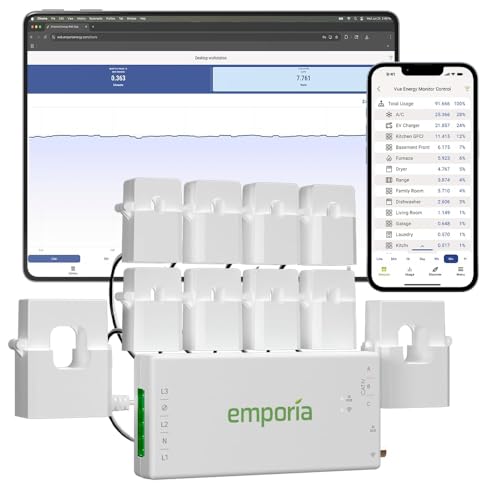
- UL Listed for safety confidence
- Circuit-panel install with clamp-on sensors
- Supports solar and net metering
Best For: Homeowners who want detailed whole-home monitoring with app-based control
Plug-In Usage Tracking
P3 International Kill A Watt EZ

- Measures appliance-level electricity use
- Shows cost forecasts by week, month, and year
- Accurate within 0.2% with LCD readout
Best For: People who want a simple plug-in monitor for individual appliances
WiFi or Ethernet Whole-Home Monitor

- Tracks whole-home use and solar production
- Includes two 200A sensors
- No subscription required
Best For: Homeowners and solar users who want flexible real-time monitoring
Appliance-Level Energy Meter
KETOTEK Watt Meter Plug Monitor

- Plug-in meter for single appliances
- Displays watts, volts, amps, and cost
- Includes overload and cost alarms
Best For: People who want a simple appliance-level electricity meter
Whole-Home + Smart Control Bundle
Emporia Energy Monitor with 16 Sensors

- Tracks up to 16 circuits with second-by-second visibility
- Includes 4 smart plugs for outlet-level control and scheduling
- Supports solar net metering and bill-saving automations
Best For: Homeowners who want monitoring and smart plug control together
AI Analysis Panel Monitor
Home Energy Monitor with 10 Channels
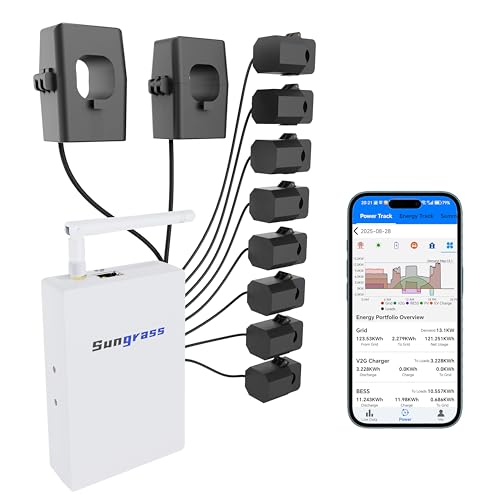
- Monitors up to 10 circuits with real-time data logging
- Works with Home Assistant, MQTT, and ModBus TCP
- Supports AI-style analysis and expandable circuit setups
Best For: Tech-forward users who want flexible data access and automation
Local-First Solar Monitor
Refoss Smart Home Energy Monitor

- Local Web UI, Open API, and MQTT with no cloud required
- Native Home Assistant integration with automation support
- Includes 2 main sensors and 16 branch sensors for circuit-level insight
Best For: Privacy-conscious solar households that want local control
Rental Home Circuit Monitor
Smart Home Energy Monitor with 16 50A Sensors

- 16 branch sensors for circuit-level tracking
- App history plus real-time cost monitoring
- MQTT/Home Assistant support with LAN-only mode
Best For: Landlords and shared homes needing transparent circuit billing
Privacy First Power Audit
Refoss Smart Home Energy Monitor with 16x60A Sensors
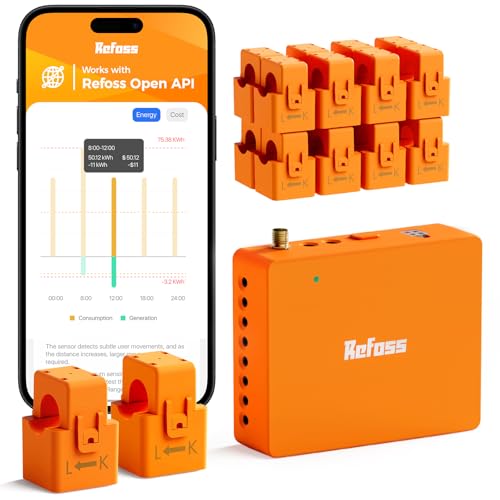
- 18-circuit monitoring with ±1% precision
- Local Web UI, Open API, MQTT, and WebSocket
- 5-year storage with solar and Home Assistant support
Best For: Users who want local control and detailed solar-aware monitoring
Solar Ready Circuit Tracker
Meross Smart Energy Consumption Monitor 18 Circuits

- 18-circuit monitoring with local data storage
- Home Assistant support for solar automation
- Smart alerts with no subscriptions required
Best For: Solar households wanting local data and automation
UL-Certified Whole-Home Monitoring – Emporia Vue 3 Smart Home Monitor
If you want a whole-house electricity usage monitor that can track more than just total draw, the Emporia Vue 3 is built for detailed home energy management. It installs in the circuit panel with clamp-on sensors, supports solar and net metering, and feeds real-time data into the Emporia Energy app for ongoing monitoring and automation.
Best For: Homeowners who want UL-listed whole-home monitoring with circuit-level visibility and solar/net metering support.
Pros:
- UL Listed and CE Listed for added safety confidence
- Tracks real-time energy use with ±2% sensor accuracy
- Supports solar and net metering plus 24/7 monitoring
- Works with iPhone, Android, and web app over 2.4 GHz Wi‑Fi
Cons:
- Requires installation in the electrical panel
- Needs 2.4 GHz Wi‑Fi and internet access
- Some system types need an additional 200A sensor sold separately
The Vue 3 stands out if you want a monitor that can help you manage usage, spot savings opportunities, and even automate around time-of-use or peak-demand pricing. It is a strong fit when you need more than a basic plug-in meter.
Plug-In Usage Tracking – P3 International Kill A Watt EZ
The P3 International Kill A Watt EZ is a straightforward whole-house electricity usage monitor alternative when you want to measure one appliance or device at a time. Plug it between the outlet and the equipment, and the LCD shows key measurements plus cost estimates for weekly, monthly, and yearly use.
Best For: Buyers who want an easy plug-in meter for individual appliances and simple cost tracking.
Pros:
- Displays eight critical units of measure on a large LCD
- Calculates electricity cost and forecasts weekly, monthly, and yearly use
- Accurate within 0.2%
- Built-in backup of accumulated information
Cons:
- Monitors one plug-in device, not the whole panel
- Not smart-home compatible
- Indoor use only
This is a practical pick for identifying how much a single appliance costs to run without any wiring work. If you need whole-home visibility, it is more limited than panel-based monitors, but for quick appliance-level checks it is very useful.
WiFi or Ethernet Whole-Home Monitor – Eyedro Home Energy Monitor
The Eyedro Home Energy Monitor is a whole-house electricity usage monitor designed for real-time visibility into what your home consumes and produces. With two 200A sensors, WiFi or Ethernet connectivity, and MyEyedro cloud access, it is built for homeowners who want clear usage data without a subscription.
Best For: Homeowners and solar users who want real-time whole-home monitoring with WiFi or wired Ethernet.
Pros:
- Works as a whole-home monitor or solar meter
- Includes two 200A sensors and network connectivity options
- No subscription required for MyEyedro cloud access
- Shows usage in watts, amps, volts, and dollars
Cons:
- A single unit cannot separate grid and solar at the same time
- Uses 2.4 GHz WiFi if connecting wirelessly
- Requires installation of sensor modules
Eyedro is a strong choice if you want broad visibility, flexible connectivity, and helpful reporting for saving energy. It is especially appealing for users who want to track net metering or solar production alongside consumption, as long as they understand the system’s setup limits.
Appliance-Level Energy Meter – KETOTEK Watt Meter Plug Monitor
The KETOTEK Watt Meter is a plug-in electricity usage monitor for home appliances, giving you a simple way to measure energy use without opening a panel. It reads watts, volts, amps, frequency, power factor, and cost estimates, making it useful for checking how much a specific device is really using.
Best For: Users who want an easy plug-in monitor for single appliances and overload awareness.
Pros:
- Measures watts, volts, amps, frequency, and power factor
- Calculates electricity cost and accumulated usage
- Built-in overload, KWh, and cost alarms
- Data is stored during power loss
Cons:
- Tracks one appliance at a time, not whole-house use
- Default overload setting may need adjustment before use
- Only starts calculating cost when load is above 2 watts
If you want a practical way to monitor the power draw of a refrigerator, TV, router, or other household device, this meter is easy to use and read. It is not a whole-house solution, but it does a solid job for appliance-level energy checks and quick comparisons.
Whole-Home + Smart Control Bundle – Emporia Energy Monitor with 16 Sensors
If you want whole-house electricity usage monitors that do more than just report consumption, this Emporia bundle is built for both visibility and control. The included 16-sensor Vue monitor tracks your main panel and up to 16 circuits in near real time, while the four smart plugs let you see outlet-level usage and automate common devices from the app.
Best For: Homeowners who want circuit-level monitoring plus smart plug control in one bundle, especially for solar homes and energy-savings automation.
Pros:
- Tracks main panel usage and up to 16 individual circuits with second-by-second visibility.
- Includes 4 Wi-Fi smart plugs for remote control, scheduling, and outlet-level energy tracking.
- Works with the free Emporia app on iOS and Android, with cloud access for trends and automations.
- Supports solar net metering, peak-demand management, and time-of-use automation.
Cons:
- Full value depends on using the app and setting up automations.
- Best suited to users who want both monitoring and active control, not monitoring alone.
Overall, this is a strong pick if you want a more complete energy-management setup instead of a basic monitor. The combination of circuit tracking, smart plugs, and solar-aware features makes it especially practical for households focused on lowering bills and spotting waste quickly.
AI Analysis Panel Monitor – Home Energy Monitor with 10 Channels
This whole-house electricity usage monitor is aimed at users who want deep circuit visibility and flexible data access for analysis. It monitors up to 10 circuits, records real-time data, and can export information through the web app and MQTT API, making it a good fit for homes that rely on Home Assistant or other automation tools.
Best For: Tech-forward homeowners who want local-style integration, AI-assisted analysis, and expandable circuit monitoring.
Pros:
- Monitors up to 10 circuits with real-time data and cloud-retained historical records.
- Supports MQTT API, ModBus TCP access, and integration with Home Assistant and other automation systems.
- Offers AI-oriented analysis and data export for identifying waste, peak demand, and abnormal loads.
- Flexible install options include WiFi or Ethernet connectivity and support for bundling up to 30 circuits.
Cons:
- Feature set is more technical than many plug-and-play monitors.
- Best suited to users who plan to use automation or data analysis tools.
This model stands out if your priority is data flexibility rather than a simple app dashboard. Its automation-friendly design, expandable circuit capacity, and analysis tools make it especially appealing for households that want to dig into usage patterns and connect energy monitoring to a broader smart home setup.
Local-First Solar Monitor – Refoss Smart Home Energy Monitor
For shoppers comparing whole-house electricity usage monitors, this Refoss model is notable for local control and strong solar automation features. It offers real-time monitoring, circuit-level insights, and direct access through a built-in web UI, open API, and MQTT without requiring cloud services.
Best For: Privacy-conscious smart home users and solar households that want local control, Home Assistant support, and no subscription fees.
Pros:
- Local-first design with built-in Web UI, Open API, and MQTT access without cloud dependence.
- Native Home Assistant integration and OpenClaw support for smarter automation.
- Built for solar homes with automation to use surplus power for appliances like EV chargers and water heaters.
- Includes 2 main sensors and 16 branch sensors, plus ETL certification and UL 61010 compliance.
Cons:
- More advanced than basic monitoring-only devices.
- Best value comes to users who will use local integrations and automation features.
Refoss is a compelling option if you want a monitor that stays useful even when the internet is down. The local data access, Home Assistant compatibility, and solar self-consumption automation make it a smart fit for homes trying to reduce feed-in waste and keep tighter control over energy use.
Rental Home Circuit Monitor – Smart Home Energy Monitor with 16 50A Sensors
If you want whole-house electricity usage monitors that can also break usage down by room or circuit, this SEM-Meter setup is built for detailed tracking. It supports clamp-on installation for many homes, real-time app monitoring, and cost tracking so you can see where power is being used instead of guessing.
Best For: Landlords, rental homes, and shared apartments that need circuit-level billing and usage visibility.
Pros:
- Includes 16 branch sensors plus 2 main 200A sensors for broad circuit-level coverage.
- Supports real-time usage, electricity cost tracking, and history views in the app.
- Works with Home Assistant and can run in LAN-only mode with MQTT for privacy.
- Compatible with single-phase, split-phase, and some three-phase systems.
Cons:
- Panels with busbar-only access may need separate flexible sensors.
- Solar and net metering are supported, but setup may be more involved than basic monitors.
This is a strong pick if you need detailed allocation across multiple circuits rather than just a whole-home total. Its privacy options and rental-focused cost templates make it especially practical where billing transparency matters.
Privacy First Power Audit – Refoss Smart Home Energy Monitor with 16x60A Sensors
For buyers comparing whole-house electricity usage monitors, this Refoss model stands out for local control and detailed circuit tracking. It monitors 18 circuits with professional accuracy, stores data locally, and offers a web UI plus Open API, making it a practical choice if you want detailed energy insight without cloud dependence.
Best For: Homeowners who want local-only energy data, solar optimization, and deep circuit analysis.
Pros:
- Tracks 18 circuits with about ±1% precision for detailed electricity audits.
- Local Web UI, Open API, MQTT, and WebSocket support reduce reliance on the cloud.
- Stores up to 5 years of data and supports CSV export for analysis.
- Works with Home Assistant and supports solar surplus management.
Cons:
- Best suited to users who will actually use the local API and data tools.
- Like other panel monitors, installation still requires working inside the electrical panel.
This is a well-rounded option if you care about privacy, long-term data retention, and automation. It gives you the tools to spot energy hogs, manage solar output, and keep control of your usage data.
Solar Ready Circuit Tracker – Meross Smart Energy Consumption Monitor 18 Circuits
This Meross system is a solid fit if you want whole-house electricity usage monitors with strong privacy and broad circuit coverage. It tracks power, voltage, current, and power factor, gives clear usage and cost charts, and supports Home Assistant for solar and automation workflows.
Best For: Solar homes and privacy-minded users who want local data and smart alerts.
Pros:
- Monitors 2 main circuits plus 16 branch circuits for detailed home energy visibility.
- Supports minute, hourly, daily, monthly, and yearly charts with up to 5 years of data.
- No subscriptions, no cloud lock-in, and local data storage for privacy.
- Home Assistant support can help route solar surplus to high-use appliances.
Cons:
- Accuracy is listed at about ±2%, which is less tight than some premium options.
- Useful automation features may require Home Assistant setup.
This monitor balances privacy, solar optimization, and alerting in a way many households will appreciate. If you want a circuit-level monitor that stays local and helps you use more of your own solar power, it is an easy one to shortlist.
How We Picked the Best Whole-House Electricity Usage Monitors
We focused on monitoring accuracy, installation style, app quality, circuit coverage, solar compatibility, and ease of use. For Whole-House Electricity Usage Monitors, the best picks also offer reliable real-time reporting, clear historical data, and practical alerts that help you act on what you see.
We also considered whether each model suits a full-panel setup or a simpler plug-in use case, since not every buyer needs the same level of detail.
Quick Comparison: What Type of Monitor Do You Need?
There are two main categories here. Panel-based monitors track usage at the breaker level and are best for whole-home insight, solar homes, and cost analysis. Plug-in monitors are simpler and better for individual appliances, portable loads, or renters who want basic electricity tracking without opening the panel.
If you want to understand total household demand, circuit behavior, and long-term energy trends, a panel monitor is usually the better fit.
Key Buying Factors for Whole-House Electricity Usage Monitors
Installation and Electrical Compatibility
Check whether the monitor supports your panel size, breaker layout, and service rating. Some systems use clamp sensors on major feeds, while others include multiple circuit sensors for deeper coverage. If you want whole-home visibility, confirm that the model matches your electrical setup before buying.
Real-Time Data and App Experience
The best Whole-House Electricity Usage Monitors show live power use, daily and monthly trends, and cost estimates in a clear app or web dashboard. A strong interface matters because it makes the data easier to understand and more useful for everyday decisions.
Sensor Count and Coverage
More sensors usually mean more detailed insight into individual circuits, major appliances, and load balancing. If you have a large home, EV charger, or solar array, extra circuit coverage can be a major advantage.
Solar and Net Metering Support
If your home includes solar, look for models that can track both consumption and production. Net metering support helps you see how much power you are drawing versus sending back to the grid.
Local Storage, Open APIs, and Privacy
Some buyers prefer cloud-based convenience, while others want local storage, open APIs, or direct web access. If privacy, automation, or smart-home integration matters to you, these features can be a deciding factor.
Who Should Buy Which Whole-House Electricity Usage Monitors?
Choose a panel-level monitor if you want the most complete picture of home energy use, especially for larger homes, solar systems, or utility bill reduction. Choose a plug-in meter if you mainly want to measure a single appliance or test specific devices.
Renters, casual users, and budget-conscious shoppers may prefer simpler monitors, while homeowners who want deeper insight should look for multi-sensor systems with strong app support and clear long-term reporting.
