

Choosing the right display can make home security feel simpler, faster, and more useful every day. The best models let you check cameras at a glance, manage alerts, and keep key controls in one place.
In this roundup, we focus on smart displays for home security cameras that balance screen quality, ecosystem support, and practical control features for real-world use.
Best 10 Smart Displays for Home Security Cameras Picks for 2026
Home Hub Security Display

- 8-inch touchscreen with four live views
- Instant door and camera alerts with voice prompts
- Local playback and daily event reports
Best For: Families wanting a dedicated, easy security monitor
Local DIY Monitor Kit
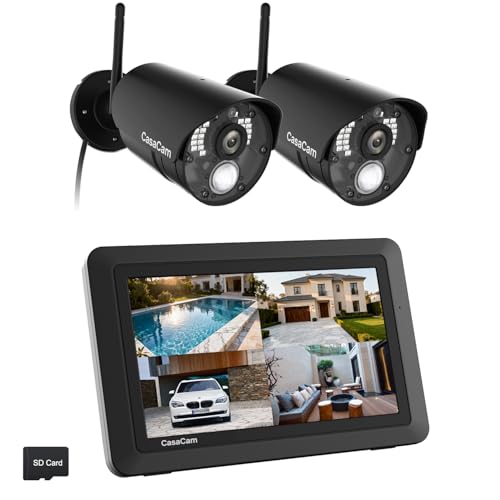
- 7-inch touchscreen with local recording
- No internet required and no monthly fees
- Two-way audio plus dual-sensor motion detection
Best For: DIY buyers who want a simple, self-contained camera monitor
Alexa Control Panel

- 8-inch dashboard for cameras and smart devices
- Built-in hub supports major smart-home standards
- Wall-mountable with privacy controls
Best For: Alexa users who want a central smart-home and camera dashboard
Floodlight Security Monitor

- 10.1-inch touchscreen with remote viewing
- Full-color night vision and PIR spotlight alerts
- Local recording with no monthly fee
Best For: Homeowners wanting a larger monitor and floodlight camera coverage
Large-Screen Alexa Hub
Echo Show 11 for camera viewing

- 11" Full-HD screen with more viewing area
- Easily view compatible camera feeds and controls
- Built-in smart home hub and spatial audio
Best For: Users who want a bigger Alexa display for camera monitoring and home control
Local Recording Security Hub

- Supports up to 16 Tapo cameras and 64 sensors
- 16GB built-in storage with expandable SATA option
- Can show up to 4 live views on an HDMI screen
Best For: Tapo owners who want local recording and centralized camera management
Compact Alexa Screen
Echo Show 5 for quick camera checks

- 5.5" display fits small rooms and desks
- View compatible cameras and video doorbells
- Deeper bass and clearer vocals than before
Best For: People who want a small Alexa display for quick home camera checks
Security-first display
- Instant door and camera alerts
- Four live feeds on one screen
- Local playback with no buffering
Best For: Homes that want fast, dedicated camera monitoring
Large family hub

- 15.6-inch Full HD screen
- Checks live camera feeds from the dashboard
- Adds Fire TV and widgets
Best For: Families wanting one screen for security and organization
Wall-mounted command panel

- Live view for four camera types
- Security modes with alarms and notifications
- Also tracks energy use and webpages
Best For: Wall-mounted control with security and camera monitoring
Home Hub Security Display – eufy Smart Display E10
If you want smart displays for home security cameras that feel built for everyday use, the eufy Smart Display E10 is all about fast awareness and simple monitoring. Its 8-inch touchscreen shows up to four live views at once, automatically lights up with door and camera alerts, and stores events locally for instant playback without buffering.
Best For: Families who want a dedicated, easy-to-use security display for quick live checks and instant alerts.
Pros:
- Four simultaneous live views on one screen
- Automatic live feed and voice alerts for doorbell or camera activity
- Local event downloads for instant playback with no buffering
- Daily security summaries with facial and package recognition via HomeBase 3
Cons:
- Designed around compatible eufy devices and HomeBase 3 features
- 8-inch screen is portable, but not a large wall-display format
The E10 stands out if you want a purpose-built monitoring panel rather than a general smart home tablet. It focuses on fast, local access to camera events and straightforward controls that are easy for kids and seniors to use.
Local DIY Monitor Kit – CasaCam VS802 Air
For shoppers comparing smart displays for home security cameras, the CasaCam Wireless Security Camera System Air is a practical local-first option. The 7-inch touchscreen monitor lets you see, hear, and speak to visitors, while the system records on the monitor itself and works without needing the internet.
Best For: Buyers who want a simple local security monitor with no monthly fees and included cameras.
Pros:
- 7-inch portable touchscreen monitor with local recording
- Works without internet and has no monthly fees
- Two-way audio from the monitor, phone, or tablet
- Smart motion detection with dual sensors to reduce false alarms
Cons:
- Includes only two 720p cameras in the base kit
- Fewer modern smart-home features than app-centric panels
This model is strongest for hands-on homeowners who want a self-contained camera system and don’t want to rely on cloud services. The included battery, SD card, and split-view support make it a straightforward DIY setup.
Alexa Control Panel – Amazon Echo Hub
The Amazon Echo Hub is a flexible choice if you want smart displays for home security cameras and broader home control in one panel. With an 8-inch touchscreen, you can tap or ask Alexa to view camera feeds, adjust widgets, and arm or disarm a compatible security system.
Best For: Alexa households that want a wall-mountable control panel for cameras, locks, and routines.
Pros:
- Controls compatible camera feeds, locks, lights, and routines
- Built-in hub supports WiFi, Bluetooth, Zigbee, Matter, Sidewalk, and Thread
- Wall-mountable design with cable-hiding options
- Privacy controls include a mic off button
Cons:
- Best experience depends on Alexa-compatible devices and app setup
- Power-over-ethernet and tabletop stand are sold separately
This is the most general-purpose panel in the group, making it ideal if your camera display needs to fit into a larger smart home. It’s less of a dedicated security monitor and more of a central dashboard for everyday control.
Floodlight Security Monitor – CasaCam Pro 2-Cam Kit
If you’re shopping for smart displays for home security cameras with a more feature-rich monitor, the CasaCam Wireless Security Camera System Pro adds a 10.1-inch touchscreen and color night vision. The system supports local or app-based viewing, lets you talk to visitors, and includes motion alerts with a PIR sensor and spotlight.
Best For: Homeowners who want a larger monitor, floodlight cameras, and local recording without monthly fees.
Pros:
- Large 10.1-inch touchscreen monitor for real-time viewing
- Full-color night vision from the floodlight cameras
- Accurate motion alerts using a PIR sensor and spotlight
- No monthly fee with local SD card or HDD recording
Cons:
- All components require power connections
- Base kit includes two cameras, so larger properties need expansion
This kit is a good fit when you want more visibility at night and a bigger display to manage your cameras. It keeps the DIY setup simple while offering room to expand up to eight cameras.
Large-Screen Alexa Hub – Echo Show 11 for camera viewing
If you’re shopping for smart displays for home security cameras, the Echo Show 11 stands out for its larger Full-HD screen and easy camera access. It gives you more viewing area than smaller Echo Show models, so checking in on live feeds, doorbells, and other Alexa-compatible devices feels simpler at a glance.
Best For: Households that want a bigger Alexa display for live camera checks, smart home control, and everyday household tasks.
Pros:
- 11″ Full-HD touchscreen with 60% more viewing area than Echo Show 8
- Easy to view camera feeds and control thousands of Alexa-compatible smart devices
- Built-in smart home hub removes the need for a separate hub
- Centered auto-framing camera with 3.3x zoom for video calls and live view
Cons:
- Best experience depends on using Alexa-compatible cameras and devices
- Larger size may be more display than some small spaces need
The Echo Show 11 makes sense if you want one screen that can handle camera monitoring, voice control, and household organization without feeling cramped. Its larger display and privacy controls make it a practical pick for daily use, especially in kitchens, living rooms, or shared family spaces.
Local Recording Security Hub – Tapo H500 for camera storage
When you’re comparing smart displays for home security cameras, the Tapo H500 is less of a screen and more of a central hub for managing camera systems. It connects up to 16 Tapo cameras, supports local recording, and lets you monitor footage on a phone, tablet, or larger display through HDMI.
Best For: Tapo users who want centralized camera storage, local access, and more organized monitoring without relying on cloud subscriptions.
Pros:
- Connects and controls up to 16 Tapo cameras and 64 Sub-G sensors
- 16GB built-in storage with expandable 2.5″ SATA HDD/SSD support
- Can show up to 4 live views on a larger screen via HDMI
- Facial recognition helps filter familiar faces and reduce alerts
Cons:
- Continuous recording is supported for up to 4 cameras
- Designed for Tapo devices, so it is not a universal camera hub
- Storage expansion requires a separately sold HDD or SSD
This is a strong option if your priority is keeping camera footage local, secure, and easy to review. It adds useful smart-home organization, but its value is highest inside a Tapo-based setup rather than as a general-purpose display.
Compact Alexa Screen – Echo Show 5 for quick camera checks
If you want a smaller option among smart displays for home security cameras, the Echo Show 5 gives you a compact way to check compatible camera feeds, view the front door, and make quick video calls. Its 5.5″ display is designed for glanceable information rather than full-room viewing.
Best For: Small rooms, desks, and bedside setups where a compact Alexa display is enough for quick camera checks and daily updates.
Pros:
- 5.5″ display is easy to place in tight spaces
- Can view compatible cameras and compatible video doorbells
- Built-in camera supports check-ins on family, pets, and home
- Clearer sound with deeper bass than previous generation
Cons:
- Smaller screen is less convenient for extended camera viewing
- 2 MP camera is basic compared with larger smart display models
The Echo Show 5 is a practical pick when you want camera access without giving up counter or nightstand space. It works best as a compact companion screen for quick monitoring, announcements, and everyday Alexa tasks.
Security-first display – eufy Smart Display E10
If you want a smart display for home security cameras that focuses on quick, hands-free monitoring, the eufy Smart Display E10 is built around instant alerts and fast access to live feeds. It lights up automatically for doorbell rings, door unlocks, and camera detections, then shows up to four views at once with local playback that avoids buffering.
Best For: Households that want a dedicated security-first screen for instant door alerts and multi-camera viewing.
Pros:
- Automatically shows a live feed and voice alert when someone rings, unlocks, or is detected.
- Displays four simultaneous live views on one screen for broader coverage.
- Stores historical events locally for instant playback with no waiting or buffering.
- 8-inch touchscreen is designed to be simple for kids and seniors to use.
Cons:
- Listed as not smart home compatible.
- Battery life is rated at about 7 days.
- It is a renewed unit, not a brand-new product.
The E10 is strongest as a dedicated monitoring panel rather than a general-purpose smart display. If your priority is seeing security events quickly and at a glance, its local playback and four-view layout are especially practical.
Large family hub – Echo Show 15
The Echo Show 15 is a large smart display for home security cameras that also works as a family hub. Its smart home dashboard lets you check live camera feeds, while the 15.6-inch Full HD screen, Fire TV features, and widgets make it more versatile than a camera-only panel.
Best For: Families who want one large screen for camera checks, organization, and entertainment.
Pros:
- 15.6-inch Full HD display gives you a roomy view of smart home content.
- Smart home dashboard can be used to check live camera feeds.
- Customizable widgets help keep calendars, to-do lists, weather, and more visible at a glance.
- Built-in Fire TV adds streaming flexibility beyond home monitoring.
Cons:
- Designed primarily as a kitchen and organization hub, not a dedicated security monitor.
- Some entertainment features may require subscriptions.
- Its camera and call features are geared more toward communication than security viewing.
This model makes sense if you want your camera feeds alongside everyday household tools. It is less specialized than a security-focused panel, but the larger screen and Alexa dashboard are useful for quick checks throughout the day.
Wall-mounted command panel – SONOFF NSPanel Pro 120
The SONOFF NSPanel Pro 120 is a compact smart display for home security cameras that combines monitoring with control-panel functions. It supports live camera viewing, home security modes, and sensor-triggered alarms, making it a practical wall-mounted option when you want one screen to manage multiple household tasks.
Best For: Users who want a wall-mounted control panel that can handle camera viewing and security modes.
Pros:
- Supports live monitoring from four types of cameras.
- Can sound an alarm and send a phone notification when a sensor is triggered.
- Includes home security modes you can customize with different arming devices.
- Also tracks energy use and can open webpages from saved addresses.
Cons:
- Smaller 4.7-inch display than some competing smart panels.
- Runs on AC power, so it is not portable.
- Camera support is specific to four listed camera types.
This panel is a strong fit if you want a fixed-location controller with camera viewing built in. It is more of a multi-function home command center than a simple display, which can be an advantage if you like centralized control.
How We Picked the Best Smart Displays for Home Security Cameras
We focused on Smart Displays for Home Security Cameras that are easy to live with, not just packed with features. Key factors included screen size and clarity, compatibility with major camera ecosystems, responsiveness, alert visibility, local control options, and whether the device works well as a true home hub rather than only a voice assistant.
We also gave priority to models that fit different buyer needs, from compact countertop displays to larger wall-mounted or all-in-one control panels.
Quick Comparison
If you want the simplest setup, a small smart display is often best for basic live viewing and alerts. If you want a stronger command center, look for a larger panel or hub with multi-camera views, better automations, and easier device management. Households with mixed devices may prefer a broader smart-home platform, while camera-specific systems are better for users who want dedicated monitoring with fewer compromises.
Key Buying Factors for Smart Displays for Home Security Cameras
Compatibility
Make sure the display works with your camera brand and ecosystem before anything else. Some models are best for Alexa-based smart homes, while others are built around specific camera systems. Compatibility affects live feeds, alert handling, and how much control you get without reaching for your phone.
Screen Size and Placement
Larger screens are easier for split views and quick checking, but they take up more space. Smaller displays are better for nightstands, desks, or kitchens where you want convenience more than a big viewing area. Consider where you will actually use it most.
Live View and Alert Handling
The biggest value of Smart Displays for Home Security Cameras is instant awareness. Look for fast camera loading, clear notifications, and the ability to bring up critical feeds quickly. If multiple cameras matter, multi-view support can be a major advantage.
Storage, Control, and Smart-Home Features
Some products are primarily displays, while others also act as hubs with built-in storage or device control. If you want fewer apps and more local management, a hub-style option may be worth it. If your goal is a simple viewing screen, prioritize ease of use over advanced automation.
Who Should Buy Which Smart Displays for Home Security Cameras?
Choose a compact display if you mainly want quick camera checks and hands-free alerts in a small space. Pick a larger smart hub if you monitor several cameras and want a more complete control center. Go with a camera-system monitor if you prefer a dedicated, no-fuss security setup with fewer monthly dependencies. For mixed smart homes, a general-purpose assistant display can offer the best blend of convenience and flexibility.
For most shoppers, the best choice comes down to whether you want a dedicated security screen or a broader smart-home dashboard. Either way, the right display should make your cameras easier to see, not harder to manage.
